Observability That Tracks What Matters: Monitoring Critical User Journeys End to End
Observability Mike SimonKey Takeaways
- Critical User Journeys are where your business meets your users: when they break, the business breaks. Traditional backend monitoring isn’t enough; you need visibility into the actual workflows users rely on to succeed.
- Effective observability connects frontend, backend, and business context. Tools like real user monitoring, session replay, and synthetic monitoring help teams see the full picture and catch issues before users feel the impact.
- CUJ monitoring is a shared responsibility across engineering, product, marketing, and leadership. When everyone aligns on what matters, organizations can move from reactive firefighting to proactive experience assurance.
What is a Critical User Journey (CUJ)?
Not all user interactions are created equal. Some are make-or-break moments that determine whether a customer converts, a user sticks around, or a support ticket gets opened. These are your Critical User Journeys (CUJs): the high-stakes paths people take when engaging with your product or platform.
You can think of CUJs as the workflows that matter most to your users and your business. For a retail site, it might be product search, cart, and checkout. In healthcare, it could be appointment scheduling or accessing test results. For a SaaS product, maybe it’s logging in and seeing your dashboard. These journeys aren’t just workflows. They are where your business meets your users. If one of them is broken, your business is too.
Examples of CUJs by industry
Critical User Journeys matter: Why monitoring CUJs is crucial for business impact
Just because backend systems are green doesn't mean your user experience is healthy.
It feels good to see green across the board. Dashboards are quiet. No alerts are firing. But if you’re not validating what actually matters to your users, that sense of calm is just a false sense of security.
I once saw a security team respond to a DDoS attack by deploying new filtering rules. It seemed to work: the attack stopped, dashboards stabilized, and people celebrated. But the rules were overly broad. A subset of customers using specific browser versions were quietly blocked. No alerts fired. No one noticed until support tickets piled up and an exec couldn't access the site. Turns out, many of those blocked users were high-value enterprise customers still using older environments.
That’s the danger of not validating your Critical User Journeys from the user’s perspective. These aren’t minor edge cases. They’re the moments that matter most.
How to monitor digital user journeys effectively: 7 Foundational capabilities
To truly support your users, and your business, you need a structured, reliable way to identify, observe, and improve these critical journeys. That begins with seven foundational capabilities.
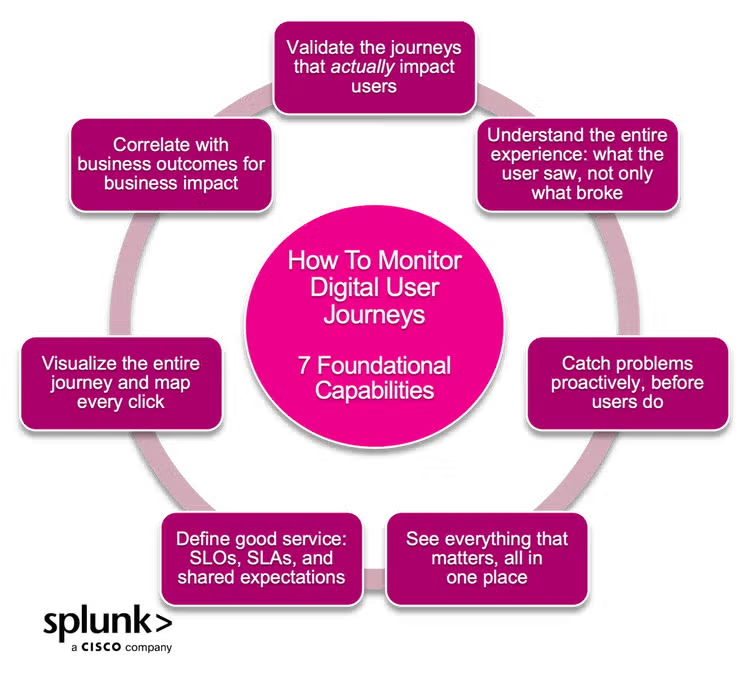
Validate the journeys that actually impact users
Critical User Journeys aren’t just API calls. They're real workflows users rely on. When login breaks or checkout stalls, it’s a business issue. And that’s why digital experience monitoring (DEM) is so important.
Splunk Synthetic Monitoring lets you proactively test these workflows from key locations. Real User Monitoring (RUM) adds live behavior insights like device, browser, geography. And with seamless correlation from RUM into backend APM traces, you can follow performance issues across the full journey. Content and digital teams can validate Core Web Vitals (CWVs) and ensure key pages load as intended before customers feel the impact.
Learn more:
- Product brief: Splunk Digital Experience Monitoring
- Use case: Optimize end-user experiences with Splunk DEM
- Use case: Power innovative digital experiences
Understand the entire experience: what the user saw, not only what broke
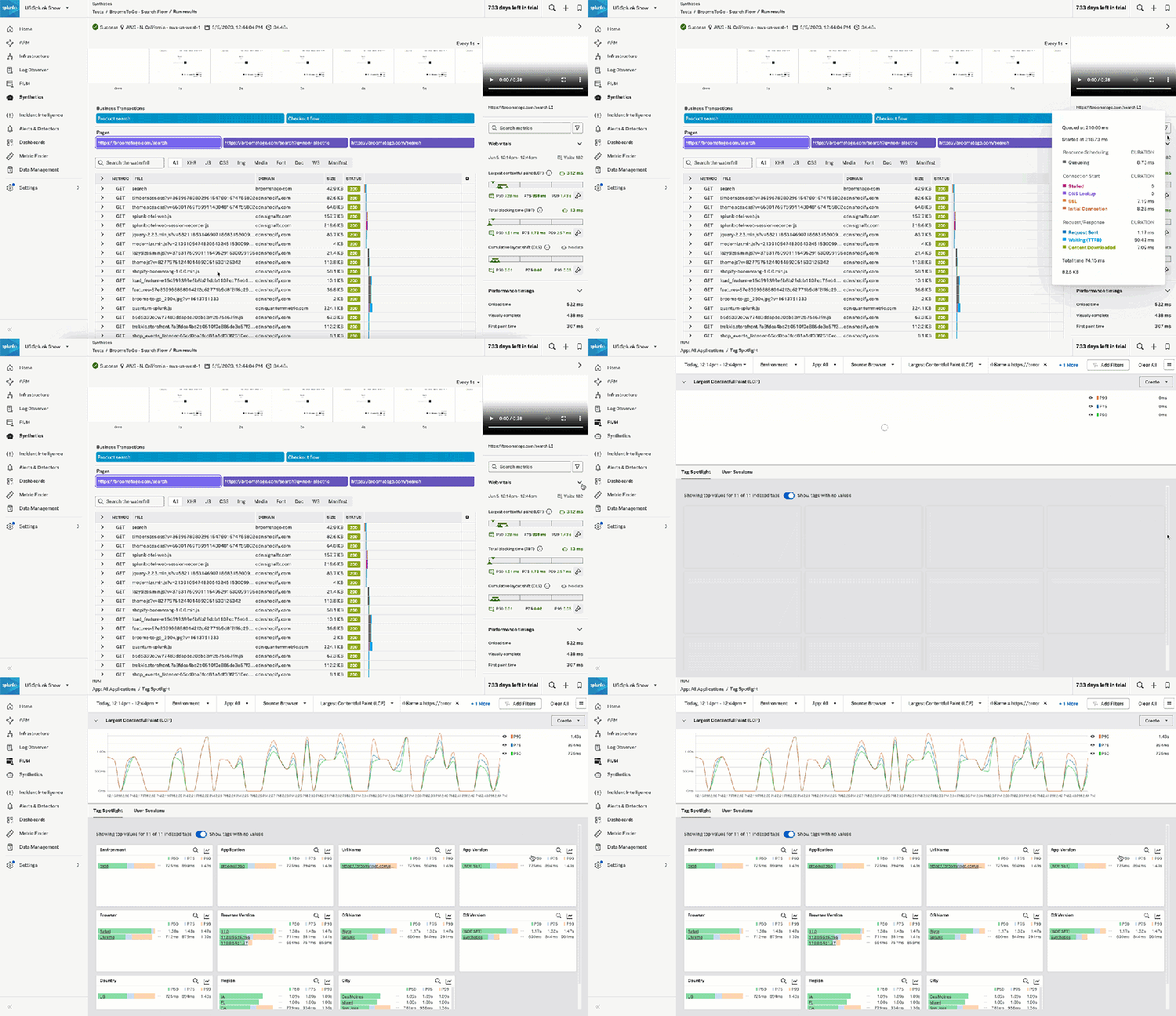
When a CUJ fails, knowing an error occurred is only step one. Teams need to understand what the user saw, clicked, or waited on. That context eliminates finger-pointing and guesswork. Session replay in Splunk RUM gives you a filmstrip view of the user’s journey: what they saw, what failed to load, where they clicked, and how the experience actually felt in real time.
Combined with Core Web Vitals like layout shift and timing metrics, teams can diagnose frontend issues with clarity and speed. Content owners also benefit by visually validating how pages render, assets load, or where users get stuck.
Want to learn more?
Catch problems proactively, before users do
By the time a user reports an issue, their user journey has already failed. Businesses need to detect issues before users do whether in pre-prod, across global locations, and during deployments, and that’s where synthetic monitoring comes in.
Splunk Synthetic Monitoring simulates real user workflows 24/7 before changes go live. Tests run from public or private locations, validating workflows behind firewalls or in staging environments. When something breaks, synthetic failures correlate directly to backend traces for fast triage. That’s how modern teams stop shipping blind and start releasing with confidence.
Learn more:
- Technical docs: Splunk Synthetic Monitoring
- Video (shown below): Intro to Splunk Synthetics by fellow Developer Evangelist Moss Normand
See everything that matters, all in one place
CUJs span frontend, backend, and third-party systems. When teams work in silos, context gets lost and resolution slows. Splunk brings everything together, correlated in a single interface that is your single source of truth across technical and business audiences.
- Related Content keeps filters and context intact across telemetry types.
- Log Observer Connect makes logs accessible to developers without needing to learn a custom query language.
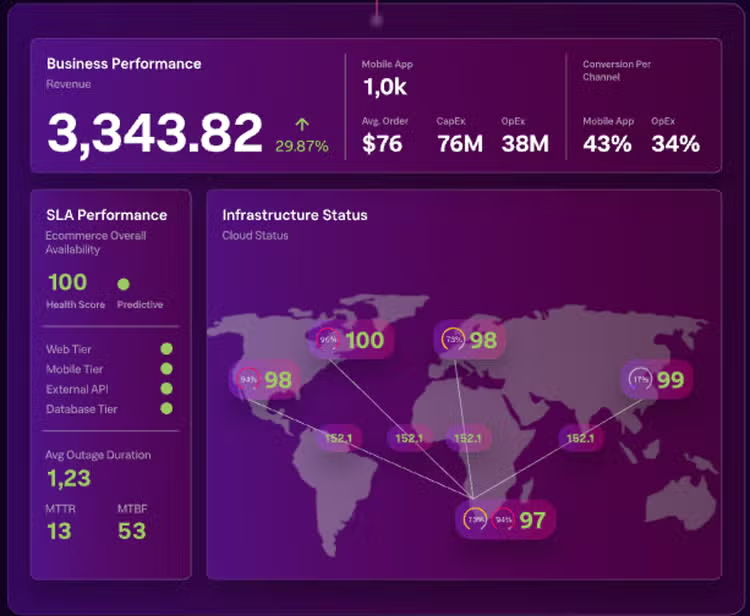
- ITSI Glass Tables provide clear red/yellow/green views of CUJ health tied to business outcomes, which is perfect for leadership. Check out this video overview.
Learn more:
- Video: Log Observer Connect
- Tutorial: Getting started with log Observer Connect within Splunk Observability Cloud
- Session from CiscoLive: Top 10 Glass Table Design Tips (BRKOBS-2892)
Define good service with SLOs, SLAs, and shared expectations
Reliability means different things to different teams, unless you define it together. CUJs need clear SLOs and SLAs that reflect user expectations and business risk.
With Splunk Observability Cloud, teams can define and track SLOs around real workflows like login success rates or checkout time. SLO dashboards track trends and compliance over time, while Glass Tables in ITSI surface those insights for execs. When something breaks, everyone knows how bad it is, and whether you’re still within the bounds of what users will tolerate.
View Service Level Objectives (SLOs) in Splunk Observability Cloud
Visualize the entire journey and map every click
Not every journey is a straight line. The Experience Journey Map in Splunk AppDynamics helps teams visualize the full path users take through a site or app, even when it spans multiple interactions, components, or devices. The map highlights areas of friction, drop-off, or latency, which in turn helps:
- Product and engineering teams to prioritize experience issues that affect real outcomes.
- Content and marketing teams to identify which messaging flows underperform or which steps cause drop-off.
Watch this video overview: Experience Journey Map
Correlate with business outcomes for real business impact
Not every slowdown is equally important. Splunk AppDynamics’ Business iQ connects backend performance data to business KPIs such as revenue, conversions, and customer churn. This lets teams prioritize based on actual impact, not just technical metrics. Instead of reacting to alerts, you can focus on which degradations are stalling orders, impacting financial approvals, or hurting customer satisfaction.
Business iQ bridges the gap between operations and business strategy so engineering decisions align with outcomes that matter.
Want to learn more?
- Use cases: How customers leverage BusinessIQ
- Free guide: Transforming Data into Business Impact with AppDynamics Business iQ
- Video overview: BusinessIQ Business Performance Monitoring
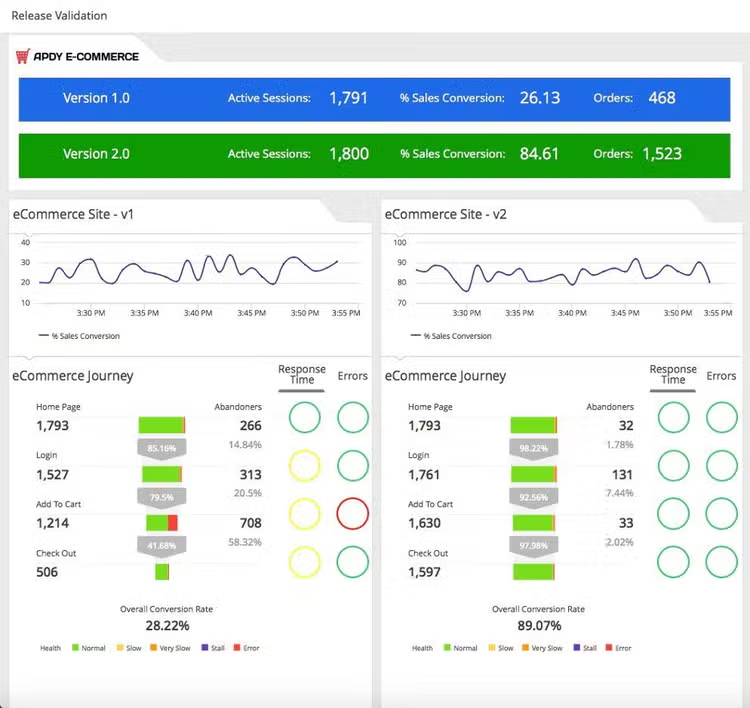
Monitoring customer journeys is a shared responsibility
While CUJs can span backend and frontend systems, frontend digital experiences are often a shared responsibility. That’s a strength when teams understand their part in supporting the end-to-end experience.
Role of frontend engineers
Frontend engineers design and build the interfaces users rely on to complete key workflows. Their decisions around performance, usability, and flow continuity directly shape the success of each journey. They influence:
- How quickly a page renders
- How intuitive each interaction feels
- How easily users move from one step to the next.
The work they do is often the most visible, and it’s the most consequential when something goes wrong.
Role of SRE and platform teams
Platform and SRE teams are charged with ensuring backend reliability, API performance, and service health. But Critical User Journeys often span multiple services and dependencies, which means it’s essential that these teams understand how backend changes impact user-facing flows. SRE and platform engineering teams play a key role in validating that:
- New releases don’t introduce regressions
- Services remain performant under load
- Users aren’t affected by backend failures
Role of content and digital marketing teams
Content and digital marketing teams shape the dynamic pieces of the journey, often using enterprise content management or experience delivery platforms. Whether it’s personalized content, localized messaging, or a targeted banner, their updates affect what users see and interact with.
A slow-loading hero image, broken redirect, or misfired A/B test can disrupt a journey just as much as a code-level bug. These marketing teams are part of the CUJ equation, even if they’re not writing code.
Role of business stakeholders and executives
Business stakeholders and executives want to know if customers are able to engage and transact. Their dashboards often reduce complex signals into red, yellow, or green. But behind each status light is a set of journeys that must work: Login, search, checkout. These leaders may not build the systems, but they do set expectations, define outcomes, and are often first to escalate when the experience breaks.
When pieces that make up Critical User Journeys are observed in silos, it's easy to miss the full picture. A fast API doesn’t matter if the UI doesn’t render. A beautiful homepage means nothing if checkout stalls. Visibility into each piece is important but context across the entire journey is what makes that visibility meaningful.
Mature organizations treat CUJs as a shared concern. They assign ownership, align on definitions, and track the journeys that matter most. They connect roles, not just metrics.
Make what matters observable
Your users don’t experience your application one API or even one page at a time. They experience journeys. And while every click might matter, some of those journeys are mission critical (such as logging in, checking out, viewing a balance, submitting a claim).
These are the flows that make or break trust, loyalty, and revenue. That’s why teams can’t afford to treat these journeys like any other interaction or assume that backend health means user satisfaction. Instead, teams should:
- Identify your Critical User Journeys and align teams around them.
- Define what “good” looks like and track it with real metrics.
- Break down silos with shared visibility and context.
- Equip every role, from frontend to executives, with the data that matters.
The right tools make it possible to monitor what really matters. With Splunk Observability Cloud, you can gain complete visibility into your Critical User Journeys. Ready to see how it works? Learn about observability solutions from Splunk or start your free trial right now.
FAQs about Critical User Journeys
Related Articles
![The Importance of Traces for Modern APM [Part 2]](https://www.splunk.com/content/dam/splunk-blogs/images/media_169b5de3cafe6e35fe4acb9c6a148b797d03da32c/the-importance-of-traces-for-modern-apm-part-2.jpg?width=300&format=jpg&optimize=medium)
The Importance of Traces for Modern APM [Part 2]

Splunk Remains the Leader in APM and Observability — GigaOm Report Confirms It