Contextual Observability: Using Tagging and Metadata To Unlock Actionable Insights
Observability Mike SimonObservability isn’t about collecting more telemetry — it’s about making that telemetry data meaningful.
Contextual observability transforms raw telemetry into actionable insights by enriching it with consistent tagging and metadata. Without context, telemetry data remains fragmented, troubleshooting slows, and aligning with business priorities is nearly impossible.
In this guide, I’ll explain:
- Why context matters for observability.
- How to implement it effectively.
If you’re responsible for or contribute to improving observability outcomes, this article is for you — platform, SRE and DevOps engineers and leaders, Observability CoE stakeholders, product owners, and more.
What is contextual observability?
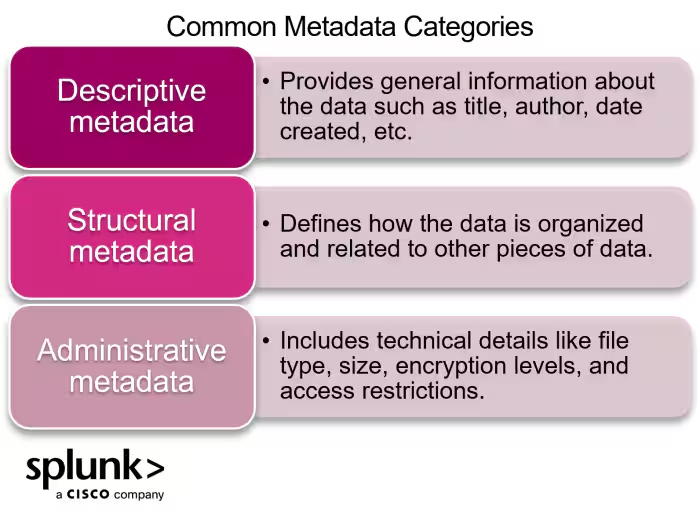
Contextual observability means enriching telemetry data — metrics, logs, traces, alerts, synthetic test results, etc. — with consistent metadata that ideally adds both business and technical meaning.
This is not tagging for tagging’s sake. By adding context via tags and metadata, you turn telemetry into usable signals that answers critical questions like:
- What environment was this running in?
- What application or business service is this part of?
- Who owns this system?
- What’s the criticality of the service?
- Where did it run? What region, platform, or instance type?
Consider this example:
- Without context, you get a generic “Process down” alert from “ip-10-254-88-42.ec2.internal”, an instance that auto-terminated five minutes ago. Now you're digging through telemetry to guess who owns this service and trying to reconstruct what happened.
- With context, an alert tells you: “The checkout service in prod (tier 0) is failing in us-east-1. Owned by the payments team.”
With this level of context in place, telemetry becomes immediately more actionable. Teams can filter by business unit or tier, route alerts to the right people, and confidently diagnose problems across distributed architectures.
Instead of “what is this metric?”, the question becomes “what’s broken in production right now, and who needs to act?”
That’s the power of contextual observability!
When to add context
Context should be added as early in the telemetry lifecycle as possible, ideally at the source, whether that’s through an OpenTelemetry SDK, agent config, or cloud-native exporter. Early enrichment ensures that the context flows downstream into dashboards, alerts, and queries without requiring patchwork fixes or one-off dashboards.
Examples of metadata to gather, by telemetry type
(Related reading: metadata management.)
Why context matters in modern observability
In legacy environments, monitoring relied on static infrastructure. Hostnames meant something. Applications ran on long-lived VMs. Change was infrequent and predictable.
Today, of course, that’s no longer the case. The volume of telemetry data is skyrocketing. Between cloud infrastructure, containerized workloads, serverless functions, synthetic tests, and distributed tracing, organizations are generating more observability data than ever.
At the same time, the environments this data represents are increasingly ephemeral. Services are deployed multiple times a day, hosts come and go, Kubernetes pods live for minutes, and infrastructure scales dynamically.
In this kind of environment, raw telemetry — that is, telemetry without context — quickly loses value. Identifiers like hostnames, IPs, or auto-generated resource names are not enough to understand what’s happening, let alone understand why it matters or who should respond.
Without consistent context, however, observability becomes fragmented and harder to use. Detection slows, diagnosis drifts, and action stalls. Symptoms of missing context include:
- Inconsistent instrumentation
- Misrouted alerts that delay MTTR
- Delayed root cause analysis due to manual work
- Blind spots in monitoring
Engineers face alert fatigue, compliance is significantly more challenging, and you’ve lost pretty much all your ability to tie telemetry to business outcomes. The result?
Organizations collect vast amounts of data but miss the value that data can deliver.
Contextual observability solves this by enriching telemetry with self-describing, filterable metadata. This structure helps systems scale and IT resources understand what they’re seeing.
When implemented consistently, contextualized observability enables:
- Correlation across metrics, logs, traces, and events
- Prioritization due to faster issue isolation and clarity of impact
- Accurate alert routing based on ownership and criticality
- Expedited root cause analysis (RCA) and response
- Reduced noise, downtime, and MTTR when incidents do occur
- Self-service observability that reuses assets like dashboards, detectors, and alert thresholds
In a world defined by constant change, context is what turns observability into something actionable, reliable, and valuable.
How to implement contextual observability
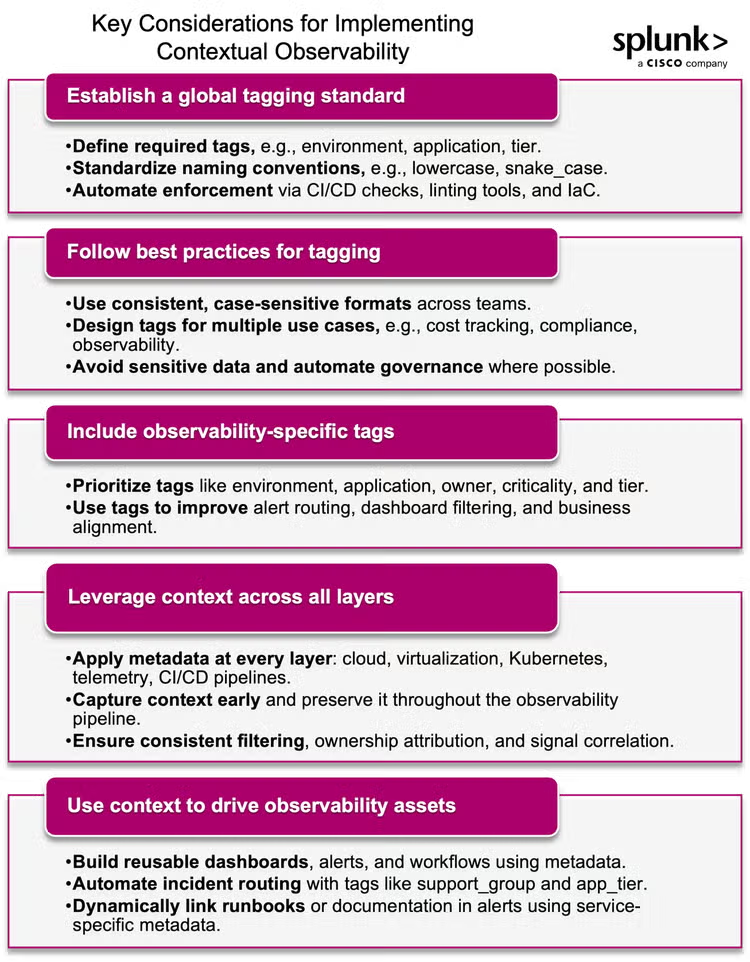
Adding context to your observability practice does not have to be difficult. Follow these five best practices to establish and scale contextual observability.
Establish a global tagging standard
Tags provide the structure that gives meaning to your telemetry data, but their value depends on consistency across the organization.
Without a global tagging standard, teams risk adopting inconsistent approaches, leading to broken filters, unscalable alert logic, and unreliable dashboards. (Even small inconsistencies, like env=Prod vs. env=prod can break dashboards and duplicate alert rules.)
To ensure consistency, your tagging standard should define:
- Required tags: Specify which tags must be applied to each telemetry type (e.g., environment, application, tier).
- Allowed values: Provide clear, documented values for each tag (e.g., environment =
prod, staging, dev). - Naming conventions: Standardize formatting, such as lowercase,
snake_case, no spaces, etc. - Application points: Clarify where tags should be applied (e.g., at the source, via agents, or in pipelines).
Pro-tip: Use high-cardinality tags sparingly.
Tags such as IDs or frequently changing attributes can strain performance, inflate costs, and degrade usability in platforms not designed for high-cardinality data. Use these tags intentionally and make sure your observability tooling, like Splunk Observability Cloud, can handle these tags at scale.
A strong tagging standard should also include:
- Normalized tag names such as environment, application, tier, and support group
- Allowed values for each tag, documented and governed
- Clarity on required vs. optional tags, based on telemetry type
- Formatting conventions, like casing, delimiter usage, and value formatting
- Governance practices: Assign ownership (Observability CoE or platform engineering teams, for example), automate enforcement via CI/CD checks, linting tools, or IaC modules, and review periodically to adapt as needed.
By establishing and enforcing a robust tagging standard, you ensure your observability data remains reliable, actionable, and scalable.
Follow best practices for tagging standards
Before implementing your tagging strategy, it’s important to ground it in well-established best practices. Cloud providers — AWS, Azure, and GCP — and infrastructure components like Kubernetes and VMware have all established tagging best practices to support scale, automation, and governance.
These principles are adapted from AWS’s tagging best practices. While these examples are from AWS, the concepts apply broadly to modern IT workloads:
- Use a standardized, case-sensitive format and apply it consistently (e.g.,
snake_case, lowercase keys) - Favor more tags over fewer, it’s easier to remove unused tags than retroactively apply missing ones
- Design for multiple use cases including cost tracking, access control, automation, compliance, and observability
- Avoid sensitive data (e.g., PII or credentials) in tags, since tags are often widely visible
- Establish clear naming conventions for tag keys and values
- Be aware of platform-specific limits on tag key/value length, character sets, and case sensitivity
- Automate tag governance using tools like AWS Tag Policies, Azure Policy, or CI/CD-integrated tag linting to monitor and enforce standards.
- Define tag ownership by assigning clear responsibility for maintaining and reviewing tags across teams or business units
- Anticipate tag evolution, changing tags that are used in access control, reporting, or alerting can have downstream consequences. Plan for versioning, deprecation, or refactoring when needed
The goal isn’t a perfect taxonomy. It’s a usable, scalable standard that supports consistency across teams and systems.
Include observability-specific tags
Observability teams may not own the global tagging standard, but they should influence it. Many critical observability use cases — such as alert routing, SLO reporting, and dashboard filtering — depend on tags that aren’t always prioritized in infrastructure tagging discussions.
Common tags that support observability
Many of the most valuable tags for observability already exist across infrastructure and cloud standards:
environment(prod, staging, dev)applicationorserviceteam,owner, orsupport_groupcost_centerorbusiness_unitcriticality,tier, orcompliance_level
These tags help drive alert routing, dashboard filtering, priority mapping, and business alignment, and should be directly referenced in how observability assets are designed and deployed.
Real-world example: Maintenance window tag for alert suppression
In a past life, we implemented a standardized maintenance_window tag across critical systems. This tag used clear, consistent values like "3thur2000" (indicating the 3rd Thursday at 8pm) to define scheduled maintenance windows for a given resource.
The observability team used this tag to suppress alerts during scheduled maintenance, reducing noise and increasing confidence in alerts. This simple yet effective approach demonstrates how a single, well-applied tag can streamline operations and enhance the observability experience.
Leverage context at every layer
Once your tagging standard is defined, the next step is to operationalize it across your architecture.
That means implementing a multilayered metadata strategy that spans all layers of your stack, from infrastructure to services, and from source to visualization. This approach ensures that context is captured early and preserved throughout your observability pipeline.
In a modern environment, metadata can (and should) be applied at multiple points:
- Cloud platforms: Native resource tags from AWS, Azure, GCP
- Virtualization layers: Hypervisor-level context like image ID, zone, or VM type
- Host-level agents: Instance metadata like OS, region, or instance class
- Kubernetes: Labels and annotations at the pod, namespace, or deployment level
- Application telemetry: Trace, log, and metric attributes via OpenTelemetry
- CI/CD pipelines: Deployment metadata like release version, pipeline owner, or change ID
- Observability assets: Tagging dashboards, alerts, synthetic tests, and detectors for ownership, environment, or application tier
This multilayered approach ensures context is preserved from source to value realization (dashboards/visualizations, detectors, etc). When properly implemented it enables consistent filtering, ownership attribution, and signal correlation, regardless of where telemetry originates.
Use context to drive observability assets
Once you’ve implemented consistent tagging and enrichment across your environment, the real payoff comes when you start using that context to drive the observability experience.
A strong metadata strategy enables dashboards, detectors, and workflows to become reusable, scalable, and actionable. These aren’t one-off configurations — they’re dynamic assets that adapt to the environment, team, or workload through metadata.
environment=prod and tier=0, reducing noise. Include support_group to route incidents automatically.support_group or app_tier to auto-assign incidents to the correct on-call team.service.name or failure_type.This approach transforms observability from static dashboards and hardcoded alert rules into metadata-driven workflows that scale with your organization, driving self-service observability. It’s how you go from ad hoc visibility to operational consistency, without introducing friction.
Wrapping up: Contextual observability delivers real value
Sending more telemetry isn’t enough. To realize the full value of your observability investments, that data needs context.
Context makes telemetry meaningful. It connects signals to systems, ownership, and business impact, driving faster response, smarter alerts, and more actionable insights. It turns a bunch of telemetry data into valuable observability outcomes.
If you’re working to mature your observability practice, context is where the value starts to show. Interested in learning more?
- Explore related blogs on Observability Best Practices, Tools Simplification, and Tiered Observability.
- Try Splunk Observability Cloud to see how contextual observability drives value at scale.
The future of observability isn't more data — it’s better, smarter, contextualized data. And it's ready for you to build it.
Related Articles

Measuring & Improving Observability-as-Service (OaaS) with KPIs and OKRs
Cisco builds a unified observability experience between AppDynamics and Splunk