What Is Synthetic Monitoring?
Learn Billy Hoffman , Muhammad RazaKey Takeaways
- Synthetic monitoring proactively simulates user interactions with websites, applications, and APIs from multiple global locations to detect performance issues before real users are impacted.
- It enables organizations to continuously test critical user journeys, monitor application availability and response times, and track service-level indicators to ensure a consistent and reliable digital experience.
- By identifying and diagnosing problems early, synthetic monitoring reduces downtime, supports timely troubleshooting and optimization, and drives better business outcomes through data-driven insights.
The focus of synthetic monitoring is on website performance. Synthetic monitoring emulates the transaction path, between a client and application server, and monitors what happens.
The goal of synthetic monitoring is to understand how a real user might experience an app or website.
In this article, we’ll go deep into this topic. You should learn a thing or two about how to get more value from your synthetic monitoring tools and strategy.
What is synthetic monitoring?
Synthetic monitoring is one type of IT monitoring, and its focus is on website performance. (Other types, for example, include application performance monitoring and real user monitoring. These different classes exist because each has its own strengths and weaknesses.)
Synthetic monitoring can be used to answer questions like:
- Website performance and availability, like “Is my website up? How fast is my site loading?”
- Incident resolution, like “Have we fixed our failed shopping cart transactions?”
- Optimization opportunities, like “Is there any part of this transaction where users are getting stuck? How or where can I optimize?
The best synthetic monitoring tools enable you to test at every development stage, monitor 24/7 in a controlled environment, A/B test performance effects, benchmark against competitors and, baseline and analyze performance trends across geographies.
(Explore Splunk Synthetic Monitoring, a leading tool for enterprise environments.)
How synthetic monitoring works
Synthetic monitoring vendors provide a remote (often global) infrastructure. This infrastructure visits a website periodically and records the performance data for each run.
(Importantly, the traffic measured is not of your actual users — it is synthetically generated to collect data on page performance.)
A simple synthetic monitoring simulation design includes three components:
- Agent nodes that actively probe a web service component
- A scenario generation component that describes the characteristics of the environment for the client-server transaction
- A dynamic web service component that simulates the workload through the assigned environment characteristics.
In synthetic monitoring, you can program a script to generate client-server transaction paths for a variety of scenarios, object types and environment variables. The synthetic monitoring tool then collects and analyzes application performance data along the customer’s journey of interacting with your application or web server:
- 1. A synthetic agent actively probes the target web service component to generate a transaction response.
- 2. Once the connection is established with the target, the tool collects performance data on actions that are typically performed by an end-user.
(Related reading: synthetic data.)
What synthetic monitoring can check
Synthetic monitoring checks are performed at regular intervals. The frequency of these checks—how often they happen — is typically determined by what is being checked. Availability, for example, might be checked once every minute.
You can set up all sorts of monitors, including:
Browser monitors. A real browser monitor simulates a user’s experience of visiting your website using a modern web browser. A browser monitor can be run at frequent intervals from multiple locations and alert you when, for example:
- Your site or application becomes unavailable.
- Performance degrades below the baseline.
Click path monitors. Click path monitors also simulate a user’s visit to your site but these monitor specific workflows. They allow you to create a custom script that navigates your website, monitoring a specific sequence of clicks and user actions, and which can be run at regular intervals.
Broken links monitors. These monitors allow you to create scripts that will test all the links for a specific URL. All failures are reported so you can investigate the individual unsuccessful links.
HTTP monitors. HTTP monitors send HTTP requests to determine the availability of specific API endpoints or resources. They should allow you to set performance thresholds and be alerted when performance dips below the baseline.
Comparing synthetic vs. real user monitoring
- Synthetic monitoring generates synthetic (not data from real users or interactions) traffic data to collect data on page performance.
- Real user monitoring (RUM) injects an agent on each page of a website or application. The agent reports real page load data for every request that is really made for each page.
(Go deep into the differences in synthetic vs. real user monitoring.)
Delay scenarios in client-server comms
Let’s consider various delay scenarios for the client-server communications.
- A global delay may be caused by a network outage or dependency issue. It creates a significant delay in response time for all users. An example of the global delay scenario is a new feature release that introduces a slow database query that is overlooked by the QA.
- A partial delay may only affect some part of the web service infrastructure. An example is a hardware issue that affects the load balancer, which means that all servers now share a partial delay due to the issue on one server.
- A periodic delay occurs repetitively, and perhaps at irregular intervals. An example is periodic data backups that occupy the network bandwidth and introduce delays during peak usage intervals.
The synthetic monitoring agent emulates the behavior of a real-user and allows the synthetic monitoring tool to collect data on predefined metrics (such as availability and response time). This agent follows a programmable test routine. The configurations of this routine may include:
- Identifiers of the web service components that need to be tested
- The sequence of processes, activities and interactions between the agent and the web service
- Data sampling interval and testing duration
The scenario generation component injects a variety of testing scenarios that reflect the performance degradation or network outages. It may also specify how various agents are distributed to simulate a global user base accessing a web service through different data centers, as well as developments and changes in these circumstances.
What to look for from synthetic monitoring
The output of synthetic monitoring reports may be visual or time series data observations. You can then further analyze these outputs using a variety of statistical analysis and machine learning methods.
Here, analysts typically look for:
- Spikes as extreme performance issue indicators in response to a sudden surge in data traffic.
- Periodic indicators such as regular delays in response to a client agent-service request.
- Trends that suggest gradual but consistent change over the time series data observations.
- Outliers that can be considered anomalous behavior. It may require further analysis to determine the significance of the outliers as well as a cost-performance benefit analysis of addressing outlier issues.
- Exploratory analysis evaluates the change in time series observations prior to and following an issue or agent action.
- Changepoint analysis that takes a moving average of the data; this knowledge is often evaluated in connection with the trends analysis. It allows analysts to evaluate significant changes over the course of the user experience journey.
- Feedback cycles/loopsthat plans for future monitoring scenarios, based on the knowledge obtained from present observations.
Active agent probing can be used for a variety of monitoring types, including API monitoring, component monitoring, performance monitoring and load testing, among others.
The key idea is to emulate a real-world usage scenario on-demand. These interactions may be infrequent and available sporadically.

Splunk Synthetic Monitoring
Proactively find and fix performance issues across user flows, business transactions and APIs to deliver better digital experiences.
Enterprise-ready: Synthetic monitoring features you need
With that understanding, we can now turn to helping you choose the best tool for your needs. We’ve put together the lists of features any strong, enterprise-grade synthetic monitoring tool should have. Let’s take a look.
Scripting for user flows & business transactions
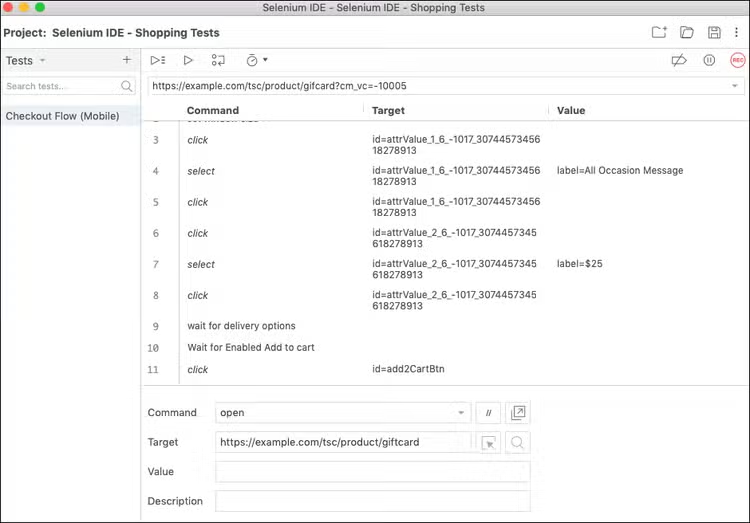
A key benefit of synthetic monitoring is that you can define the specific actions of a test, allowing you to walk through key flows of your application — a checkout flow or a sign-up flow — to verify its functionality and performance. This is called scripting. A tool’s scripting capabilities directly determine how valuable it can be.
Here are some of the scripting capabilities that are essential to look for:
- How do you record scripts?
- Is there a browser-based recorder?
- Do you need to manually write code or steps?
- Can you manually edit recorded tests or do you need to completely re-record?
- What is the level of technical knowledge would someone need to be able to record a script?
- Does the tool allow you to import industry-standard formats (like Selenium IDE)?
Of course, since enterprise websites change daily, and scripts can stop working, it is also important to evaluate a tool based on its troubleshooting capabilities, such as:
- Can you test the script?
- Will it tell you what steps it fails on and why?
- Does it capture screenshots or a video of script running, so you can see what the screen looked like when a button or form field couldn’t be found?
- Can you export the script in an industry-standard format so you can troubleshoot it somewhere else if need be?
As an example, here is what the industry-standard Selenium IDE recorder looks like when testing a mission-critical “checkout user flow”.
Measuring & comparing performance
A big advantage of synthetic tools is they allow you to experiment with what-if scenarios and see the impact on performance. It is essential to ensure you have flexibility and options that make it easy to get a clear line of sight of the impact of your performance initiatives.
Some common examples include:
- Testing your site with and without a content delivery network (CDN) or with different CDNs
- Excluding specific third parties and seeing the impact on performance
- Comparing mobile performance to desktop, or even different mobile devices
- Determining the impact of Single Points of Failure
- Measuring the performance of different A/B test groups
- Testing new features that are not enabled for all users
- Using different global locations to see how geography exacerbates any performance slowdowns
How completely a specific synthetic tool can do these things depends on how much you can control about a test. Here are some of the configuration options to look for to be able to assess the results of common web performance experiments:
- Can you configure the test to exclude requests for certain domains or URLs?
- Can you overload DNS or hostnames to point at different IP addresses?
- Can you pre-load specific cookies for a test?
- Can you test with 4G, 5G, or different networking connections?
- Can you specify custom HTTP headers to add to requests?
- Can you specify the device, viewport, or user-agent used?
- Can you specify the location? How precisely can I define the location? (Am I testing from “Canada”, or am I testing from “Vancouver, in British Columbia, in Canada?”)
Of course, configuring a test with different options is only half the battle. In all these scenarios, you will collect performance data about your sites and applications under different conditions, and then you will need to compare them.
How your synthetic solution allows you to compare data and visualize differences is critical — that determines how easily and quickly you get results. Here are a few ‘must-haves’ to look for:
- Can you compare two specific measurements?
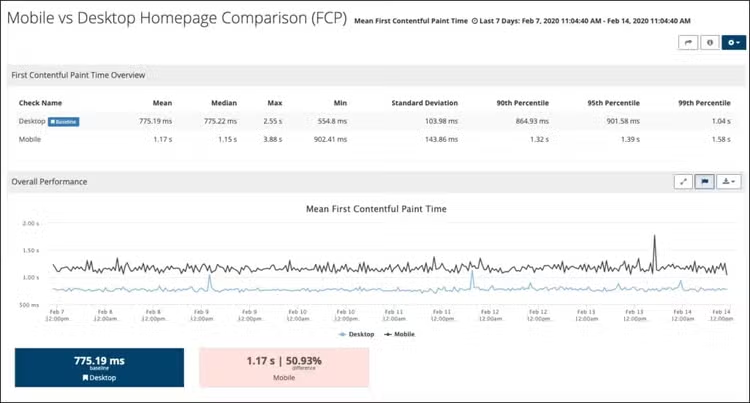
- Can you see both absolute and relative improvement? (For example: Visually Complete improved by 400ms, or 24%.)
- Can you compare the videos or waterfalls side-by-side?
- Can you collect multiple samples of each configuration, and compare those on a graph?
For example, here is what a comparison report looks like in Splunk Synthetic Monitoring:
Robust alerting capabilities & integrations
Synthetic monitoring is one of the best ways to detect outages or availability issues since it actively tests your site from the outside. Critical to this is what capabilities does the tool have to define an outage and send the notification.
Here are a few things to look for:
- Can you run it from different locations inside the major geographic regions where most of my visitors are?
- What is the testing frequency?
- Can you verify the presence or absence of text?
- Can you verify with the response code?
- Will connection issues (DNS, TCP, etc.) trigger an outage?
- Can SSL certificate issues trigger an outage?
Trouble accessing the site once doesn’t necessarily mean there is an outage. False positives can lead to alert fatigue so here are some of the more advanced capabilities to look for as well:
- Does the tool show you a screenshot or the source code of where the error was?
- Will the tool automatically retry a test that fails to verify the outage?
- Can you test from multiple locations?
- Does the tool use results for multiple locations to automatically detect regional vs global outages?
For example, here is a real screenshot (displayed within Splunk Synthetic Monitoring) showing off a page which returned an error:

Once your synthetic monitoring solution has detected an outage, it is critical that it notifies you and your team. How you want a tool to notify you depends on the workflow of your team — email and SMS are minimums.
Beyond that, you should focus on notification options that can easily integrate as tightly as possible into your team’s workflow and style. This will optimize how quickly your team can see and react to an outage.
Here are a few options to look for:
- Mobile teams in multiple countries? You may need a tool that sends push notifications.
- Decentralized team? Can the tool send messages to teams or channels inside chat applications (Slack, Microsoft Teams, etc.)?
- Are you already using an operations tool? Look for a tool that comes with turnkey integrations.
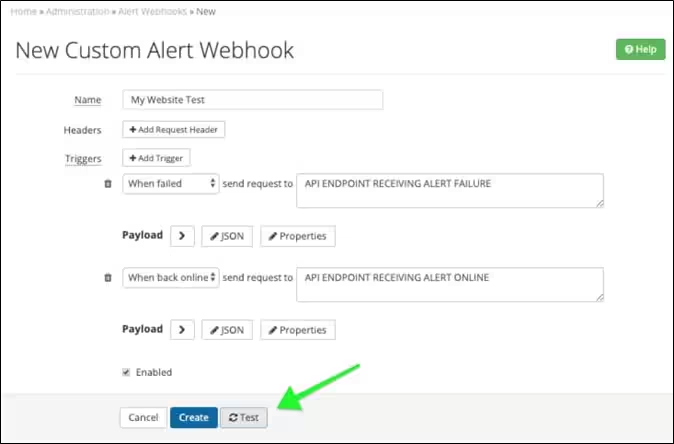
- Does the solution have a generic ‘send a webhook’ alert option? This is a great catch-all that allows you to connect the tool to the rest of your process, regardless of how the tools that make up the process evolve.
Here is what a typical custom webhook looks like. Make sure the synthetic tool you choose has similar functionality:
Pre-production testing
One of the key strengths of synthetic monitoring solutions is that they can help you assess the performance and user experience (UX) of a site — without requiring large volumes of real users driving traffic.
This means synthetic monitoring tools can be used in pre-production and lower environments (staging, UAT, QA, etc.) allowing you to understand the performance of your site while it’s still in development. This is tremendously powerful, allowing you to use performance as a gate and stopping performance regressions over time.
To do this, your solution must be able to reach your lower environments and gather performance data. It also must deal with some configuration nuances that are unique to testing environments. Capabilities for accessing pre-production that you should look for:
Is the testing location outside of your environment? Will you need to whitelist IP addresses? How much work is involved with your security team?
- Can you ignore SSL certificate errors (because it uses an internal Certificate Authority or a self-signed certificate)?
- Can you install something inside of your environment to run tests? Do you need to open ports for it to work properly?
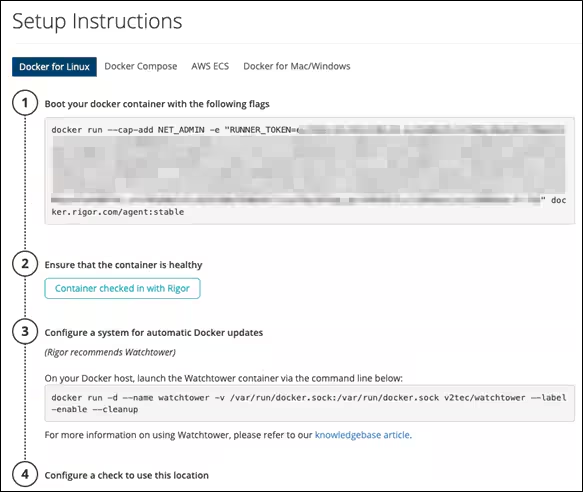
- Is it a physical system or virtual? If virtualized, what is the technology used (VM, Docker, software package)?
- What resources are needed to run the internal testing location?
- How many tests can you run simultaneously through it, and how can you increase that?
As an example, Splunk Synthetic Monitoring provides copy and paste instructions to launch a Docker instance to test pre-production sites:
Competitive & industry benchmarking
A major use case of synthetic tools is to measure the performance of an industry to gain clear visibility into how your performance stacks up against others.
This application is unique to synthetic monitoring! That’s because other tools, like RUM or APM, will require you to place a JavaScript tag on the site or a software agent on the backend infrastructure, something that you obviously cannot do to the websites of other companies.
With a synthetic product, benchmarking a competitor’s site is as easy as testing your own site…you simply provide a URL — and you’re done!
However, there are various web security products that sit in front of websites and can block traffic from synthetic testing tools as a byproduct of trying to block attackers, bots, and other things that can cause fraud. You may often find that the IP addresses of the cloud providers and data centers used by synthetic providers are blocked. So, one thing to consider in your synthetic monitoring solution is:
Can you run tests from locations that your competitors are not blocking?
Another reason security products used by your competitors can block synthetic tests are because of the User Agent. If the User Agent is different than what an actual browser uses, that can cause you to be blocked. Another capability to check for is:
Can you customize the User Agent to remove anything that identifies it as a synthetic testing tool?
Once you can collect performance and user experience data from a competitor, you have everything you need to compare those results to your own site, so it is important to further understand:
- Can you easily compare multiple competitors in a single view?
- Is there an easy-to-understand way to show less technical people internally which site is “Best” and why?
- Does the tool offer a composite score like the Google Lighthouse performance score, which makes it easier to compare one site to another?
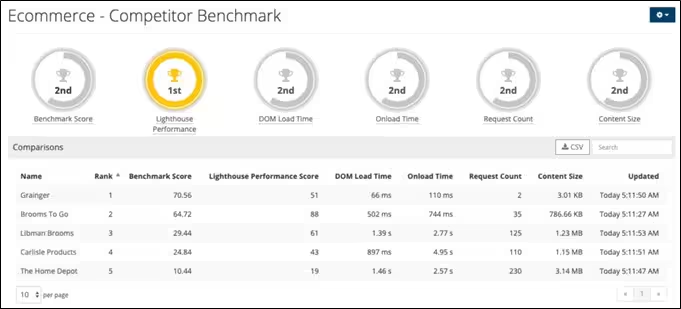
Here, Splunk Synthetic Monitoring illustrates a Competitor Benchmark dashboard:
In order to extract the most value of your synthetic solution, keep these questions in mind:
- How easy is it to configure tests and how flexible are the controls for different experiments?
- How easy is it to integrate into your existing alerting workflow?
- How easy is it to integrate into pre-production testing environments?
- How is it to visualize and compare different tests and trends over time?
Challenges in synthetic monitoring
A major challenge facing synthetic monitoring is the validity of assumptions that go into producing a usage scenario. That is — we cannot assume we know what a user might do. In a real-world setting, users may behave unexpectedly. The scenario generating component, described above, may not be able to emulate an exhaustive set of complex real-world scenarios.
Still, you can mitigate these limitations. By combining synthetic monitoring with real-user monitoring, you’ll get the ideal view: you’ll get to look at the data produced by synthetic monitoring alongside information from real user monitoring to make a well-informed and realistic statistical analysis.
Splunk Synthetic Monitoring
Proactively find and fix performance issues across user flows, business transactions and APIs to deliver better digital experiences.
Related Articles

12 Must-Have Data Analysis Tools for 2026 | Python, SQL & AI

Software Supply Chain Security: Proven Frameworks & Tactics to Stay Ahead of Threats