What Are Servers? A Practical Guide for Modern IT & AI
Learn Joe HertvikKey Takeaways
- A server is a hardware or software system that processes requests and delivers data, services, or applications to client devices over internal networks or the Internet.
- Servers are built from specialized components — such as CPUs, GPUs, memory, storage, networking, and power systems — designed to handle high-volume, continuous processing.
- Organizations can choose from many server types and deployment models, including physical, virtual, cloud, and AI-optimized servers, based on workload, scalability, and budget needs.
What is a computer server?
Short for “computer server”, a server is a hardware or software system that delivers data, resources, services, applications, and other outputs to client devices over internal networks or the Internet. Organizations and individuals may host their servers:
- In-house/on premises
- In large, shared data centers containing rooms full of servers
- In the cloud
(Read about data center optimization & data center security.)
How servers work
Simply put, servers process digital requests (inputs) and generate responses (outputs). When the server receives a request, it processes the request and if applicable, returns any requested output.
Requests can originate:
- From client devices (“clients”) including laptops, smartphones, tablets, Internet of things (IoT) devices, and AI driven applications and prompts.
- Internally from production job schedulers, automated processing tasks, or other processes running directly on the server.
Computer servers can also function as client devices by sending requests to other servers. They can process many transaction requests per second and can act as a client when it requests data from another service. (For example, a web server requesting data from a DBMS server.)
Components of a server
The hardware hosting a server is a complex system composed of many critical components for data storage, processing, communications, backups, and other functions, including:
- Central Processing Units (CPUs): One or more processing units (chips) that execute transactions and software instructions, perform calculations, manage data flow between motherboard components, and more.
- Graphics Processing Units (GPUs): GPUs rapidly process requests requiring complex logical, visual, mathematical, and graphical rendering. They are used for gaming, video, design, and most importantly, processing workloads for AI and large language models (LLMs).
- Memory: Volatile RAM (Random Access Memory) is used for temporary storage during server processing.
- Storage: Storage, aka “secondary” or permanent storage, includes non-volatile media like SSDs, HDDs, and NVMe drives where data persists after power-off. This includes devices that store operating systems, data, and applications, such as hard drives, cloud storage, disk arrays, portable storage, and other media.
- Motherboard: A circuit board that distributes electricity and connects and facilitates communication with all other server components.
- Network connection: All servers have one or more network interface cards (NICs) and internal network port(s). NICs allow communication between local and Internet-connected computers. Modern servers often use SFP+ or QSFP ports for fiber optic connections, not just standard RJ45 (Ethernet) ports.
- Power supply: Servers need one or more power supplies, including backup power as required.
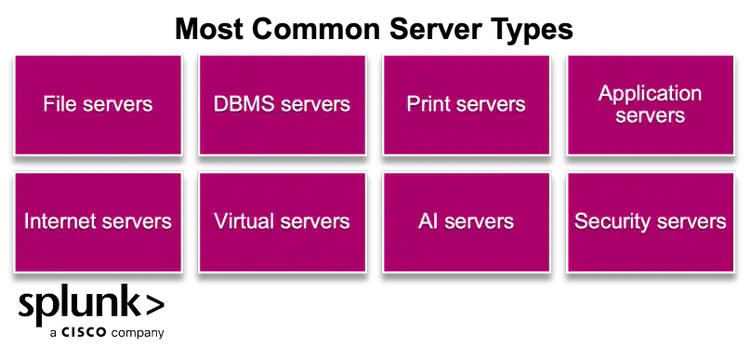
Types of servers
There are many types of computer servers. Although every server serves a distinct purpose, larger servers can run multiple server types, depending on factors such as:
- Server capacity
- The operating system in use (such as Windows, Linux, Mainframe, or Midrange)
- The server's architecture (whether physical, virtual, or cloud-based)
File servers
File servers store, manage, and provide shared access to unstructured user files including documents, spreadsheets, PDFs, photos, videos, and executables.
File servers can run on cloud servers (Google, AWS, and others), Windows, Linux, and some legacy servers such as midrange, mainframe, Unix, and AIX platforms.
DBMS servers
Database Management System (DBMS) servers provide database services to SQL and other structured relational databases. DBMS servers support:
- Complex query transactions
- Data integrity
- Data management processing
Examples include Microsoft SQL Server, MySQL, Oracle Database, IBM DB2, PostgreSQL, NoSQL DBMS platforms, and other cloud-based database services.
Print servers
Print servers receive print requests from network clients and route each request to the correct printer. They organize and queue printer jobs to prevent bottlenecks.
Application servers
Application servers host digital solutions used in business processing — you can think of them as software servers. Clients run a user interface such as a browser, terminal, or client application, to access and run server applications.
Application servers allow clients to access centralized apps without the overhead of downloading large amounts of data or running software locally. There are millions of application servers running on the Internet including:
- Mail servers
- Web servers (These often sit in front of application servers to handle initial traffic)
- Enterprise/business application servers
- Multimedia servers
- Other software solutions used within organizations
Application servers run on many operating systems, including Windows, Linux, mainframe, midrange, Unix, containers, and other platforms. Application servers are often clustered to process large volumes of user requests sent to a central location.
Internet servers
Servers that route requests and responses between clients and servers across local networks and the Internet. Internet servers include:
- DHCP servers (Dynamic Host Configuration Protocol): Automatically assign IP addresses and network configuration settings to clients and servers.
- DNS servers (Domain Name System): Resolve user-friendly domain names (Web URLs) into Internet IP addresses to enable efficient routing for Internet traffic.
- Proxy servers: Gateway servers that protect client traffic by hiding a requester’s true IP address and forwarding traffic to its destination address. Proxy servers enhance security in many ways including hiding user IP addresses (locations) from bad actors, supporting load balancing, and caching and compressing traffic.
- Plain and secure FTP (File Transfer Protocol) servers: FTP servers facilitate file transfers between computers.
Virtual machines (VM)
IT teams use hypervisor software, or virtual machine monitors (VMM), to build virtual machines within a single device. A hypervisor can manage hundreds of virtual machines on a single piece of hardware, virtualizing entire racks of physical servers.
AI servers
AI servers use GPUs or Google’s Tensor Processing Units (TPUs) to perform LLM processing for artificial intelligence tasks. AI servers often require specialized high-speed interconnects (like NVIDIA NVLink or InfiniBand) to allow multiple GPUs to communicate rapidly. (This is a key technical differentiator between a standard server with a GPU and a purpose-built AI server.)
AI servers can execute complex modeling, language-based tasks, including data analysis, pattern recognition, decision-making processes, output generation (text, images, and predictions), and more.
(Related reading: AI Infrastructure.)
Security servers
Perform specialized security processing, to protect data and networks from unauthorized access, cyberattacks, data breaches, and more. Security servers provide protection for functions such as firewalls, intrusion detection/prevention, authentication, and other services.
How to choose the right server for your organization
Consider these elements to make the best decision when selecting servers for your organization:
- Server requirements. Select appropriate hardware and operating systems tailored to your applications. Plan for capacity and scalability to maintain performance and accommodate future growth.
- Physical type. Physical servers come in many formats, including tower, rack, and blade servers. Cloud servers and containers are Internet-based services that organizations lease or subscribe to.
- Location and maintenance. Will you run workloads on bare metal, virtual machines, or within a containerized orchestration platform like Kubernetes? What maintenance will be required?
- Budget. How much can you spend on servers? Factor in operational upkeep costs when budgeting server expenses.
- Maintenance: Follow best practices for server maintenance, including regular patching, server monitoring, and backups.
(Related reading: Moore’s Law & Amdahl’s Law.)
FAQs about Servers
Related Articles

Chief Digital Officer Role: Responsibilities, Skills and Salary Expectations

What's Dogfooding? AKA Drinking Your Own Champagne, or Eating Your Own Ice Cream