Splunk SOAR: Anyone Can Automate
Security SplunkIf you haven’t heard the news, Splunk Phantom is now Splunk SOAR – available both on-prem and in the cloud. What does this mean to you?
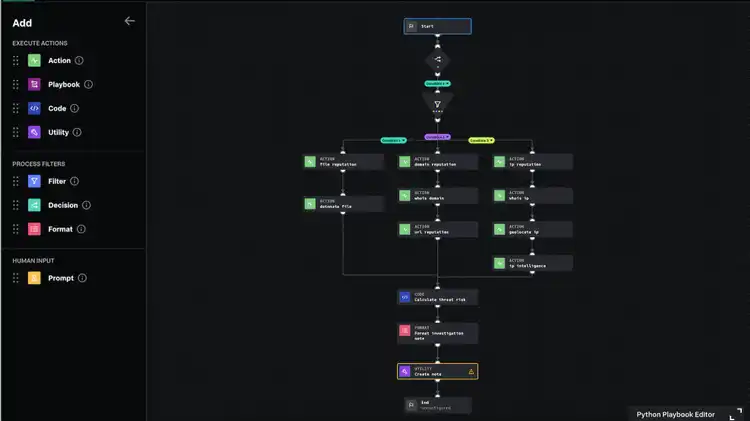
Hot on the heels of our cloud release is another exciting announcement: Splunk SOAR’s new Visual Playbook Editor. This new, modern visual playbook editor makes it easier than ever to create, edit, implement and scale automated playbooks to help your business eliminate security analyst grunt work, and respond to security incidents at machine speed.
With the new Splunk SOAR visual playbook editor, we’ve focused on making changes and improvements to ensure that anyone can automate. We’ve decreased the amount of custom code needed to perform basic and complex tasks, and delivered a more intuitive, familiar interface ensuring it’s approachable to all. Advanced users will appreciate increased modularity, improving reusability and scale.
Splunk SOAR’s new, modern visual playbook editor delivers:
Effortless Automation Through a Simplified Interface
- Improved readability with wider blocks to support longer descriptions, labels on lines, new shapes to denote block type, and a bolder color palette all help quickly to communicate the purpose of the playbook
- Vertical playbook orientation, playbook block auto-arrange and zoom-to-fit functionality make navigating and modifying playbooks easier than ever
- New options for creating playbook blocks with drag-and-drop, mini-menu, and keyboard shortcuts allow analysts to use what works best for them.
Scale Automation Efficiently and Quickly with Modular Playbooks
- Definable playbook inputs and outputs, allow analysts to easily pass data between playbooks, reducing automation development time.
- Create smaller, micro-playbooks first, and then leverage them together to solve broader, more complex problems.
Advanced Yet Approachable
- Playbook creation and editing is easier than ever for less code-savvy users, without inhibiting functionality for the most advanced users.
- Parameters that were only available via custom code are now built into the UI, allowing analysts to create robust playbooks without needing to be Python superstars
- Redesigned datapath picker allowing for powerful customization and easy understanding of datapaths, the data they describe, and how to modify them
For those that are fans of the original experience, don’t worry, users still have the option to build and edit playbooks in the classic visual playbook editor pictured here.
To learn more about cloud-delivered Splunk SOAR, fill out this form and we’ll be in touch. Also, catch us at our SOAR virtual event where our SOAR experts will show you how to orchestrate and automate common use cases such as phishing, application vulnerability management, and cloud security management, all while using the new visual playbook editor.
----------------------------------------------------
Thanks!
Ian Forrest
Related Articles

Australia Is Investing in Resilience – Are Businesses Ready?

Measuring Hunting Success with PEAK