PowerShell Detections — Threat Research Release, August 2021

Splunk is committed to using inclusive and unbiased language. This blog post might contain terminology that we no longer use. For more information on our updated terminology and our stance on biased language, please visit our blog post. We appreciate your understanding as we work towards making our community more inclusive for everyone.

The Splunk Threat Research Team (STRT) most recently began evaluating more ways to generate security content using native Windows event logging regarding PowerShell Script Block Logging. This method provides greater depth of visibility as it provides the raw (entire) PowerShell script output. There are three sources that may enhance any defender's perspective: module, script block and transcript logging. We focused our security content on script block logging (Event Code 4104) as it provides the most granular visibility of PowerShell scripts that execute on an endpoint. However, we also provided a way to gather all three for testing validation, production or curiosity. Adversaries continue to use PowerShell and defenders are granted deeper visibility with Script Block Logging.

Watch the video to understand how STRT has developed PowerShell analytics for Splunk by using the Splunk Attack Range to collect the generated logs, and hunt for suspicious PowerShell.
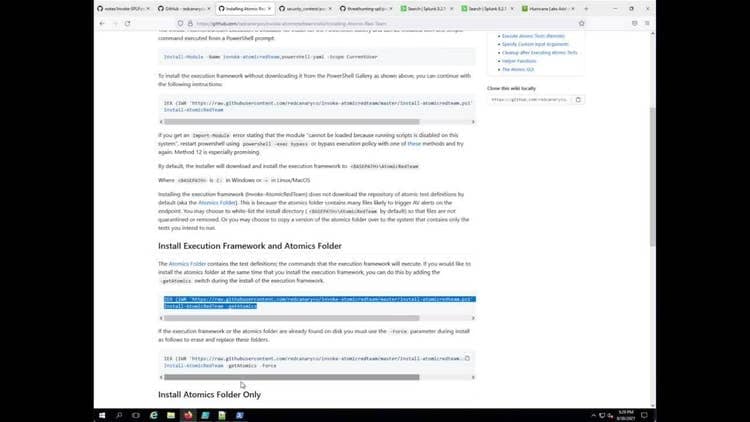
PowerShell attacks have not surmised and Microsoft continues to expand on new features, plus it’s native integration in each operating system. Since version 5 of PowerShell, logging was expanded to include script block, module and transaction logging. What does this mean? Granular visibility into what is being run on our endpoints.

What is PowerShell Script Block Logging?

This is the raw, deobfuscated script supplied through the command line or wrapped in a function, script, workflow or similar. Think of everytime an adversary executes an encoded PowerShell script or command, script block logging provides that data in its raw form.

Windows Event Code=4104

What does it look like?

PowerShell Detections

The Splunk Threat Research Team has developed a set of detections to assist with getting started in detecting suspicious 4104 script block events.

Analytic
Technique
Tactic
Notes
Detect Empire with PowerShell Script Block Logging
T1059.001
Execution
Identifies two values that are always found in the default PowerShell-Empire payloads.
Detect Mimikatz With PowerShell Script Block Logging
T1059.001
Execution1
Identifies strings typically found in PowerShell script block code related to mimikatz.
Powershell Fileless Process Injection via GetProcAddress
T1059.001, T1055
Execution, Defense Evasion, Privilege Escalation
Identifies the use of GetProcAddress within the script block.
Powershell Fileless Script Contains Base64 Encoded Content
T1059.001, T1027
Execution
Identifies the use of Base64 within the script block.
Unloading AMSI via Reflection
T1562
Defense Evasion
Identifies system.management.automation.amsi within the script block, typically found in encoded commands disabling AMSI.
PowerShell Domain Enumeration
T1059.001
Execution
Identifies commands typically found with domain and trust enumeration.
PowerShell Loading .NET into Memory via System.Reflection.Assembly
T1059.001
Execution
Identifies system.reflection.assembly within the script block being used, typically found in malicious PowerShell script execution.
Powershell Creating Thread Mutex
T1027.005
Defense Evasion
Identifies the `mutex` function typically found and used in malicious PowerShell script execution.
Powershell Processing Stream Of Data
T1059.001
Execution
Identifies suspicious PowerShell script execution via EventCode 4104 that is processing compressed stream data.
Powershell Using memory As Backing Store
T1140
Defense Evasion
Identifies within the script block the use of memory stream as new object backstore.
Recon AVProduct Through Pwh or WMI
T1592
Reconnaissance
Identifies suspicious PowerShell script execution performing checks to identify anti-virus products installed on the endpoint.
Recon Using WMI Class
T1592
Reconnaissance
Identifies suspicious PowerShell where WMI is performing an event query looking for running processes or running services.
WMI Recon Running Process or Services
T1592
Reconnaissance
Identifies suspicious PowerShell script execution where WMI is performing an event query looking for running processes or running services.
Allow Inbound Traffic In Firewall Rule
T1021.001
Lateral Movement
Identifies suspicious PowerShell commands to allow inbound traffic inbound to a specific local port within the public profile.
Mailsniper Invoke functions
T1114.001
Collection
Identifies known mailsniper.ps1 functions executed on an endpoint.
Delete ShadowCopy With PowerShell
T1490
Impact
Identifies PowerShell commands to delete shadow copy using the WMIC PowerShell module.
Powershell Enable SMB1Protocol Feature
T1027.005
Defense Evasion
Identifies enabling of smb1protocol through PowerShell Script Block logging.
Detect WMI Event Subscription Persistence
T1546.003
Privilege Escalation, Persistence
Identifies WMI Event Subscription to establish persistence or perform privilege escalation.

Responding to PowerShell with Automated Playbooks

The following community Splunk SOAR playbooks mentioned below can be used in conjunction with some of the previously described Powershell analytics.

Name
Technique ID
Tactic
Description
Malware Hunt And Contain
T1204
Execution
This playbook hunts for malware across managed endpoints, disables affected users, shuts down their devices, and blocks files by their hash from further execution via Carbon Black.
Email Notification for Malware
T1204
Execution
This playbook tries to determine if a file is malware and whether or not the file is present on any managed machines. VirusTotal "file reputation" and PANW WildFire "detonate file" are used to determine if a file is malware, and CarbonBlack Response "hunt file" is used to search managed machines for the file. The results of these investigations are summarized in an email to the incident response team.
Block Indicators
T1204
Execution
This playbook retrieves IP addresses, domains, and file hashes, blocks them on various services, and adds them to specific blocklists as custom lists

For more information about how Splunk SOAR can accelerate investigations and remediations for your SOC, check out the upcoming Splunk4Ninjas Splunk SOAR Hands On Workshop.

Why Should You Care About PowerShell Logging?

PowerShell is not leaving the Windows endpoint any time soon. As defenders, we need to expand beyond process and command-line analytics and begin diving deeper into our logs to identify more unique ways to capture malicious or suspicious activity. Script block logging, albeit not new, opens our horizons to see complete scripts being executed

For a full list of security content, check out the release notes on Splunk Docs:

Learn More

You can find the latest content about security analytic stories on GitHub and in Splunkbase. Splunk Security Essentials also has all these detections now available via push update.

Feedback

Any feedback or requests? Feel free to put in an issue on GitHub, and we’ll follow up. Alternatively, join us on the Slack channel #security-research. Follow these instructions If you need an invitation to our Splunk user groups on Slack.

Contributors

We would like to thank the whole threat research team Jose Hernandez, Rod Soto, Bhavin Patel, Mauricio Velazco, Michael Haag, Teoderick Contreras, Lou Stella and Patrick Bareiss for their contribution to this release.

Related Articles
Safe Passage: Seamless Transition Path for IBM QRadar Customers
Security
4 Minute Read

Safe Passage: Seamless Transition Path for IBM QRadar Customers

The SOC is where it all goes down and where dedicated SecOps teams work tirelessly to protect every digital corner of an organization.
Logs Are For Campfires: Log Data, Big Data, and Splunk Asset & Risk Intelligence
Security
3 Minute Read

Logs Are For Campfires: Log Data, Big Data, and Splunk Asset & Risk Intelligence

Discover how Splunk Asset and Risk Intelligence (ARI) transforms log data into actionable insights. From automated asset discovery to risk and compliance management, ARI empowers organizations with real-time visibility, vulnerability tracking, and proactive threat mitigation. Elevate your security posture today.
Introducing… The Threat Hunter’s Cookbook!
Security
1 Minute Read

Introducing… The Threat Hunter’s Cookbook!

The security experts on the SURGe team have released The Threat Hunter’s Cookbook, a hands-on guide for security practitioners that features actionable insights into threat hunting methods, ready-to-use queries, and more.