Unleashing Data Ingestion from Apache Kafka
Platform SplunkWhether it’s familiar data-driven tech giants or hundred-year-old companies that are adapting to the new world of real-time data, organizations are increasingly building their data pipelines with Apache Kafka. Confluent has an impressive catalog of these use cases.
Splunk Connect for Kafka introduces a scalable approach to tap into the growing volume of data flowing into Kafka. With the largest Kafka clusters processing over one trillion messages per day and Splunk deployments reaching petabytes ingested per day, this scalability is critical.
Overall, the new connector provides:
- High scalability, allowing linear scaling, limited only by the hardware supplied to the Kafka Connect environment
- High reliability by ensuring at-least-once delivery of data to Splunk
- Ease of data onboarding and simple configuration with Kafka Connect framework and Splunk's HTTP Event Collector
How it Works
As a sink connector, Splunk Connect for Kafka takes advantage of the Kafka Connect framework to horizontally scale workers to push data from Kafka topics to Splunk Enterprise or Splunk Cloud. Once the plugin is installed and configured on a Kafka Connect cluster, new tasks will run to consume records from the selected Kafka topics and send them to your Splunk indexers through HTTP Event Collector, either directly or through a load balancer.
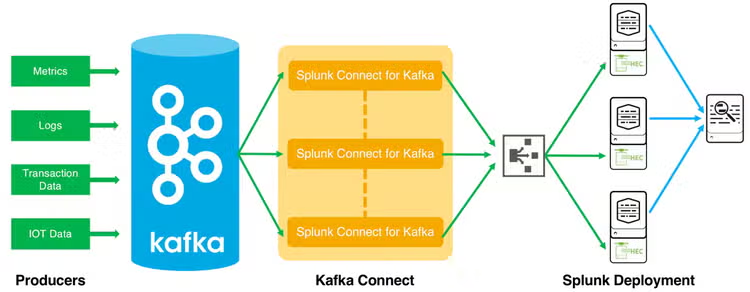
Key configurations include:
- Load Balancing by specifying list of indexers, or using a load balancer
- Indexer Acknowledgements for guaranteed at-least-once delivery (if using a load balancer, sticky sessions must be enabled)
- Index Routing using connector configuration by specifying 1-to-1 mapping of topics to indexes, or using props.conf on indexers for record level routing
- Metrics using collectd, raw mode, and collectd_http pre-trained sourcetype
Getting Started
To get started, download Splunk Connect for Kafka from Splunkbase. Install this JAR file across your Kafka Connect nodes, and restart your these nodes with updated properties to enable the Splunk connector. Please consult our documentation for additional instructions, configuration options, and troubleshooting. Also, check out Don Tregonning’s blog post for a full guide to getting set up and tips for configuring your end-to-end pipeline.
With the introduction of Splunk Connect for Kafka, we recommend shifting existing use of the legacy Splunk Add-on for Kafka for consuming Kafka topics to the new connector. The add-on will continue to be supported for monitoring your Kafka environment using JMX.
And in case if you are wondering, yes—Splunk Connect for Kafka is open source! You can access the source code at our github repo.
----------------------------------------------------
Thanks!
Michael Lin
Related Articles

Introducing… Splunk for iPad!
New Year, New Dashboard Studio Features: What's New in 8.2.2201