Splunking Azure: NSG Flow Logs
Platform Ryan Lait
Splunking NSG flow log data will give you access to detailed telemetry and analytics around network activity to & from your NSG's. If that doesn’t sound appealing to you yet, here are some of the many things you could Splunk with your network traffic logs from Azure.
- Virtual Machine traffic monitoring
- Correlate on-prem firewall traffic with cloud traffic (Got expressroute?)
- Application troubleshooting
- network forensics
- protocol analysis
- Compliance monitoring
- Usage forecasting
Enabling flow logging in Azure aggregates this data and stores it in a Azure Storage Blob. This blog won’t cover those steps, but if you don’t already have flow logs configured, you can check out the setup steps, here (ignore the VM creation and proceed from “Enable Network Watcher”).
We’ll run through 2 ways of getting NSG flow logs out of Azure and into Splunk.
Option 1: Splunk Add-on for Microsoft Cloud Services
This option uses the Splunk Add-on for Microsoft Cloud Services to connect to your storage account and ingest your flow logs into Splunk. The input will poll the storage blob periodically looking for new events.
1. Configure your flow logging using the instructions above
2. In your Azure Portal, browse to your storage account
3. Select Shared access signature
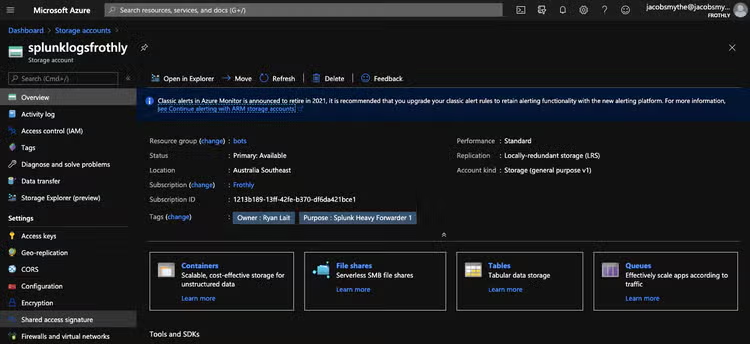
4. Create read-only permissions to the storage account
- Allowed services: Blob, Table
- Allowed resource types: Service, Container, Object
- Allowed permissions: Read, List
- No Blob versioning permissions
- Sufficient expiry period for SAS Key: 1 year, 2 years etc.
- Allowed protocols: HTTPS only
- Signing key: key1 or key2
- Generate SAS and connection string

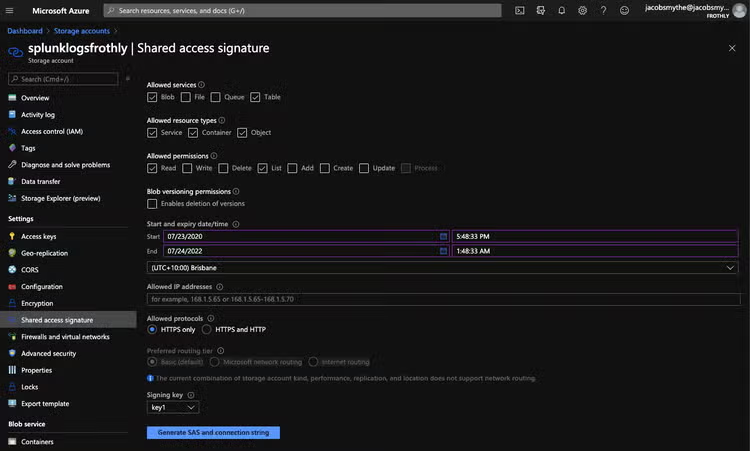
5. Copy SAS Token

6. Install the Splunk Add-on for Microsoft Cloud Services
7. Install the Microsoft Azure App for Splunk
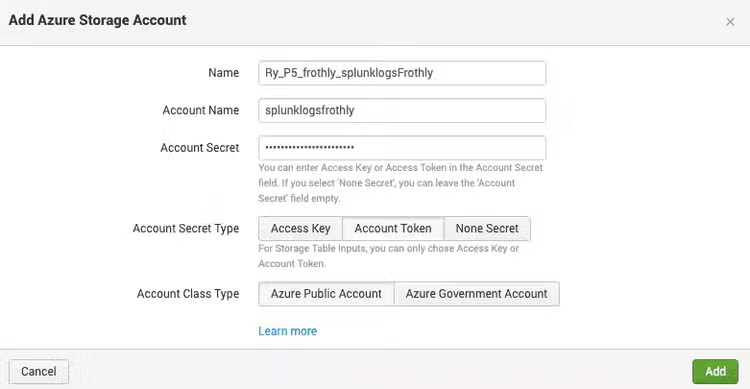
8. Splunk Add-on for Microsoft Cloud Services > Configuration > Azure Storage Account > Add

9. Configure:
- Name: (Splunk friendly name - no spaces)
- Account Name: Storage account name as per Azure Portal
- Account Secret: SAS Token
- Account Secret Type: Account Token
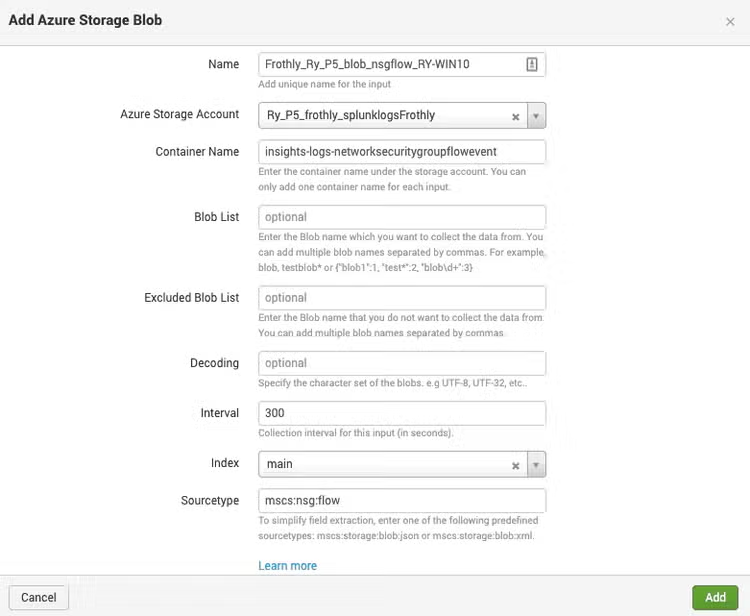
10. Splunk Add-on for Microsoft Cloud Services > Inputs > Create New Input > Azure Storage Blob

11. Configure:
- Name: (Splunk friendly name - no spaces)
- Azure Storage Account: Account from Step 9
- Container Name: insights-logs-networksecuritygroupflowevent
- Interval: 5 mins (depending on your performance and requirements, modify this value)
- Sourcetype: mscsflow
Confirm data is being indexed by searching your index for mscsflow sourcetyped data.
Troubleshooting: index=_internal sourcetype="mscs:storage:blob:log"
The Microsoft Azure App for Splunk contains search-time extractions and knowledge objects for parsing the mscsflow data. The app also contains a pre-built dashboard for visualizing the NSG Flow Logs. Security > NSG Flow Logs.
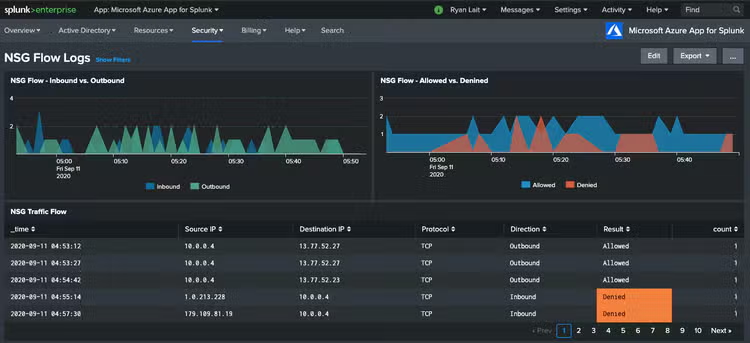
Be sure to have the app installed on your seach head or alternatively, ensure you use the props & transforms configs for the mscsflow sourcetype to ensure fields are extracted correctly.
Now, this process works perfectly fine and allows us access to the information contained in the flow logs. However if you look at the raw events, you can see the format of the data can be somewhat "messy". Microsoft log these events as flowTuples. Essentially strings that contain multiple properties and property values.
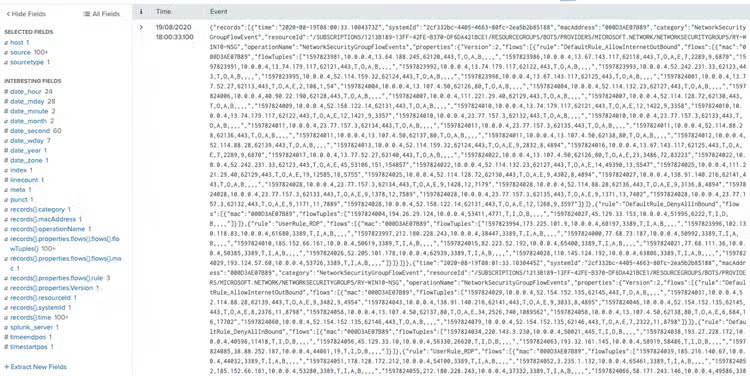
The dashboards and configs above will allow you to search these events perfectly enough, but may require some tinkering in order to truly get the most out of this dataset.
I prefer to take the easier route.
Option 2: Deploy an Azure function app to send NSG logs to Splunk via HEC (HTTP Event Collector)
This option deploys an Azure Function from a configurable template, into your Azure Subscription. Its job is to read NSG Flow Logs from your configured storage account, parse the data into clean JSON events and fire the events to a Splunk HEC endpoint.
Pre-Reqs:
- Sufficient permissions to deploy resources in your Azure environment
- Ensure you have configured NSG flow logging to your storage account before deploying the Azure function
1. Create a new HEC data input in Splunk, store a copy of the HEC token.
2. Browse to this GitHub link
3. After configuring per the instructions in GitHub, deploy the function to your Azure environment using the “Deploy to Azure button”
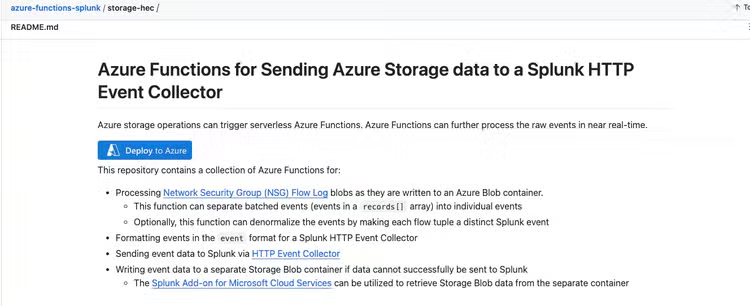
Once deployed, the function will retrieve NSG events logged to the container specified using the connection string from the associated storage account, parse them into JSON events, and send them to your HEC endpoint.
If you're already sending Azure data to Splunk using Event Hubs, you can use this deployment template to send your NSG events to your Event Hub instead.
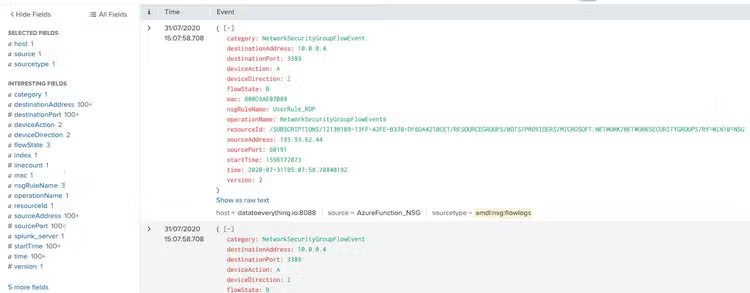
The output format is identical to the HEC feed.
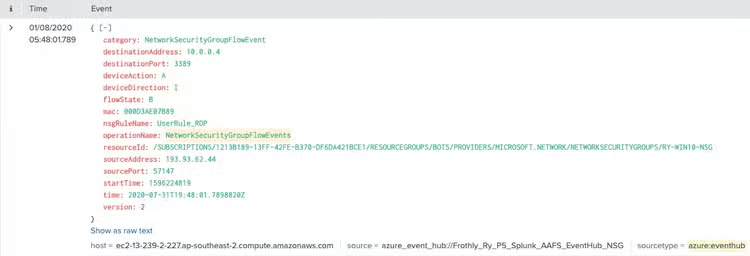
As you can see, these events appear in a much more friendlier format, allowing us easier access to search, reporting and investigation capabilities of the Splunk ecosystem. If you're using Splunk Enterprise Security, or Splunk SOAR, this should be right up your alley.
Your decision on which technical path to go depends on your specific circumstances, however the below is a list of Pros and Cons that you could consider.
Splunk Add-on for Microsoft Cloud Services (via Azure Blob Storage aka option 1)
Pros:
- Set up using the Splunk UI and apps.
- No additional Azure services required.
- Direct integration between Splunk and Azure Blob storage.
Cons:
- Logs are unstructured, making them harder to analyze.
- Less control over data parsing; additional configurations will be required in Splunk.
- May require manual tuning to scale efficiently for large data volumes.
- This option is considered a “pull” vs the 2nd option is considered a “push”.
Azure Function + HTTP Event Collector (based on Azure Functions repo aka option 2):
Pros:
- Scalable solution that can handle high data volumes and large event payloads.
- Near real-time processing, data is sent to Splunk as soon as it's written to the blob container.
- Logs are parsed into structured JSON format, making them easier to search and analyze.
- Denormalization can separate or group flow tuples based on your needs, improving customization.
- Fallback option, write unsent data to an alternate storage account if Splunk is unreachable, ensuring no data loss.
- More control over log processing logic (e.g., denormalizing flow tuples)
- This option is considered a “pull” which allows data to be sent as soon as it is generated and the azure function runs.
Cons:
- Higher operational overhead, including monitoring Azure Functions and maintaining the pipeline.
- Additional costs from Azure Functions execution and storage, although this provides a structured, tailored solution.
Troubleshooting
If your logs are not appearing as expected, it is likely that some custom parsing rules need to be applied to this sourcetype. Using the GUI or through props.conf, add this configuration to the relevant sourcetype. Note that your mileage may differ based on how you ingested the data:
[mscs:nsg:flow]
description = Azure NSG Flow Logs
LINE_BREAKER = (^|,|\[)\{"time"
category = Application
KV_MODE = json
SEDCMD-remove_footer = s/\]\}$//g
SEDCMD-remove_header = s/^\{"records":\[//g
SHOULD_LINEMERGE = false
TIME_PREFIX = time\":\"
TRUNCATE = 0
MAX_TIMESTAMP_LOOKAHEAD = 32
Happy Splunking!
Ry
Related Articles

Must-See Splunk Security Content at Cisco Live 2026