IT Event Analytics: The Complete Guide to Driving Efficiency, Security, and Insight from Your Event Data
Learn Austin ChiaUnderstanding how your digital infrastructure operates is no longer optional. The way IT teams monitor, interpret, and act on system events can mean the difference between a thriving business and a costly outage. That’s where event analytics in IT comes in.
In this article, we'll unpack what event analytics is, why it’s crucial for organizations, and how you can leverage key metrics and tools for smarter, more proactive IT management. We’ll share some best practices as well.
What is IT event analytics?
Every click, server log, error message, and system notification in your organization is an IT event. Collectively, they form a constant stream of data about your technology environment. Event analytics is the process of collecting, processing, and analyzing this data to:
- Gain valuable insights.
- Spot problems before they escalate.
- Optimize performance across your systems.
Event analytics plays a crucial role in security. Missing a single significant event — even for a few minutes — can lead to security vulnerabilities, downtime, or a cascade of service disruptions. That’s why more IT teams are adopting data-driven approaches to monitor and analyze their digital environments.
(Related reading: events vs. alerts vs. incidents, explained.)
What is event data?
Event data refers to any type of data generated by applications, servers, devices, and networks that capture specific events or transactions. Event data is typically collected in real-time and can be highly granular, capturing details at a very specific level.
Common sources of event data
Event data comes from a variety of sources within an organization's IT ecosystem, including:
- Application logs: Logs generated by software applications (e.g., errors, user actions).
- Server logs: Operating system logs, error logs, and performance data from servers.
- Network traffic: Logs from firewalls, routers, and switches, including packet flow and intrusion attempts.
- Cloud services: Events from cloud platforms, for example API usage, scaling events, etc.
- User activity: Login attempts, session tracking, and actions captured by authentication systems.
(Related reading: log data explained.)
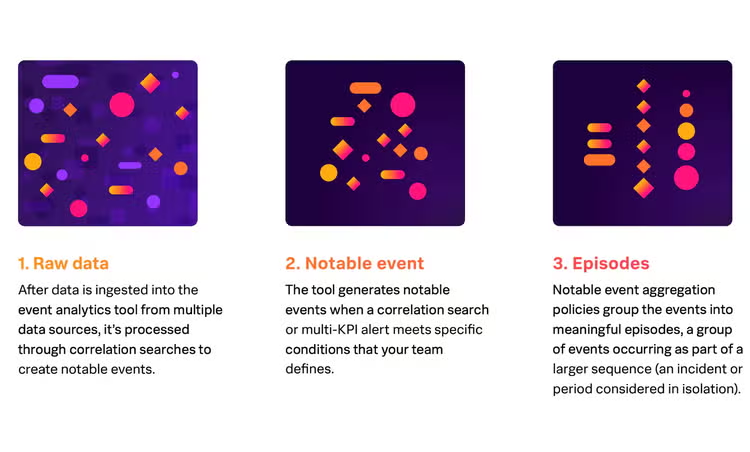
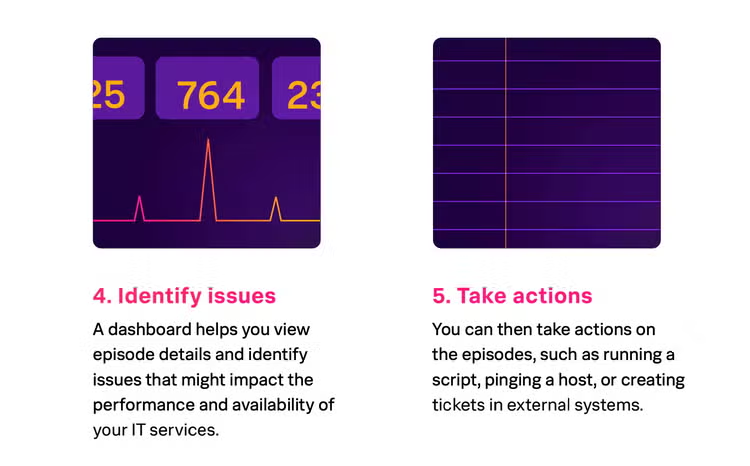
Related terms: event correlation and predictive analytics
- Event correlation is the process of linking related events from different sources to uncover underlying patterns or root causes. For example, a failed login followed by a sudden spike in CPU usage could indicate a brute-force attack on a server.
- Predictive analytics. Modern event analytics tools increasingly leverage AI/ML to predict potential issues before they occur. For example, by analyzing historical trends in server load, predictive analytics can forecast when additional resources might be needed to prevent an outage.
The benefits of implementing IT event analytics
Implementing a robust IT event analytics strategy brings tangible advantages for any organization. Here’s how:
Proactive problem detection
Event analytics helps IT teams move from reactive firefighting to proactive prevention. Through the continuous analysis of event data, teams can detect anomalies and address potential issues before they affect users. This will lead to improved system uptime and availability, minimizing the impact of IT incidents on business operations.
Example: If an event is detected that could cause a system outage, the IT team can immediately take action to resolve the issue before it affects users.
Faster incident response
With real-time monitoring and alerts, IT staff receive instant notifications about critical events. This dramatically reduces mean time to detection (MTTD) and mean time to resolution (MTTR), minimizing downtime and improving service reliability.
Access to real-time data and metrics can help teams identify patterns and troubleshoot problems faster. This enables teams to proactively respond to potential issues — before they escalate into major problems, preventing service disruptions and minimizing downtime. Additionally, real-time monitoring provides valuable insights into system performance and utilization, allowing IT teams to optimize resources and improve overall efficiency.
Improved root cause analysis
Digging into volumes of event data makes it easier to correlate incidents, trace dependencies, and identify root causes faster. This leads to more effective long-term solutions, not just quick fixes.
Example: If a server crashes, real-time monitoring can reveal that the root cause was actually a sudden spike in CPU usage due to an unexpected increase in user traffic. Armed with this information, IT teams can take proactive measures, such as:
- Adding additional servers.
- Optimizing code to prevent similar issues from occurring in the future.
Enhanced security and compliance
Detecting suspicious events and maintaining comprehensive audit trails are essential for both cybersecurity and regulatory compliance. Event management through analytics streamlines reporting and incident documentation. As a result, organizations can quickly identify potential issues — security threats or compliance violations, for instance — and take swift action to mitigate them. Additionally, with the help of machine learning algorithms, event analytics can learn patterns and anomalies in user behavior, further enhancing security measures.
Key metrics to track in IT event analytics
To make sense of the flood of data, focus on metrics that provide actionable intelligence. Some of the most vital metrics tracked in IT event analytics include:
Metric 1: Event volume
Event volume is a measure of the number of events occurring over a specific period. This metric is essential in understanding the scale of events and potential threats to the IT infrastructure. A sudden increase in event volume could indicate a security breach or malfunction in the system. Understanding how many events are being generated over specific periods helps you to:
- Spot unusual spikes.
- Highlight periods of high activity.
- Optimize system capacity.
Event volume can be measured by:
- Intrusion attempts
- Malware infections
- Network traffic
- Failed login attempts
Example: A sudden increase in failed login attempts may signal a security threat.
Metric 2: MTTD and MTTR
How long does it take to identify and fix critical events? Lower numbers here indicate a mature, responsive IT operation. Through the use of MTTD and MTTR, you can better understand your team's performance and identify areas for improvement.
- Mean time to detect (MTTD) is the average time it takes for an IT team to detect a problem or incident. This can include tools like monitoring systems, ticketing systems, and user reports. This metric is important because it measures how quickly your team can identify issues that may impact services.
- Mean time to resolve (MTTR) is the average time it takes to resolve a problem or incident. It includes all steps taken to mitigate the issue and restore services to normal operation. This metric is critical in understanding your team's ability to respond and remediate issues.
Example: A consistently high MTTD may indicate a lack of proactive monitoring tools or inefficient incident escalation processes.
Metric 3: Mean time to contain (MTTC)
The Mean Time to Contain (MTTC) is the average time it takes for your team to contain a problem or incident. "Containment" refers to isolating the issue and preventing it from causing further impact on services. Similar to MTTR, a lower MTTC is desirable as it indicates that your team is able to quickly identify and mitigate issues — before they cause widespread disruption.
A high MTTC may signify ineffective containment strategies or inadequate resources allocated for incident response. For example, consider these scenarios:
- An organization might have well-defined incident response procedures and good team communication, but if you lack the necessary tools, resources, or personnel to respond quickly, the actual time to contain incidents might still be high.
- Conversely, a well-staffed team might still have a high MTTC if their containment strategies themselves are not effective.
This metric helps measure the effectiveness of your team's incident management processes in minimizing incident impact.
Metric 4. Severity levels
Tracking the distribution of incident severity helps prioritize response and resource allocation. Incidents are often categorized using incident severity (SEV) levels:
- SEV 1 (Critical): Events that have the potential to cause significant harm, loss of life, or infrastructure damage. These events require immediate attention and a swift response from the incident response team.
- SEV 2 (High): Events that can significantly impact business operations or cause customer disruption. These events may not have an immediate threat, but still require urgent attention and prompt resolution.
- SEV 3 (Medium): Events that may disrupt day-to-day operations but are not critical. These incidents can typically be managed within regular business hours.
- SEV 4 (Low): Minor incidents that do not disrupt operations and can be resolved with minimal resources.
- SEV 5 (Informational): Incidents that do not require action but provide important information for future reference and improvement.
When an incident occurs, quickly determining its severity level is crucial for initiating the appropriate response. An effective incident management system allows organizations to categorize incidents based on their severity levels and helps in prioritizing them for resolution.
Tools and technologies for event analytics
Events tracking typically involves the use of tools to help organizations collect, store, and analyze event data across multiple channels. A range of tools has emerged to make event analytics more accessible, sophisticated, and actionable. Some of the popular event analytics platforms include:
- Splunk: A leader in real-time monitoring, observability, and indexing of event data from multiple sources, with strong visualization tools. Splunk can integrate this data with security events, for a unified, end-to-end security and observability platform.
- ELK Stack (Elasticsearch, Logstash, Kibana): An open-source suite popular for log aggregation, searching, and dashboarding.
- Sumo Logic: Known for its cloud-native, machine learning-powered analytics and security integrations.
Importance of scaling
As organizations generate more and more event data, scalability becomes critical. Modern tools like Splunk are specifically designed to handle high data throughput, often using distributed architectures or cloud-native solutions to scale dynamically with demand.
Best practices for effective event analytics
To ensure effective implementation, you'll need to follow some general best practices. Here are some proven practices:
Centralize event data
Event data is generated from multiple sources, including customer interactions, devices and servers. Therefore, you'll need a centralized data repository that can gather and store all this data in one place for analysis. This allows businesses to have a holistic view of their operations and customer interactions, making it easier to identify patterns and trends. Centralization also ensures that all data is consistent and accurate, reducing the likelihood of errors in analysis.
Example: you can store your event data in a cloud-based data warehouse like Google BigQuery or Amazon Redshift for easy access and scalability.
Normalize and enrich data
Before using any event data, it’s important to normalize and enrich it. Uniform data structures and contextual metadata make it easier to analyze, correlate, and visualize events across systems. This process of normalizing involves cleaning, standardizing, and organizing the data in a way that is consistent and usable for analysis.
Example: Dates may be stored differently in different systems — some may use YYYY-MM-DD while others may use DD/MM/YYYY — so normalizing the date format ensures consistency across all data sources.
Data enrichment involves adding additional information to the event data, such as customer demographics or historical purchase data. This enriched data can provide more context and insight into customer behavior, making it easier to identify patterns and trends.
Set intelligent alerts
When managing a voluminous amount of data, manually monitoring and detecting anomalies is overwhelming if not impossible. This is where setting intelligent alerts comes into play. Using machine learning algorithms, you can set up automated alerts to notify you of any unusual activity in the data. Intelligent alerts use historical data to establish baseline patterns and then compare incoming data against those patterns. If there are any significant deviations from the norm, an alert will be triggered, allowing for quick investigation and action.
Moreover, with intelligent alerts, you can also set up dynamic thresholds that adjust based on changing conditions in real-time. This ensures that the alerts remain relevant and effective even as the data changes over time. When using alerts, try to avoid alert fatigue. (This fatigue occurs when IT teams receive too many notifications, many of which are false positives or low-priority issues. This can lead to important alerts being missed.) To combat alert fatigue, you should:
- Adjust thresholds to ensure only high-severity events are prioritized.
- Use dynamic baselines.
- Implement machine learning to suppress irrelevant or redundant alerts.
Invest in and use visualization
Data is best understood and analyzed when presented in a visual format. Investing in data visualization tools can greatly aid in understanding patterns and trends within the data. These tools allow for easy manipulation of data to create charts, graphs, and interactive dashboards. This not only helps with analyzing current data but also allows for predictive analysis by identifying potential future trends.
Visualization also aids in communicating insights and findings to stakeholders or non-technical team members. With visually appealing and easily understandable representations of complex data, it becomes easier to convey important information and make informed decisions. Having dashboards and visual analytics makes complex event patterns more understandable to users.
Automate routine responses
You'll also need to automate playbooks for common scenarios like restarting services, blocking suspicious IPs, or notifying affected users. This saves time and effort in responding to routine incidents and allows your team to focus on more complex tasks.
Trends in event analytics
- AIOps (Artificial Intelligence for IT Operations): AIOps tools like Splunk IT Service Intelligence analyze event streams, identify patterns, and reduce noise, allowing IT teams to focus on the most critical issues.
- Observability Platforms: Observability goes beyond traditional monitoring, providing full-stack visibility into applications, infrastructure, and user experience. Tools like Splunk Observability Cloud give organizations deeper insights into how their systems behave.
Final thoughts
Event analytics is more than just tracking your system and avoiding downtime. It can be used as a strategic tool for business growth, innovation, and customer satisfaction.
To stay ahead of IT challenges, invest in building your analytics capabilities for better event tracking through real-time monitoring and data analysis through an IT monitoring and observability platform.
FAQs about IT Event Analytics
Related Articles

The Purple Team: Combining Red & Blue Teaming for Cybersecurity

AI Tools & Vendors for The Enterprise