Splunkを使用したMCPサーバーのセキュリティ監視
Artificial Intelligence Rod Sotoこのブログでは、Splunkを使ったMCPサーバーのセキュリティ監視の方法をご紹介します。MCPはAnthropic社が開発した新しいテクノロジーで、ローカルアプリケーションと大規模言語モデル(LLM)との間のブリッジの役割を果たします。
MCPとは
MCP (Model Context Protocol)は、AIがさまざまなシステム(社内データベース、ファイルシステム、Web API、その他のソフトウェアツール)と安全に「対話」できるようにするための、万能な通訳者のような存在です。AIシステムごとにあらゆるデータソースに合わせた個別の統合を構築する必要はなく、MCPが共通の言語とルールを提供します。
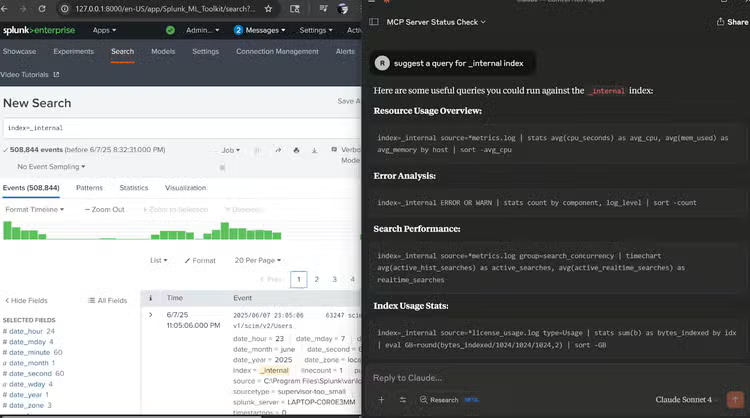
MCPの開発ではAnthropic社が中心的な役割を果たし、MCPに対するサポートも最も成熟していますが、このプロトコルはAIエコシステム全体でより広く利用されることを目的として設計されています。以下の画面は、MCPサーバーを実際に使用している様子を示しています。この画面では、ユーザーがClaude LLMに対して、指定したフォルダーにローカルファイルを作成するように指示しています。Claude LLMはクラウドで運用されていますが、MCPサーバーを介して、ユーザーのコンピューターでローカルな操作を実行できます。
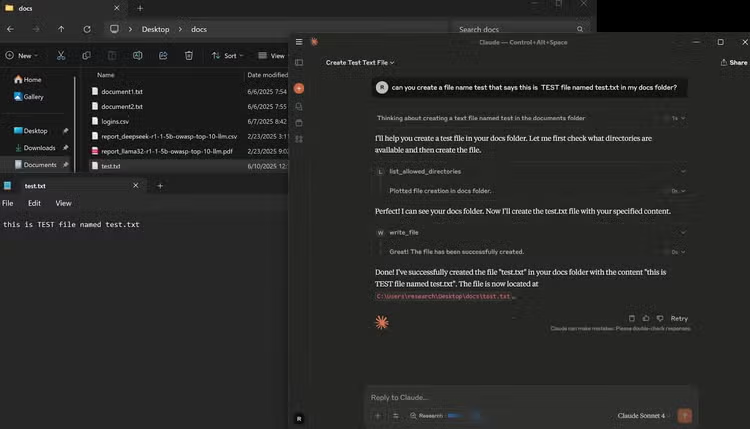
MCPを使用することで、AIはさまざまなシステム(社内データベース、ファイルシステム、Web API、その他のソフトウェアツール)と安全に「対話」できます。この機能により、MCPの利用可能な用途が注目を集め、その人気が高まった結果、特定のアプリケーション向けに対応した複数のMCPサーバーの開発が進められました。
このブログでは、オペレーティングシステムとの直接的なやり取りとSplunkの操作にMCPを使用し、そこから、このテクノロジーを利用するうえでのセキュリティ上の課題を探っていきます。
MCPサーバーのアーキテクチャ概要
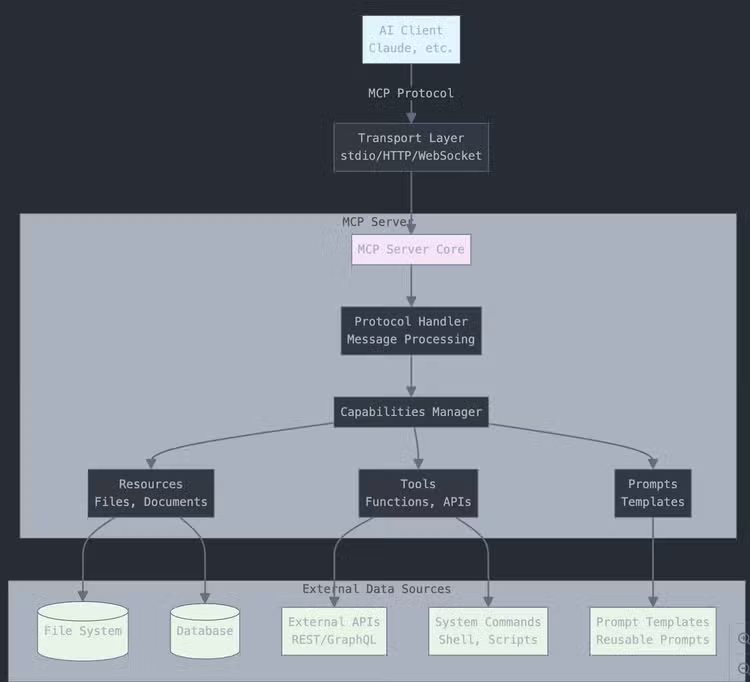
最上位層(Client):
- AIクライアント(Claudeなど)が、標準化されたプロトコルを使ってMCPサーバーに接続します。
Transport Layer:
- 通信方式を処理します(ローカル接続では通常stdio、リモート接続ではHTTP/WebSocketを使用)。
MCP Server Core:
-
Protocol Handler:MCPメッセージとリクエストを処理します。
-
Capabilities Manager:サーバーが実装する機能を管理します。
-
機能の主なタイプには3つあります。
- Resources:ファイル、ドキュメント、データへのアクセス
- Tools:AIが呼び出せる機能(API、システムコマンド)
- Prompts:再利用可能なプロンプトテンプレート
External Data Sources:
- MCPサーバーが接続する実際のシステム(データベース、ファイルシステム、APIなど)
サーバーは、AIとデータ/ツール間を安全につなぐ役割を果たします。
このブログでは、私がGitHubで公開しているコードを基にしたMCPサーバーを使用します。このコードでは、ファイル操作MCPとSplunk MCPサーバーの構築ができます。その後、これらのMCPサーバーの使用中に生成されるログを分析して、MCPサーバーを監視する方法を検討します。
ログファイルの構造の概要
この調査では、2つのMCPサーバーを構築します。1つはファイル操作MCPサーバーで、指定したフォルダーに接続し、ファイルの一覧表示と読み書きができます。もう1つがSplunk MCPサーバーで、Splunkインスタンスに接続し、SPLクエリーの実行、インデックスの読み取り、さらにアプリケーション関連クエリーの実行ができます。これらの操作は、アクセス権やユーザーの権限によって制限される場合があることに注意してください。たとえば、ファイル操作MCPサーバーを使用する場合、Claudeデスクトップでは、ローカルシステムで要求されたアクションを許可するかどうかを尋ねられます。Splunkでは、アカウントとロールの権限の機能によってこの制限に対処できます。2つのMCPサーバーはいずれも、NVIDIA 4070 GPUと32GBのRAMを搭載したWindows 11マシンにインストールします。
これから、2つのMCPサーバーの使用中に作成されたログファイルを見ていきます。ここではクライアント(Claudeデスクトップを実行しているコンピューター)に焦点を当てます。この環境では、ログは「C:\Users\--user–\AppData\Roaming\Claude\logs\」に作成されます。
Claudeアプリケーションログ
main.log
- アプリケーションの起動/終了イベント、バージョン情報、更新チェック
- プラットフォームの詳細(Windows x64、Node.jsのバージョン)
- 自動更新のエラーメッセージとネットワーク接続の問題
window.log
- ブラウザのwindow/rendererプロセスログ
- JavaScriptエラーとDOM操作の問題
- メッセージ解析エラー
MCPサーバーログ
mcp-server-filesystem.log
- ファイルシステムとMCPサーバーの通信
- クライアントとサーバー間のJSON-RPCメッセージ
- ファイル操作(get_file_info、read_file、write_file)
- すべてのファイルシステムツール呼び出しのリアルタイムログ
mcp-server-splunk.log
-
接続タイムアウトとMCP通信エラー
-
JSON-RPC通信ログ
-
双方向通信
-
ツール呼び出しログ
- splunk_search - 実行されたSPLクエリー
- splunk_indexes - 利用可能なインデックスのリスト
- splunk_test - 接続テスト
-
サーチ実行の詳細
- クエリーの内容:実行されたSPLクエリー全体
- ジョブ管理:SplunkジョブのSID (サーチID)
- 結果のメトリクス:返された結果の件数
- 実行ステータス:成功/失敗の追跡
- 応答コード:HTTPステータスコード(ジョブ作成は201)
一般的なMCPサーバーログ
-
JSON RPC通信
-
タイムスタンプの形式:ISO 8601
-
ログレベル:[info]、[error]、[debug]
-
メッセージのタイプ:
- クライアントリクエスト(クライアントからのメッセージ)
- サーバー応答(サーバーからのメッセージ)
- ツール呼び出し(ツール/呼び出し)
- 機能ネゴシエーション(prompts/list、resources/list)
MCPのセキュリティ監視
以前のブログ「SplunkでローカルLLMのセキュリティを監視する方法(パートII)」で説明したように、AI/モデルを保護するために監視すべき領域は基本的に3つあります。
- 使用時(プロンプト、API、RPC呼び出し)
- 使用先(モデルを実行するホスト、モデルの使用元ホスト)
- 開発時(トレーニングデータ、モデルのアルゴリズム、敵対的機械学習)
ここでは、MCPデスクトップアプリケーションがクライアントとして機能し、MCPサーバーがそのクライアントとモデル(ローカルまたはクラウドで運用)との間のブリッジの役割を果たします。そして、監視する必要があるのは、MCPブリッジアプリケーションの使用状況(上記のタイプのログ)と、このMCPサーバーを 実行 しているホスト(MCPサーバーログ)です。
システムの構成と監視すべきログを確認したので、次に、MCPサーバーの特定の情報を監視するためのSPLサーチを確認しましょう。
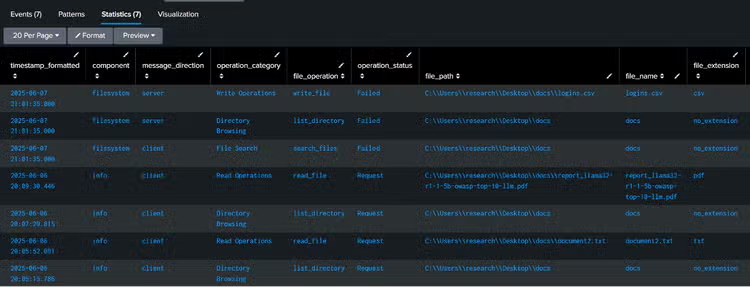
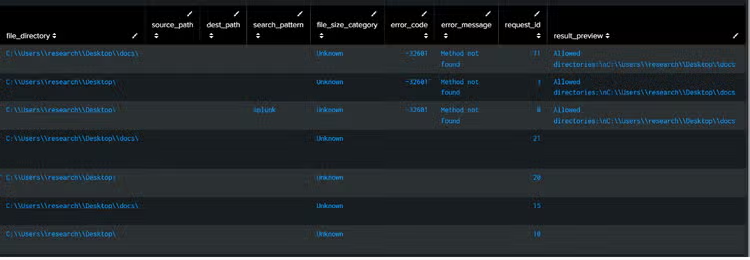
SPLコード - ファイル操作
index=* (sourcetype=*mcp* OR source=*mcp* OR source=*filesystem*)
    ("tools/call" OR "read_file" OR "write_file" OR "list_directory" OR "get_file_info" OR "create_directory" OR "move_file" OR "search_files" OR "directory_tree" OR "edit_file")
| rex field=_raw "\"method\":\"tools/call\",\"params\":{\"name\":\"(?P<file_operation>[^\"]+)\",\"arguments\":{(?P<full_arguments>[^}]+)}"
| rex field=full_arguments "\"path\":\"(?P<file_path>[^\"]+)\""
| rex field=full_arguments "\"content\":\"(?P<file_content>[^\"]{0,100})"
| rex field=full_arguments "\"source\":\"(?P<source_path>[^\"]+)\""
| rex field=full_arguments "\"destination\":\"(?P<dest_path>[^\"]+)\""
| rex field=full_arguments "\"pattern\":\"(?P<search_pattern>[^\"]+)\""
| rex field=full_arguments "\"paths\":\[(?P<multiple_paths>[^\]]+)\]"
| rex field=_raw "\"id\":(?P<request_id>[^,}]+)"
| rex field=_raw "\[(?P<component>\w+)\]\s+\[(?P<log_level>\w+)\]"
| rex field=_raw "Message from (?P<message_direction>client|server)"
| rex field=_raw "\"result\":{\"content\":\[{\"type\":\"text\",\"text\":\"(?P<result_preview>[^\"]{0,200})"
| rex field=_raw "\"error\":{\"code\":(?P<error_code>[^,]+),\"message\":\"(?P<error_message>[^\"]+)\""
| where isnotnull(file_operation) AND match(file_operation, "read_file|write_file|list_directory|get_file_info|create_directory|move_file|search_files|directory_tree|edit_file|read_multiple_files")
| eval operation_category=case(
    match(file_operation, "read_file|read_multiple_files"), "Read Operations",
    match(file_operation, "write_file|edit_file"), "Write Operations",
    match(file_operation, "list_directory|directory_tree"), "Directory Browsing",
    match(file_operation, "search_files"), "File Search",
    match(file_operation, "get_file_info"), "File Information",
    match(file_operation, "create_directory"), "Directory Management",
    match(file_operation, "move_file"), "File Movement",
    true(), "Other Operations"
)
| eval file_extension=if(isnotnull(file_path) AND match(file_path, "\."),
    replace(file_path, ".*\.([^\.\\\\]+)$", "\1"),
    if(isnotnull(file_path), "no_extension", "N/A"))
| eval file_directory=if(isnotnull(file_path),
    replace(file_path, "^(.*)[\\\\/][^\\\\/]+$", "\1"),
    "N/A")
| eval file_name=if(isnotnull(file_path),
    replace(file_path, "^.*[\\\\/]([^\\\\/]+)$", "\1"),
    "N/A")
| eval operation_status=case(
    isnotnull(error_code), "Failed",
    isnotnull(result_preview), "Success",
    message_direction="server", "Response",
    true(), "Request"
)
| eval file_size_category=case(
    match(result_preview, "size:\s*(\d+)") AND tonumber(replace(result_preview, ".*size:\s*(\d+).*", "\1")) > 1000000, "Large (>1MB)",
    match(result_preview, "size:\s*(\d+)") AND tonumber(replace(result_preview, ".*size:\s*(\d+).*", "\1")) > 100000, "Medium (100KB-1MB)",
    match(result_preview, "size:\s*(\d+)"), "Small (<100KB)",
    true(), "Unknown"
)
| eval timestamp_formatted=strftime(_time, "%Y-%m-%d %H:%M:%S.%3N")
| eval hour_of_day=strftime(_time, "%H")
| eval day_of_week=strftime(_time, "%A")
| sort -_time
| table timestamp_formatted, component, message_direction, operation_category, file_operation, operation_status, file_path, file_name, file_extension, file_directory, source_path, dest_path, search_pattern, file_size_category, error_code, error_message, request_id, result_preview
SPLコード - MCPサーバー経由で実行されるSplunkクエリー
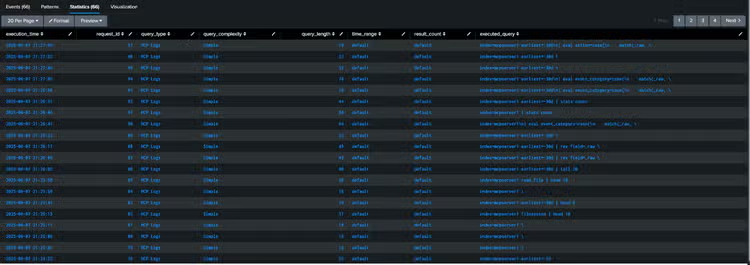
index=main sourcetype=mcpjson "tools/call" "splunk_search"
| rex field=_raw "\"query\":\"(?P<executed_query>[^\"]+)\""
| rex field=_raw "\"id\":(?P<request_id>[^,}]+)"
| rex field=_raw "\"earliest_time\":\"(?P<time_range>[^\"]+)\""
| rex field=_raw "\"count\":(?P<result_count>[^,}]+)"
| where isnotnull(executed_query)
| eval query_type=case(
    match(executed_query, "(?i)index=\\*"), "Cross-Index Search",
    match(executed_query, "(?i)index=_internal"), "Internal Logs",
    match(executed_query, "(?i)index=main"), "Main Index",
    match(executed_query, "(?i)index=mcp"), "MCP Logs",
    match(executed_query, "(?i)\\| rest"), "REST API Call",
    match(executed_query, "(?i)\\| makeresults"), "Data Generation",
    match(executed_query, "(?i)\\| inputlookup"), "Lookup Table",
    match(executed_query, "(?i)predict"), "Machine Learning",
    match(executed_query, "(?i)stats|eval|where"), "Data Analysis",
    true(), "Other"
)
| eval query_complexity=case(
    len(executed_query) > 200, "Complex",
    len(executed_query) > 100, "Medium",
    true(), "Simple"
)
| eval execution_time=strftime(_time, "%Y-%m-%d %H:%M:%S")
| eval query_length=len(executed_query)
| eval time_range=coalesce(time_range, "default")
| eval result_count=coalesce(result_count, "default")
| table execution_time, request_id, query_type, query_complexity, query_length, time_range, result_count, executed_query
| sort -_time
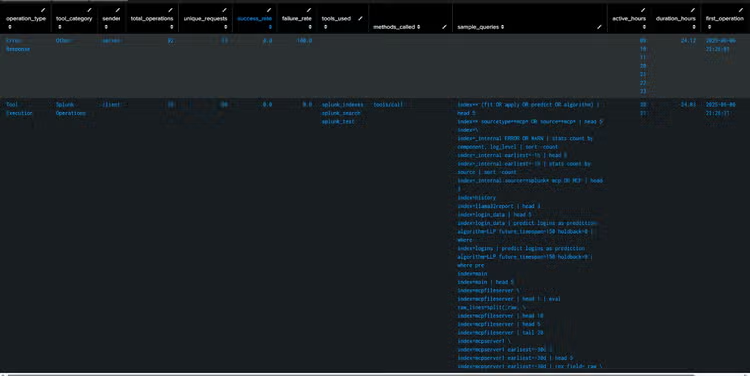
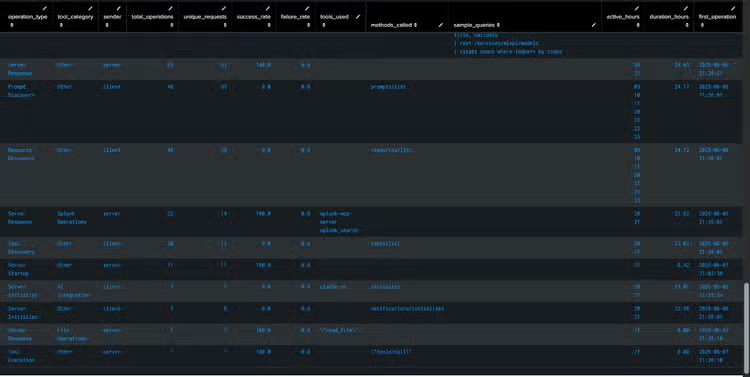
SPLコード - MCPサーバーの操作
index=main sourcetype=mcpjson
| rex field=_raw "\"method\":\"(?P<method>[^\"]+)\""
| rex field=_raw "\"name\":\"(?P<tool_name>[^\"]+)\""
| rex field=_raw "Message from (?P<sender>server|client)"

| rex field=_raw "\"id\":(?P<request_id>[^,}]+)"
| rex field=_raw "\"error\":\{\"code\":(?P<error_code>[^,]+)"
| rex field=_raw "\"query\":\"(?P<splunk_query>[^\"]{1,100})"
| eval operation_type=case(
    match(method, "tools/call"), "Tool Execution",
    match(method, "tools/list"), "Tool Discovery",
    match(method, "initialize"), "Server Initialize",
    match(method, "notifications/initialized"), "Initialization Complete",
    match(method, "prompts/list"), "Prompt Discovery",
    match(method, "resources/list"), "Resource Discovery",
    match(_raw, "Initializing"), "Server Startup",
    isnotnull(error_code), "Error Response",
    sender="server" AND isnull(method), "Server Response",
    sender="client" AND isnull(method), "Client Request",
    true(), "Unknown"
)
| eval tool_category=case(
    match(tool_name, "splunk"), "Splunk Operations",
    match(tool_name, "read_file|write_file|list"), "File Operations",
    match(tool_name, "claude"), "AI Integration",
    true(), "Other"
)
| eval success_status=case(
    isnotnull(error_code), "Failed",
    match(_raw, "\"result\""), "Success",
    true(), "Pending"
)
| eval hour_of_day=strftime(_time, "%H")
| eval day_of_week=strftime(_time, "%A")
| stats
    count as total_operations,
    dc(request_id) as unique_requests,
    values(tool_name) as tools_used,
    values(method) as methods_called,
    count(eval(success_status="Success")) as successful_ops,
    count(eval(success_status="Failed")) as failed_ops,
    values(error_code) as error_codes,
    values(splunk_query) as sample_queries,
    earliest(_time) as first_operation,
    latest(_time) as last_operation,
    values(hour_of_day) as active_hours,
    values(day_of_week) as active_days
    by operation_type, tool_category, sender
| eval
    success_rate=round((successful_ops/total_operations)*100, 1),
    failure_rate=round((failed_ops/total_operations)*100, 1),
    duration_hours=round((last_operation-first_operation)/3600, 2),
    first_operation=strftime(first_operation, "%Y-%m-%d %H:%M:%S"),
    last_operation=strftime(last_operation, "%Y-%m-%d %H:%M:%S")
| table operation_type, tool_category, sender, total_operations, unique_requests, success_rate, failure_rate, tools_used, methods_called, sample_queries, active_hours, duration_hours, first_operation, last_operation
| sort -total_operations
MCPサーバーのセキュリティに関する考慮事項と監視項目
- 認証とアクセス制御の監視:認証の試行、ログインの失敗、権限の昇格、MCPサーバーに接続するクライアント、認証トークン、不正アクセスの試行、アクセス権と権限の変更を監視します。
- データの漏えいと流出:モデル使用時のデータ漏えいや組織の専有データの流出(特にバックエンドがクラウドにある場合)、アクセスされたデータ(ファイル操作)、アクセスされた情報の量を監視します。
- リソースの使用と悪用:計算リソース、APIレート制限、ツールの実行頻度、リソースを大量に消費する操作、自動スクレイピング、DoSの試行を追跡します。
- ネットワークトラフィックと通信のセキュリティ:インバウンド/アウトバウンドトラフィック、暗号化の適切な使用、不審なネットワークパターン、予期しない外部接続、MCPインターフェイスを通じた制御回避の試みを監視します。
- 監査ログとフォレンジック:MCPツール、データアクセスイベント、サーバーとのやり取りに関する包括的なログを監視します。また、監査ログで、機密データへのアクセス、ログの整合性、保護状況を確認します。
- 入力の検証:ツールのパラメーター内の悪質なペイロード、プロンプトインジェクションの試行、コマンドインジェクションのパターンを監視します。
- 設定の変更:セキュリティパッチの適用状況と依存関係の更新を監視します。
- サンドボックス:セッションの分離、データベースプロキシ、プロセスレベルの分離、権限ベースのツールアクセスを監視します。
このように、MCPサーバーで生成されたデータをクライアントレベルで確実に監視できます。これらの情報と、以前のブログで説明したバックエンドログを組み合わせれば、クライアントとサーバーでのLLMモデルの使用状況について、プロンプトやデータ補完による直接的な使用だけでなく、クライアントやサーバーバックエンドが実行されているプラットフォームからの使用でも、包括的に把握できます。
関連記事

オブザーバビリティメトリクスの分析に生成AIを活用

2026年のベストAIガバナンスプラットフォーム