Log Files: Definition & Introduction
Learn Austin ChiaKey Takeaways
- Log files are chronological records generated by systems, applications, and network devices that capture events, processes, and security-related activities, serving as essential sources for monitoring, troubleshooting, and compliance reporting.
- There are various types of log files — such as system, application, security, and transaction logs — each providing specific insights that help organizations maintain system health, improve performance, and detect security incidents.
- Effective log management involves collecting, storing, analyzing, and securing logs, often using platforms like Splunk to enable real-time searches, visual dashboards, and alerts, thereby optimizing operations and meeting regulatory requirements.
When working with systems, especially in a development or production environment, log files are an essential part of troubleshooting and understanding the system's behavior.
Log files contain information that helps developers and system administrators to:
- Identify errors
- Track events
- Analyze performance
In this article, we'll explore the various types of log files and their formats, why they are important, best practices for managing them, and the tools available for log file analysis.
What are log files?
Sometimes known as log data, log files are documents that record events that occur while a computer system or application is running. These include error messages, transactions, status updates, and other activities.
Log files are created by the operating system or applications to track events that happen on a particular machine. These log files can be generated in real time or on a pre-defined schedule, depending on the setup.
(Related reading: MELT metrics, events, logs & traces.)
The importance of log files
So why do we pay so much attention to log files, and why should we use them?
Well, log files serve as a valuable source of information for developers, system administrators, and security analysts. The information captured in log files can range from simple text messages to detailed data about network traffic, system performance, and user interactions.
Without log files, diagnosing errors or tracking events in a complex system with numerous components would be challenging. Log files also provide an audit trail for compliance purposes and can aid in detecting suspicious activities or security breaches.
Here's a list of some of the benefits of using log files:
- Troubleshooting: Log files provide a detailed report of system events, which makes it easier to identify and resolve errors.
- Performance analysis: Log files can be used to track system performance over time and pinpoint areas for improvement.
- Security monitoring:By analyzing log files, security analysts can detect potential security threats and take necessary actions to prevent them.
- Compliance: Log files can serve as evidence for regulatory compliance audits.
- Historical data analytics: Log files can be used to track trends and patterns over time, which can help in making informed decisions for system upgrades or changes.
Types of log files
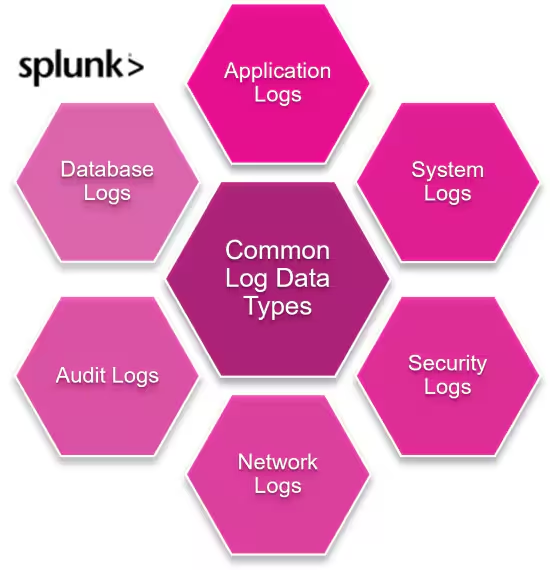
To better appreciate what log files are, let's have a look at some common types produced:
Access logs
Access logs record every request made to a server, capturing details such as the IP address, timestamp, request method, and status code. These logs provide a clear picture of user activity on a website, helping identify patterns and anomalies.
Examples include:
Application logs
Application logs, also known as event logs, record information about an application's behavior. These logs are generated by the application itself and can provide insights into critical errors and exceptions that occur during runtime.
Examples include:
- Multiple failed login attempts on an application can be tracked
- A messaging application recording chat history
Network logs
Network logs capture information related to network traffic, including source and destination IP addresses, port numbers, protocol, and other relevant data. These logs are useful for monitoring network performance and detecting potential intrusions or malicious activity.
Examples include:
- Firewall logs
- DNS server logs
System logs
System logs record events related to the operating system's behavior. This includes hardware changes, software installations, errors or warnings, and system crashes.
Examples include:
- Event Viewer on Windows systems
- Syslog on Unix/Linux systems
Common log file formats
These log files used in SIEM platforms can come in several formats. Here are the various common ones used:
Common Log Format (CLF)
The NCSA Common Log Format (CLF) is a standardized format used by many web servers to record access logs. It includes fields such as the client's IP address, request timestamp, request line, and response status code.
Here is an example of a log entry in CLF:
127.0.0.1 - 23/Feb/2021:10:15:32 +0800 "GET /index.html HTTP/1.1" 200
JSON
JSON (JavaScript Object Notation) is a lightweight, human-readable format that is increasingly used for log files. JSON logs are easy to parse and integrate with various tools and systems, making them a popular choice for modern web applications.
Common Event Format (CEF)
The Common Event Format (CEF) is a standardized format used for security event logs. It is designed to provide a common schema for security tools and systems, making it easier to aggregate data and analyze data from multiple sources.
Log files in web development
Within the field of web development, log files are crucial for identifying and resolving issues. Developers can use log files to troubleshoot code errors, track user activity, and analyze website traffic.
Some examples of how log files are used in web development include:
Debugging
Log files are essential for debugging web applications, as they provide detailed information about errors and issues encountered by the server. By analyzing error logs, developers can identify and resolve problems quickly, ensuring a smooth user experience.
(Related reading: bug vs. defect vs. errors: what’s the difference?)
Monitoring website performance
Access logs provide valuable insights into website performance, including response times, request rates, and user behavior. By monitoring these logs, developers can identify performance bottlenecks and optimize their applications for better performance.
(Related reading: website performance monitoring.)
Improving user experience
Log files can help developers understand how users interact with their websites, identifying popular pages, navigation paths, and potential issues. This information is invaluable for improving the user experience (UX) and ensuring that websites meet the needs of their users.
(Related reading: UX metrics to track.)
Best practices for log file management
To make the best use of your logs, you have to consider how best to manage logs within your SIEM system. Here are some best practices you can adopt based on industry recommendations by NIS (National Institute of Standards and Technology):
Storage
Proper storage of log files is essential for ensuring their availability and data integrity. Logs should be stored in a secure location with adequate storage capacity, and older logs should be archived or destroyed according to the respective data retention policies.
Access control
Access to log files should be restricted to authorized personnel only, ensuring that sensitive information is protected from unauthorized access. Implementing strong authentication and encryption measures can help safeguard log files from potential threats.
(Related reading: role-based vs. attribute-based access control.)
Data retention policies
Establishing data retention policies is crucial for managing log files effectively. These policies should specify how long logs are retained, when they are archived or deleted, and how they are protected during storage.
(Related reading: data lifecycle management.)
Tools for log file analysis
For a better picture of what your logs are saying, there are several tools you can use for log file analysis.
These are generally split into two categories: free and paid tools.
Free tools
Several free tools are available for log file analysis, including:
- Logwatch: A log analysis tool that provides detailed reports on system activity.
- GoAccess: An open-source log analyzer that offers real-time web analytics and visual reports.
- Webalizer: A fast and flexible web log analysis tool that generates detailed reports on web traffic and usage.
Paid tools
For more advanced log file analysis, particularly at the organizational and enterprise levels, paid tools are preferred for their additional features and capabilities.
Splunk Log Observer Connect is a powerful log management and analysis platform that provides real-time insights and visualizations with end-to-end visibility. It pairs perfectly with Splunk’s industry-leading SIEM solution, keeping your SOC running at full speed.
Final thoughts
Log files are an invaluable resource for cybersecurity analysts and web developers, providing detailed insights into system activity, security threats, and user behavior. With this information, the right tools, and proper management practices, organizations can effectively leverage log files to improve their security posture, enhance website performance, and provide a better user experience.
Related Articles

How Logging Works in Kubernetes: Challenges, Approaches, and Solutions for K8s Logging

The Data Engineer Role, Explained