Kaseya, Sera. What REvil Shall Encrypt, Shall Encrypt
A uthors and Contributors: As always, security at Splunk is a family business.
Credit to author Ryan Kovar and collaborators: Mick Baccio, Drew Church, Shannon Davis, Lily Lee, James Brodsky, John Stoner, Matt Krumholz, Eric Schou.
While Splunk was not impacted by the ransomware attack, as a security leader we want to help the industry by providing tools, guidance and support. If you want to see how to find Kaseya REvil specifics skip down to the “Detecting REvil Ransomware Kaseya in Splunk” sections. Otherwise, read on for a quick breakdown of what happened, how to detect it, and MITRE ATT&CK mappings.
Introduction
When Splunk told me we would have a “breach holiday” theme for the summer, I didn’t think it would be quite so on the nose… For those of you who have been working on this Kaseya REvil Ransomware incident over the weekend, I salute you. We’ve been doing the same. As usual, my team here at Splunk likes to make sure that we have some actionable material before posting a blog, and this time is no different. In the sections below, you will see that we break this out into a little bit of a different format than usual. We first discuss what happened and what you need to know if you are actively hunting/looking for REvil ransomware via the Kaseya VSA. We then discuss the work done by Splunk's Threat Research Team regarding a deep dive on REvil, which you can read here. This deep dive will complement our significant, existing body of content focused on helping organizations detect any and all strains of ransomware. Heck, we even did a write-up talking about the Executive Order and memo on ransomware from the US Federal government.
Finally, we will talk about the future; what we have in store to help you train and better prepare for events like this before they happen again. Not to mention how to think about your software supply chain. Why? Because like your alarm clock blasting “I’ve got you babe” every morning at 6 AM, this will happen again. Our recent “State of Security” report showed that 78% of security and IT leaders fear that a SolarWinds-style attack will hit them. Guess what? This is one of them. As always, remember that this is a breaking news event, and while every effort has been made, some of our recommended searches may not be as accurate or performant as we desire.
What You Need to Know
On Friday afternoon, July 2nd, 2021, in what is becoming entirely too familiar a scenario, internet rumors of a "supply-chain ransomware" attack began circulating on Reddit. As reports of more systems becoming encrypted surfaced, the "rumors" were confirmed: Kaseya VSA, remote monitoring management (RMM) software heavily used by managed service providers (MSP), was compromised by REvil, and being used to distribute ransomware to its on-premises customers. Since VSA requires elevated permissions to execute, an adversary was able to use it to disable Microsoft Defender and efficiently distribute ransomware via endpoint agents. Its compromise led to a cascading effect of encrypted machines at the MSP customers. Eventually, organizations that don't even use Kaseya were being infected with ransomware. As this is an ongoing incident, we'll provide updates and content as we collect more data.
Worried about Today, Tomorrow, and Beyond?
Unpacking this latest incident shows three significant security areas to address. We’ll be releasing content to help in each of these areas, so stay tuned.
- Ransomware is one of the biggest security threats to most organizations today - The frequency and severity of ransomware attacks are increasing, as are the blogs and guidance we release to help net defenders maintain their organization's security posture.
- Operational supply chain compromises and their impacts - The diversity and complexity of interconnected services we rely on daily - a fancy way of saying if a cog in that technical or service wheel gets stuck (or… encrypted) - uhoh, trouble.
- Your software supply chain - The Kaseya incident very much has shades of PHP/SolarWinds activity, showing how destructive unauthorized modifications to software packages can be. If you are a software developer or a user of the software, it has become increasingly apparent that organizations need to have a better understanding of the processes involved in updating or developing software that they use or sell.
If you are a Kaseya VSA on-prem customer, drop down to the “Detecting REvil Ransomware Kaseya in Splunk” section to immediately assess your environment using Splunk or take a peek at the wealth of content in the MITRE ATT&CK section where we pull every Splunk security search we have that maps to REvil TTPs via the MITRE ATT&CK method.
Detecting REvil Ransomware Kaseya in Splunk
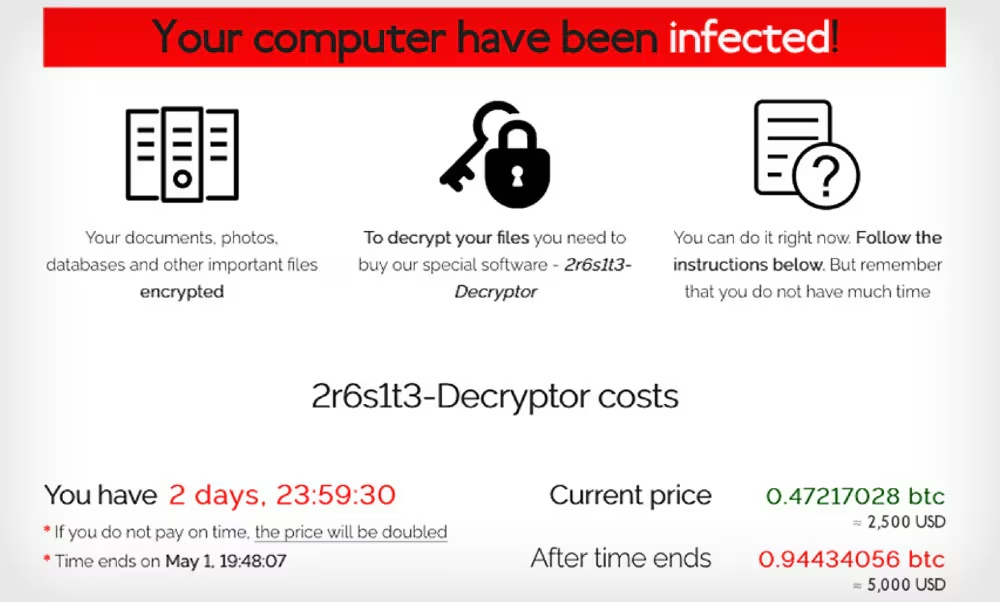
As many of you know, the primary challenge in detecting ransomware is the speed with which ransomware can impact systems. With a rapid response, the spread of ransomware can be limited. Unfortunately, in most cases, by the time an attack is detected, files are already encrypted. That said, we want to provide some insight into detections that provide awareness of these activities happening (as well actions one can take to mitigate the risk of attacks like this).
With that in mind, we are providing a set of indicators and Splunk searches to help uncover Kaseya in your environment. If you use Enterprise Security and other Splunk products, take a look at the “Know thy self” section below for how to scan and determine your networks susceptibility to this specific attack.
Indicators of Compromise (IOCs)
Sophos and Cado Security have both published IOCs for Kaseya. Throw them into a Lookup table or ES threat intel framework, and off you go! We have converted these indicators into a simple CSV format to use them as lookup tables - they are posted here.
Additionally, Cado Security has published a sample packet capture (PCAP) file on their Github repository covering SSL/TLS connections to some of the domains contained in the IOC data above.
Searches
Huntress has done great work detailing activities that the ransomware code performs, and we will highlight some of this in our detection searches. From a Splunk detection perspective, here are some data sets that we always suggest collecting:
- Process execution logs from our favorite Windows Security 4688 events, or Sysmon EventCode 1, or any commercial EDR, are crucial to detecting the processes involved in actions on intent and lateral movement, amongst other activities.
- PowerShell Script Block Logging is also critical to detect certain modules being used where you don’t expect and the use of encoded PowerShell.
One of its initial endpoint actions is to disable a litany of Microsoft Defender for Endpoint technologies when the ransomware runs. A litany, you say? It will disable accurate time monitoring, IPS, cloud lookup, script scanning, controlled folder access, network protection, and stop cloud sample submissions.
It accomplishes this by issuing a PowerShell command to turn these all off, so if you are monitoring PowerShell scripting, this could be a quick hit if you see all of these protections being disabled concurrently.
The detection search below requires a configuration in your inputs.conf file to monitor WinEventLog://Microsoft-Windows-PowerShell/Operational on the client where your Splunk Universal Forwarder is installed.
We are only including two of the Defender technologies being turned off in the same command line for this search. A single technology being turned off could create false positives by authorized users, but the chances that a second technology being turned off simultaneously is unlikely to be benign. Notice the wildcards in the Message field so that the search would still return results in case the order of the technologies is different. One other comment here, keep in mind that certain values can be shortened in scripts as well. For example, -drtm can be used in place of -disablerealtimemonitoring, so flexibility in searches is key!
source="WinEventLog:Microsoft-Windows-PowerShell/Operational"
| search Message="*Set-MpPreference -Disable* $true* -Disable* $true*"
| table _time, host, Message
If we wanted to use the specific command found in the ransomware, we could use the following search instead. This would have the benefit of creating an exact match but potentially risk missing variants that reorder the technologies in the command itself.
source="WinEventLog:Microsoft-Windows-PowerShell/Operational"
| search Message="*Set-MpPreference -DisableRealtimeMonitoring $true -DisableIntrusionPreventionSystem $true -DisableIOAVProtection $true -DisableScriptScanning $true -EnableControlledFolderAccess Disabled -EnableNetworkProtection AuditMode -Force -MAPSReporting Disabled -SubmitSamplesConsent NeverSend*"
| table _time, host, Message
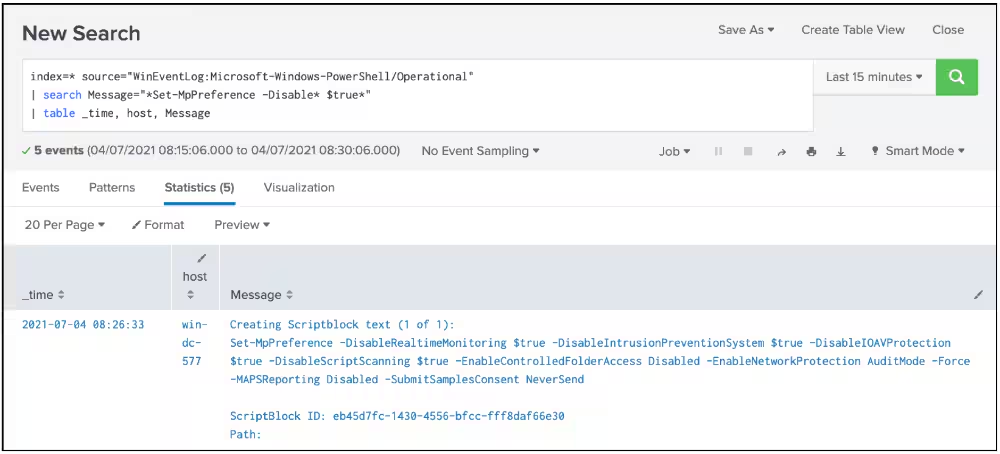
But wait! I don’t have PowerShell logging set up today. Are there other options to detect this behavior? Of course! Microsoft Sysmon, Event Code 1 for Process Creation, and Windows Security Event Code 4688, A new process has been created, are great to use as well.
Here is what the Sysmon Event Code 1 search would look like. Depending on your configuration, the source and sourcetype might vary slightly. This same logic can be applied to your EDR platform of choice.
source="WinEventLog:Microsoft-Windows-Sysmon/Operational" EventCode=1 cmdline="*powershell.exe Set-MpPreference -DisableRealtimeMonitoring $true -DisableIntrusionPreventionSystem $true -DisableIOAVProtection $true -DisableScriptScanning $true -EnableControlledFolderAccess Disabled -EnableNetworkProtection AuditMode -Force -MAPSReporting Disabled -SubmitSamplesConsent NeverSend*"
| table _time, host
Similarly, if you look at process creation in Windows Event logs, your search would look like this. Depending on your configuration, the source and sourcetype might vary slightly.
source="WinEventLog:Security" EventCode=4688 Process_Command_Line="*powershell.exe Set-MpPreference -DisableRealtimeMonitoring $true -DisableIntrusionPreventionSystem $true -DisableIOAVProtection $true -DisableScriptScanning $true -EnableControlledFolderAccess Disabled -EnableNetworkProtection AuditMode -Force -MAPSReporting Disabled -SubmitSamplesConsent NeverSend*"
| table _time, host
Windows Defender status is logged to the Application folder in Windows Event Viewer. A search of the Event Code 15 and the message in the search will indicate when Defender real-time monitoring has been turned off in the manner of this ransomware. Just because you see these events does NOT mean you have been infected, but it does indicate that Defender real-time was turned off, and if the other search options above are not available to you, this might be a place to start.
source="WinEventLog:Application" EventCode=15 Message="Updated Windows Defender status successfully to SECURITY_PRODUCT_STATE_SNOOZED."
| table _time host Message
On the outside chance that you are sending Microsoft-Windows-Windows Defender/Operational events to Splunk, a search like this will return events from the Defender application, and the details in the events will show when configurations of these technologies are changed.
source="WinEventLog:Microsoft-Windows-Windows Defender/Operational" EventCode IN (5001, 5004, 5007)
| table _time host Message
Along with disabling Defender, an older version (circa 2014) of msmpeng.exe (Defender) is being used to sideload REvil into the Kaseya agent software. The hash of this older executable is included in the Github IOC repository listed above.
If you have Sysmon EventCode 7, Image Loaded events, the following search could be helpful to detect this side-loading of malicious DLLs as well.
source="WinEventLog:Microsoft-Windows-Sysmon/Operational" EventCode=7 Image="*MsMpEng.exe" ImageLoaded="*mpsvc.dll" SHA256 IN (e2a24ab94f865caeacdf2c3ad015f31f23008ac6db8312c2cbfb32e4a5466ea2, 8dd620d9aeb35960bb766458c8890ede987c33d239cf730f93fe49d90ae759dd)
Moving into other process execution activity within the ransomware, GossiTheDog shared a specific process command line. Here is what that search looks like in both Sysmon and Window Events, with the same caveats mentioned above.
source="WinEventLog:Microsoft-Windows-Sysmon/Operational" EventCode=1 cmdline="c:\\kworking\\agent.exe*"
| table _time, host, cmdline
source="WinEventLog:Security" EventCode=4688 Process_Command_Line="c:\\kworking\\agent.exe*"
| table _time, host, Process_Command_Line
Splunk Enterprise Security, Splunk SOAR, and Enterprise Security Content Updates (ESCU)
Know Thyself
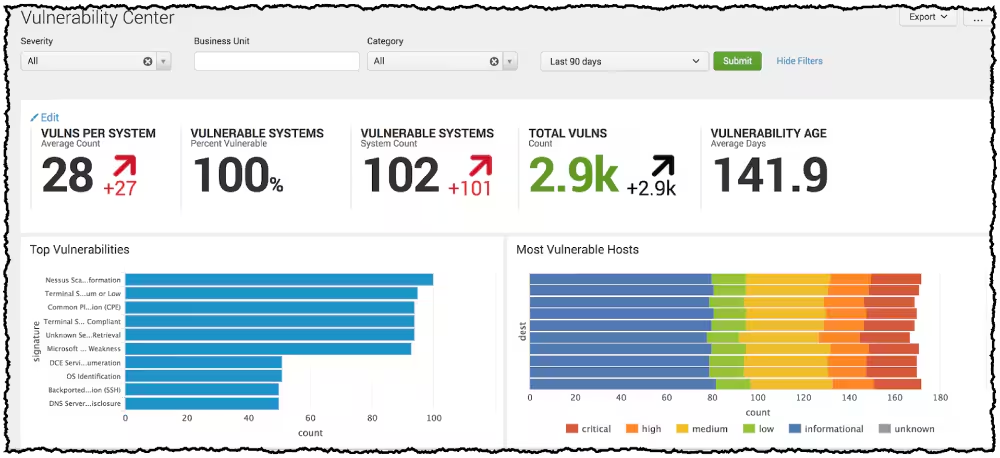
While we have spent some time explaining this attack and effort needs to be put toward investigating this, it is also important to remember that the foundational elements of cyber-security, such as asset management, are as crucial as ever. When performed well via your asset and identity framework, you can quickly identify where your vulnerable systems reside. Running regular vulnerability scans that integrate into Splunk will display which systems are vulnerable and can help you prioritize your patching schedule and better focus your detection efforts. In the case of ransomware, knowing which assets to protect or are impacted as quickly as possible can be key to your defense strategy.
While the details of the vulnerability in the Kaseya software have not been detailed, it appears that the CVE-2021-30116 will be utilized, and as vulnerability assessment solutions update their platforms, searching for this vulnerability will be essential to understand future exposure to this attack vector.
Threat Intelligence Framework
If you are using Splunk Enterprise Security, the lookups of IOCs listed above can be ingested easily into the threat intelligence framework. Perhaps you aren’t sure how to do that. No worries, we published some guidance and a how-to on integrating lists of IOCs into the Enterprise Security threat intelligence framework.
Enterprise Security Content Updates (ESCU)
If you have ESCU running today, you already have some great coverage! For folks using ESCU, our Security Research team has already released a new Splunk Analytic Story REvil Ransomware, containing detections for this threat. Saying that, check out the MITRE ATT&CK table below for all the searches we can find!.
Splunk SOAR
For folks using Splunk SOAR, we don’t have any customized playbooks out yet, but we have lots of examples that are a great place to start:
- Automate Your Response to WannaCry Ransomware
- Playbook: Detect, Block, Contain, and Remediate Ransomware
- Playbook: Ransomware Investigate and Contain
Splunk Services and workshops
Workshops
Maybe at this point of the day, you are thinking, “Hey, I need to get savvier about detecting and responding to ransomware.” Don’t worry; Splunk has you covered. Head over to https://bots.splunk.com/ and create a Splunk.com account. If you already have one, cool, use that and log in. You will immediately have access to a virtual “Getting Started with Splunk for Security” workshop, AND you can enter to participate in BOTS DAY North America on August 5th, 2021. Stay tuned for more content that will be coming soon!
Engagements
Our team of Security Professionals that are part of our Splunk Professional Services team can help you implement everything we’ve mentioned here. We also have more targeted offerings that can help you increase your security posture as well.
Splunk Services for Breach Response and Readiness
This is all about Splunk experts working in collaboration with you and your team to help prepare for and respond to a breach using our suite of products.
- Rapid data source identification and onboarding
- How to incorporate and use threat intelligence
- Prebuilt content with searches and dashboards to facilitate faster investigation and remediation
- Tactical response planning
- Tabletop exercise to validate how you respond using the Splunk products you have
MITRE ATT&CK
After reviewing dozens of blogs and reviewing the MITRE ATT&CK team’s review of REvil we pulled all of our content that maps to the MITRE ATT&CK TTPs and listed them in a nice table below. Be aware; these searches are provided as a way to accelerate your hunting. We recommend you configure them via the Splunk Security Essentials App. You may need to modify them to work in your environment! Many of these searches are optimized for use with the tstats command. Some of these are so new they are coming straight out of the Splunk Threat Research Team’s repo! Please note that not all of these will be 100% relevant to Kaseya or REvil, but more information is better than none. For detailed information on detecting REvil, make sure to read the upcoming Splunk Threat Research Team’s blog on REvil ransomware.
Finally, as more information becomes available, we will update these searches if more ATT&CK TTPs become known. Pay special attention to the Splunk searches that are BOLDED and have (NEW) with them… the STRT freshly creates these to help you with REvil. For our complete reading list, check our bibliography at the end of the blog)
- Hide User Account From Sign-In Screen
- Excessive Usage Of Taskkill
- Disable Registry Tool
- Disable Windows SmartScreen Protection
- Disable Windows Behavior Monitoring
- Disabling SystemRestore In Registry
- Disabling CMD Application
- Unload Sysmon Filter Driver
- Windows DisableAntiSpyware Registry
- Disabling ControlPanel
- Disabling Firewall with Netsh
- Attempt To Stop Security Service
- Excessive number of service control start as disabled
- Disable Windows App Hotkeys
- Disable Show Hidden Files
- Disabling NoRun Windows App
- Disabling Task Manager
- Process Kill Base On File Path
- Disabling FolderOptions Windows Feature
- Powershell Fileless Process Injection via GetProcAddress
- Malicious PowerShell Process - Connect To Internet With Hidden Window
- Nishang PowershellTCPOneLine
- Powershell Fileless Script Contains Base64 Encoded Content
- Set Default PowerShell Execution Policy To Unrestricted or Bypass
- Any Powershell DownloadString
- Malicious PowerShell Process With Obfuscation Techniques
- Any Powershell DownloadFile
- Malicious PowerShell Process - Execution Policy Bypass
- Detect Empire with PowerShell Script Block Logging
- PowerShell Domain Enumeration
- Powershell Processing Stream Of Data
- PowerShell Loading DotNET into Memory via System Reflection Assembly
- Reconnaissance of Process or Service Hijacking Opportunities via Mimikatz modules
- Suspicious DLLHost no Command Line Arguments
- Powershell Fileless Process Injection via GetProcAddress
- Illegal Service and Process Control via PowerSploit modules
- DLLHost with no Command Line Arguments with Network
- Illegal Service and Process Control via Mimikatz modules
- Cobalt Strike Named Pipes
- Trickbot Named Pipe
- Suspicious GPUpdate no Command Line Arguments
- Suspicious SearchProtocolHost no Command Line Arguments
- Applying Stolen Credentials via Mimikatz modules
- SearchProtocolHost with no Command Line with Network
- Powershell Remote Thread To Known Windows Process
- Applying Stolen Credentials via PowerSploit modules
- GPUpdate with no Command Line Arguments with Network
- Winword Spawning Windows Script Host
- Winword Spawning PowerShell
- Office Document Spawned Child Process To Download
- Office Product Spawning BITSAdmin
- Office Application Spawn rundll32 process
- Office Product Spawning MSHTA
- Office Document Creating Schedule Task
- Winword Spawning Cmd
- Office Product Spawning Wmic
- Office Document Executing Macro Code
- Office Product Spawning CertUtil
- Office Product Spawning Rundll32 with no DLL
- Suspicious Email Attachment Extensions
- Detect Outlook exe writing a zip file
Here is a list of all the MITRE ATT&CK TTP’s that we have found that are relevant to this incident or REvil ransomware:
T1134.001 T1134.002 T1071.001 T1059.001 T1059.003 T1059.005 T1485 T1486 T1140 T1189 T1573.002 T1041 T1083 T1562.001 T1070.004 T1105 T1490 T1036.005 T1112 T1106 T1027 T1491 T1069.002 T1566.001 T1055 T1012 T1489 T1082 T1007 T1204.002 T1047 T1204 T1218.003 T1547.001
rcanary is a little something extra...
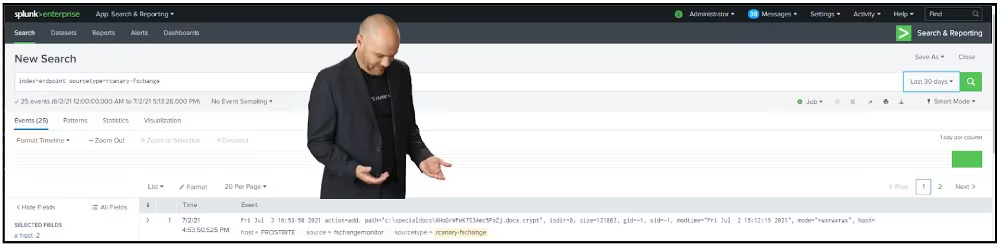
In an attempt to get my boss off my back, I told James Brodsky that he should “create a TA that detects files being encrypted.” Of course, he took me seriously and went off and created “TA-rcanary.” This TA uses fschange, a deprecated feature of the Splunk UF (which still works), to monitor a single randomly named .docx file in a hidden directory on the Windows filesystem. Upon the first run, the .docx file is created in this directory. Then, a fschange entry is added to the inputs.conf, and every 15 seconds, this file is monitored for any changes. If any changes occur to it (copy of it, delete it, rename it, etc.), an event is generated and indexed in Splunk, as shown below. Keep in mind that this is a very new TA and will probably need some changes, but if it helps, you have “Splunkspiration” and detects some encrypted files… all the better!
Conclusion
We know that many of you are coming to this blog not because you were impacted directly by the Kaseya ransomware incident but because you are worried that you might be affected in the future. Hopefully, the content above will provide you with searches that give you the ability to have more visibility into your environment and detect (and we hope it never does) a ransomware outbreak in your network. If they don’t work perfectly, think of them as “SplunkSpiration” :-).
We will update this blog and add new content as needed over the next week, but keep your eyes peeled for the upcoming publication on REvil ransomware by the Splunk Threat Research team. Furthermore, Splunk will be developing significantly more content this month around ransomware. Workshops, webinars, Twitter Spaces, and much more, so watch out for those coming soon.
Finally, even though this blog primarily focused on ransomware, the more significant concern is that this attack appears to be propagated via the software supply chain of the victims. We recognize what a big deal this is and have dedicated sessions at October’s .conf21 around this very topic. If you are new to Supply Chain attacks and want to learn how to defend your org against things like SolarWinds or Kaseya, consider attending my talk with Marcus LaFerrerra, “Hunting the known unknown: Supply Chain Attacks” (SEC-1745). If you are a defender whose company builds software, I’d suggest attending “Securing the software factory with Splunk” (SEC-1108) by Dave Herrald and Chris Riley. No matter what you do, I hope that you could get some enjoyment this weekend and weren’t chained to the desk like we were. As always, happy hunting :-)
And one more thing: As we’ve stated before, this blog ain’t the first time we’re covering our approach to Ransomware:
.conf talks and videos
- Splunking the Endpoint 2016: Ransomware Edition! and Video
- How Splunk Can Help You Prevent Ransomware From Holding Your Business Hostage
- Windows Ransomware Detection with Splunk (1 of 6) – Vulnerability Detection and Windows Patch Status
Detections Blogs
- Clop Ransomware Detection: Threat Research Release, April 2021
- Ryuk and Splunk Detections Splunk Blog
- Detecting Ryuk Using Splunk Attack Range
- Darkside of the ransomware pipeline
Whitepaper
Splunk SOAR Responses
- Automate Your Response to WannaCry Ransomware
- Playbook: Detect, Block, Contain, and Remediate Ransomware
Machine Learning Method
Operationalizing Detections
Bibliography/Reading list
Beaumont, Kevin. GossiTheDog/ThreatHunting. 2017. 3 July 2021, https://github.com/GossiTheDog/ThreatHunting/blob/9e3a20d7c046bd7aac765a1a7df762ac7e3acffe/AdvancedHuntingQueries/KaseyaRansomwarePayload.ahq.
---. “Kaseya Supply Chain Attack Delivers Mass Ransomware Event to US Companies.” Medium, 3 July 2021, https://doublepulsar.com/kaseya-supply-chain-attack-delivers-mass-ransomware-event-to-us-companies-76e4ec6ec64b.
Cado-Security/DFIR_Resources_REvil_Kaseya. 2021. Cado Security, 2021. GitHub, https://github.com/cado-security/DFIR_Resources_REvil_Kaseya.
---. 2021. 4 July 2021, https://github.com/cado-security/DFIR_Resources_REvil_Kaseya.
cdoman1. “Resources for DFIR Professionals Responding to the REvil Ransomware Kaseya Supply Chain Attack.” Cado Security, 3 July 2021, https://www.cadosecurity.com/post/resources-for-dfir-professionals-responding-to-the-revil-ransomware-kaseya-supply-chain-attack.
E, Mehmet. Cyb3r-Monk/Threat-Hunting-and-Detection. 2020. 3 July 2021, https://github.com/Cyb3r-Monk/Threat-Hunting-and-Detection/blob/4217cfec566f7f3b30d6e227fd3870a47ca390f6/Command%20and%20Control/Suspicious%20Network%20Connections%20-%20Supply%20Chain%20Attack.md.
Facebook, Share on, et al. “Supply Chain Attack on Kaseya Infects Hundreds with Ransomware: What We Know.” VentureBeat, 3 July 2021, https://venturebeat.com/2021/07/03/supply-chain-attack-on-kaseya-infects-hundreds-of-victims-with-ransomware-what-we-know/.
Gevers, Victor. “Kaseya Case Update 2.” DIVD CSIRT, 4 July 2021, https://csirt.divd.nl/2021/07/04/Kaseya-Case-Update-2/.
Hammond, John. Rapid Response: Mass MSP Ransomware Incident. https://www.huntress.com/blog/rapid-response-kaseya-vsa-mass-msp-ransomware-incident. Accessed 4 July 2021.
huntresslabs. “Crticial Ransomware Incident in Progress.” R/Msp, 2 July 2021, www.reddit.com/r/msp/comments/ocggbv/crticial_ransomware_incident_in_progress/.
“Important Notice July 3rd, 2021.” Kaseya, https://helpdesk.kaseya.com/hc/en_gb/articles/4403440684689-Important-Notice-July-3rd-2021. Accessed 3 July 2021.
Kaseya Ransomware Supply Chain Attack: What You Need To Know. https://symantec-enterprise-blogs.security.com/blogs/threat-intelligence/kaseya-ransomware-supply-chain. Accessed 3 July 2021.
“Kaseya Supply‑chain Attack: What We Know so Far.” WeLiveSecurity, 3 July 2021, https://www.welivesecurity.com/2021/07/03/kaseya-supply-chain-attack-what-we-know-so-far/.
Kaseya VSA Supply-Chain Ransomware Attack. https://community.sophos.com/b/security-blog/posts/active-ransomware-attack-on-kaseya-customers. Accessed 3 July 2021.
Mark Loman @🏡. “We Are Monitoring a REvil ‘supply Chain’ Attack Outbreak, Which Seems to Stem from a Malicious Kaseya Update. REvil Binary C:\Windows\mpsvc.Dll Is Side-Loaded into a Legit Microsoft Defender Copy, Copied into C:\Windows\MsMpEng.Exe to Run the Encryption from a Legit Process.” @markloman, 2 July 2021, https://twitter.com/markloman/status/1411035534554808331.
Mehmet Ergene. “How to Detect Software Supply Chain Attacks with #Sysmon, #MicrosoftDefender, or Any Other #EDR: 1. You Use Specific Software in Your Environment. 2. The Software Is Usually Installed on a Few Servers That Have Privileges across the Environment.” @Cyb3rMonk, 3 July 2021, https://twitter.com/Cyb3rMonk/status/1411404182054178826.
Shutdown Kaseya VSA Servers Now amidst Cascading REvil Attack against MSPs, Clients | Malwarebytes. https://blog.malwarebytes.com/cybercrime/2021/07/shutdown-kaseya-vsa-servers-now-amidst-cascading-revil-attack-against-msps-clients/amp/?__twitter_impression=true. Accessed 3 July 2021.
Splunk Security Content Analytic Story - Splunk Documentation. https://docs.splunk.com/Documentation/ESSOC/3.24.0/stories/UseCase#Revil_ransomware. Accessed 3 July 2021.
Threat-Hunting-and-Detection/Suspicious Network Connections - Supply Chain Attack.Md at Main · Cyb3r-Monk/Threat-Hunting-and-Detection. https://github.com/Cyb3r-Monk/Threat-Hunting-and-Detection/blob/main/Command%20and%20Control/Suspicious%20Network%20Connections%20-%20Supply%20Chain%20Attack.md. Accessed 3 July 2021.
Will, Bushido. “My Current @MaltegoHQ Graph Researching the #REvil Supply-Chain Attack on #Kaseya: Https://T.Co/TOk1tiqr4S.” @BushidoToken, 3 July 2021, https://twitter.com/BushidoToken/status/1411469864653496321.
Related Articles

Predicting Cyber Fraud Through Real-World Events: Insights from Domain Registration Trends

When Your Fraud Detection Tool Doubles as a Wellness Check: The Unexpected Intersection of Security and HR

Splunk Security Content for Threat Detection & Response: November Recap

Security Staff Picks To Read This Month, Handpicked by Splunk Experts

Behind the Walls: Techniques and Tactics in Castle RAT Client Malware

AI for Humans: A Beginner’s Field Guide

Splunk Security Content for Threat Detection & Response: November 2025 Update

Operation Defend the North: What High-Pressure Cyber Exercises Teach Us About Resilience and How OneCisco Elevates It
