Elevate Your Cloud Security Posture with Splunk and Google Cloud
Security SplunkSplunk is committed to using inclusive and unbiased language. This blog post might contain terminology that we no longer use. For more information on our updated terminology and our stance on biased language, please visit our blog post. We appreciate your understanding as we work towards making our community more inclusive for everyone.
This article is co-authored by Roy Arsan, Cloud Solutions Architect at Google, and Wissam Ali-Ahmad, Partner Solutions Engineer at Splunk.
We will cover essential security protection and controls offered by Google Cloud—the same infrastructure and security services Google uses, how to reliably on-board those security signals into your Splunk Enterprise or Splunk Cloud, and how to use readily available security content from threat detections in Splunk Enterprise Security to automated response playbooks in Splunk SOAR with purpose-built apps for Google Cloud.
For the list of all these technical resources, see the reference table at the end of this blog.
Logs, Alerts and Assets, Oh My!
The first step in your threat hunting journey is to get to know and on-board all security-relevant cloud data. Google Cloud provides the visibility that customers have to come to expect from a public cloud provider, across all their GCP projects and services. This includes:
-
Logs from Cloud Logging such as audit logs including Google Workspace (formerly G Suite) audit logs, vpc flow logs, firewall rules logs, application logs, and more.
-
Assets changes and metadata from Cloud Asset Inventory covering both cloud resources and associated permission policies.
-
Alerts from Security Command Center which aggregates automated security findings from several purpose-built cloud security monitoring tools, in particular:
- Security misconfiguration (e.g. open firewall rule or public storage bucket) from Security Health Analytics.
- Security anomalies (e.g. brute force SSH, cryptomining activities) from Event Threat Detection.
- App vulnerabilities (e.g. cross-site scripting XSS, outdated libraries) detected by Web Security Scanner.
- Sensitive data like personally-identifiable information (PII) in storage buckets or BigQuery flagged by Cloud Data Loss Prevention (DLP) to keep it secure.
- Suspected attacks (e.g. traffic anomalies, spikes in allowed or denied traffic ratio) detected and mitigated by Cloud Armor, Google Cloud’s global-scale defense against DDoS attacks and application attacks like XSS & SQL injections.
Google and Splunk have worked together to make it easier for customers to export all those different types of logs and alerts using the same uniform data export pipeline, powered by Cloud Dataflow, as shown in the following diagram.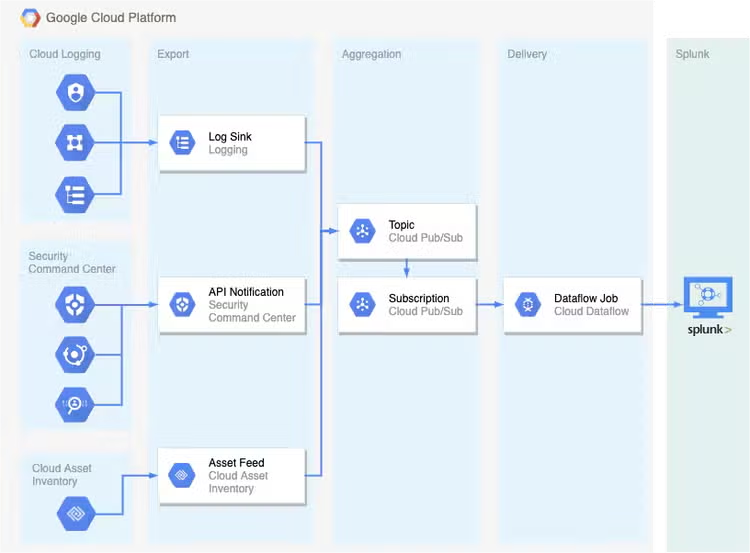
Using the purpose-built Pub/Sub to Splunk Dataflow template, Splunk customers can stream that data in real-time to Splunk Enterprise or Splunk Cloud via Splunk HTTP Event Collector (HEC). For more details, refer to "Deploying production-ready log exports to Splunk using Dataflow."
In addition to the Google-supported Splunk Dataflow template and aforementioned Google Cloud reference guide, here’s a list of technical resources:
- Terraform templates to automate provisioning of the log export pipeline to Splunk per aforementioned reference guide. This includes a pre-built Cloud Monitoring dashboard to monitor the log export operations.
- Community tutorial with step-by-step walkthrough to set up Google Cloud security data sources, and their aggregation in Cloud Pub/Sub as shown in above diagram.
Data Knowledge & Modeling
After collecting and ingesting events data from Google Cloud into Splunk, data needs to be parsed and normalized into common semantic models part of Splunk Common Information Model (CIM). In fact, a prerequisite to leveraging existing security content in Splunk is to map the Google Cloud data into those common data models. By normalizing GCP-specific data formats, CIM data models greatly accelerate time to value as they:
- Provide you with out-of-the-box threat detections and security dashboards
- Enable you to create and share your own threat detections with custom correlations searches across all providers in your hybrid or multi-cloud environments
- Accelerate searches using faster tstats-based searches enabled by Data Model acceleration
The Splunk Add-on for Google Cloud Platform includes automatic field extractions, sourcetypes mappings for Google Cloud log data and corresponding data models when applicable. For a list of all supported sourcetypes refer to Add-on documentation. The table below illustrates that data source:sourcetype mapping. The data models column highlights the state of the CIM compliance at the time of this writing:
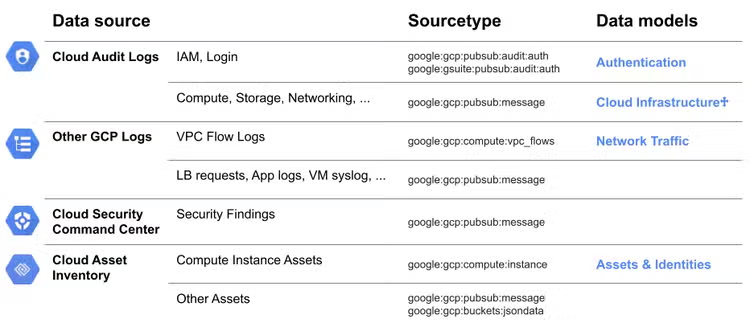
Community-supported part of Cloud Infrastructure DM
Analytics-Based Cloud Threat Detections
Today’s sophisticated security threats continue to evolve to target public cloud, multi-cloud and hybrid cloud environments. Writing efficient monitoring and detections of such threats requires a scalable analytics platform that processes and correlates large volumes of events across multiple data sources. When it comes to writing efficient correlation searches, you don't have to start from scratch. Splunk offers security content tailored for SOC analysts or for those just getting started with security on Splunk Enterprise.
SIEM-Based Cloud Threat Detections
Splunk Enterprise Security (ES) is a next generation SIEM built on modular security frameworks along with efficient detections based on correlation searches (content) of essentiel data sources mapped to Splunk’s Common Information Model. If you are running on Splunk Enterprise Security (ES), then you want to leverage the security detections included in the Splunk ES Content Update (ESCU). The latest version of ESCU includes a dozen cloud security analytic stories with a total of 49 detection rules (correlation searches) covering Google Cloud, Kubernetes, and cloud infrastructure (see table below for a list of these analytic stories).
Security Analytic Story
(Detection Rules in Splunk ES)
- Detect and investigate suspicious activities by users and roles in your cloud environments.
- Track when a user assumes an IAM role in another GCP account to obtain cross-account access to services and resources in that account. Accessing new roles could be an indication of malicious activity.
- Detections that leverage the recent cloud updates to the Authentication data model to help you stay aware of and investigate suspicious login activity.
- Detection and response of accounts accessing Kubernetes cluster sensitive objects such as configmaps or secrets providing information on items such as user user, group. object, namespace and authorization reason.
- Monitor cloud infrastructure provisioning activities for behaviors originating from unfamiliar or unusual locations. These behaviors may indicate that malicious activities are occurring somewhere within your cloud environment.
- Monitor GCP Storage buckets for evidence of anomalous activity and suspicious behaviors, such as detecting open storage buckets and buckets being accessed from a new IP.
- Detection and response around Sensitive Role usage within a Kubernetes clusters against cluster resources and namespaces.
- Detection against Kubernetes cluster fingerprint scan and attack by providing information on items such as source ip, user agent, cluster names.
Container Implantation
Monitoring and Investigation
- Monitor Kubernetes registry repositories for upload, and deployment of potentially vulnerable, backdoor, or implanted containers. Detections will provide context to address MITRE T1525 attack (container implantation upload to Google Container Registry).
- Monitor cloud compute instances for activities related to cryptojacking/cryptomining. Examples of potentially malicious behaviors include: new instances that originate from previously unseen regions, users who launch abnormally high numbers of instances, or compute instances started by previously unseen users
- Monitor your cloud infrastructure provisioning activities for behaviors originating from unfamiliar or unusual locations. These behaviors may indicate that malicious activities are occurring somewhere within your cloud environment.
- Attackers often attempt to hide within or otherwise abuse the domain name system (DNS). You can thwart attempts to manipulate this omnipresent protocol by monitoring for these types of abuses.
Splunk Security Essentials App
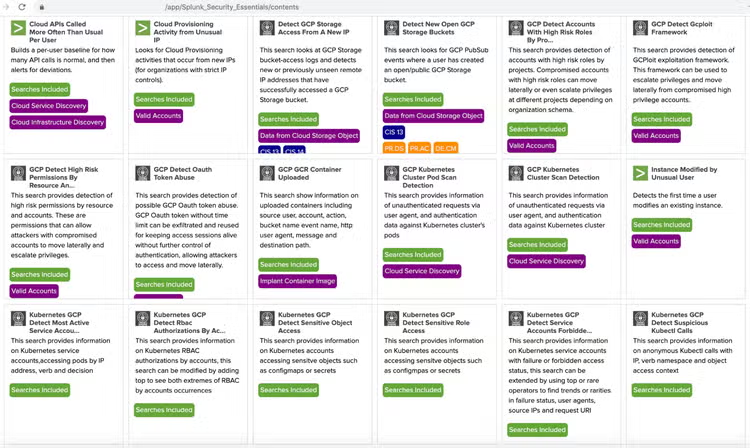
In case you haven’t deployed a SIEM in your SOC yet, the Splunk Security Essentials app is a great tool that includes 25+ example Splunk searches for detection of threats in your Google Cloud (and multi-cloud) environment. The following screenshots shows a subset of these Security Essentials app searches that you can easily deploy in your Splunk Cloud or Splunk Enterprise deployment.
Google Cloud Template App for Splunk Enterprise
Finally, if you are just getting started, the GCP Application Template for Splunk includes several Security and Audit dashboards and searches for Google Cloud. For more details on how to use this app, check out the Splunk blog, "Exploring the Value of Your Google Cloud Logs and Metrics."
Automated Response & Mitigation
After reducing time to detect a threat, the next step is to reduce the time to respond to a threat. This is accomplished with the use of Splunk SOAR Security Orchestration & Automation platform. Automated response in SOAR is accomplished by authoring playbooks using actions in SOAR apps for third-party technologies.
Google Cloud Apps for Phantom
- Chronicle App (published by Google) enables the end-user to search, analyze, and ingest the enterprise security data stored in Chronicle using investigative, reputation, and ingestion actions, such as: get domain/ip reputation, get list of IoCs, assets, alerts and detections.
- G Suite for Drive app (published by Splunk) allows various file manipulation actions to be performed on Google Drive, such as: list users, delete file, get file, create folder, and list files.
- Google Cloud Compute Engine app (published by Splunk) integrates with google cloud compute engine API that supports investigation and remediation actions, such as: describe instance, tag instance, and stop instance.
- Google Cloud IAM app (published by Splunk) integrates with Google Cloud IAM API to support identify-related investigation and mitigation actions, such as: list, create/enable, and delete/disable service account key.
- Google Cloud Storage app (published by Splunk) integrates with Google Cloud Storage API to support various investigation and mitigation actions, such as: delete object, list objects, create object, describe bucket, and list buckets.
- G Suite for GMail app (published by Splunk) integrates with G Suite for various investigative and containment actions, such as: list users, run query (search emails with query/filtering options), and delete email
Example Google Cloud Playbook: Automated Response to a Compromised VM in Google Cloud
Here's the story of a SOAR playbook that saved the day and protected a Google Cloud environment from a compromised VM instance attack.
One day Splunk ES fires a notable event indicating a potential threat with a rogue VM instance (anomalous network activity). The notable is based on a correlation search of Google Cloud VPC flow logs. Using the SOAR App for Splunk, the notable is sent to SOAR for a response.
Upon receiving such notable, Splunk SOAR executes a playbook that contains actions from both Compute Engine and Chronicle apps for Splunk SOAR. As you can see in the playbook picture below, we gather details about the VM instance configuration and activity by calling an action on the Compute Engine app. This is followed by calling app actions to check Ip reputation and IoCs from Chronicle. At the decision point, we would notify and assign the appropriate people using a service ticket. Last action would be to initiate a prompt to ask a responder whether or not to mitigate the instance.
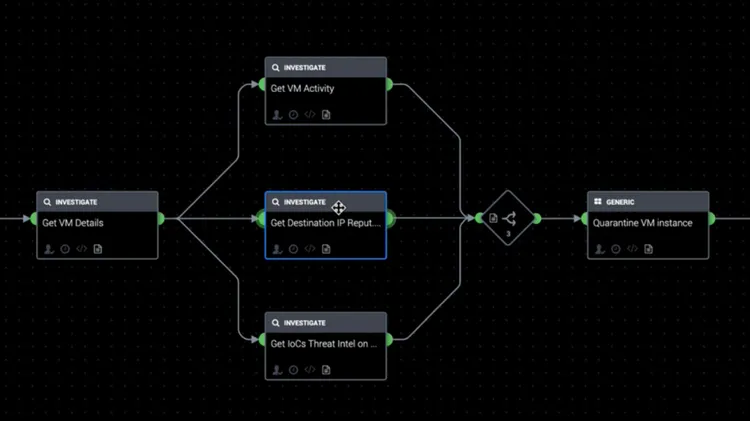
If the decision is to take a mitigating action, then we would “quarantine” this instance by calling the ‘tag instance’ action from Google Cloud Engine app. A ‘quarantine’ tag will enable a pre-created firewall rule to deny it any network traffic.
Resources Reference Table
The following table summarizes all technical resources mentioned in this article. We will keep this updated as more tools are added:
To learn more about Google Cloud and Splunk enhance your threat prevention, detection, and response techniques, tune in to our webinar, "Enhance Your Threat Prevention, Detection, and Response with Splunk and Google Cloud."
----------------------------------------------------
Thanks!
Wissam Ali-Ahmad
Related Articles

Splunk Security Content for Threat Detection & Response: May 2026 Update
Investigating GSuite Phishing Attacks with Splunk