What Is Network Configuration?
Learn Stephen WattsKey Takeaways
- Network configuration involves defining and applying settings — such as IP addresses, protocols, and security rules — across devices like routers, switches, and firewalls to enable secure, consistent, and efficient communication within an organization.
- Proper network configuration is essential for optimal performance and security, helping to minimize vulnerabilities, prevent unauthorized access, reduce downtime, and ensure network resources are used efficiently.
- Utilizing automated tools, best practices, and rigorous configuration management streamlines the configuration process, reduces errors, and maintains reliable, compliant, and secure network environments.
The personal computer revolutionized the way people work and play, but it was the computer network that ushered in the internet as we know it.
Network configuration is the process of arranging a network's settings, controls, and policies to support communication among devices and systems. When we talk about the value that information, data, and computer efficiencies bring, we're actually talking about the value of computer networking. Networked computers have forever changed our daily lives: the way we communicate, work, shop, learn, and play.
Network configuration, maintenance, and management is the primary job of millions of IT professionals around the world. That task simultaneously becomes easier and more complex as we continue to expect more from these networks. Today’s networks are expected to handle more traffic faster than ever.
Fortunately, automation and configuration management tools make it easier to provision, monitor, and troubleshoot networks—and their potential issues.
In this article, we'll talk about everything networks! We’ll start with network configuration basics and the risks network administrators face, as well as the benefits of properly maintaining networks and some best practices for keeping networks up and running. Then we’ll turn to network monitoring and management, looking at tools and best practices along the way.
What is network configuration?
First, let’s define a network: a network is simply a connection between at least two systems or devices. Writ large, a network can connect an entire corporation, government, or other organization, and it can span geographies. (The big, complicated networks are also known as distributed systems.)
With that, we can define network configuration as the process of setting a network's policies, flows, and controls to enable communication over the network infrastructure. It essentially covers the overall design of a computer network, including:
- Assigning network settings.
- Creating policies.
- Establishing flows.
- Putting controls in place.
Improving efficiency, underpinnning cybersecurity, supporting compliance, simplifying troubleshooting: effective network configuration management is crucial in today's digital landscape. Neglecting this aspect can lead to network outages and downtime, data breaches, and other severe consequences. As networks continue to evolve and expand, adopting advanced monitoring solutions, including network security monitoring, becomes increasingly important. By staying proactive and informed, organizations can maintain robust, secure, and efficient networks that support their operations and contribute to long-term success.
Network configuration tasks
Network management protocols that determine how a network operates are also an important part of network configuration. The process of network configuration can also be automated, using network configuration management tools. Common network configuration tasks include:
- Router configuration that sets IP addresses and route settings.
- Host configuration that creates a network connection on a host computer to allow network connections.
- Software configuration that grants access to network-based software and establishes the correct credentials.
- Permissions within your network configuration that allow for internet access, software and application installation, and the configuration of firewalls.
The internet is a network
To explain better, let's look at a clear example: the internet! You can easily access the internet through various wired or wireless networks, like Wi-Fi or cellular networks. Your internet provider has set up these networks to enable you to communicate with the internet through your device — a laptop or cell phone.
Because of this configuration, your internet provider can assign IP addresses to a variety of components on the network, including the host (you), routers, switches, and gateways. This configuration will include setting up access lists and software installations on hosts and servers, as well as network controls, flow, operation, and security settings.
Put simply, we can describe the network configuration as the layout of your communication network.
Types of network configurations
Of course you can configure your network in a variety of ways, shapes, and forms. Here are the six most common types of network configs:
- Local Area Network (LAN). LAN is a widespread network type, especially in businesses and organizations. It’s a private network system that connects multiple devices, making it perfect for corporate networks.
- Personal Area Network (PAN). PAN is a small network that connects one person to several other networks. For example, your Bluetooth connection is a PAN.
- Metropolitan Area Network (MAN). MAN is a network system that spans several miles, like a college campus. Although it allows data to be sent and received simultaneously, it's very security vulnerable.
- Storage Area Network (SAN). SAN is a local network that can handle massive data transfers quickly within server-to-server and processor-to-processor applications. Therefore, it makes data retrieval and storage fast and easy.
- Enterprise Private Network (EPN). Organizations usually use EPNs to connect and share resources across multiple servers and locations securely.
- Virtual Private Network (VPN). Privacy and security are key features of this network. It encrypts your data when connecting to other networks via a private network's virtual connection. Thus, it's ideal for sending or receiving sensitive data.
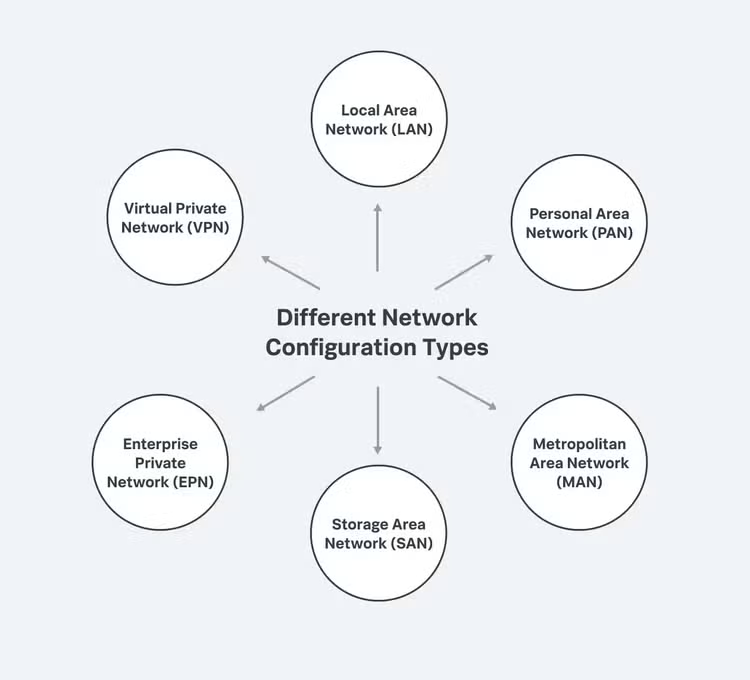
Different configuration types include virtual private network, local area network, personal area network, metropolitan area network, storage area network, and enterprise private network.
The importance of network configuration
Yes, network configuration is necessary for an organization's operations, IT efficiency, and connectivity—supporting network traffic, ensuring security, reducing downtime and maintaining stability. And there are several more reasons you shouldn’t overlook it.
Network configuration introduces observability—visibility, traceability, and accountability—into your network system. Network telemetry is the official name for collecting, measuring, and analyzing network data.
Because networks are constantly changing, tracking and reporting traffic flow over the network is vital to maintaining their stability. By properly configuring your network, you can:
- Keep track of basic configurations and quickly spot any changes from your baseline.
- Automate data tracking and reporting, which allows administrators to identify configuration changes as well as potential issues.
- Apply bulk changes and roll back network parameters to a previous configuration.
- Increase uptime due to increased visibility into the network and any changes.
- Easily maintain and quickly repair both physical and virtual network devices.
- Centrally store device configurations.
Neglecting network configuration exposes your network's software and hardware to various risks while depriving end-users of a seamless experience, especially as your networks get more complex.
How network configuration works
First, you can check your own network configuration for yourself. These commands let you see information about your network configuration, including its default settings, and also allow you to configure your network interface:
- In a command-line environment, the Windows command is ipconfig.
- In a Mac or Linux-type environment, the command is ifconfig.
If you're using a network configuration management tool, it'll have its own interface for configuring, monitoring, and administering the network.
Configuration files are editable files that store information about the user, server's hostname, infrastructure, application, settings, parameters, external service credentials, and much more. Consequently, they allow you to:
- Manage the parameters.
- Tailor your environment.
- Govern your network's behavior.
Although config files are structured in various formats, some standardized forms are YAML, JSON, TOML, and INI. Network configuration files are found in the /etc directory. Here, you'll find several standard config files, like /etc/hosts. The following are examples of network configuration files:
- /etc/hosts are used to map IP addresses to their hostnames.
- /etc/resolv.conf defines the Domain Name System (DNS servers) and the search domain to use.
- /etc/sysconfig/network maps host information to your network interfaces.
- /etc/protocols define your networking protocols, which define how devices exchange data across networks. Some examples include simple network management protocol (SNMP), internet control message protocol (ICMP), and much more.
- /etc/services store information that clients' applications use.
These files define essential processes of your network operations. That means your config files must appropriately manage them. Regular backups, versioning, and comparing configuration file updates can all help with this. By doing this, you can track, compare, and restore previous working versions, receive notifications, and detect harmful activity early.
Trends in network configuration
Network configuration isn’t the trendiest of technologies, but here are some useful buzzwords you’ll hear:
- Network automation offers scalability and reduces the possibility of human error in your process. It’s more about the goal than the task: what are things, beyond mere configuration, that you can automate to focus more strategically.
- Network as code explores the transition to a DevOps strategy for networks, treating our network infrastructure as code. Network as code involves having standardized configurations in a templated format with source control and transforming the network configuration process.
Tools for network configuration
Yes, network configuration can be high stakes. Fortunately, a bevy of tools can help you manage the network. Network configuration tools are designed to help manage as well as gain visibility into your network. Keep in mind the ultimate goal: to proactively perform troubleshooting and configuration tasks from a single administrative panel.
Ideally, it’s best to get a tool that offers you total visibility and insight into your networks.
The wide variety of network configuration tools, across many vendors, generally fall into three categories: scripting systems, network configuration management tools, and intent-based networking configuration management.
- Scripting systems allow IT professionals to write scripts that determine how the network operates, based on network design models. The advantage of model-based scripting is flexibility, especially when configuring large networks. The disadvantage is that it requires a high level of familiarity with scripting languages.
- Network configuration management tools are offered by vendors designed to perform network configuration tasks. They don’t require the level of code knowledge that scripting systems do, but they also provide less overall flexibility than model-based scripting.
- Intent-based networking configuration management, according to TechTarget, “is a form of network administration that incorporates artificial intelligence (AI), network orchestration, and machine learning (ML) to automate administrative tasks across a network.” It's a software-enabled service designed to eliminate the human error that often occurs with more hands-on, less automated solutions.
Benefits of network configuration
Because networks are constantly changing, it’s challenging to track and report on network performance. Proper network configuration and management offer numerous benefits that are vital to maintaining safe and secure operations:
- Track network configuration: With network management software, you can see through a user interface that your network is operating the way you intended it to.
- Identify changes quickly: Once you’ve set a baseline network configuration, network configuration management will alert you to any changes that occur—whether from human error, intended changes, cyberattacks, or other reasons—enabling you to recover more quickly.
- Improve efficiency: Network configuration management includes the ability to automate key set-up and configuration tasks, helping IT administrators streamline network operations and focus on more strategic initiatives.
- See and understand network performance: There are numerous factors that can affect your network's performance at any given time. Network management software allows engineers to track key performance indicators (KPIs) and see instantly when they begin to deviate.
- Boost cybersecurity: Properly configured networks reduce vulnerabilities that can be exploited by attackers. Tracking intended and unintended changes to your network helps defend against breaches and attacks. Network security monitoring plays a crucial role in this. (More on this later.)
- Support compliance: For organizations that must comply with various regulations, network management software provides the tracking and reporting capabilities needed to demonstrate compliance with industry standards.
- Simplify Troubleshooting: A well-documented network configuration simplifies the process of identifying and resolving issues, reducing downtime, and maintaining business continuity.
- Improve scalability: Proper network configuration allows for easier scaling as your organization grows, ensuring that new devices and services can be added without disrupting existing operations.
Risks associated with network configuration
A poorly configured network won't operate with the speed, efficiency, and security necessary to meet the organization’s needs — and it can open you up to more serious risks. Some risks associated with improper network configuration include:
- Network outages: A poorly configured network may suffer from frequent outages, leading to loss of revenue, financial penalties, reduced customer satisfaction, and damage to your organization’s reputation. (Downtime is expensive: see how much it costs your org.)
- Data theft: Vulnerabilities in network configuration can leave your network open to data theft, often through exploits like firmware hacks. If your firewall is breached, sensitive data can be compromised, which can be disastrous, especially for organizations handling financial, medical, or other confidential information.
- Ransomware attacks: Misconfigurations can make your network more susceptible to ransomware, where attackers encrypt your data and demand payment for its release.
- Device hijacking: With the proliferation of Internet of Things (IoT) devices, hackers have more entry points into a poorly configured network. They can hijack devices to exploit other vulnerabilities and access sensitive data.
- Compliance violations: Improper network configuration can lead to non-compliance with industry regulations, resulting in legal penalties and fines.
- Operational inefficiencies: Inefficient network configurations can lead to slow network performance, bottlenecks, and decreased productivity.
- Expensive miaintenance: Poor configurations often require more time and resources to troubleshoot and fix issues, leading to higher maintenance costs.
- Security breaches: Open ports, weak passwords, and outdated firmware due to poor configuration can be exploited by cybercriminals to gain unauthorized access.
Once you’ve got your configuration figured out, you’ll move into the monitoring and managing of that network.
(Related reading: IoT monitoring helps you secure all the devices on your network.)
Network configuration monitoring
Monitoring your network configuration has two primary and vital purposes:
- To provide visibility across the entire network (aka network monitoring).
- To identify issues and bottlenecks, alerting network administrators when a potential issue arises.
Network or system administrators, working in the NOC, have the ability to set the monitoring tool to report on various issues at different thresholds. When network monitoring determines that an issue has occurred, administrators can use network configuration management tools to address and correct the problem.
Network monitoring oversees all networking components including network access, routers, servers, devices, and switches, while tracking key performance indicators. Network monitoring allows organizations to maintain uptime and identify and solve critical issues before they have a significant impact on the organization.
What does network security monitoring do?
Network security monitoring is a crucial aspect of network configuration monitoring that focuses specifically on detecting and responding to security threats. It involves the continuous observation of a network to detect malicious activities or unauthorized behaviors. By analyzing network traffic and system logs in real time, network security monitoring helps organizations quickly identify and mitigate potential security incidents before they escalate into serious breaches.
Key functions of network security monitoring include:
- Threat detection identifies potential security threats like malware, intrusion attempts, and suspicious activities. This is achieved by monitoring network packets for known threat signatures and using intrusion detection systems (IDS) to spot malicious patterns.
- Anomaly detection monitors network traffic to detect unusual patterns that may indicate a security breach. Anomalies could include unexpected spikes in data transfer, unusual login times, or access from unfamiliar IP addresses, which might signify a compromised system.
- Incident response provides alerts and actionable insights that help security teams respond promptly to threats. Timely notifications enable security personnel to isolate affected systems, block malicious actors, and initiate recovery procedures to minimize damage.
- Compliance assurance helps organizations meet regulatory requirements by logging and analyzing security-related events. Maintaining detailed logs and audit trails supports compliance with standards like GDPR, HIPAA, and PCI DSS, and can be crucial during security audits or investigations.
- Vulnerability management identifies vulnerabilities within the network configuration that could be exploited by attackers. Regular scanning and assessment help in patch management, ensuring that software and systems are up-to-date and fortified against known exploits.
Network security monitoring helps organizations to defend against cyber threats proactively, ensuring the integrity and confidentiality of their data. It not only protects sensitive information but also helps maintain customer trust and safeguards the organization's reputation. Additionally, it provides valuable insights that can inform security policies and future investments in cybersecurity infrastructure.
Define what to monitor and track
First, determine the networks, devices, and metrics you want to track. Generally, any network device that generates data can be monitored. Common network performance metrics track things like:
- Uptime
- Throughput
- IP
- CPU usage
- Error rates
- Disk space
- Bandwidth
In addition to the hardware layer of your network, you have the software layer of your network to consider. This layer checks network data flow within your network environment using network protocols like DNS, SNMP, and ICMP. If you monitor all of these, you can rest assured that your network is healthy and working at its best.
Choose the right tools
Next, you'll need one or more tools to monitor network traffic and analyze performance natively. While various network configuration tools and managers can help you manage your networks, choosing the proper one isn't always easy.
Ideally, it’s best to get a tool that offers you total visibility and insight into your networks—a tool that lets you be proactive with a fast-troubleshooting strategy and configuration adaptability from a single administrative panel.
Real-world tips for network configuration management
Now that we’ve covered all the angles of configuring your networks, let’s look at some real-world advice for best practices and—everyone’s favorite—ways to reduce cost without losing efficiencies.
Best practices
Understanding what’s happening at all times in your network is the key to maintaining its safe and effective operation. Here are some best practices that can help you keep your network properly functioning.
-
Map your network: You need a complete understanding of how your network is designed and configured, what devices are connected to it, and how it all works together. Use asset discovery to find and document the software, hardware, systems, and devices in a network map. Include all devices including servers, firewalls, routers, and switches.
-
Standardize device configuration: Create standard configurations for each device classification on your network (routers, switches, network topology, etc.) so that you can avoid human error or other config errors when provisioning new devices. Configuration management software is the simple way to accomplish this goal.
-
Track and document changes: Track when configuration changes are made and set up alerts that will notify you when they occur. Keep backups of all changes made to the network so that you can review them when errors occur and restore previous configurations if necessary.
-
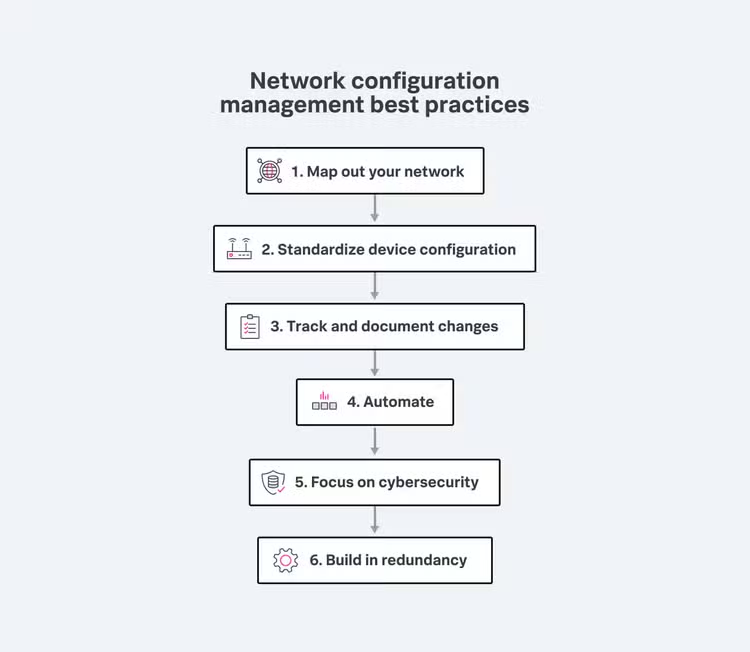
Automate: Automating processes that would otherwise require human intervention can eliminate human error, help teams handle repetitive tasks, manage configuration changes across multiple devices, and help maintain compliance to regulatory standards.
-
Focus on cybersecurity: As important as it is to understand how your network is configured and how it operates, it can be even more important to understand how you will protect it from cyberattacks. A security breach can do significant harm, often far greater and more expensive than other network issues.
-
Build in redundancy: No matter how well prepared you are, network components can fail, bringing your operations to a halt. Avoid potential disasters by building redundancy into your network so that if a device fails, your network will continue to function.
(Related reading: redundancy vs. resiliency, differences explained.)
Reducing costs
Network management is a significant cost for any organization. A particular challenge is to maintain proper functioning of the network while at the same time reducing unnecessary expenditures. Here are a few suggestions that can help keep costs down.
- Consolidate network vendors. Keeping your networking contracts with a minimum number of vendors can help you gain efficiencies and economies of scale. Evaluating your network contracts is the best way to start.
- Know your total cost of ownership (TCO). TCO includes every single expense related to installing, maintaining, and operating a network. When evaluating your networking spend, consider management costs, service plans, the cost of IT department time, and all expenses you incur as part of maintaining your network. That way, you’ll have more information to evaluate, and more data if you decide to pursue a new vendor or renegotiate a contract.
- Centralize network management. It’s very likely that your IT department spends a considerable amount of time on network management tasks, and that many of those tasks are manual, repetitive, and time consuming. Implementing a centralized network management approach saves time and money. Unified network management processes and tools allow the IT department to to update and configure hardware remotely and can completely automate many of the simplest tasks.
- Invest in network security. Increasing your network security isn’t just a best practice, it has a bottom-line business value. Investing in enhanced cybersecurity should be an essential part of reducing networking expenses.
- Automate your network. The cost of IT department time can be a considerable expense that adds to the total cost of network ownership and operation. If IT professionals are manually testing, configuring, deploying, and managing devices on the network, they're spending time that could be greatly reduced by network automation hardware and software.
Network configuration: The backbone of the digital economy
Network configuration is a fundamental aspect of modern IT infrastructure, enabling the seamless communication and operation of devices and systems within an organization. Proper network configuration and monitoring are essential for ensuring network performance, security, and scalability. By understanding the importance of network configuration, leveraging the right tools, and implementing best practices, organizations can reap significant benefits while mitigating risks associated with poor configurations.
FAQs about Network Configuration
Related Articles

What is BPA? Business Process Analytics, Explained

Using AI in Security Operations: A Practical Checklist for the Modern SOC