Accelerate Productivity With Updates in Your Platform UI Home Page
Are you tired of constantly switching between apps just to find your previous searches? Ever wished you could have the essential resources for your Splunk tasks right within the product?
With the recent updates made to the home page:
- You can access Search history from various apps in one place
- Administrators can customize the home page of all users with shared bookmarks
- Both admins and users can personalize their homepage with private bookmarks
A redesigned home page was launched in Splunk Cloud Platform 9.0.2303 and Splunk Enterprise 9.1 t o help you easily discover knowledge objects for faster insights. The top customer enhancement requests were to provide a consolidated search history view and support for custom bookmarks.
The feature updates (search history view and custom bookmarks) highlighted in this blog will be available in the upcoming Splunk Cloud Platform 9.2.2403 and Splunk Enterprise 9.3 versions.
Now, let’s have a run-through of the recent experiences added to the home page.
Search History
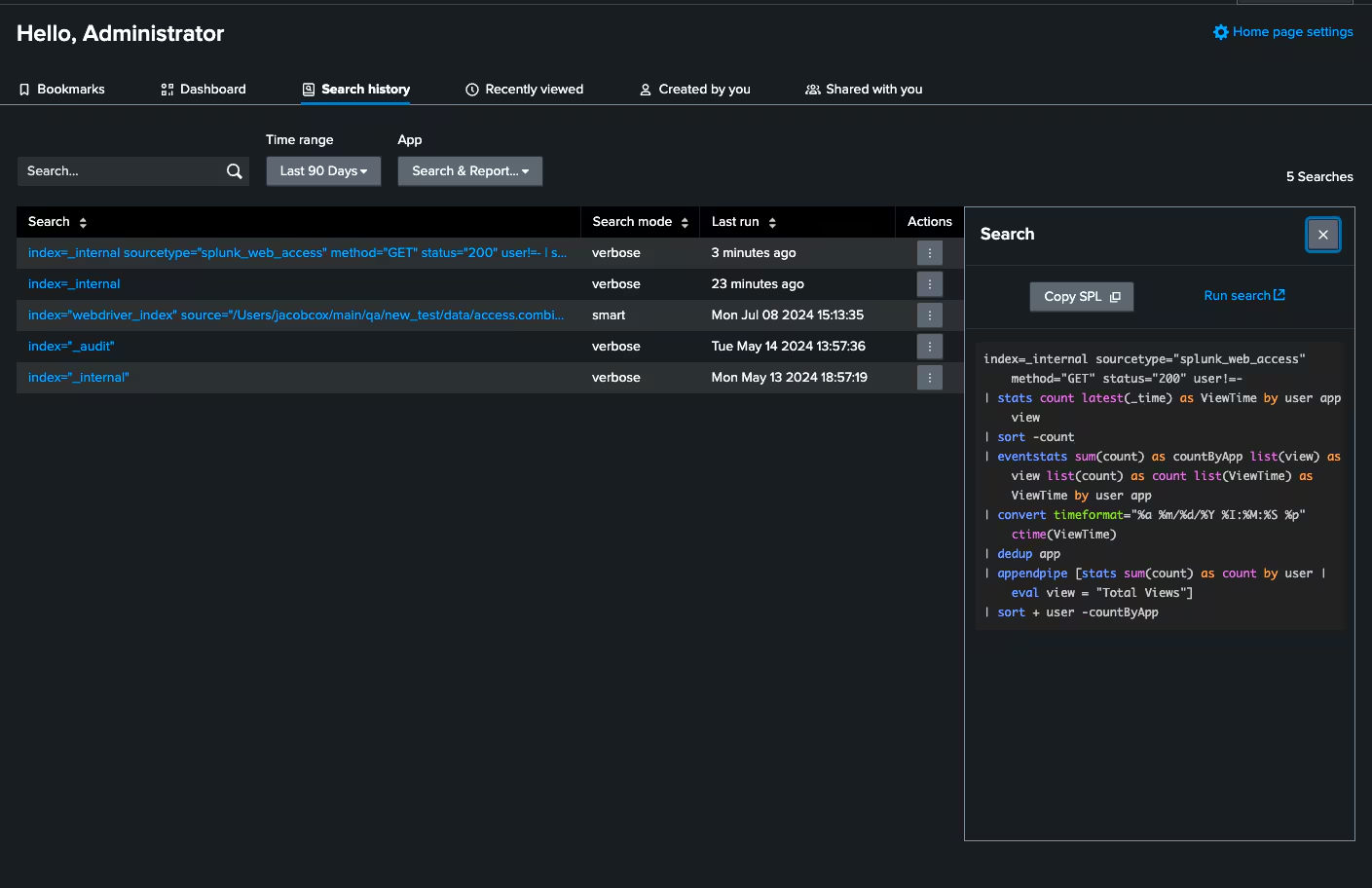
Search is the core of Splunk products. Running a search is a key to data analysis workflows. Writing SPL queries can be challenging and it takes time, especially for queries that work, are performant, and optimized for runtime and resource consumption. Finding those previously run searches for reuse or to build on top of them has been a hassle. Searches are run in the app context within Splunk and users need to navigate through multiple apps to locate them. Now, all users can access their recent searches and history across from all apps on the home page under the “Search History” tab. This tab allows users to
- Access their Search history by Time Range & App with a few clicks and without cross-app navigation
- Expand each search to show the SPL in full detail with formatting & highlighting
- Copy the SPL for reuse or expansion
- Initiate running the search in the associated app with a single click
Custom Bookmarks
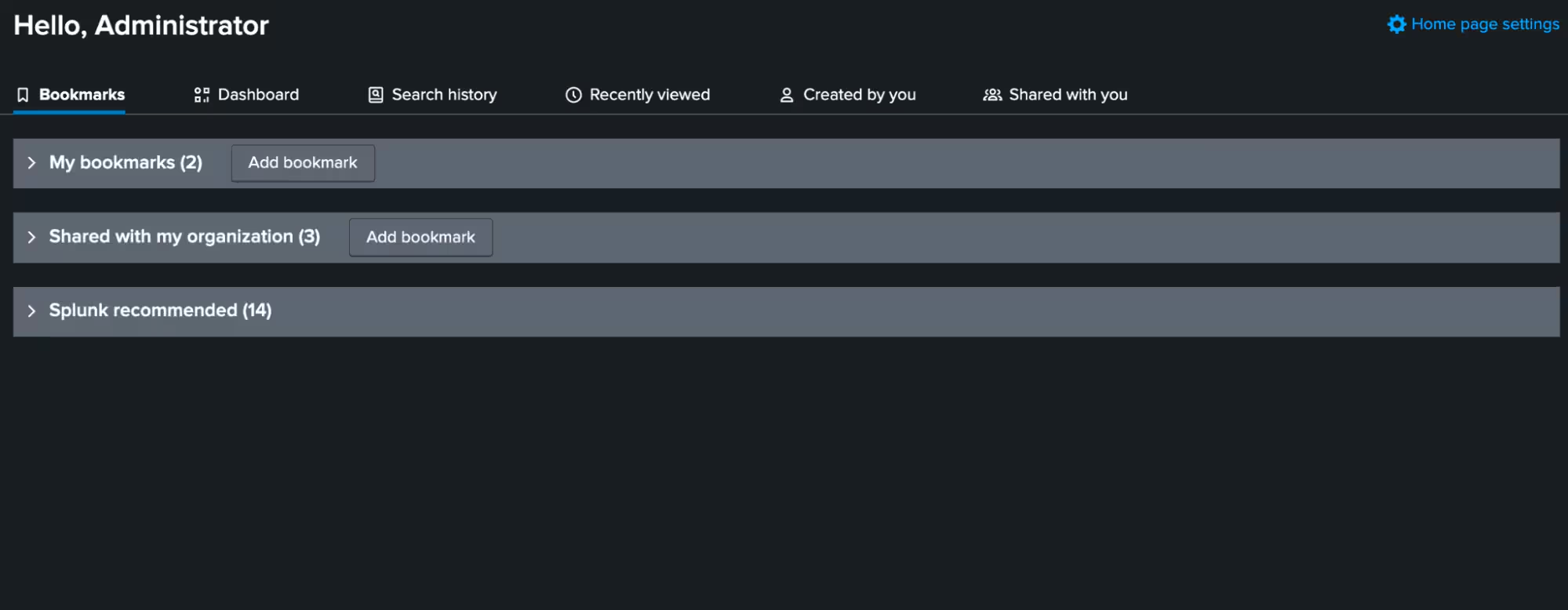
Bookmarks within the product come in handy when users switch between machines and browsers. The capabilities around the custom bookmarks are -
- In addition to Splunk-recommended links, both admins and users can now add their custom in-product bookmarks for easier access to resources like guides, manuals, apps, knowledge objects – anything important to their Splunk tasks!
- Admins can create allowed domains to control the bookmark destinations
- Admins can share bookmarks with their entire user population or by role. This way, they can share important resources with everyone or target audiences
- Admins of regulated stacks like FedRamp and air-gapped customers can decide to hide Splunk-recommended links sections from their users, as needed
Allowed Domains
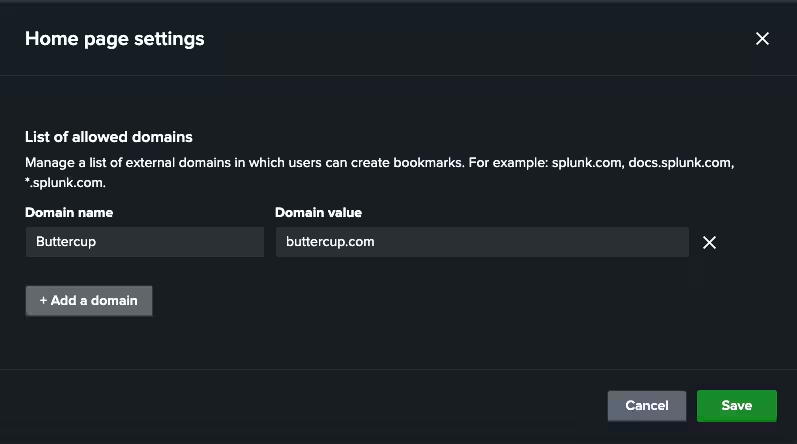
Bookmarks using the stack URL can be created by default. External bookmarks require the configuration of Allowed Domains by admins via the “Home page settings” on the home page. Both admin and users will not be able to add external bookmarks without an allowed domain entry. This would help keep the security and integrity of their stack under control.
Allowed domains can contain one or many domains and subdomains, and also support wildcards e.g., buttercup.com, docs.buttercup.com, *.buttercup.com. Some examples of domain entries not allowed are *buttercup.com, buttercup*.com, buttercup.com*
Shared With My Organization
Bookmarks shared by administrators are available in this section for admin users. All admins can view and manage the entire set of shared bookmarks. Those shared by the logged-in admin user can be found under “Shared by me”. In case of more than 1 admin sharing bookmarks, the ones shared by other admins are under “Shared by other administrators”. Non-admin users can only view shared bookmarks, and can’t share bookmarks.
My Bookmarks
All users can create their private bookmarks to suit their personal product needs, and those created by the logged-in user are available in this section.
Shared by Administrators
Bookmarks shared by the admins are available in this section for the logged-in non-admin users based on the sharing settings.
How Do I Get This New Home Page Experience?
As you can see, the new home page has tons to offer to accelerate your day-to-day tasks with the Splunk Platform. To take advantage of the new experience, your default app must be “Home”. If it isn’t currently, you can always change your default app settings by going to “User Profile > Preferences > Global > Default Application” and selecting Home from the list.
Splunk is committed to the continued enhancement of products and experiences for our customers. We want to know your thoughts and ideas about these features via the Splunk Community and Splunk Ideas.
As always, keep on rockin’ and Splunkin'!
Related Articles

Announcing the General Availability of Splunk POD: Unlock the Power of Your Data with Ease

Introducing the New Workload Dashboard: Enhanced Visibility, Faster Troubleshooting, and Deeper Insights

Leading the Agentic AI Era: The Splunk Platform at Cisco Live APJ

Dashboard Studio: Token Eval and Conditional Panel Visibility

Introducing Resource Metrics: Elevate Your Insights with the New Workload Dashboard

Powering AI Innovation with Splunk: Meet the Cisco Data Fabric

Remote Upgrader for Windows Is Here: Simplifying Fleet-Wide Forwarder Upgrades

Dashboard Studio: Spec-TAB-ular Updates
