Introducing Edge Processor for Splunk Enterprise: Data Management on Your Premises
We’re excited to announce the introduction of Edge Processor for Splunk Enterprise 10.0, which is designed to help customers achieve greater efficiencies in data transformation close to the data source and improved visibility into data in motion. This powerful capability, which was previously accessible only through Splunk Cloud Platform, lets you build and deploy pipelines that optimize, manage, and transform data before routing it to external environments.
We’re providing our Enterprise customers with that same rich and intuitive experience for developing, deploying, and monitoring data pipelines from a central location coupled with the same powerful processing capabilities. How? We’re bringing key components from our cloud to yours, starting with the same data management console and services from Splunk Cloud Platform that compose our control plane. A key difference, of course, is that they’re conveniently packaged and ready to use as part of a Splunk Enterprise 10.0 deployment — even one that is completely air-gapped.
Can I use Edge Processor before upgrading everything to 10.0?
Yes! At a minimum, you need a machine that runs Splunk Enterprise 10.0 which will host the control plane. If you plan to co-locate the Data Management experience with other management components, then that machine must be updated. Alternatively, you can install Splunk Enterprise 10.0 on a dedicated machine.
The associated Edge Processor runtime that ships with Splunk Enterprise 10.0 is compatible with supported forwarder-indexer combinations where the forwarders have a minimum version of 8.2.x. See the Splunk version compatibility matrix to learn more.
Getting Started
Set up a dedicated machine or leverage an existing one in your management tier that can accommodate additional workloads. If you’re a Splunk administrator, then after installing (or upgrading to) Splunk Enterprise 10.0, you’ll see “Data Management” in the apps list after you log in. When you open it the first time, the application presents you with requisite one-time configuration options and pointers to where you can find those options in configuration (.conf) files.
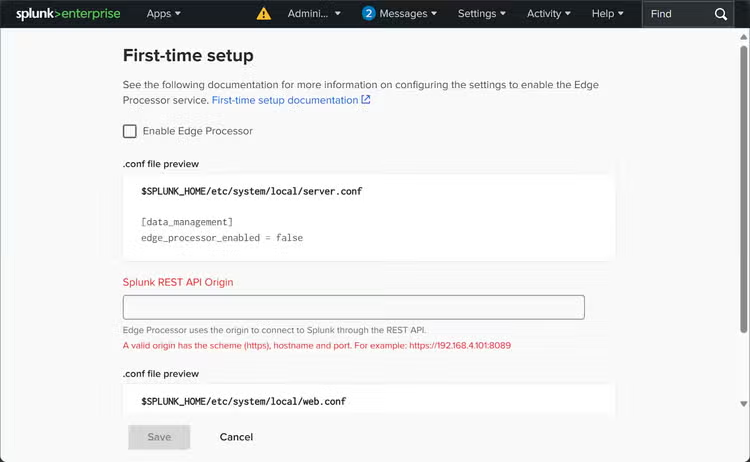
Set those configurations, restart Splunk Enterprise, log back in, and return to the Data Management app to begin optimizing your data!
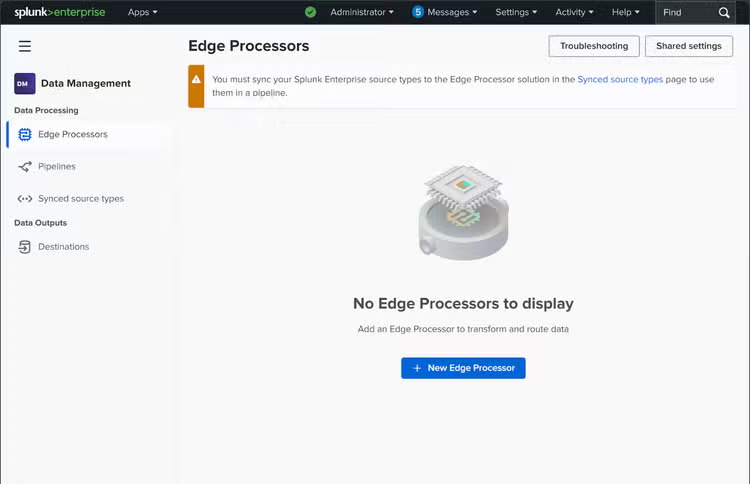
You now have complete control over your data, letting you focus on and leverage only the information that delivers the greatest value to your organization.
With Edge Processor for Splunk Enterprise 10.0, organizations gain control over data costs and end-to-end visibility into their entire data pipeline, empowering teams to optimize resources and drive smarter business outcomes.
Related Articles

Splunk Mobile, iPad, AR and TV in Private Networks

Introducing Cloud Monitoring Consoles’s New Overview Dashboard: Intuitive Actionable Insights at Your Fingertips