Introducing the New Workload Dashboard: Enhanced Visibility, Faster Troubleshooting, and Deeper Insights
Splunk is excited to announce the general availability of the new workload dashboard—a modern and intuitive dashboard experience in the Cloud Monitoring Console (CMC) app. This dashboard replaces the old workload dashboard, providing Splunk administrators with deeper insights with new metrics, advanced attribution, and easy-to-read visualizations.
With a new navigation workflow and a streamlined single-page view, the new workload dashboard lets Splunk administrators complete tasks more efficiently and optimize Splunk Virtual Compute (SVC) and resource metric usage.
What’s New in the Workload Dashboard?
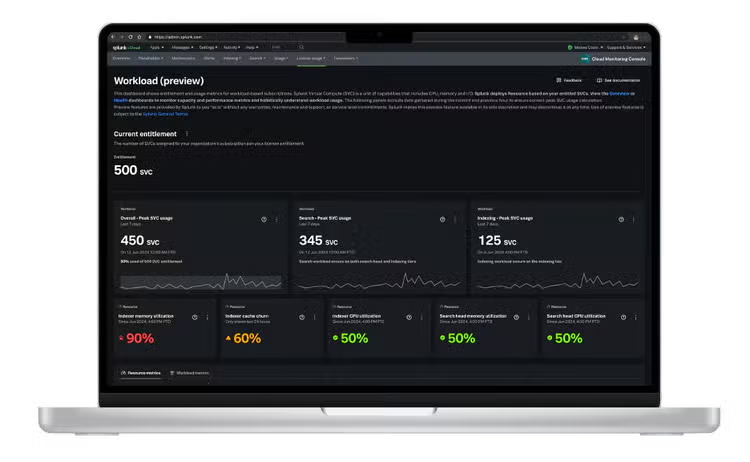
CMC’s new workload dashboard is now generally available (GA). It is a dashboard located in the “License Usage Tab” of the Cloud Monitoring Console (CMC). Splunk Cloud Platform administrators use it for workload license monitoring, capacity planning, and troubleshooting.
The new workload dashboard provides the following benefits, allowing for easier workload license and resource consumption monitoring for Splunk platform Administrators.
- Summarized view with new metrics: View a comprehensive summary of all available metrics in the new Workload Dashboard. This includes both the workload metrics retained from the previous dashboard as well as newly added resource metrics across search and indexer components.
- Threshold and recommendations: The new resource metrics feature color-coded thresholds, making it easy to quickly identify metrics that might require action or further analysis. Additionally, tooltips provide recommendations on how to take action when a resource metric reaches an elevated or critical level.
- Advanced filters and attribution: The drilldown visualization provides detailed graphs for every metric in the summarized view, letting administrators explore each metric for troubleshooting and root cause analysis. The new drilldown visualizations include filters that allow for detailed attribution. Administrators can attribute both workload and resource metrics to individual users, apps, and search levels.
Understanding the New Workload Dashboard Structure
The dashboard has four main sections:
- Current Entitlement
- Single Value Metric Cards
- Detailed Line Graphs
- dditional Resources
Let’s take a closer look at each of them.
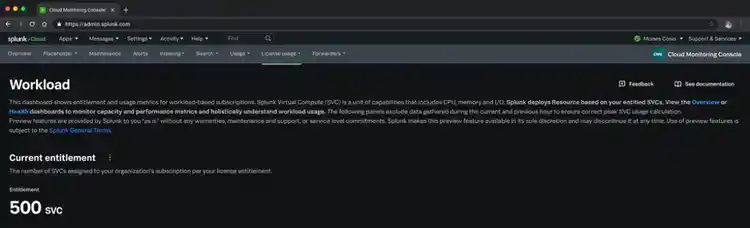
Current Entitlement
At the top, you’ll find essential contract details, such as total purchased SVCs. This ensures that administrators always know their available capacity.
Single Value Metric Cards
These cards offer a high-level summary of your stack's most critical workload and resource metrics. Splunk administrators can customize the displayed time period and granularity using the dedicated picker, making them ideal for a quick status check. The cards incorporate eight total metrics, including three carried over from the previous dashboard and five newly introduced metrics.
- Overall peak SVC usage
- Search Peak SVC usage
- Indexing Peak SVC usage
- Indexer CPU utilization (new)
- Search Head CPU Utilization (new)
- Indexer Memory Utilization (new)
- Search Memory Utilization (new)
- Indexer Cache churn (new)
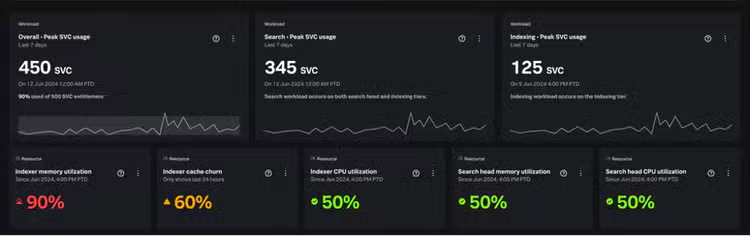
Each metric card includes a tooltip with essential information such as metric definition, thresholds, and recommendations. Each metric also includes a “more options” icon which lets administrators refresh the data or open the metric in the Search app for further analysis.
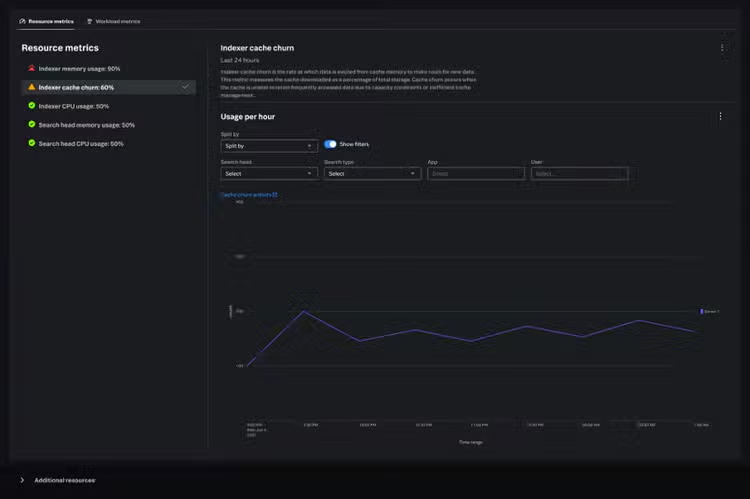
Detailed Line Graphs
Positioned beneath the summary cards, these graphs offer deeper visibility into trends and patterns over time. This section is crucial for analyzing changes, identifying anomalies, troubleshooting, and understanding historical performance.
There are eight graphs, one for every metric, so administrators can delve into any metric of their choice. These graphs are split into two tabs:
- Resource Metrics
- Workload Metrics
The Resource Metric line graphs display the same thresholds as their corresponding metric cards for consistency. Additionally, some of the line graphs feature advanced filters and attribution options, enabling you to break down metrics by search, app, user, search head, index, and search type.
Additional Resources
Find helpful links and documentation for quick access to further information and support whenever you need it.
What’s Next?
The General Availability (GA) launch of the new Workload Dashboard is just the start! We are committed to delivering continuous updates that offer even greater visibility into your license usage and stack resource consumption. These enhancements will allow for powerful new ways to monitor, troubleshoot, and predict your Splunk workloads.
To see the Workload Dashboard in action, check out our walkthrough demo.
Join us on this journey—your feedback and ideas are invaluable. Select the feedback button on your Workload Dashboard to share your thoughts. We can’t wait to hear from you!
For more information about the Workload Dashboard and the Cloud Monitoring Console (CMC), visit our comprehensive documentation.
Related Articles

Deep Learning Toolkit 3.5 - Part 2: Change Point Detection, Matrix Profiles and LSTM-based Predictions

Introducing Splunk Cloud App Export