SOAR: Security Orchestration, Automation & Response
Key Takeaways
- SOAR platforms integrate and orchestrate disparate security tools, automating and streamlining incident response processes through consistent, repeatable workflows.
- By leveraging automated playbooks and actions, SOAR reduces manual work, accelerates threat detection and remediation, and enables security teams to focus on higher-value work.
- Integrated case management, threat intelligence, and collaboration features provide centralized visibility, audit trails, and improved cross-team coordination for more effective incident handling.
An important piece of cybersecurity, SOAR solutions provide a single location for you to observe, understand, and decide how to respond to security incidents. Short for security orchestration, automation and response, true SOAR solutions are operational tools that can be very flexible and powerful, useful even beyond security use cases.
In this article, we’ll explore what SOAR is, why it’s important for enterprises and how you can get the most value from your SOAR solution.
What is SOAR?
SOAR has revolutionized security operations, specifically the way security operations teams manage, analyze and respond to alerts and threats. Without security automation and orchestration, your security analysts are left to investigate every detail manually.
Today, that’s simply not enough. And it’s a guarantee for disaster: cyberattacks of all stripes are rising. SOAR can remedy many of these all on its own. SOAR also helps analysts to more efficiently remedy other threats.
So, let’s talk about what SOAR really is. Technology analyst Gartner defines SOAR as:
Next, we’ll break down these three pieces. As we go along, we’ll see how they realize the rest of what SOAR can do: “document and implement processes (aka playbooks, workflows and processes); support security incident management; and apply machine-based assistance to human security analysts and operators.”
Incident response
Of the three components, incident response is the easiest to understand. NIST defines incident response as “the mitigation of violations of security policies and recommended practices”. Basically, any incident or event that violates your organization's security policies and/or overall cyber best practices.
Incident response is a full practice, made up of a variety of pieces including incident planning and incident response itself. (There are several steps, depending on the framework you use.) You can put all of this under the umbrella of incident management.
(Related reading: incident response 101, incident response metrics & CSIRTs: critical incident response teams.)
Security automation & orchestration
Next, let’s look at automation and orchestration. These are different technologies:
- Security automation is all about simplifying and automating individual tasks: if this one thing happens, then this is the one thing to respond with to fix it.
- Security orchestration connects all your tools and data, even when spread across distributed systems. The orchestration piece uses multiple automation tasks, for a complete workflow, with a beginning and end.
Automation and orchestration are best used in concert. With SOAR, you’re not choosing one or the other: you get both. This capability relieves your security pros from weeding through logs, manually addressing every single alert. (Let them focus on investigation and strategy!)
In a matter of seconds, security automation and orchestration can:
- Detect threats in your environment.
- Triage potential threats and determine whether it is a legitimate incident.
- Determine whether to act on the incident.
- Contain and resolve the issue.
- Use machine-based orchestration to coordinate all your tools and actions.
Let’s be clear: SOAR is in no way a replacement for human staff. You will continue to need highly-skilled security analysts to investigate emerging and non-standard issues. And then to orchestrate appropriate responses as necessary.
Threat intelligence
Threat intel is its own full subject! For our purposes here we can define cyber threat intelligence as “evidence-based knowledge” — things like known TTPs and indicators of compromise or attack. When folded into your SOAR solution, this information can help your security teams to better:
- Understand threat actors’ attack behavior and motives.
- Predict next attack targets.
- Plan and improve the security posture as useful.
(Read our full explainer on cyber threat intelligence.)
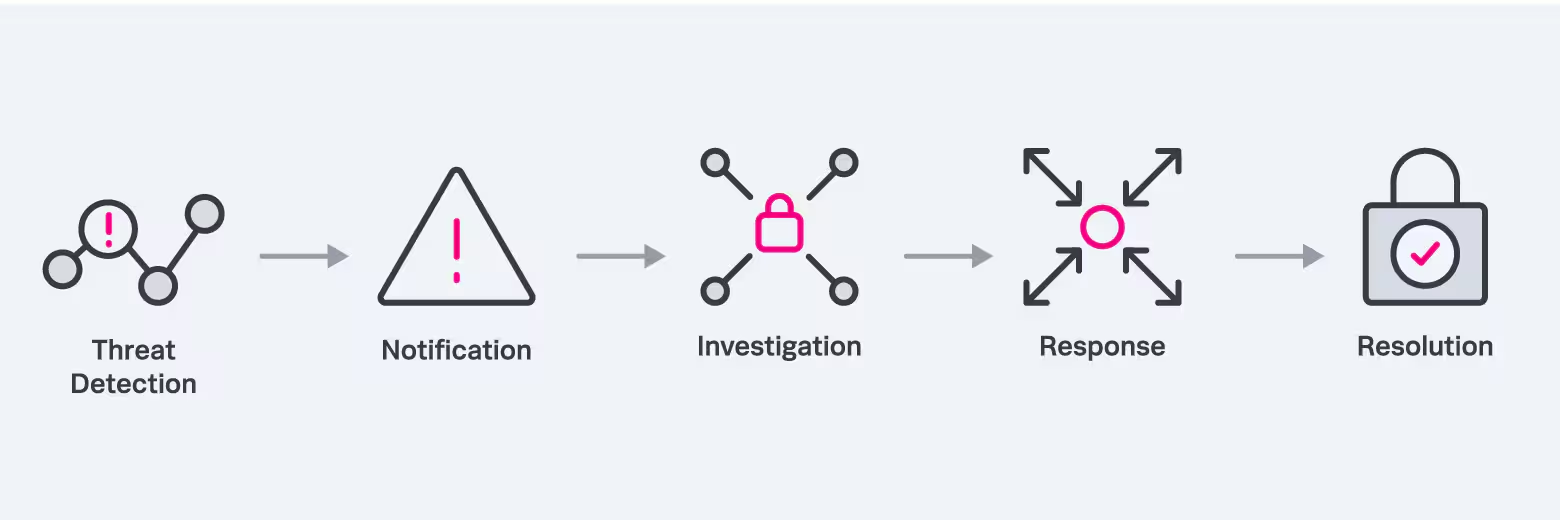
A high-level SOAR workflow
SOAR use cases & benefits
A lot of the alerts your security teams receives are mundane, requiring rote manual responses. Others are redundant or false positives — you can ignore these.
SOARs remove rote tasks and makes clear exactly which alerts are worth exploring more. This way you’re handling incidents more efficiently: the easy ones get handled automatically, and more complicated ones get the attention they deserve. That’s an ideal security posture.
Successful SOARing can really change how your SOC teams operate. We can sum up the benefits in three categories:
- Ease. SOAR enables you to see everything in places: you can integrate SIEM, firewalls, IDS and IPS solutions as well as ITOps and threat intel tools, from different vendors, to get the ultimate data collection and analysis. This comprehensive context gives you deeper and specific insights.
- Speed. With many tasks automated and false positives reduced, you can get to work faster on the things that require it. That means you can reduce risk and also decrease MTTD and MTTR.
- Better decision making. With full context, clear insights and useful one-stop dashboards, decision making is better for everyone across the business: starting with your SecOps teams, and rippling across to product, people and legal teams and even the CTO, CISO and other C-levels.
Ultimately, SOAR solutions free you to investigate the things worthy of analyst time.
Use cases
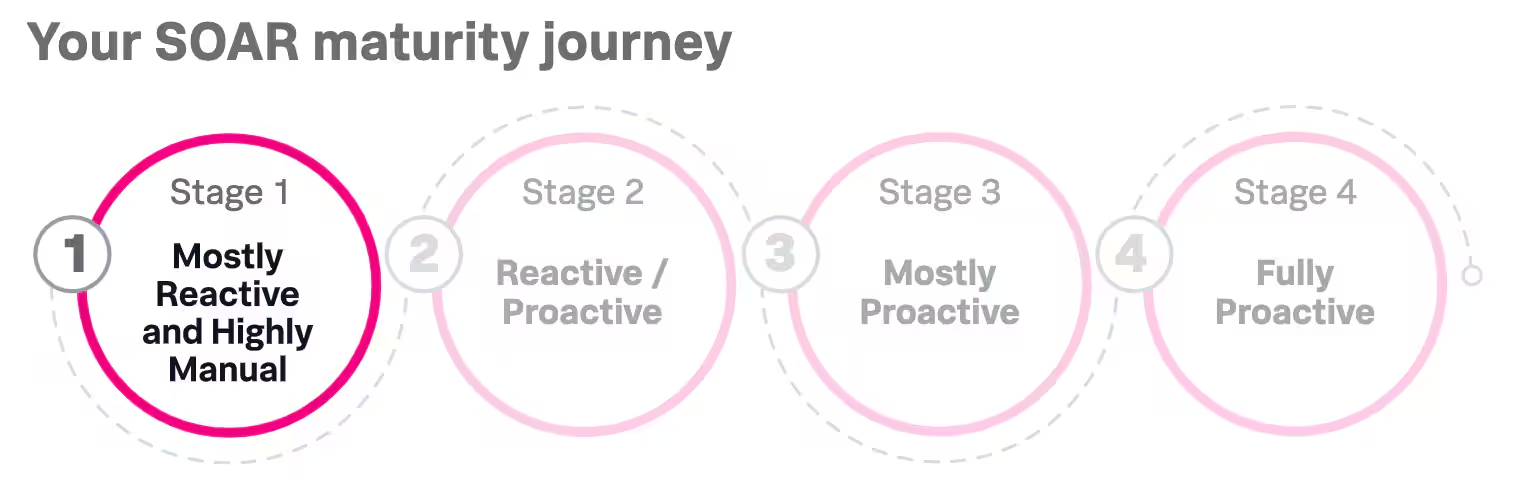
The smartest thing you can do when exploring SOAR solutions is to imagine how your organization will use it — both initially and over the long term. That’s where SOAR maturity models can help. So, what are common use cases? They often depend on your industry and company profile, but common use cases include:
- Combating malware, phishing and other cyberattacks. SOAR solutions can automatically detect and examine the sources of certain types of attacks and data exfiltration, including phishing. Though numbers are hard to verify, phishing is the likely culprit of over 36% of your data breaches. And over 3 billion phishing emails are sent daily.
- Triaging alerts for SIEMs. Reduce alerts with automation, and then orchestrate early investigation with different alert types.
- Supporting the vulnerability management practice. Automate vulnerability assessment and vulnerability scanning. Orchestrate the patches you need to deploy.
- Hunting for trickier threats. With automation, many threats are addressed instantly. Now, security analysts can actively hunt for threats, like insider and emerging threats.
SOAR features & capabilities
OK, so we know what SOAR tools can do. Now, you’ll need the right features in your SOAR solution. There’s plenty of options out there — including Splunk SOAR — though only a few will have all the features you need.
Here are the capabilities that you should look for:
- Easily digestible reports to quickly understand what’s going on within the network, investigate issues and decide what to do next.
- Dashboard modification so you can display data the way you need it.
- Automatic queueing and prioritizing of alerts without having to search extensively.
- Flexible, easy playbook creation and case management. Look for SOAR solutions that offers both built-in playbooks and options to customize, build and categorize your own playbooks.
- Integration with a variety of cross-vendor tools, including security and infrastructure assets, such as firewalls, endpoint products, sandboxes, directory services and SIEMs.
- Built-in guidance integrated into the interface, offering suggestions for investigating, containing, eliminating and even recovering from an incident. (This feature is especially valuable for new security analysts.)
- Scalability so the platform can grow its capabilities along with your organizations’.
(Take a guided SOAR tour or try Splunk SOAR for free.)
Comparisons with other cyber solutions
SOAR vs. SIEM
SOAR solutions are often deployed alongside SIEM technology (security incident & event management) because they have distinct differences. Key differences include data sources, alerting vs. investigating capabilities, and the need for tuning. We can sum up these differences:
- SIEMs provide valuable insight into cyber threats by aggregating and analyzing security data from various sources.
- SOARs prioritize and respond to security incidents effectively by leveraging machine learning-driven automation and orchestration capabilities.
(See how Splunk is a Leader in SIEM.)
SOAR vs. XDR
Yes, SOAR and extended detection and response (XDR) solutions are often compared: they both integrate diverse security tools and automate and coordinate the response. But how they do it — and how widely the technologies can be used — varies:
- Automation. SOAR focuses more on orchestration, using a playbook-based system to orchestrate incident response procedures. By contrast, XDR usually only automates single actions.
- Integration. SOAR is designed to integrate with as many tools and point solutions as possible. More a marketing term, XDR solutions are typically a variety of a single vendor’s tools implemented together.
- Broader use cases. SOAR can also be used in applications outside of security, e.g., IT operations and software development.
SOAR best practices for maximizing value
As with all security tools, the real value of SOAR is in how you use it. Follow these best practices to gain the most value from your SOAR solution investment:
Establish priorities
First evaluate where automation will help immediately, and prioritize those needs. Consider the big picture: prioritize incidents based on frequency and resolution time.
Then define your short-term and long-term use cases and create a list of how you will use SOAR. Involve stakeholders to identify further use cases, even if you implement them later.
Develop your playbooks
Document the steps, instructions and best practices for resolving incidents effectively, ensuring that your security team follows a consistent, repeatable process.
Inventory your tools, apps and APIs
Ensure the vendor you choose can support all the tools you’re currently using. A SOAR solution is only as good as the information you’re putting into it.
Train staff
Train staff for to use SOAR appropriately, but don’t stop there. Train your team to address complex incidents: When alerts require human invention, your staff must have the expertise and confidence to tackle those issues.
Take advantage of newfound time
Plan how your analysts will focus on value-added tasks that benefit the organization — for example, conducting a deep investigation as to why you are constantly fighting off phishing attacks. Even better: Automation will create new roles within the organization. So, use this new time for new areas of focus, like managing the automation and playbooks.
Don’t expect magic overnight
Ease in, don’t expect to use every feature immediately. Focus first on one critical area, then mature sophistication over time. This way you’ll realize the full potential of the solution while minimizing growing pains.
(Learn 5 things to automate first: watch the on-demand webinar.)
Optimize security operations with SOAR
Enable your security team to do the impossible: Keep up with the never-ending security alerts that plague a highly complex IT environment. Freeing your team from dealing with false positives, repetitive alerts and low-risk warnings, SOAR lets you pivot from a reactionary approach to a more proactive one. Rather than fighting fires, security analysts can put their talents and extensive training to better use, ultimately improving your organization’s overall security posture.
Related Articles

What Is Prompt Injection? Understanding Direct Vs. Indirect Attacks on AI Language Models

Energy-Efficient Computing: How To Cut Costs and Scale Sustainably in 2026

How GSLB Improves Reliability and Performance Across Multi-Cloud Environments

SOLID Design Principles: Hands-On Examples

Knowledge Graphs: What They Are and Why They Matter

Artificial Intelligence as a Service (AIaaS): What is Cloud AI & How Does it Work?

Understanding Application Lifecycle Management (ALM): Stages, Strategies, and Benefits

Top AI Trends for 2026: Key Technologies and Challenges and What They Mean