Understanding Application Lifecycle Management (ALM): Stages, Strategies, and Benefits
Learn Joseph NduhiuKey Takeaways
- Application lifecycle management (ALM) provides a structured approach for managing software from initial planning and development through deployment, maintenance, and eventual retirement, ensuring applications deliver ongoing business value
- Following ALM best practices helps organizations maintain software quality, improve collaboration across teams, reduce risks, and remain adaptable to changing business needs and technologies.
- Effective governance and oversight throughout each ALM phase are essential for meeting compliance requirements, optimizing resources, and achieving strategic business goals.
Software applications play a pivotal role in driving value, supporting operations, and enabling innovation. However, the journey from a strategic decision to invest in a new software solution to realizing its full business value involves a series of well-defined steps.
Each application, whether a small cloud-based tool or a mission-critical enterprise system, undergoes a unique process of introduction, development, and ongoing management. Despite these variations, modern organizations commonly rely on a standardized approach to ensure software is delivered efficiently, meets business objectives, and remains aligned with evolving needs.
What is application lifecycle management?
Application lifecycle management (ALM) is the comprehensive and integrated approach to managing software applications throughout their entire existence within an organization. ALM encompasses all the phases — from initial planning and business analysis to design, development, testing, deployment, ongoing maintenance, and ultimately, retirement or replacement. This end-to-end process can span a few months for rapidly deployed cloud applications or extend over decades for foundational platforms like ERP or office systems.
A key aspect of ALM is governance: ensuring that every stage of the software’s lifecycle is monitored, controlled, and tracked. This oversight helps organizations maintain quality, address risks, and maximize the business value of their software investments. By following ALM best practices, enterprises are better equipped to adapt to change, meet compliance requirements, and achieve their strategic goals.
Let’s explore the main stages of ALM and see how organizations use this framework to manage their software assets effectively.
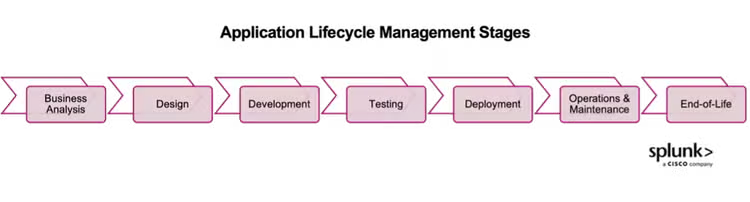
Key stages of application lifecycle management
1. Business analysis
The ALM begins by defining the 'why'. This involves identifying and articulating organizational and customer needs, then identifying and justifying the solution needed to fulfill that need. This involves understanding the business strategy and resource limits, as well as considering other drivers such as compliance, market trends, and urgency, to ensure that the identified applications are aligned with the enterprise goals.
Some of the activities in this phase include:
Idea management
This involves brainstorming with focus groups, experimenting with mockups, trials with different solutions, and research on applications that address a gap or provide new capabilities.
Portfolio analysis
This involves a strategic review of the IT product and service portfolio which represents the organization’s commitments and investments across all its IT applications that support them. The decisions from the portfolio analysis result in strategic directives to invest in new applications or upgrade existing ones.
In line with portfolio analysis, the organization may require that a formal business case be developed that outlines the strategic needs being met by the new or changed applications, as well as the associated benefits, costs and risks for considered options.
Requirements gathering
Before going into development or procurement, the functional and non-functional requirements from application users and other stakeholders (infrastructure, security, compliance) need to be elicited and documented.
The level of detail to be documented depends on the type and scale of the application and can include user stories or business requirements documentation. A traceability matrix is also developed to facilitate requirements validation throughout the application delivery and support.
2. Design
This phase of the application lifecycle management involves transforming the requirements into a solution blueprint or technical code requirements. This is usually performed by a solution architect, designer, developer or business analyst, depending on the organizational structure and roles. The main elements in application design include architecture, modules, data, components and interfaces.
Some of the outputs from the design phase include:
- Wireframes
- High level system architecture
- Detailed technical documentation
- Data flow diagrams
- User interface designs
- Prototypes
Design is usually an iterative activity where the team shares their conceptualization to stakeholders (users, developers etc.) and refines it by incorporating their feedback.
Design of an application is not done in isolation but in a holistic manner that considers interfacing with other systems, architectural requirements, underlying technology components, as well as compliance concerns. Good design also requires documentation of assumptions made, clear outlining of user scenarios, and defining telemetry elements required for performance monitoring.
When design is done right, then it makes the rest of the application lifecycle activities easier and significantly contributes towards the final software product providing value for users and system administrators.
3. Development
This phase of the application lifecycle management involves transforming the design outputs into an actual solution. The development team takes the requirements and design documents, then breaks them down into coding tasks. These tasks are used to build the necessary units or modules in the chosen programming language.
Depending on the environment, developers might write scripts to configure components automatically. In some cases, they may request that a separate engineering team provide the needed components.
Most development teams use agile methods, such as Scrum. They plan tasks in a backlog and work on them during timeboxed sprints. Teams hold daily standup meetings to review progress. At the end of each sprint, they demo the new features to customers and gather feedback. The team also holds a retrospective to discuss lessons learned and identify ways to improve.
Throughout this process, the development team follows established guidelines. These standards cover how to complete tasks, which programming languages to use, and what tools are required for development.
4. Testing
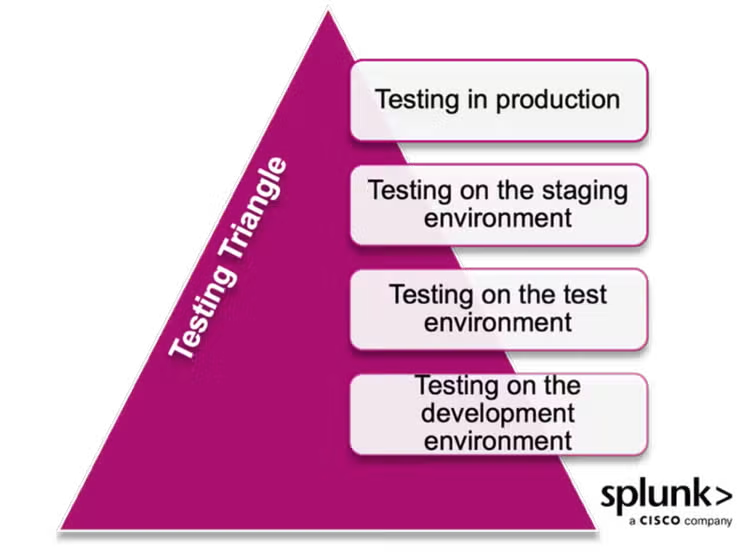
Testing is all about checking whether the developed application meets the defined requirements in terms of functionality, quality and reliability. In agile organizations, testing runs parallel will the development and deployment phases, and is carried out within different environments (see the testing triangle below) to try find and fix defects before the end user gets access to the application.
Testing can also happen in design, where users are presented with prototypes to interact with, and the results used to refine the application designs. A technology team will usually define a testing strategy and plan that outlines the approach, tools, and standards to be followed based on their organizational context.
Some of the common testing activities include:
- Unit testing: Developers test the smallest functional unit of code to ensure they run as expected. Unit tests are written as code and run automatically with each code change. These tests check logic, boundaries, error-handling, and other key functions, helping to catch bugs early in the development cycle.
- Integration testing: Developers test to see that their code works well with other components and modules. This ensures external dependencies function together as intended.
- Quality assurance testing: A dedicated QA team verifies that applications meet the specified requirements, identifies errors, and reports them for fixing. QA analysts test functionality, performance, and compliance using both manual and automated methods. Most QA tests happen in a separate environment before moving to staging and continue through to post-deployment in production.
- User acceptance testing (UAT): This is the final phase of, where real users test the application to ensure it meets real-world requirements. UAT is done in coordination with other application lifecycle stakeholders to gather valuable feedback and make sure all needs are met. Testing occurs in the staging environment and sometimes immediately after deployment to production.
5. Deployment
Deployment is the go-live phase where the tested application moves into the production environment for end-users. This structured, controlled process is essential to maintain application integrity and avoid negative impacts on existing services, users, or the business.
Depending on the application's criticality, formal change approval and stakeholder communication may be required before deployment. Deployment often happens alongside or just before the application’s release to users.
The key activities in the deployment phase, as outlined in ITIL 4 practice guides, include:
- Deployment planning: In manual environments, teams create schedules and align resources. In automated environments, code is committed to a DevOps pipeline branch with the features set for deployment.
- Component and environment verification: Manually, teams check components, environments, and conduct quality and compliance checks. In automated setups, code is deployed and tested in a test environment, with issues fixed in the branch until quality thresholds are met.
- Deployment execution: Manually, teams install and activate components and perform post-deployment checks. Automated processes use CI/CD pipelines to push code to production. Organizations may set specific scopes and timelines for compliance or risk management needs.
- Deployment verification: Manual environments run final tests for performance, security, and compliance, then notify stakeholders for release. In automated environments, the version control system notifies the product owner upon completion.
6. Operations & maintenance
The operations and maintenance phase involves the day-to-day running of the application to keep it running smoothly and meet the expectations of the users and other stakeholders. Wherever there are deviations, the application system administrators are responsible for addressing issues including working with developers and testers as per previous phases to implement required fixes. The main activities in this phase include:
- Performance monitoring: Technology solutions provide real-time data on metrics such as availability, response time, errors, resource usage, and transaction status. Application performance monitoring is carried out through in-built mechanisms, or separate stand-alone tools that collect performance data through agents installed within the application.
- User support: Organizations uses human or AI systems to handle user requests and resolve concerns. Service desks (helpdesks) allow users to contact support teams through designated channels (email, phone, chat, ticket) and have their application related issues logged and tracked to resolution per service levels agreements.
- System maintenance: Administrators use performance monitoring and user feedback to perform updates (such as security patches), fix bugs, and add enhancements. This ensures that the application remains functional, efficient, and responsive to changing user and stakeholder needs.
7. End-of-life
This is the phase where the application no longer serves its business purpose, and it is determined that technical support will cease including updates and security patches. This means that the systems administrators plan for its graceful retirement where the application is decommissioned and its data is archived or migrated in a controlled manner.
Users are notified about the phaseout well in advance and are seamlessly transitioned to a newer version or a replacement application which come through the previous application lifecycle activities.
To wrap up
Application Lifecycle Management provides a structured, end-to-end framework for guiding software applications from initial concept through to retirement. By following the key stages of ALM, organizations can ensure their software remains reliable, secure, and aligned with business goals.
Effective ALM not only helps maximize the value of software investments, but also improves collaboration, reduces risks, and enables organizations to adapt to changing needs and technologies.
FAQs about Application Lifecycle Management (ALM)
Related Articles

Quality Management Explained: From TQM to Modern QMS

Container Security, Explained