What is Security Automation?
Key Takeaways
- Security automation reduces manual effort and human error by using technology to streamline repetitive security tasks, enabling faster detection and response to threats.
- Successful implementation requires careful selection of high-impact processes to automate, integration with existing tools and workflows, and continuous testing and refinement.
- Low-code platforms and machine learning-driven decision logic can help centralize workflows, enforce consistent response actions, and maximize the value of automation.
If there’s one scenario that happened all the time in most security operations centers (SOCs), it’s having your security analysts dealing with a flood of alerts, sorting through many low-priority ones, trying to find the issues that require immediate resolution. These analysts had to investigate alerts and remediate every threat manually.
Now, rather than relying on such a time-intensive and reactive approach to security operations, automated systems handle the threat detection, investigation, and remediation in seconds.
In this article, we’ll go over what security automation entails, including its benefits, challenges, use cases, and best practices for getting it right.
Defining security automation
Security automation is the process of automatically detecting, investigating, and remediating cyber threats — with or without human intervention — using a programmatic solution designed explicitly for this purpose. It’s done using scripts, playbooks, and automation tools powered by machine learning (ML) or artificial intelligence (AI) to automate certain security operations.
Security automation used to be a luxury reserved for enterprises and large organizations with the budget to afford automation systems. Today, however, that’s changing: every organization must deal with constant threats. In fact, our recent research indicates:
The key takeaway? Organizations of all sizes who need to protect and keep safe their networks and systems must automate much of their security operations — or risk the consequences of undetected threats.
(Related reading: security operations metrics to use.)
A note on orchestration
Security automation and security orchestration are often used interchangeably, but they are different.
- Security automation is designed to automate specific security tasks to make security operations more efficient and effective.
- Security orchestration unites various automated processes and tools.
(Related reading: automation vs. orchestration, what's the difference?)
How security automation works
In a modern security operations center (SOC), automation does most of the essential work that security teams are responsible for. This offers huge benefits:
- Improving the speed and efficiency of threat detection, investigation, and response.
- Freeing human operators from the responsibility of manually addressing alerts, giving them more time to focus on higher-level security tasks where manual intervention is much more valuable.
That second point is worth lingering: automation here is not intended for you to reduce your experienced workforce. Instead, it’s a change in approach. As Anthony Grieco, SVP, Chief Information Security Officer, Cisco, puts it:
Security automation works by identifying threats to an organization’s security posture, sorting and performing triage, setting a priority level, and responding to them. It is applied to repetitive security tasks like:
- Blocking of domains
- GRC workflows, like compliance checks, audits, and risk assessments
- Deployment of security patches
- Anti-virus updates
- Data encryption
- Identity access management
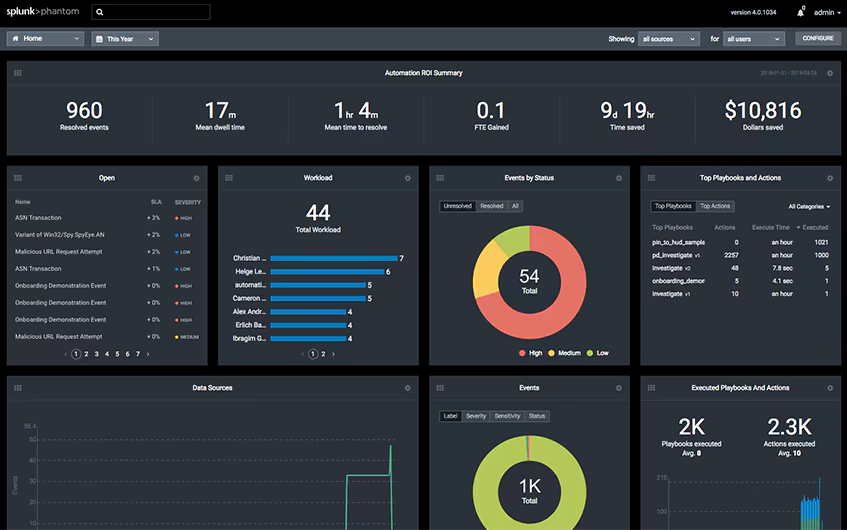
Security automation tools provide a dashboard view of incidents, response metrics, and more.
Now that we’ve established what security automation is and how it works, let’s consider some ways of knowing if an organization requires automation.
What are signs that an organization needs security automation?
Any circumstance can suggest that an organization needs to adopt, expand, or improve its security automation. The more common ways of figuring it out include:
- Increasing security breaches. Research from 2024 found that the majority of survey respondents (52%) had experienced a data breach in the past two years. While some breaches are minor and easily fixed, some can be costly and even catastrophic. The average data breach cost hit $4.88 million in 2024, a 10% increase from the previous year. Depending on your organization's resilience and health, one cyberattack could put you out of business entirely.
- Poor incident response times. If your mean time to detect (MTTD) and mean time to remediate (MTTR) incidents slow (or already below satisfactory levels), your current security apparatus needs improvement.
- Difficulty enforcing security policies. As security standards and regulations change and become more stringent, complying with them can be a real challenge. A logical next step is to employ security automation — to more efficiently ensure security compliance.
- Overwhelming false positives indicate that your organization can benefit from security automation. If your security analysts are spending their time chasing down false positives, then they’re not making the most of their time and abilities.
Of course, don’t skip the easiest thing: talking to your security teams directly — they know where and how security automation can be used. If they’re experiencing alert fatigue, handling security tasks that are routine, tedious, and time-intensive, then it’s time to welcome the change that security automation brings.
Benefits of security automation
Here are some of the ways security automation benefits organizations that use it.
Efficient threat identification and detection
How many alerts do you ignore? Companies of all sizes are ignoring up to one-third of security alerts and are spending just as much time investigating false positives. This is time they are not working on real, high-priority threats.
With security automation, organizations can detect threats faster, filter through alerts to weed out false positives and negatives, and gain enough context around every incident to begin remediation and incident response.
Reduced workload
Security automation frees up more time and brainpower for cybersecurity professionals to engage in more strategic, value-added services like deeper analysis. This is important for company health: the ROI from automation contribute directly to employee satisfaction and retention.
Streamlined SOC operations
Between the changing processes and technologies, it can be challenging for SOC analysts to maintain the standard operating procedures at work.
Automation solves this problem by implementing these SOPs across the entire security ecosystem, making it easy to adhere to (and comply with) regulatory frameworks and security controls.
Reduction of human error
Security automation helps analysts avoid errors by reducing manual processes and eliminating alert fatigue. In an automated SOC, when an analyst receives an alert, they can trust that it is real, field-tested, and requires true human effort.
Continuous monitoring
Automated security systems operate round-the-clock support for SOCs and are not subject to distractions, human inadequacies, and off days that can cripple security operations.
Security automation use cases
Here are some areas of your security operations that can be automated:
Automate vulnerability prioritization.
Generate remediation tickets.
Monitor the remediation process.
Run automated compliance checks.
Integrate compliance activities into the regular workflow.
Ensure controls operate effectively and identify issues in real-time.
Track changes in configurations, data usage, and access controls.
Identify abnormal and potentially hazardous user and device behavior.
Sift through volumes of notifications to focus on indicators of actual threats.
Additional use cases: Security automation can also be applied to threat intelligence, threat prevention, and risk scoring. However, it’s not ideal when making sensitive decisions on an organization’s security infrastructure. Critical thinking from cybersecurity professionals will have to suffice here.
(Real world case study: by automating security operations, MBSD can work agilely and focus on threat hunting. )

Splunk is an Industry Leader in SIEM
Splunk is proud to be recognized as a Leader in SIEM by Forrester, Gartner® and IDC. Download the latest Magic Quadrant to see why. Get the report →
Must-have features in security automation solutions
A security automation solution is a unified software that can holistically handle security needs across your organization. Beyond automation, some of the capabilities of such security solutions includes:
Standardized workflows
Based on a playbook, the security automation solution will know what actions to take in a particular scenario and will do so consistently, ensuring a repeatable and auditable process. Standardized actions might include:
- Deleting or quarantining suspected malware-infected files or devices from the network.
- Performing a geolocation lookup on a given IP address.
- Searching for files on a particular endpoint.
- Blocking a URL on perimeter devices.
For example, Splunk SOAR has playbooks for all sorts of use cases, including this playbook for threat investigations. This video gives more detail:
Seamless integration with other security systems
Security automation products integrate with your other security assets — including firewalls, endpoint products, reputation management services, sandboxes, directory services, ticketing systems, and SIEM — to orchestrate actions that span multiple attack vectors and require the involvement of numerous security tools.
Other examples of these security automation solutions are:
- Security orchestration, automation, and Response (SOAR)
- Endpoint detection tools
- Vulnerability scanners
- Unified asset inventory tools
- Patch management systems
- Network monitoring
How to get started: automating security operations
To implement security automation, you must establish your requirements, define use cases, and thoroughly research providers. So if you’re ready, here are a few ways to move forward with the big decision about which security automation solution to adopt.
Establish your needs first
Know how security automation can help you, what tools you need to adopt, and what processes to establish. They will all depend on the cyber risk profile and industry of your organization.
For example, retailers dealing with ransomware and phishing attacks at unprecedented levels. Automation can help clear the deck of repetitive attacks and false positives so security analysts can deeply investigate those cases and establish long-term safeguards.
Before you consider vendors, work with your IT team and other leaders in the organization to pinpoint the problems you need to solve. Here are a few questions that can drive the conversation:
- Is the security team dealing with alert fatigue? How many alerts do they receive daily, and how many can they respond to? How many are repetitive or false positives?
- What are your dwell times (the length of time an active threat goes undetected) and response rates?
- Which tasks are repeatable and well-defined? How could automation speed up the completion of those tasks?
- What are the organization's top three goals (e.g., growth, operating leanly, reducing inefficiencies)? What security priorities must you establish to help the organization meet those goals?
Define use cases
Based on your industry and organizational goals, list ways you will use security automation. Spend some time on this step because it will be critical when researching vendors that can meet your business needs and, eventually, create playbooks.
Research and select service providers
Armed with your goals, priorities, and use cases, you can begin looking for a vendor. Some things to keep in mind to help you narrow down your options:
- Ease into coding: Writing code to deploy a new tool takes time. Ideally, you want a solution that allows you to build your playbooks with little to no coding required.
- Third-party integrations and plugin support: Evaluate all your apps and tools to ensure that any vendor you choose can integrate with your existing tech stack.
- Ease of use and flexibility: Choose a cloud solution to eliminate maintenance. Find out how much customization you can do to meet your immediate and long-term needs.
- Length of deployment: For immediate ROI, speak to vendors about how long it will take to get you up and running, from configuration to integration to staff training.
- Technical support: Find out what kind of support you can expect starting from day one (e.g., 24/7 support, phone, email, or web chat).
Challenges of security automation
Adopting security automation offers benefits but comes with challenges:
Skills gap. Many automation tools rely on AI or machine learning, requiring strong technical expertise. However, the cybersecurity talent shortage often hinders effective implementation.
Cost of adoption. Security automation involves high upfront costs for tools and technologies, along with ongoing expenses for maintenance, training, and licensing.
Compliance requirements. Automated responses must align with evolving compliance standards. Managing this becomes challenging as data volume increases and regulations change.
(Related reading: automated incident response.)
Automating security: best practices
Security automation enhances efficiency, but proper implementation is key. Follow these best practices to maximize its value:
- Don’t replace or reduce the role of human expertise. Automation is excellent for executing actions but lacks the nuanced judgment of skilled security analysts. Retain experienced professionals for complex decision-making.
- Set clear priorities. Analyze your cybersecurity posture and define key issues to address. Establish use cases with input from all stakeholders to ensure alignment. This groundwork is critical for building effective playbooks.
- Adopt gradually. Introduce automation incrementally. Focus on areas with the highest immediate impact to validate use cases (like an automated playbook for low-level, routine tasks), measure effectiveness, and refine processes.
- Develop playbooks. Document and streamline current workflows before automating them. This ensures that automation integrates seamlessly with existing practices.
- Train your team. Transitioning to automation requires thorough training at all levels. Clearly define the capabilities and limitations of automation to balance human and machine roles effectively.
- Leverage free time. Use the time saved by automation for high-value tasks, such as investigating persistent threats, refining automation logic for continuous improvement, and threat hunting to inform your automated TDIR.
Keep up with the cyber landscape with security automation
Security automation is a must in today’s complex environments. Reduce your incident investigation drastically and response times and stay ahead of threats.
Tasks that could take hours — or even days — can be reduced to mere seconds. That means you’ll be able to address threats faster and better protect your customers while safeguarding your business’s reputation and bottom line.
Related Articles

Cyber Resilience Explained: Strategies, Definitions, & More

Splunk Threat Intelligence Management

The Compliance-as-a-Service (CaaS) Ultimate Guide

The Role of Behavioral Analytics in Cybersecurity

Log Aggregation: Everything You Need to Know for Aggregating Log Data

CIO vs. CISO vs. CPO: What's The Difference?

The Incident Commander Role: Duties & Best Practices for ICs

Cyber Counterintelligence (CCI): Offensive & Defensive Strategies for Cybersecurity