The Complete Guide to CI/CD Pipeline Monitoring: Metrics, Tools, and Best Practices for Delivery Visibility
Key Takeaways
- CI/CD pipelines are as critical as production environments and must be monitored to detect delays, failures, and drift before they affect users.
- Metrics like deployment frequency, MTTR, and change failure rate offer fast signals for release health, but only gain value when correlated with logs and traces.
- Standardizing, alerting, and templatizing pipeline observability through platform engineering drives reliability, speed, and scalability.
The new delivery reality: CI/CD pipelines need deep visibility
In today’s fast-moving DevOps-centric world, new application releases are delivered continuously, often with the added complexity of AI/ML integrations and evolving security requirements. Simply monitoring applications or infrastructure is no longer enough. To ensure system health and deliver a positive user experience, teams need deeper and more complete visibility into the CI/CD pipelines that power integration and release velocity.
CI/CD pipelines form the backbone of continuous software delivery, connecting development with production.
- When these pipelines are well-monitored, they enable rapid, reliable releases.
- But when they're opaque or overlooked, they become a hidden source of delays, defects, and technical debt.
In this article, we’ll explore why CI/CD monitoring is essential, the key metrics that define pipeline performance, and best practices for observability that link development workflows with operational excellence.
Why CI/CD monitoring matters more than ever
Continuous integration/continuous delivery (CI/CD) pipelines are distinct from runtime environments, but they are deeply intertwined. A healthy pipeline enables development teams to write, build, test, and deploy code and configuration changes continuously — ideally automatically — with each new commit or merge.
Problems that occur inside the CI/CD system create a ripple effect, one that often leads to degraded application performance or missed delivery timelines. Even the best-written code won't meet user expectations if it’s blocked, delayed, or misconfigured during delivery.
(Related reading: the product development lifecycle.)
Real-world CI/CD failure scenarios
Poor pipeline visibility creates significant issues, impacting release cycles and developer efficiency. These problems often fall into distinct failure categories:
Deployment delays
Slow or unstable CI/CD operations hinder rapid releases, delaying critical bug fixes. A spike in queue time can delay hotfixes during an outage, increasing Mean Time To Recovery (MTTR) and customer churn. Flaky tests causing random build failures also erode developer trust and contribute to these delays.
Test coverage issues
Without full visibility, detecting problems early is challenging. Bottlenecks like build delays or flaky tests may lead teams to skip important test cases, reducing coverage and increasing production bugs.
Technical debt in the delivery process
Technical debt extends beyond code, all the way into the release process. Lack of visibility often forces teams to rely on manual workarounds or custom scripts, quick fixes for release. Unfortunately, these ad-hoc solutions obscure failure points, making the pipeline harder to debug, scale, or improve.
For example:
- A manual infrastructure change bypasses the pipeline, introducing drift that breaks production deploys.
- A deployment script fails silently, leading to releases that never reach users despite "successful" CI results.
Reduced deployment agility
When teams lack insight into code flow, adapting to changes (e.g., switching cloud providers or modifying infrastructure) becomes slower and riskier. Visibility enables safe, confident iteration.
A quick overview of CI/CD pipeline stages
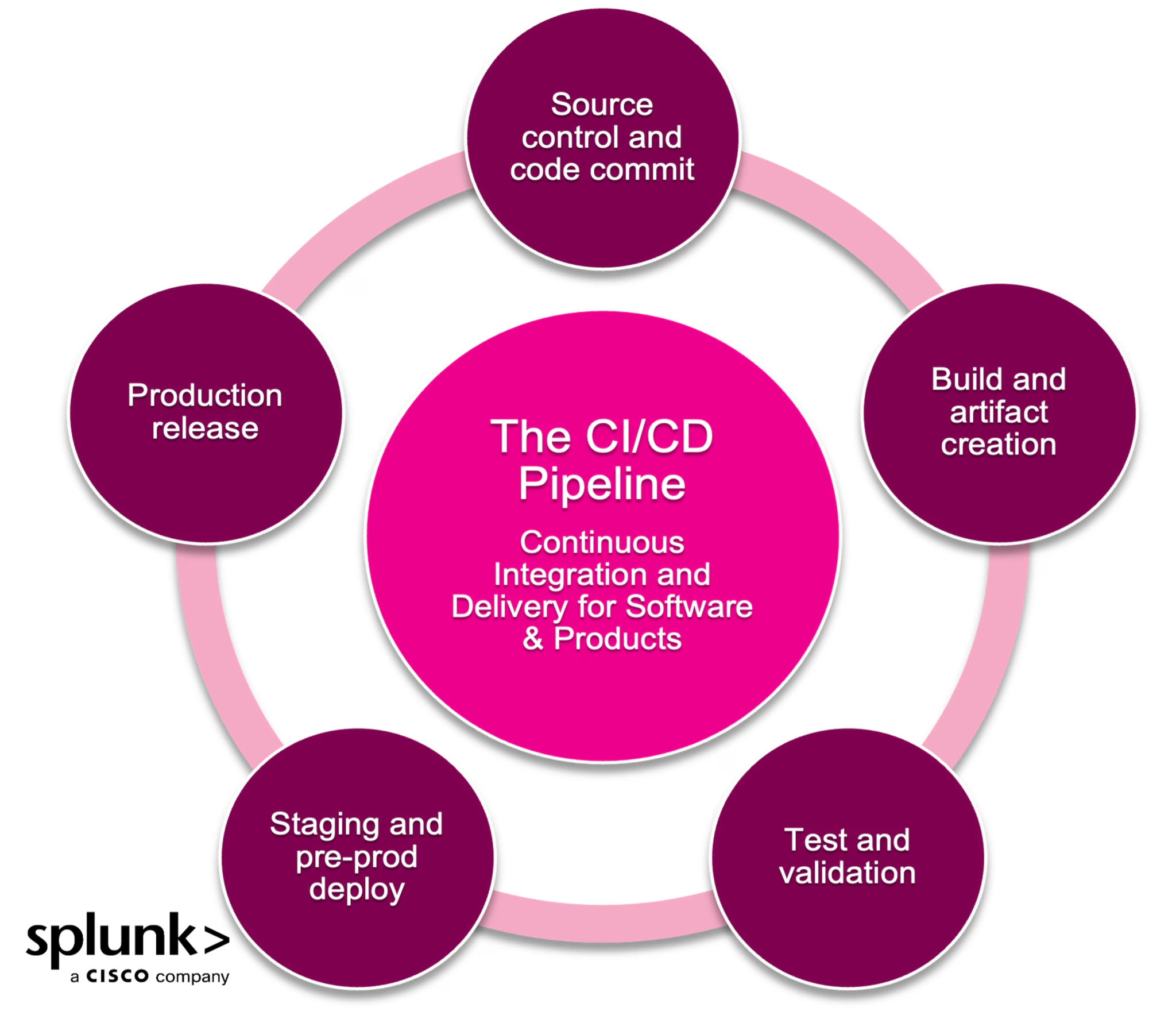
Before diving into what to measure, it’s helpful to understand the typical stages of a CI/CD pipeline. While implementations vary, most follow a common structure:
- Source control and code commit
- Build and artifact creation
- Test and validation
- Staging and pre-prod deploy
- Production release
Each of these stages is an opportunity to detect issues early, and each has distinct telemetry points worth monitoring. For a deeper dive into the CI/CD stages and how they connect, read our full guide to CI/CD pipeline architecture.
Key metrics for monitoring CI/CD pipelines
To prevent the inefficiencies and risks described above, teams must monitor CI/CD workflows as thoroughly as they monitor application environments. These metrics serve as critical signals for identifying friction, failures, and optimization opportunities within the pipeline:
- Deployment frequency: How many deployments occur daily or weekly? Higher frequency often reflects maturity in automation and team velocity.
- Deployment time: How long does a validated release take to move from code merge to production deployment?
- Lead time for changes: Once a code or config change is planned, how long does it take from implementation to successful deployment?
- Mean time to recover (MTTR): After a production issue is detected, how quickly can your team push a new release to resolve it?
- Change failure rate: What percentage of changes fail due to test issues, integration errors, or rollback scenarios?
- Queue time: How long do changes wait in the pipeline before execution? A growing queue can indicate resource constraints or inefficient staging.
Tracking these metrics gives you the foundation for CI/CD performance analysis. But the true power lies in correlating them with runtime telemetry from the applications themselves.
Benchmarks: What does a healthy CI/CD pipeline look like?
While ideal metrics vary by organization, there are industry-accepted targets that help teams gauge maturity. Here are rough benchmarks that you can adapt for your unique business and process:
- Deployment frequency: Daily or hourly for high-performing teams
- Lead time for changes: Under 1 day from commit to deploy
- MTTR: <1 hour for most incidents
- Change failure rate: <15% of releases fail or require rollback
- Queue time: Minimal, less than a few hours per change
Regularly tracking these metrics and trending them over time helps teams spot regressions and continuously improve delivery efficiency.
Correlating pipeline metrics with runtime performance
CI/CD metrics shouldn’t exist in isolation. When connected with application logs, traces, and performance data, they tell a more complete story and enable faster problem-solving. For example:
- If traces reveal a production slowdown that requires a code change to resolve, queue time and deployment time metrics will show how long users will experience degraded performance before a fix can be deployed.
- If deployment frequency is rising but application performance is declining, it may point to inadequate validation or weak automated testing in the pipeline.
Correlating CI/CD metrics with operational signals helps you pinpoint whether issues stem from delivery mechanics, code quality, or infrastructure. And that means smarter triage.
Best practices for monitoring CI/CD pipelines
Once you've implemented an observability platform that connects CI/CD pipelines with applications and infrastructure, it's important to turn that visibility into action. Strong CI/CD monitoring uncovers bottlenecks, and it also fuels faster feedback loops, more reliable releases, and better user experiences.
Here are five best practices to maximize the value of your pipeline telemetry:
- Capture key metrics in dashboards. Visualize the metrics discussed above in dynamic, contextual dashboards. Use them during incident reviews and proactively refine them to close gaps in visibility.
- Automate alerting for failure scenarios. Set up real-time alerts for slow builds, test flakiness, or failed deployments. Start with obvious thresholds, then fine-tune them based on historical data and pipeline maturity.
- Standardize environments. Consistency across dev, staging, and production environments improves test reliability and deployment predictability. It reduces “works on my machine” bugs and accelerates issue reproduction.
- Version and rebuild artifacts once. Building and versioning artifacts once, then promoting them through environments, prevents configuration drift and ensures metric consistency across stages.
- Leverage platform engineering for scale. Platform engineering teams can help centralize and templatize CI/CD pipelines and monitoring approaches. Shared internal platforms reduce duplication, accelerate onboarding, and ensure alignment across teams.
Common CI/CD tools and observability integration points
Modern CI/CD pipelines are built using a variety of tools that handle different stages of the process. Each tool provides integration points for telemetry and monitoring, which should be tapped into for full pipeline observability.
Popular CI/CD tools include:
- Code commit and test automation: GitHub Actions, GitLab CI, Bitbucket Pipelines
- Build orchestration and job runners: Jenkins, CircleCI, Travis CI
- Continuous deployment into Kubernetes or cloud environments: ArgoCD, Flux, Spinnaker
- Infrastructure-as-Code provisioning in deployment workflows: Terraform, Pulumi, CloudFormation
To create a complete picture of code-to-production health, you’ll first instrument these tools to emit logs, metrics, and traces, and then you feed that data into a unified observability platform. This visibility lets you troubleshoot failures at any stage, whether it's a broken test in GitHub Actions or a failed deployment in ArgoCD.
(See how observability as code (OaC) integrates observability directly into the CI/CD pipeline.)
The role of observability platforms in pipeline monitoring
To gain actionable insight, CI/CD monitoring must integrate with application performance and infrastructure telemetry. Platforms like Splunk Observability Cloud provide unified visibility, helping teams connect delivery metrics to runtime behavior in real time.
By using tools such as Splunk Application Performance Monitoring and Splunk Infrastructure Monitoring, teams can correlate CI/CD performance with logs, metrics, and traces across the software lifecycle. This end-to-end observability ensures that performance issues are resolved faster, before they reach users.
Security and compliance considerations in CI/CD monitoring
Observability isn't just about speed. It also helps enforce security and compliance across delivery workflows. With the rise of supply chain threats and policy mandates, it's increasingly important to monitor for:
- Unsigned or unverified artifacts moving through stages
- Policy gate violations (e.g., bypassed tests, unreviewed code)
- Secrets or credentials exposed during build or deployment
- Infrastructure drift caused by manual changes
- Audit trail completeness across environments
By integrating security-focused signals into your CI/CD observability strategy, you ensure releases are not just fast — but also safe and accountable.
Make your pipeline a performance asset
In modern software delivery, CI/CD pipelines are not tools for developers — they are core components of product and customer experience. Monitoring these pipelines with the same rigor applied to applications and infrastructure is essential for sustaining velocity, quality, and customer satisfaction.
By correlating CI/CD data with other application metrics, traces, and log analytics by using tools like Splunk Application Performance Monitoring and Splunk Infrastructure Monitoring, you put yourself in the strongest position to optimize performance and delight your users, even in fast-moving continuous delivery chains.
Ready to gain full visibility and control of your CI/CD delivery process? Start your end-to-end observability journey today with a free trial of Splunk Observability Cloud. Try it for yourself for 14 days.
FAQs about Monitoring CI/CD Pipelines
Related Articles

How to Use LLMs for Log File Analysis: Examples, Workflows, and Best Practices

Beyond Deepfakes: Why Digital Provenance is Critical Now

The Best IT/Tech Conferences & Events of 2026

The Best Artificial Intelligence Conferences & Events of 2026

The Best Blockchain & Crypto Conferences in 2026

Log Analytics: How To Turn Log Data into Actionable Insights

The Best Security Conferences & Events 2026

Top Ransomware Attack Types in 2026 and How to Defend