Log Management: Introduction & Best Practices
Key Takeaways
- Centralized and automated log management enhances security, streamlines compliance, and provides valuable insights into system activity and user behavior.
- Adopting best practices — such as consistent log formats, tiered retention policies, and secure, cost-optimized storage — improves the efficiency and effectiveness of log management while meeting compliance mandates.
- Advanced log management solutions that index, correlate, visualize, and alert on logs enable real-time operational insights, proactive issue resolution, and better-informed decision-making.
Log management is crucial for every business, big or small. Understandings logs is a critical method for resolving errors or failures.
So, what does log management actually mean? Let's explore more in this introductory guide.
What is Log Management?
Log management is the practice of dealing with large volumes of computer-generated log data and messages. Various computer systems and applications generate logs, including:
- Servers
- Databases
- Websites
- Network devices and endpoints
Logs contain valuable information about the events that take place on these systems and can be used for troubleshooting potential issues or monitoring system performance.
(Related reading: data logging & machine data.)
Importance of log management
Log management allows organizations to keep track of all activities taking place within their IT infrastructure. This can be helpful in a variety of business situations:
- Identifying security breaches.
- Troubleshooting technical issues.
- Monitoring system performance.
In addition, many regulatory bodies require companies to retain log data for a specified period as part of compliance regulations. Log management makes it easier to fulfill these requirements.
Types of logs
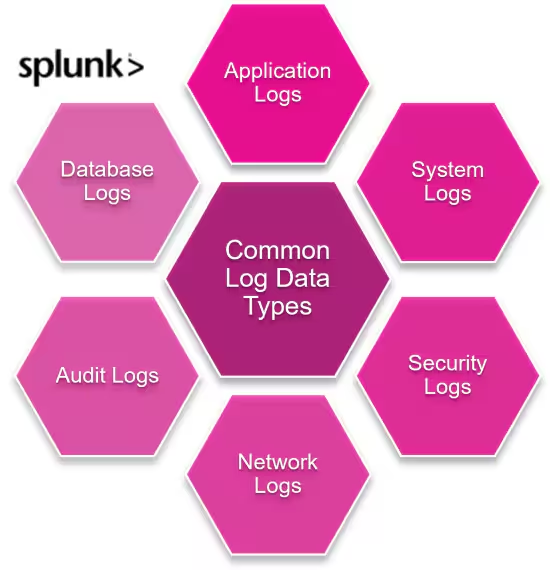
Understanding your data means you have to understand the variety of logs you might see. Each log type gives distinctive, often vital data. Here are some types of logs you may encounter:
Server logs
Server logs hold crucial data covering user activities, system errors, and other operational details. Server logs can assist in identifying performance issues, unauthorized access attempts, and suspicious activities.
Application logs
Application logs are indispensable instruments used by system administrators, offering insights into software behaviors, users' interactions, and potential issues that impact the user experience. App logs can help with:
- Identifying aberrations or inconsistencies that affect an application's performance.
- Understanding user behaviors and patterns, valuable for improving user experience.
- Troubleshooting and resolving issues in the application.
- Preserving a historical record of software activities for audit and compliance purposes.
(Related reading: application performance monitoring, or APM.)
Network logs
Network logs, which record the traffic entering and leaving a network, provide information that can help locate and identify potential issues. Network logs…:
- Contain information about server performance.
- Can help identify unusual patterns or anomalies in network traffic.
- Support the detection and mitigation of security threats.
(Read our full introduction to log data.)
Log data formats
Log data can be generated in various formats, including plain text, XML, JSON, and syslog.
Extensible Markup Language (XML) is a markup language used to store and transport data. It is human-readable, making it easy for developers to understand and work with.
JSON is another popular format for log messages that offers a more compact and efficient way of storing data than XML. They are a type of structured log existing in key-value pairs, which is more machine-friendly.
Syslog is a standard protocol for generating log messages on network devices. This format includes essential information such as timestamps, severity levels, and facility codes to help with log analysis.
(Know the differences in structured, unstructured & semi-structured data.)
The log management process
The process of managing logs typically involves the following steps:
- Log collection. The initial step is to collect all log messages from various systems into a centralized location.
- Parsing & normalization. Logs are often generated in different formats, making it difficult to analyze them. Log management tools convert these logs into a standardized format — via parsing and normalizing — for easier analysis.
- Storage. Once normalized, logs are stored in a centralized logging system where real-time analysis and long-term storage occur.
- Monitoring. Organizations can use log management tools to monitor logs in real-time, alerting them to any potential issues or security breaches.
- Analysis. Once collected, parsed, and stored, the next step is to analyze the log data for system performance monitoring, troubleshooting, or security purposes.
- Reporting. Log management solutions offer customizable reporting features, so you can create detailed reports on system activities, performance, and errors.
- Disposal. Log data is typically retained for a specified period, after which it can be archived or disposed of according to regulatory requirements or business needs.
(Related reading: log aggregation & data lifecycle management.)
Tools & technologies for log management
To help achieve proper log management, you can use certain tools to monitor, store, and analyze your log data.
One popular log management option is Splunk. Splunk starts with log management and uses that data for dozens of purposes, including security operations and overall system monitoring and observability.
Additionally, various open-source solutions provide real-time monitoring and analysis of logs. Some examples include:
- Apache Flume efficiently collects, aggregates, and moves large amounts of log data.
- Fluentd is a data collector for unifying log collection and aggregation.
(Learn more about Splunk or explore our solutions.)
Log management example: key pairs
To help you understand how log management works, let’s walk through an example for key pairs.
Let’s take string format for our log example. In this example, the data is about providing information about airline status.
WARNING:__main__:Lufthansa airlines 820 from Indira Gandhi International airport, New Delhi(DEL), India to Frankfurt International Airport, Frankfurt(FRA), is delayed by approximately 5 hours, 22 minutes
INFO:__main__:Air India flight 120 from Indira Gandhi International airport, New Delhi(DEL), India to Frankfurt International Airport, Frankfurt(FRA), Germany has departed at 12:20:18
The content is understandable and readable enough — so it shouldn’t be a problem for someone to extract important information. But if this task is assigned to a machine, how will it understand and identify the appropriate information? What if we have a collection of similar log data?
This situation requires that the logs be structured for the machines. How do we do this? Let’s begin.
Logs must be written in a different format, not in the string format that’s above. The above data will simply be stored in a dictionary (i.e., key pair values) that can be further serialized.
Let’s do this task in Python. We’ll use a Python package called a structlog package for structured logging.
from structlog import get_logger
log = get_logger("Structured Logger")
if status in ['departed', 'landed']:
    log.info(status, **flight)
elif status == 'delayed':<
    log.warning(status, **flight)
else:
    log.critical(status, **flight)
The result generated will be in the form of a dictionary. This will allow the machines to understand and extract the information and help manage the log file.
[warning ] delayed airline=Lufthansa airlines 820 delay_duration= 5 hour 22 mins destination={'airport': 'Frankfurt International Airport', 'iata': '', 'icao': '', 'city': 'Frankfurt', 'state': '', 'country': 'Germany'} flight_id=820 origin={'airport': 'Indira Gandhi International Airport', 'iata': '', 'icao': '', 'city': 'New Delhi', 'state': '', 'country': 'India'} stops=1
As you can see, key-value pairs have been created to perform queries and extract information. This is what structured logging looks like. As discussed, there can be many formats used, such as XML, JSON, etc.
In this example, we have taken a simple case of structured logging. But, in real-world scenarios, log messages can contain much more complex data and require advanced parsing techniques to extract valuable information.
Best practices for log management
Does your organization want good system performance, strong data security, and easy issue resolution and troubleshooting? They you must have good log management practices in place.
Here are some best practices for log management:
- Standardize log formats. Using a standardized format makes it easier to analyze and monitor logs from different sources.
- Review and analyze logs regularly. Logs should be reviewed regularly to identify trends or anomalies that may indicate potential issues or security breaches.
- Setup alerts. Alerts should be configured to notify relevant personnel of critical events when failure metrics reach beyond the critical threshold.
- Back up log data. Regular backups of log data ensure that it is not lost in case of system failures or attacks.
- Use unique identifiers (IDs). Unique IDs allow for easier tracking and identification of specific logs.
- Use timestamps for every event. Timestamps are crucial for troubleshooting and identifying the sequence of events leading up to an issue.
- Use clear key-value pairs. It's essential to use clear, well-defined key-value pairs for easy parsing and analysis of log data.
- Enable OpenTelemetry tracing. Perform instrumentation in the logs.
(Related reading: logging best practices for Splunk Enterprise.)
Manage logs effectively with Splunk
To wrap things up, log management is an essential practice for any organization. It enables efficient data collection, helps identify and troubleshoot issues, and contributes to overall system performance and security.
If your organization is not currently implementing effective log management practices, it's time to start. As log management is a critical aspect of every IT system, it's best to follow the best practices and use standardized log formats to ensure smooth operations.
Keep learning more about logging and other related topics on our Developer Guide, where we provide resources and information to help you develop better applications with good logging practices in mind.
Logging with Splunk
White Paper: Automated Log Search and Analysis is Your Next Employee →
Getting started with logging with Splunk:
Related Articles

What is Automated Incident Response? Benefits, Processes, and Challenges Explained

Infrastructure Security Explained: Threats and Protection Strategies

What Is Splunk? The Complete Overview of What Splunk Does

Advanced Persistent Threats (APTs): What They Are and How to Defend Against Them

Deep Packet Inspection (DPI) Explained: OSI Layers, Real-World Applications & Ethical Considerations

The Guide to Network Forensics: Importance, Tools, and Use Cases

Data Centers Explained: Types, Features, and Choosing the Right Model

IT Event Analytics: The Complete Guide to Driving Efficiency, Security, and Insight from Your Event Data