Dashboard Studio Tips: What's New in 8.2.2106
Here on the Splunk Dashboards team we take your feedback seriously. While we can't get to every request right away, we do add most requests to the backlog so we can roll your feedback into the product. In this blog post, we'll cover new features and improvements to Dashboard Studio in Splunk Cloud Platform 8.2.2106 based on feedback from you, our customers:
- UI to add data sources to inputs
- New markdown visualization in grid layout
- New view mode options for hiding the Edit and Open in Search buttons
- Improved usability around saving dashboard changes
Adding Data Sources to Inputs
Adding data sources to dropdown or multi-select inputs enables you to dynamically populate the menu items. Previously, you could only associate a data source to an input via the source code editor. As of Splunk Cloud Platform 8.2.2106, you can add a data source to an input via the UI, and select which fields from that data source should represent the label displayed in the menu and the token value.
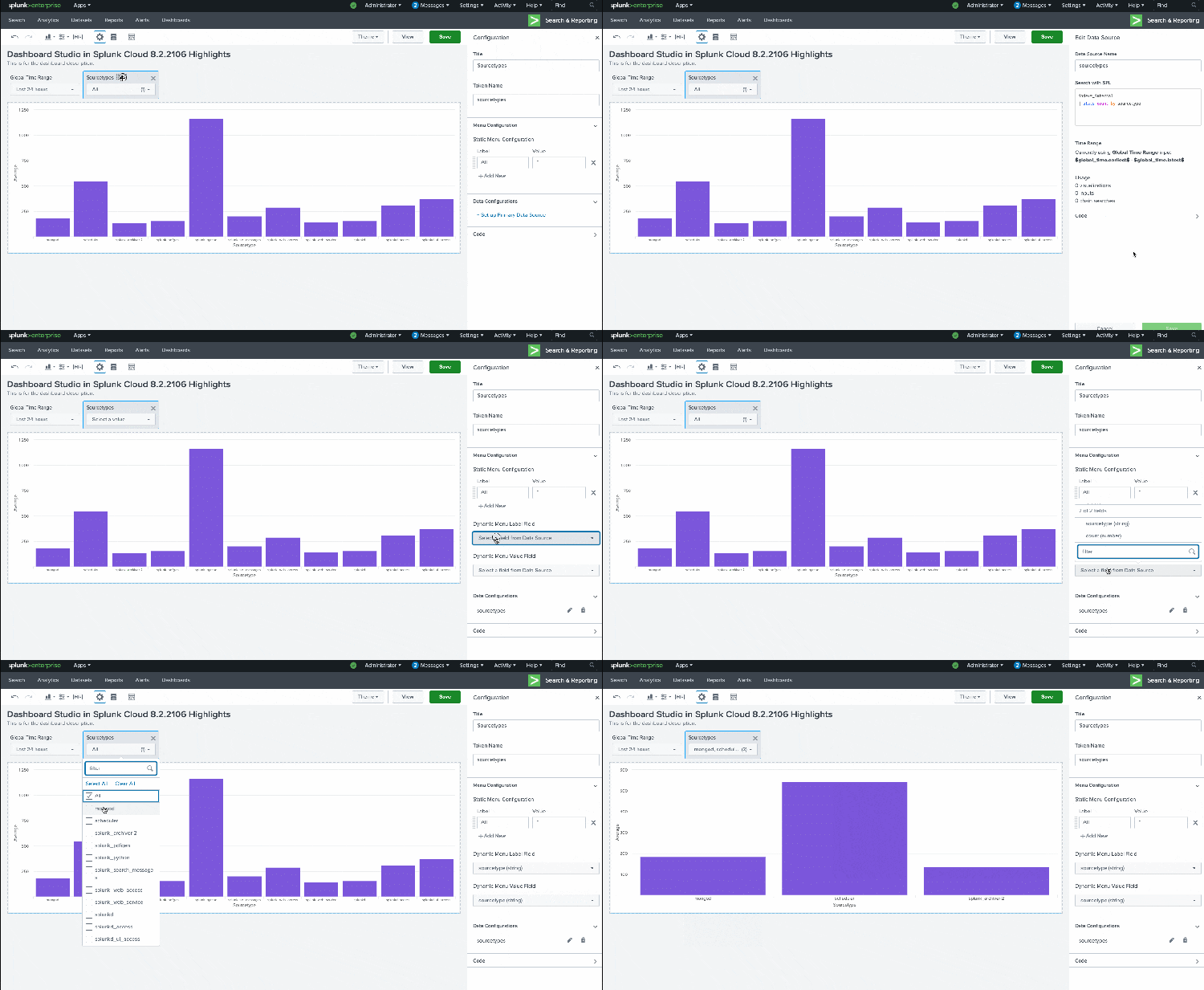
In the example above, the multi-select input is backed by a search that returns a list of sourcetypes. In this scenario, we're using the field sourcetype for both the label (what's displayed in the UI) and the value (what's set as the token value). You can use different fields for the label and value, for example, if the label was a user's first and last name, "Lizzy Li", and the value was the username, "lizzyl".
Markdown for Grid Layout

The newest visualization addition to Dashboard Studio is markdown, which you can use to add summary information or contextual details to your dashboard. It's currently only supported in Grid layout.
View Mode Options
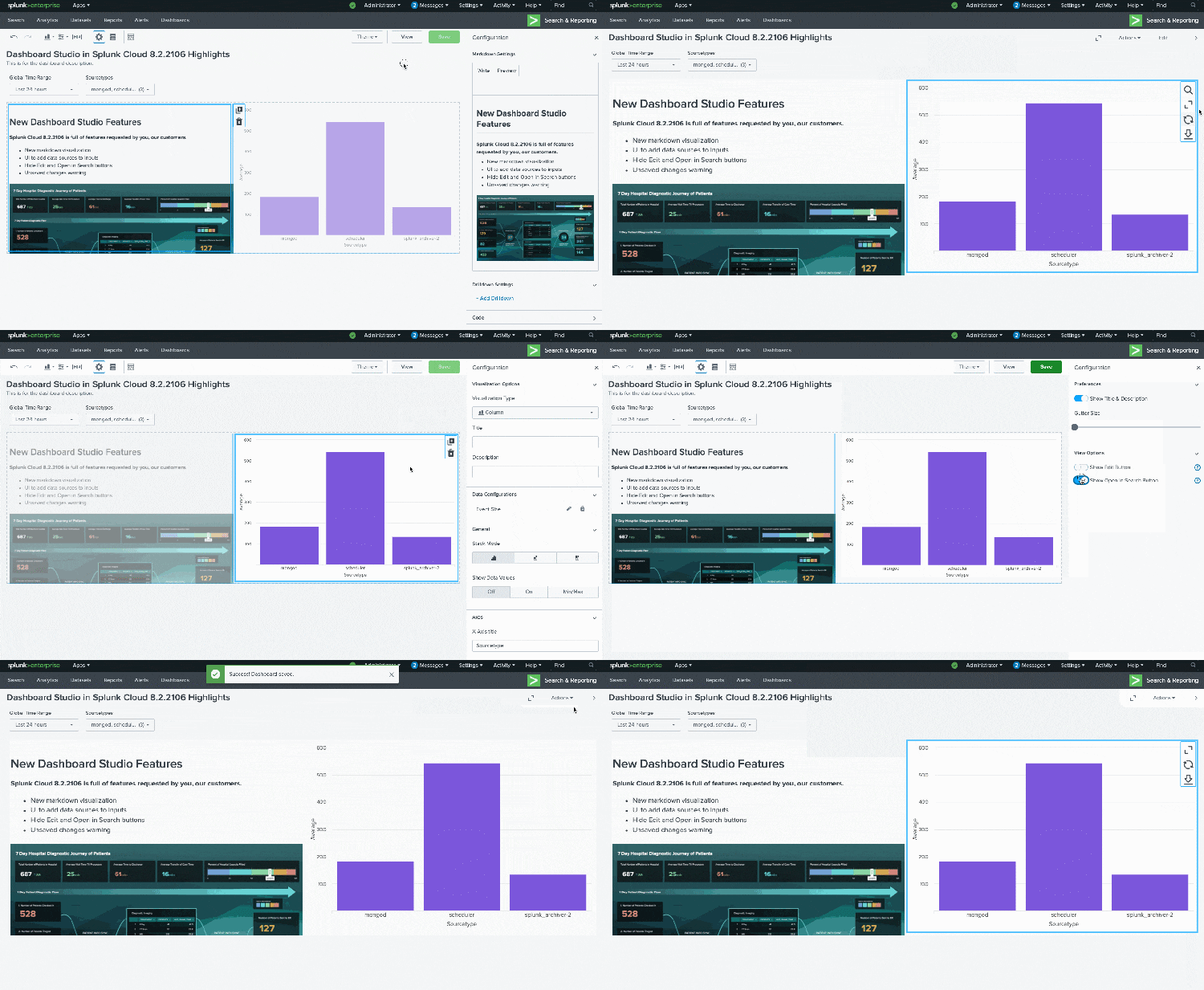
Sometimes you may want to provide a more curated dashboard viewing experience for your users, to have them focus on the visuals, and not on the editor or search bar. That is now possible with two new options we've added to Dashboard Studio to hide the Edit button and hide the Open in Search buttons.
When you toggle off "Show Edit button", it becomes hidden from the View mode. You can re-enter the edit experience from the dashboard listing page and clicking Edit. When you toggle off "Show Open in Search," all panels will hide the Open in Search button.
Unsaved Changes

If you have ever unintentionally switched from Edit to View mode without saving your changes, you're not alone. With Splunk Cloud Platform 8.2.2106, we've made it easier to make sure you don't lose your work by moving the Save button to the right side of the toolbar, and right next to the View button. We've also added a toast message any time you switch from Edit to View mode with unsaved changes, and a quick link to save your dashboard.
Coming Soon
Check out Dashboard Studio and send in your feedback, and you might see your feature request listed on a future blog's "coming soon" list! We are continuing to work on new capabilities, which are delivered incrementally with Splunk Cloud Platform and Splunk Enterprise releases.
- Ability to hide the App bar and Splunk bar
- Ability to add saved searches from the data configuration UI
- Expanded tokens & drill down support
*This information is subject to change at any time, at the sole discretion of Splunk LLC and without notice. This roadmap information shall not be incorporated into any contract or other commitment. Splunk undertakes no obligation to either develop or deliver any product, features, or functionality described here.
Helpful Resources
- Dashboard Studio Tech Talk
- Splunk Dashboard Studio Documentation
- Splunk Ideas - Dashboard Studio for feature or enhancement Requests
- Examples Hub - Find the Examples Hub from the Dashboards page in Search & Reporting
- Splunk Community - Dashboards & Visualizations for questions
Related Articles

Announcing the General Availability of Splunk POD: Unlock the Power of Your Data with Ease

Introducing the New Workload Dashboard: Enhanced Visibility, Faster Troubleshooting, and Deeper Insights

Leading the Agentic AI Era: The Splunk Platform at Cisco Live APJ

Dashboard Studio: Token Eval and Conditional Panel Visibility

Introducing Resource Metrics: Elevate Your Insights with the New Workload Dashboard

Powering AI Innovation with Splunk: Meet the Cisco Data Fabric

Remote Upgrader for Windows Is Here: Simplifying Fleet-Wide Forwarder Upgrades

Dashboard Studio: Spec-TAB-ular Updates
