Splunk AR: Admin AR Web App
Splunk AR isn't a one-trick pony with only a cool mobile AR app; rather it’s a full, integrated product suite for your workforce. This includes a Splunk AR web app that allows administrators to manage their entire AR experience at scale and all in one unified place. Let’s walk you through the major capabilities within the Splunk App for AR and how to best leverage these features for your deployment.
Asset Management
An asset is any real-world object that you want to associate an AR workspace or Splunk dashboard with. You likely manage field assets that are crucial to your workforce already. The Splunk App for AR makes it easy for you to manage your workforce’s AR experience for all of those assets. Getting started is easy, whether you need to create new asset tags or want to quickly import existing ones into Splunk. Just like other asset management solutions, you can share configurations across groups of assets to manage your fleet at scale.
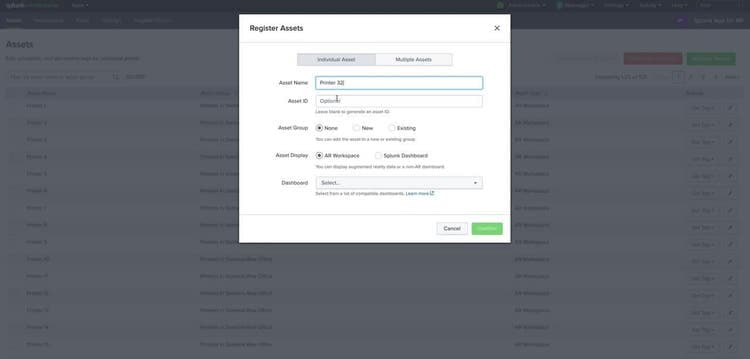
An AR workspace is an AR representation of a Splunk dashboard. Workspaces can also include objects such as notes, media files, or Phantom playbooks. Workspaces act as templates for your metadata and 3D placement information. For example, to manage an asset group of printers, you can specify a shared dashboard and create a single workspace across the entire fleet. This allows you to reuse a template for data, through the shared dashboard, and a common set of notes and media, through the workspace, for all of your printers. Using a shared dashboard across an asset group is simple, Splunk AR injects a special form input token named $ar.assetID$ and your search can easily use that to determine which asset the dashboard is populating for. With the asset management feature, you can conveniently create a single dashboard for multiple assets in your workspace.
Role-Based Access Control (RBAC)
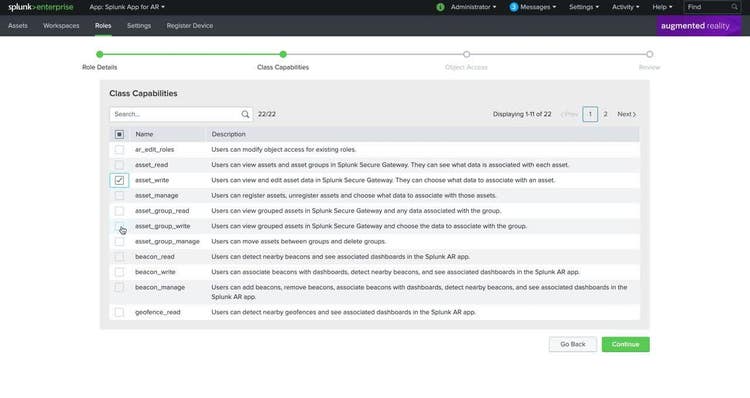
We know that it’s important to you to create an AR experience that is personalized for every Splunk user in your organization. Splunk App for AR allows you to configure user roles to grant or restrict access to specific components of your AR deployment. For example, you can limit visibility on sensitive workspace notes or media to only those that need to see it, grant write access to personnel that are directly responsible for certain assets, or provide a user role with access to entire classes of AR objects like assets, asset groups, workspaces, notes, media, and playbooks. Splunk App for AR provides an intuitive web interface for managing AR-specific capabilities across your existing Splunk user roles.
Workspace Editor
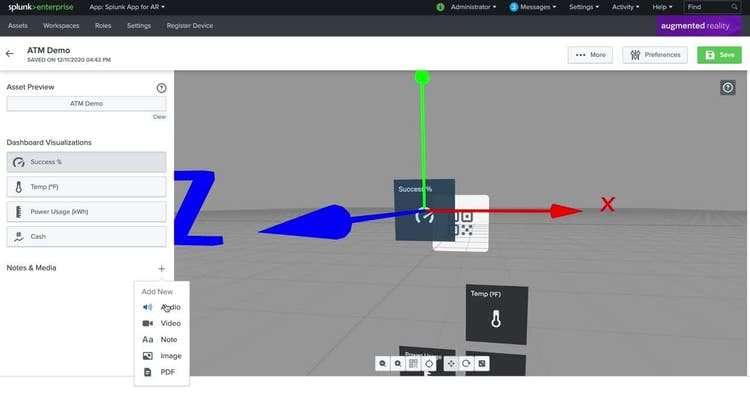
The Workspace Editor is the easiest way to manage your AR workspaces without having to use your phone. With this tool, you can rearrange, move, and resize visualizations, media, and notes for your workspaces right from your browser. The Workspace Editor is especially useful when your asset is in a remote area as it allows you to make those changes without having to be physically present.
With capabilities such as asset management, RBAC, and the Workspace Editor, the Splunk AR web app makes it easy to centrally manage and scale your AR experience for deployments of any size. In 2021, we are focused on creating an even more robust and collaborative experience inside of Splunk App for AR. Here are some next steps for you to try it out:
- Sign up for the AR Newsletter - Hear from us about new use cases and product updates.
- Splunk App for AR Documentation - Get started with Splunk App for AR.
- Reach out directly - Collaborate with us on your AR business problem immediately.
This article was co-authored by Sammy Lee, Product Manager for AR, Devin Bhushan, Engineering Manager for AR, and Jesse Chor, Head of Mobile Engineering.
----------------------------------------------------
Thanks!
Jesse Chor
Related Articles

Announcing the General Availability of Splunk POD: Unlock the Power of Your Data with Ease

Introducing the New Workload Dashboard: Enhanced Visibility, Faster Troubleshooting, and Deeper Insights

Leading the Agentic AI Era: The Splunk Platform at Cisco Live APJ

Dashboard Studio: Token Eval and Conditional Panel Visibility

Introducing Resource Metrics: Elevate Your Insights with the New Workload Dashboard

Powering AI Innovation with Splunk: Meet the Cisco Data Fabric

Remote Upgrader for Windows Is Here: Simplifying Fleet-Wide Forwarder Upgrades

Dashboard Studio: Spec-TAB-ular Updates
