Getting Started with Machine Learning at Splunk
I’m sure many of you have heard of our Machine Learning Toolkit (MLTK) app and may even have played around with it. Some of you might actually have production workloads that rely on MLTK without being aware of it, such as predictive analytics in Splunk IT Service Intelligence (ITSI) or MLTK searches in Splunk Enterprise Security.
A recurring theme during my time at Splunk — and something we often hear from colleagues who don’t work directly with MLTK — is that people are unsure where to start with machine learning (ML).
Here I’d like to take you through some of the concepts and resources that you might need to get familiar with to use MLTK in your Splunk instance. I’ll also highlight some of the new content we’re working on to help you get more insight from your data using ML.
What Makes ML Different?
Typically at Splunk, when you’re trying to analyze a dataset or find a needle in a haystack, a single SPL search is enough to get the information you need. With ML-based analytics though, you have to train an ML model first, which will subsequently be used to derive the insights you need.
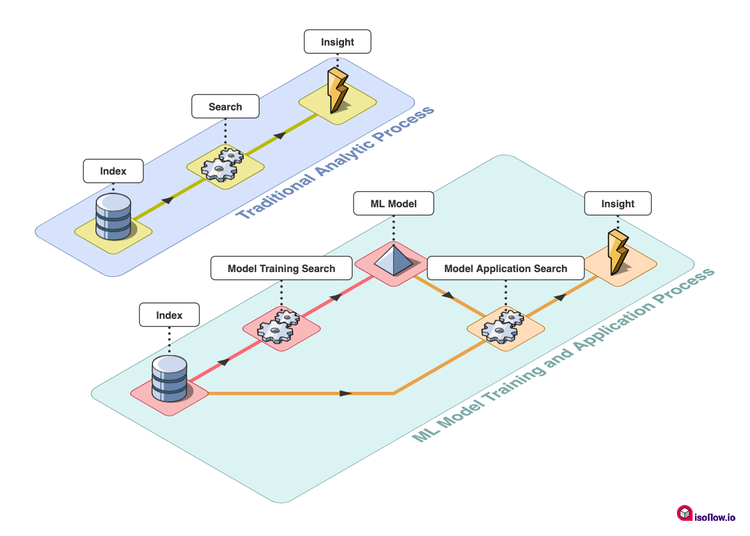
This may seem like an overly complex process compared to what you may usually do in Splunk, but it’s really no different to using lookups! If you can create a lookup from your data that you later use to enrich search results — such as generating a list of IPs from known malicious sites that you then use to trigger alerts as new data comes in — then you can use ML. In more detail, the outputlookup command performs a broadly similar function to the fit command in MLTK, with lookup having parallels with the apply command from MLTK. If you’re interested, you can learn more about exactly how fit and apply work here.
What Have We Done to Help Already?
There is a whole host of content in MLTK to help you get started. Many of the showcases that ship with the app take you through guided examples of the model training and model application process. The Experiments and Smart Assistants are there to help you develop your own ML-based analytics, all via a guided user interface that means you don’t need to know how the fit and apply commands operate.
For those who are more comfortable with SPL, however, there is a wealth of content available on our Splunk Blogs site, with long-term stalwarts like the cyclical statistical forecasts and anomalies series providing detailed SPL examples that you can copy into your own environments alongside more recent gems like a Splunk approach to baselines statistics and likelihoods on big data.
My personal favorite though is the wealth of details that we have in our .conf archives, with use cases and examples of how ML has been used to gain valuable insights coming directly from our customers.
What Are We Doing Now?
MLTK tutorials! We’ve spent a load of time recently working through the most common use cases we see for ML at Splunk and have started documenting them as follow-along tutorials to make it easy for you to pick up how particular ML techniques and analytics can provide specific insights.
The first of these is an example of how you can detect anomalies in your data ingest pipelines. This is based on a superb piece of work described by Abe in his blog here, but we thought we’d give you all of the details for how you can implement it yourself in our MLTK docs too!
You can follow along with this tutorial to:
- Train a model that estimates how much data is being generated by a particular sourcetype at a particular time of day.
- Compare this estimate to the actual data volume to calculate a Z-Score statistic, which describes how close the estimate is to the real value.
- Put all of this together in a dashboard or an alert that can help you identify periods of time when a given sourcetype is creating either too much or too little data compared to what is expected.
I’d encourage you to check out the article and try it out for yourself!
In addition to this tutorial we have also provided some content for our advanced users too. I have often been asked by customers if it’s possible to train a model outside of Splunk and bring it to MLTK. Well, we’ve now provided guidance on how to do this through extension of our ML-SPL API. Our amazing Security Research Team recently put together some content for detecting potentially malicious command line strings by first training a model outside of Splunk, then importing the trained model into MLTK—and we thought that we should share the goodness with you all!
There are three phases to bringing a model to Splunk:
- Train a model in your environment of choice.
- Encode that model so that it can be read by MLTK, noting that you may need to add a custom algorithm to MLTK as well.
- Drop the model into the lookups folder of the app you want to use it in.
Now go ahead and start bringing your pre-trained models to Splunk.
So What Next?
Well, first of all, I’d recommend that you go and download MLTK and get started by trying out the ingest anomaly detection technique that we’ve wrapped up for you in our docs. Check out this awesome Tech Talk if you want to find out about some alternative ways of detecting anomalies in your data. Keep an eye out for more of these tutorials too—we will be releasing more of them over the coming weeks and months.
I’d also encourage you to grab the latest release of the Security ES Content Update pack where you can find our pre-trained MLTK model with the new potentially malicious code on commandline analytic. If you’re feeling really adventurous, you could also try training a model and bringing it to Splunk using our docs.
I’m sure you will have also seen that .conf22 is happening a little earlier than usual this year from June 13-16. As with most years, we hope to celebrate some of our amazing customer wins with MLTK, so watch out for ML focused talks once the sessions are confirmed!
Happy Splunking!
Related Articles

Announcing the General Availability of Splunk POD: Unlock the Power of Your Data with Ease

Introducing the New Workload Dashboard: Enhanced Visibility, Faster Troubleshooting, and Deeper Insights

Leading the Agentic AI Era: The Splunk Platform at Cisco Live APJ

Dashboard Studio: Token Eval and Conditional Panel Visibility

Introducing Resource Metrics: Elevate Your Insights with the New Workload Dashboard

Powering AI Innovation with Splunk: Meet the Cisco Data Fabric

Remote Upgrader for Windows Is Here: Simplifying Fleet-Wide Forwarder Upgrades

Dashboard Studio: Spec-TAB-ular Updates
