Communicating Context Across Splunk Products With Splunk Observability Events
When an IT or Security issue impacts a development team’s software how are they notified? Is your organization still relying on mass emails that lack context and most engineers have probably already filtered out of their inbox? Communicating between siloed tools and teams can be difficult. How would you like to put IT, Security, legacy processes, and business notifications specific to development teams right into one of their most important tools? Now you can!
Send events to Splunk Observability from Splunk products such as:
In many organizations these Splunk tools are used as the basis for monitoring and alerting by Development, Security, and IT Ops teams who all may have organizationally siloed access to various Splunk products. Now, each of these tools has an integration that allows sending alerts as Events to Splunk Observability along with related field data! These sorts of events are easily overlaid on Splunk Observability dashboards, the sort of dashboards development teams look at first when attempting to troubleshoot a problem.
Issues and service interruptions caused by external circumstances can lead to lost engineering hours as dev teams attempt to troubleshoot and fix problems outside of their control. A DDOS, network issue, or cows loose in the data center could lead to lost developer hours as they troubleshoot known causes. With the additional context of events in Splunk Observability, not only can those lost hours be avoided, they can also mark the beginning and end of impacts for historical auditing or reference.
In other words, why aren’t you using Observability Events to pass context between different parts of your organization yet? Not sure how? Read on!
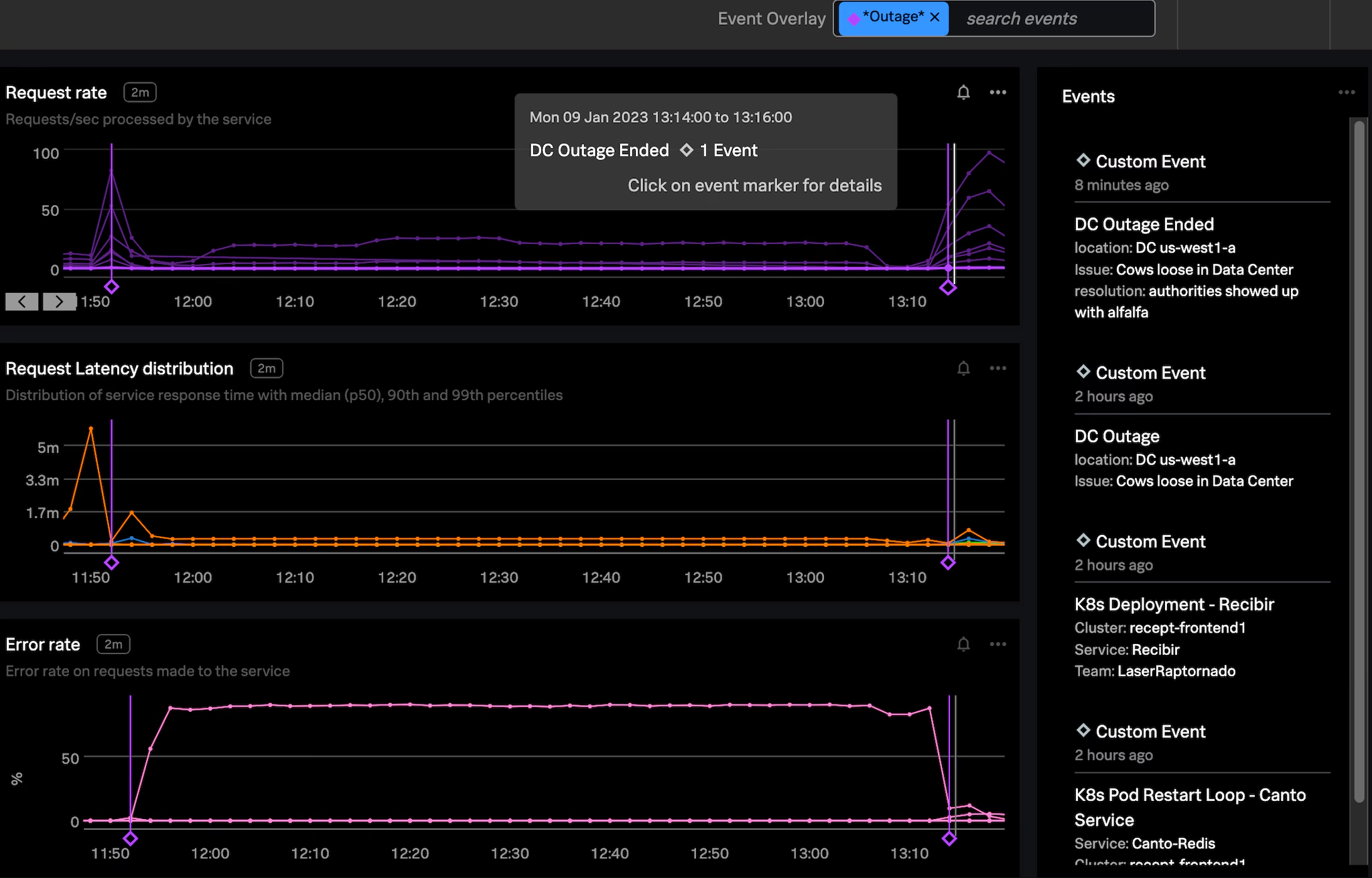
Figure 1: How would your developers know there were cows loose in a Google Cloud Datacenter? How would they establish what was impacted between the cows getting loose and the cows being removed? Event markers!
Or maybe your team just needs to get CI/CD events and fields from data logged in Splunk Cloud into Splunk Observability. This way the start, end, outcomes, build numbers, and other data related to deployments can be easily visualized and overlaid on monitoring dashboards. Really anything you can search up with SPL can be sent across to Splunk Observability including fields from matching data.
Arm Your Ops and Dev Teams With Context!
Developers are an inquisitive bunch, when they see issues with the proper functioning of their software, they are likely to investigate. But sometimes issues are caused by elements outside of development teams’ control.
A small non-exhaustive list of examples:
- External Threat Actors: DDOS identified by Splunk Enterprise Security. How do developers get notified? An email that is likely lost in a filtered inbox?
- Business Processes: Seeing an inventory issue tracked in Splunk ITSI? Are developers aware of this or are they frantically trying to identify why requests requiring inventory numbers are failing?
- Security Scanning and Remediation: Vulnerability identified in microservice configuration and auto-remediated by Splunk SOAR. Are developers aware of the remediation? Or are they looking into why a recent deployment seems to have “disappeared”?
- CI / CD: Another team has deployed bad code impacting all downstream services. Are these deployment events logged in Splunk easily identifiable by the downstream teams in their monitoring tool?
These are just a few examples where Observability Events coming from Splunk Enterprise Security, Splunk ITSI, Splunk SOAR, and Splunk Cloud can pass important contextual data to development and ops teams.
For most use cases, simply adding event markers for the starts and ends of impact are invaluable. The ability to easily visualize on your dashboards what was happening before and after a major event reduces troubleshooting time while developers establish impacts to their services, and possible related issues for After Action or Post-Incident Reviews.
For Every Product, a Solution!
Splunk products provide context and insights from large amounts of data that canbe vital to the healthy operation and development of your software. Often the teams that use these tools are only loosely connected, and access to the tools may be siloed organizationally, but the links below will detail how to quickly bring that context into Splunk Observability Cloud:
Splunk Cloud / Splunk Enterprise: Splunk holds logs for your entire organization and can be a wealth of data! Unfortunately not all employees have access to all of that data for various security and business reasons.
- You can use the Splunk Observability Event Alert Action to send important alerts and associated fields into Splunk Observability Cloud.
Splunk IT Service Intelligence (ITSI): Splunk ITSI houses our business service insights and KPIs along with incident data that may be crucial to communicate to developers in Splunk Observability Cloud.
- You can easily pass information about your ITSI KPI alerts and ITSI managed services to Splunk Observability Cloud with Alert Actions.
Splunk Enterprise Security (ES): Splunk Enterprise security is perhaps the most unknown Splunk product to software developers but contains important security context that impacts software development and software infrastructure.
- Now you can use Enterprise Security’s Adaptive Response Actions to send important events and fields to Splunk Observability.
Splunk SOAR: Splunk SOAR may be running automation that impacts your development teams. Remediations, failed builds, and other automated activities can all impact your software infrastructure. Why not automate notification of these events to development and operations teams in Splunk Observability Cloud?
- With the SOAR App for Splunk Observability (SignalFx) you can easily automate that last mile of communication.
By enabling even a single one of the products to send data easily into Splunk Observability you can unlock the potential of an incredible amount of operations, CI/CD, infrastructure, and business data. But by combining the context from each of these tools, your developers and engineering organization can unlock important details and historical analysis that may otherwise be difficult or impossible to attain.
Pulling All the Threads Together
Imagine tying together context from all of your tools into a single developer friendly interface like Splunk Observability Cloud. The diagram below pictures each of the previously mentioned Splunk tools passing along context on their part of responding to a DDOS incident.
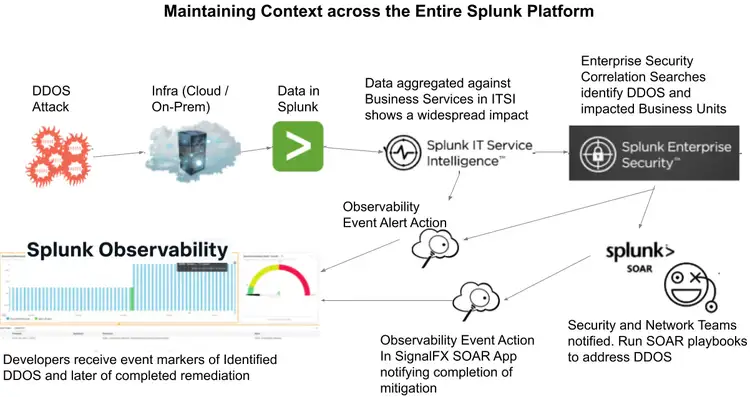
Figure 2-1: Passing context of a DDOS attack and its remediation via Splunk ITSI, Enterprise Security, a Splunk SOAR into Splunk Observability
- ITSI notices impact to business services and anomalous behavior and sends an event to Splunk Observability denoting start of impact.
- Enterprise Security (ES) correlates data in Splunk and recognizes the impact as being driven by a DDOS attack.
○ ES sends an event notifying developers of a DDOS and lets them know impacts to their service are outside of their control.
○ ES kicks off a Splunk SOAR run book which notifies network engineers and runs a SOAR playbook in an attempt to remediate the DDOS.
- Completion of the remediation run book by SOAR triggers and sends an event marking when remediation happened and hopefully marks the end of the impact.
- Developers at a glance can see the entire incident and impact bracketed by the events for start of impact, attempt at fix, and end of impact.
Because each of the products sends events to Splunk Observability Cloud, developers are immediately aware of what is going on outside of their infrastructure and software. They don’t need to waste any time trying to diagnose what the issue is. Ingestion of these events even make historical audits and post-incident reviews and root cause analyses more straightforward. Not only do the events denote important details like incident start and end, they even include details on actions performed. For any teams doing incident management, events of this type will be an important source of information and storytelling data.
Check Out the Below Example in Splunk Observability:
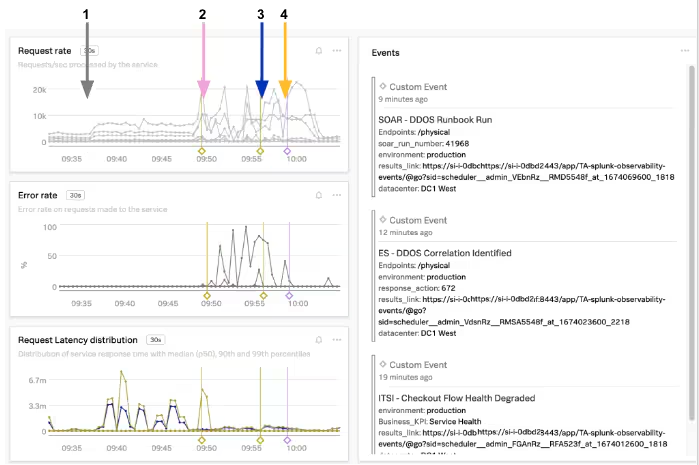
Figure 2-2: Passing context of a DDOS attack and its remediation via Splunk ITSI, Enterprise Security, a Splunk SOAR into Splunk Observability
- Likely start of impact ~09:37 as request rate increases and latency spikes occur
- 2. High request rates and a large latency spike begin to knock over services. Business impact alert from ITSI on Checkout flow sends an event to Splunk Observability.
- MTTD: We can use the above data to calculate Mean Time To Detect: ~09:50 - ~09:37 = ~13m
- Enterprise Security recognizes a DDOS on an external endpoint kicks off an event to Splunk Observability and a SOAR runbook for remediation.
- Developers can stop troubleshooting
- SOAR runbook completes ~09:59 and sends an event to Splunk Observability notifying developers of completion. DDOS traffic begins to fall off and errors subside.
- MTTR: We can use the above data to calculate Mean Time To Repair: ~09:59 - ~09:37 = ~22m
Events are a crucial element of any observability strategy and help tell the whole story of an incident and helps us understand the whole business. Without events denoting what happened, when, and where, it may be hard to establish basic facts about the functioning and malfunctioning of software environments, external impacts, or business processes. Additionally, events provide you with the ability to measure how your teams respond to those malfunctions, along with the metrics to measure improvement like MTTD and MTTR.
Next Steps
Bring together context from all of your tools! Observability events have no associated costs and can add important information to your dashboards and incident response. They’re free real estate! Enriching your monitoring data is easier than ever!
Download and install the Splunk Observability Events App from SplunkBase and try the Observability Events action in the SignalFX SOAR Connector App pre-installed in Splunk SOAR.
Not yet a Splunk Observability customer but using other Splunk products? You can sign up to start a free trial of the Splunk Observability Cloud suite of products today!
This blog post was authored by Jeremy Hicks, Staff Observability Field Solutions Engineer at Splunk.
Related Articles

Announcing the General Availability of Splunk POD: Unlock the Power of Your Data with Ease

Introducing the New Workload Dashboard: Enhanced Visibility, Faster Troubleshooting, and Deeper Insights

Leading the Agentic AI Era: The Splunk Platform at Cisco Live APJ

Dashboard Studio: Token Eval and Conditional Panel Visibility

Introducing Resource Metrics: Elevate Your Insights with the New Workload Dashboard

Powering AI Innovation with Splunk: Meet the Cisco Data Fabric

Remote Upgrader for Windows Is Here: Simplifying Fleet-Wide Forwarder Upgrades

Dashboard Studio: Spec-TAB-ular Updates
