IT Event Management Explained: Detecting, Categorizing, and Responding to IT Events
Learn Joseph NduhiuWhenever an IT service or component fails to perform as expected, or the users perceive that something isn’t right, there’s a reasonable expectation that the responsible IT team should quickly:
- Detect this issue.
- Record it.
- Analyze it.
- Take action to address the issue.
Failure to do so can result in negative impact for both the company and the people who use its services, sometimes with serious consequences.
Each year, approximately 10 to 20 high-profile IT outages or data center events globally cause serious or severe financial loss, business and customer disruption, reputational loss and, in extreme cases, loss of life. Just ask AT&T— their network outage on 22 February 2024 affected many customers including rescue services, triggering an investigation by the FCC.
The ability to quickly and accurately detect service outages and degradation is priceless: how quickly can your teams recover and return to normal?
What is Event Management in IT?
The ITIL® 4 service management framework defines an event as:
A subset of the ITIL monitoring and event management practice, event management focuses on those monitored changes of state defined by the organization as an “event”. The practice of event management, then, is all about:
- Determining the significance of a given event.
- Identifying and initiating the correct response to them.
Information about events is also recorded, stored and provided to relevant parties. Events are often used in tandem with logs, metrics, and traces: MELT.
Not everything is an Event. Yes, IT monitoring is necessary for event management to take place — however, not all monitoring results in the detection of an event. Changes of state to be treated as events are determined by thresholds and other criteria.
(Event management is a critical part of cybersecurity, including modern SIEM solutions. Learn how SIEM works.)
Types of Events
Changes of state for services and service components occur continuously in the IT environment.
Monitoring systems may generate alerts or system logs about the status of a service or component reaching a threshold or changing, for example:
- Transaction errors
- Security breaches
- Temperature warnings
To properly handle and respond to the different changes of state, it is necessary to filter and categorize the incoming information.
The ITIL 4 framework categorizes events as follows:
They provide the status of a device or service or confirm the state of a task.
They signify that regular operation is occurring.
They do not require action at the time they are identified.
A user login completed
A transaction is successful
They signify that an unusual, but not exceptional, operation is occurring.
They inform the appropriate team or tool to take necessary actions before any negative impact is experienced.
Backups not running
Free Disk space below 15%
They indicate that a critical threshold for a service or component metric has been reached.
They may indicate that a service or component is experiencing a failure, performance degradation, or loss of functionality that impacts business operations.
Network port unreachable
Error rate at 100%
Unauthorized file access
Categorizing IT Events
Event categorization focuses attention on the events that are truly significant for the management and delivery of IT services. It ensures that operational events are tracked, assessed, and managed appropriately.
Configuring alerts & thresholds
The configuration of alerts and their thresholds is a critical activity in supporting event categorization, especially when drawing the fine line between warning and exceptional events. For instance:
- If a warning threshold is set incorrectly, there may not be sufficient time to respond accordingly leading to an exception such as an outage.
- Also, what is a warning to one team may be an exception to another, hence the need to regularly review and align understanding of alert thresholds among IT teams.
Setting up a standard classification scheme for events will enable a common set of actions to be established for each grouping, which will enable different IT teams to coordinate better responses.
(Related reading: adaptive thresholding.)
IT alerting best practices
An alerting system should be characterized by:
- High reliability
- Flexibility
- Ability to generate detailed and actionable notifications
As IT environments grow in scale and complexity, the use of multiple alerting systems may give rise to the occurrence of “over-alerting” where more alerts are generated than IT can handle, potentially causing truly significant alerts to be lost in the 'alert noise'.
By investing in the right tools embedded with artificial intelligence operations (AIOps) and machine learning (ML) capabilities, the aggregation, correlation, and filtering of numerous alerts can mitigate against this risk.
See how Splunk quiets all those noisy alerts:
Event Handling Process
The event handling process consists of the following activities:
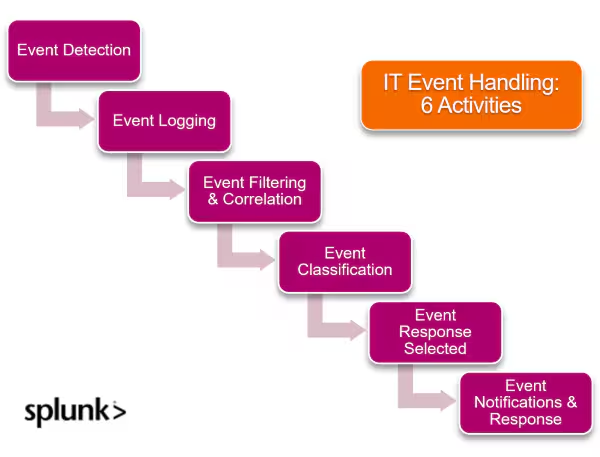
Step 1. Event detection
Detection of events is primarily conducted through monitoring systems, where event information is queried or received from:
- Configured applications
- Infrastructure
- Devices
Once an event passes pre-set thresholds and criteria related to system and transaction status, this triggers the generation of events which the monitoring systems parses in readiness for processing.
(Related reading: application monitoring, infrastructure monitoring & endpoint monitoring.)
Step 2. Event logging
Logging involves the generation of the event record in the monitoring system, in order to serve as the information reference point for handling. The record will generally include:
- A unique identifier
- Timestamp
- Name
- Status information
Step 3. Event filtering & correlation
This step is iterative in nature and involves the analysis of the event record, alongside other related records and information with a view of informing the next course of action.
- Filtering places the event into a particular subset depending on criteria such as: element affected, time, and level of significance.
- Correlation identifies any anomalous patterns that could point a finger to the event’s cause and effect.
(Related reading: IT event correlation.)
Event 4. Event classification
Here, the analyzed event is grouped according to an agreed criteria (such as priority or type) in readiness for response. The classification is informed by the earlier mentioned categories, as well as the operational context of the organization.
Event 5. Event response selected
Based on agreed rules and plans, a pre-defined event response is then chosen. In an automated set up, the response is designed to be triggered by the selection, either:
- Immediately
- After a programmed time interval
Step 6. Event notifications and response
Finally, the response is communicated to the relevant teams or stakeholders for implementation. Notifications can be sent out via common communication channels such as email, text, collaboration tools, or social media channels.
The response can involve actions that carry out a service action such as:
- Setting up a virtual instance.
- Moving failover traffic to a different network connection.
- Deploying a software feature or fix to a designated environment.
Measuring & Improving Event Management
One of the critical success factors for event management is ensuring that events are detected, interpreted, and if needed acted upon as quickly as possible.
Considering that warning and exceptional events could foreshadow a service outage or degradation, ensuring that the right event information is shared with the appropriate persons or technology is crucial in enabling preventive or corrective actions.
Part of event analytics, some related metrics you should regularly measure and review include:
- Impact of event management errors
- Number and impact of event ‘noise’
- Number of incidents and problems linked to poor event management
Improvement actions to reduce the occurrence of errors, noise, and associated incidents should be directly tied towards these metrics. Additionally, do encourage the regular review of tools and procedures to identify opportunities for improving event management.
Fine tuning of correlation mechanisms, filtering rules, and set thresholds should be a common practice for optimizing the IT monitoring tools to ensure that the event detection, filtering and correlation activities support the objectives of the event management practice.
FAQs about IT Event Management
Related Articles

Data Security Today: Threats, Techniques & Solutions

What Is Human Centric Software?