Indicators of Compromise (IoCs): An Introductory Guide
Learn Blessing OnyegbulaKey Takeaways
- Indicators of Compromise (IoCs) are forensic artifacts — such as unusual network traffic, file hashes, registry keys, unauthorized access attempts, and abnormal user behavior — that signal potential security breaches. IoCs guide detection and investigation efforts.
- Regular monitoring, analysis, and sharing of IoCs enable organizations to detect, respond to, and mitigate security incidents more effectively, strengthening overall cybersecurity defenses.
- To minimize false positives and sharpen threat-hunting accuracy, IoCs must be continuously validated, enriched with contextual metadata, and rotated out when stale.
To confirm cyberattack occurrences and build or enhance cyber-defense strategies, threat intelligence teams use a lot of information, including Indicators of Compromise (IoCs). These IoCs are actually forensic data that are critical in:
- Identifying system vulnerabilities.
- Determining how a cyber-crime was executed.
The relevance of IoCs cannot be downplayed, but they're not all that’s needed in building an effective cybersecurity strategy. In this article, we’ll explore indicators of compromise, their types, and their relevance to threat intelligence teams.
Let’s begin!
What are IoCs, Indicators of Compromise?
Indicators of compromise are behaviors or data that show that a data breach, intrusion, or cyberattack has occurred. Their presence indicates a vulnerability within a system, network, or domain. The primary purpose of IoCs are to help analyze secyrity events after they occured. Post-event analysis is an important tool during threat hunting.
In in their book, Identity Attack Vectors, authors Morey Haber and Darran Rolls describe exactly what IoCs can indeintify:
- When something is amiss in an environment
- What evidence supports the anomaly
- The root cause of the breach
Characteristics of IoCs
Experts say three conditions can define something as an IoC:
- Observability: It must display signs that a malicious event has transpired.
- Context: An artifact must fit the specific context in which the attack happened. For example, if a phishing campaign occurs, the IoCs are probabl things like suspicious URLs or suspicious email attachments — both common mediums for executing such attacks.
- Metadata: There must be additional information that helps security teams make sense of the IoC. This can include the indicator source, data, time of occurrence, and related artifacts linked to the attack.
IoCs can point you to the tools used in carrying out the attack, the different touch points the attacker or malware passed through, and the result of the intrusion.
Types of IoCs
Let's look at the three popular IoC types.
- Network-based IoCs are detected by analyzing a network’s connectivity or traffic. Across the different components of a network, we can find malicious data that constitute IoCs. Network-based IoCs could be malicious domain names or suspicious IP addresses.
- File-based IoCs are attached to files found within a host system. They could be hash files, file names, or file paths.
- Behavioral IoCs are found by observing patterns within a system or network that indicate malicious activity. Behaviors like unusually high traffic to a site and repeated failed login attempts could be flagged as IoCs.
Importantly, the challenge of detecting various types of IoCs and the consequences of detecting them differ depending on the adversary. The Pyramid of Pain illustrates the difficulty and impact levels across IoC types. The concept was developed by threat expert David Bianco in 2013. Bianco explains its origins:
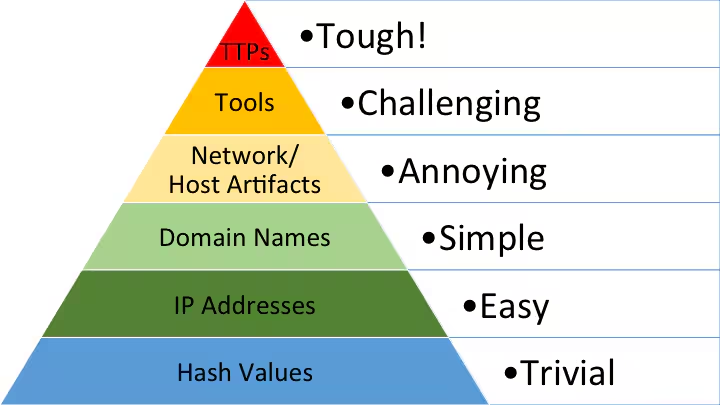
Think of the Pyramid of Pain as a framework for "the effective use of Cyber Threat Intelligence in threat detection operations, with a particular emphasis on increasing the adversaries' cost of operations."
Examples of IoCs
IoCs come in several forms. Here are some of the more common IoCs known to the cybersecurity community:
Abnormal outbound network traffic. A high or unusual amount of traffic from your server could be a sign of command and control (C2) communication. This could be traffic from an internally compromised system to an external C2 communication center.
Importantly, this could indicate the presence of malware or data exfiltration — with data loss the major consequence of this IoC.
Large number of unsuccessful login attempts. Unsuccessful user logins are a daily occurrence. In certain instances, however, these failed logins indicate a malicious character using fake credentials to log into a system. The reasons could be to:
- Take over a specific user account. (Fraudsters often adopt this approach on victims.)
- Compromise a larger system in general.
Activity from an unexpected location. Be suspicious of network activities from a region your system is not used to. Often, real hacking attempts come from unknown locations or faked/changed IP addresses.
Unexpected software update. An unexpected software update that happens without authorization from system administrators indicates a breach in a system’s security.
An attacker may implant an unusual application that, if not eliminated, will execute malicious code through a software update.
Suspicious registry changes. The Windows registry houses sensitive information like:
- Configuration settings
- Options for operating system and applications
Constant registry modification potentially signals an attacker creating a system for executing malicious code.
HTML response sizes. You can use HTML response sizes to weigh information from a web server during online interaction. A higher-than-usual HTML response size is a red flag, since it could indicate data exfiltration or malicious code hidden within an HTML response.

Increase in database read volume. Frequent access to a database that spikes up its read volume could indicate an unauthorized attempt to access and extract sensitive data — like financial data or customer records — from a database.
Geographical irregularities. Network traffic from IPs belonging to a different country with no business relevance can be a sign of malicious activity. Similarly, a huge amount of outgoing traffic to a country where your organization has no business can indicate exfiltration.
Login attempts from a different location than the legitimate user's location can indicate that someone is trying to access the account. If you see multiple failed login attempts, then it could indicate a brute-force attack.
Unusual DNS requests. DNS requests involving malicious domains can indicate that a system has been infected with malware. High amounts of DNS queries could be a sign of data exfiltration and communication with command and control servers. Attackers can also use DNS tunneling to bypass security measures.
(Related reading: DNS security.)
Comparing indicators: IoCs vs. IoAs
In threat intelligence, IoCs are one of the two indicators that allow security administrators to know if a breach has happened or is occurring. The second indicator type, is Indicator of Attack.
- Indicators of attack (IoAs) are behaviors or patterns used to identify a cyberattack that is in progress. An IoA identifies the intent and the techniques used in carrying out malicious activity on a system or network. So, the state of the attack is the most significant difference between the two concepts. If the attack is still ongoing at discovery, it’s an IoA.
- In contrast, where IoAs reveal a potential attack in progress, IoCs are used for a thorough post-attack investigation.
Imagine a scene where you catch a rat attempting to steal cheese, or you’re drawn to a noise at your door, indicating a burglar is trying to break in. IoAs are digital versions of this behavior that you can use to checkmate a cyberattack while it’s happening or even to capture a hacker on the spot.
Although both indicators are essential, some significant differences can help you identify and classify the two. These differences are:
Time-based indicators
- IoAs provide timely, dynamic information for handling cyberattacks and data breaches. Identifying an IoA often means you can still salvage a situation before it escalates.
- IoCs are more lookbacks at evidence, like looking at CCTV recordings of a crime after the criminals leave a physical space. They hint at what’s responsible for the attack and how it occurred.
Proactive vs. reactive
- IoAs empower you with just enough information to shut down an attack before the situation worsens. This immediate action means less damage to clean up and hopefully fewer losses.
- The post-event analysis nature of IoCs only allows you to respond to a crime after it has been carried out.
Nature of data
- IoAs are not described as forensic information but are instead patterns and techniques that hint at an ongoing event. This means they're unpredictable and can change based on the intent of the malware or the goals of the attacker.
- IoCs are usually confirmed data and have a format that can be classified and compared to past information. They're considered static and easier to work with.
Importance of IoCs in threat intelligence
WIth our understanding of IoCs, let's now look at the major benefits organizations and threat intelligence teams gain when studying IoCs:
IoCs forestall future attacks. Most IoCs have a stable format for security teams to create a database of attacks and integrate the information into tools that automatically identify and eliminate malicious tools from the system in the future. There are several reports and cyber communities which regularly disseminate the IoCs found in their systems, in the interest of helping others defend against similar attacks.
A real-life example is when CISA, America’s cyber defense agency, sent an alert on the FBI’s flash report of IoCs associated with a popular ransomware attack group called RagnarLocker, to warn organizations of the group’s intended attack on cyberspace.
IoCs help build effective incident response plans. Familiarity with the mode of entry of cyberattacks and their impact can help you formulate an effective incident response plan. Your analysts won’t be left in the dark — they’ll work with tangible information they can use to anticipate or even counter cyberattacks.
IoCs support threat hunting. Since IoCs fall under threat intelligence in cybersecurity, they're a great starting point for a security audit or threat hunt — providing tangible evidence of what’s amiss and often leading to detailed information on how an attack was carried out.
IoCs enhance the overall safety of the cyberspace. Organizations sometimes make public their knowledge of past and existing IoCs. This information helps more organizations improve their cybersecurity.
Also, sometimes IoC alerts come with detailed recommendations for preventing cyberattacks, and the best incident response strategy for preventing a cyber crisis from escalating and penetrating other networks. For instance, following the cyberattack on the Chile bank regulator, they promptly shared the IoCs that were discovered in their Microsoft Exchange server. The aftermath of this was an updated Microsoft MSERT tool for prompt detection of such IoCs.
How to identify and handle IoCs
Identifying and responding to an IoC involves the following:
Flag and investigate artifacts with suspicious qualities
Look for artifacts with similar qualities to the ones highlighted in the previous section. If something feels off about the data, pause and investigate. With cyberattacks, the principle of “better safe than sorry” always applies.
Install tools for automatic checks
Anti-virus and anti-malware tools can help detect and eliminate malicious agents identified as IoCs from your system. However, even with sophisticated tools, keep in mind that zero-day attacks can go undetected from these tools and wreak havoc. (Zero days are new attacks that are unknown to the software, hardware, and security community.) So, do not rely exclusively on these tools, you'll certainly miss important activities.
Keep up with trends and reports
Know what's happening in the cyber world. Read and follow trends and reports on IoCs from reliable sites with public IoC information sources like:
- VirusTotal
- Onyphe
- Any.run’s malware trends tracker site
- Malware information sharing platform (MISP)
- AlienVault OTX
- BlackBerry Threat Research & Intelligence Team Public Git
Also, an in-house database of recognized IoCs can be integrated into your monitoring tools and security information and event management (SIEM) solution.
Rely on employees to help identify IOCs
Employees can be of great help in identifying IoCs if trained well. Train your teams and employees to recognize and report any unusual or suspicious activity. This includes but is not limited to unexpected emails, unusual login attempts, or strange network or system behavior. Employees should have clear guidelines and should be aware of the process to follow when they identify an IoC and report to the relevant stakeholders.
Eliminate the threat once an IOC is identified
This simple outlines shows how to eliminate a threat that an IoC identifies:
- Contain the threat. Containment may include isolating the system or network, disabling accounts, blocking traffic, etc.
- Investigate the root cause and the impact of the threat. Use log data such as logs, network traffic, and system files.
- Eradicate the threat by following the relevant remediation process. This may include removing malicious files, updating access controls, resetting passwords, applying patches to fix vulnerabilities, etc.
- Test thoroughly to ensure the threat was eradicated. Upon confirmation, you can integrate the system or network segments back into the network.
- Continue monitoring for suspicious activities to catch any threats that you might have missed.
Best practices for better security
As always, here are best practices for any cybersecurity strategy.
Monitoring and detection: Implement tools like SIEM, XDR, IDS, IPS, and firewalls for continuous monitoring to detect threats early and allow real-time responses by security teams.
Access control: Restrict access to critical systems and sensitive data based on the principle of least privilege. Regularly review and update access controls to minimize insider threats.
Vulnerability management & patch management: Regularly assess systems for vulnerabilities and apply security patches. Automate patch checks and notify stakeholders to prioritize updates.
Backup and recovery: Regularly back up data, encrypt it, and store it in multiple locations. Test recovery procedures to ensure data can be restored in case of a breach.
Incident response plan: Develop and train stakeholders on an incident response plan. Run regular drills, update the plan after incidents, and incorporate lessons learned.
Security awareness: Provide ongoing training to employees to help them identify and report threats, and encourage good cybersecurity practices.
Cyber defense goes beyond IoC detection and management
Cyber defense teams have much to gain from knowing how to fish out IoCs and handle the aftermath of attacks. However, they’ll need to do more to survive the intense onslaught of cyber criminals on today’s web.
IoCs don’t provide foolproof guidelines, but they hint at how we can avoid similar attacks in the future. Relying solely on massive reports about IoCs or blindly integrating safeguards into your system can potentially cause more harm than good — whether in the form of false positives, or a false sense of security.
While IoCs are incredibly important, a multi-faceted approach to security is still the best approach. Factoring in aspects of cyber intelligence IoCs and IoAs while threat hunting, keeping up with reports in the cybersecurity space, and leveraging AI and machine learning technology are all crucial aspects of forging a safer cyberspace.
FAQs about Indicators of Compromise (IoCs)
Related Articles

The Software Engineer Role: Skills and Responsibilities Explained

Exploit Kits: Explained