What Are Cron Jobs?
Learn Leanne MittonKey Takeaways
- Cron jobs automate repetitive tasks on Unix-based systems: They are scheduled using the cron utility and are commonly used for tasks like backups, log rotation, and system maintenance, saving time and reducing manual effort.
- The cron syntax provides flexibility and precision: With five fields specifying minute, hour, day, month, and day of the week, cron jobs allow users to schedule tasks at virtually any interval, from minutes to specific days of the year.
- Splunk can monitor and troubleshoot cron jobs: By ingesting cron-related logs, Splunk helps identify issues, optimize performance, and ensure that scheduled tasks run as intended, improving system reliability.
Automation is transforming our lives, from the simple routine of our coffee maker brewing our morning cup at precisely the right time to sophisticated smart home systems that adjust everything from temperature to lighting, based on our habits.
These automations streamline our daily activities, making routines more efficient and our lives a bit easier. Similar automations are hard at work in our digital environments.
What are cron jobs?
Cron jobs are unattended programs that schedule tasks automatically on computer servers, ensuring that important, routine digital chores get done without us having to lift a finger.
Typically used on Unix-like operating systems, the backbone for many servers, cron jobs automate system maintenance and administration tasks, such as backups, updates, or cleaning up files.
- Imagine never having to remember to manually back up your data or update software again.
- Never forget a task, whether it’s daily, weekly, or monthly. Cron jobs execute tasks precisely as scheduled, ensuring nothing falls through the cracks.
- Make better use of your resources and energy within your team to increase productivity and reduce operational costs, as your systems perform optimally without constant manual intervention.
Curious about the term “cron job”? In Greek, cron means time.
Cron job components
To understand how cron jobs function, let's use the analogy of a gardener who takes care of various tasks in a garden according to a pre-defined schedule.
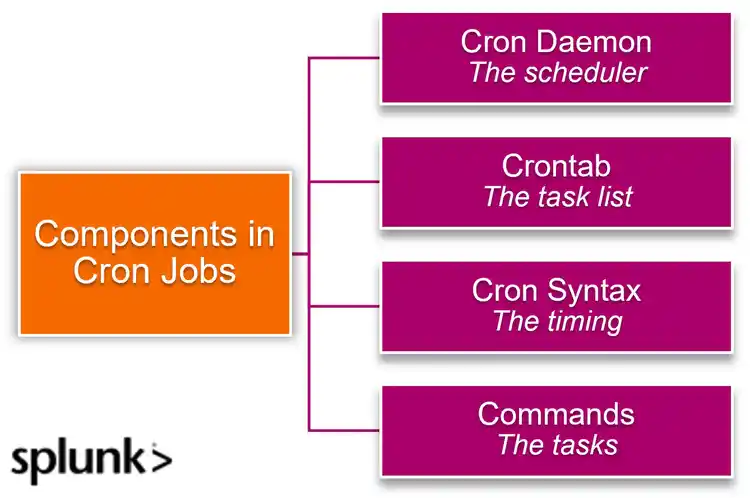
Cron Daemon (The scheduler)
Each morning, the gardener checks their wall calendar to see what needs to be done that day. On a computer, the cron daemon is a background program that regularly checks the crontab to see if there’s any task that needs to be executed at that minute.
Crontab (The task list)
From the wall calendar, the gardener creates a detailed planner for the day ahead, with the task to complete and the time to start the task. A crontab works the same way, with each line consisting of a timing and a command.
- The timing dictates when the task should occur.
- The command specifies the task itself.
Cron Syntax (The timing)
This is similar to the gardener's specific instructions, like "every Sunday at 7AM." The cron syntax in the crontab serves this purpose, detailing the exact times for tasks using fields for:
- Minutes
- Hours
- Days
- Months
- Weeks
This ensures that the tasks are carried out regularly and precisely when needed.
Commands (The tasks)
The commands in the crontab are the actual tasks our gardener performs, such as watering the roses, trimming the hedges, or applying fertilizer. In cron job terms, these commands could be scripts or programs that perform:
- Backups
- Batching
- Updates
- Other automated tasks
These tasks are the hands-on work that gets done according to the schedule noted in the crontab.
Common uses of Cron Jobs
Now let’s look at specific areas that cron jobs are especially valuable.
Database backups
One of the most critical tasks for any server is ensuring data integrity and availability. Cron jobs are extensively used to automate the backup of databases at regular intervals.
For instance, a cron job could be set to back up a server's database every night at 2 AM. This ensures that the latest data is always stored safely without manual intervention, similar to an automatic save feature that protects against data loss.
Log file management
Servers generate log files that are vital for monitoring and diagnosing issues. However, these logs quickly consume significant disk space.
Cron jobs help by automating the compression and rotation of log files weekly or even daily. This keeps the server clean and prevents it from running out of disk space, much like regular housekeeping to keep things orderly and functional.
(Related reading: log management & logs versus metrics.)
System updates & patches
Keeping a server's software up to date is crucial for security and performance. Cron jobs automate the process of checking for and applying system updates and patches. By scheduling these updates to occur during off-peak hours, such as early morning, the system ensures minimal disruption to services while maintaining high security and functionality standards.
(Related reading: patch management.)
Monitoring system health
Cron jobs can be set up to monitor various aspects of server health, including:
- Disk usage
- System loads
- Resource utilization
These tasks can be scheduled to run every few minutes or hours, providing regular health checks. This is similar to having routine check-ups that ensure everything is operating smoothly, and if something is amiss, it can be addressed promptly.
(Related reading: server monitoring.)
Automating reports & notifications
Servers often need to generate reports on traffic, performance, security, and more. Cron jobs can automate the generation and delivery of these reports to system administrators or other stakeholders.
Additionally, they can be configured to send notifications in case of server errors or other critical events, ensuring that the right people are informed immediately to take necessary actions.
Cleaning temporary files & directories
Over time, servers accumulate temporary files and directories that can degrade performance. A cron job can be scheduled to clean up these unwanted files on a regular basis, maintaining the server’s efficiency and ensuring it runs smoothly without unnecessary data clutter.
By leveraging cron jobs for these tasks, server admins can automate routine but crucial processes, reducing the need for constant manual oversight — and, ultimately, enabling a more efficient, reliable server environment.
This automation not only saves time but also enhances the stability and security of the server infrastructure.
(Related reading: IT infrastructure.)
Security best practices for cron jobs
When deploying cron jobs, maintaining robust security is crucial to protect your systems. Here are streamlined security measures you should consider:
- Minimize privileges and secure access. Run cron jobs with the least privilege necessary and avoid running them as the root user unless absolutely required. Ensure that only authorized personnel can edit the crontab files. Store scripts securely — where unauthorized users cannot alter them.
- Use absolute paths and regular audits. To prevent path hijacking, it's best practice to use absolute paths in commands within your scripts. Also, regularly review and audit scripts for security flaws and monitor cron job logs for unexpected behavior or errors.
- Implement error handling and secure communications. Design scripts with robust error handling to prevent unintended actions on failures and ensure error messages do not expose sensitive information. Use secure protocols like HTTPS and SFTP for scripts that communicate over networks to protect data in transit.
- Validate inputs and monitor activities. Sanitize any external inputs to scripts to prevent injection attacks. Set up alerts for unusual cron job activities to quickly address potential security issues.
By adopting these practices, you can enhance the security of your cron jobs, making them safe and reliable tools for automating tasks within your digital infrastructure.
(Related reading: security automation & robotic process automation.)
Final thoughts
Cron jobs are invaluable tools for system administrators, automating a plethora of routine tasks to ensure smooth and efficient server operations. From database backups to system monitoring and updates, these scheduled tasks save time and bolster reliability.
By following security best practices, SysAdmins can safeguard their systems against vulnerabilities and unauthorized access. Ultimately, the strategic use of cron jobs enhances server performance, uptime, and security, making them indispensable for robust IT infrastructure management.
Happy automating!
FAQs about Cron Jobs
Related Articles

Four Database Types You Need to Know

What are Cloud Service Providers (CSPs)?