/en_us/blog/leadership/splunk-by-cisco-brings-agent-roi-to-aws-marketplace

Splunk Blogs

Observability

Artificial Intelligence

Cisco Data Fabric

Latest Articles

Search Command>
Tips & Tricks
1 Minute Read

Search Command>

Over the day in the life of a Splunk user, he or she probably utilizes less than 50% of the available Splunk commands. It may be that the most popular commands such as stats, transaction, eval, top, timechart, chart, etc are already sufficient enough to do the types of manipulation and reporting that is required for the use case.
Using Bootstrap Modal with Splunk Simple XML
Tips & Tricks
1 Minute Read

Using Bootstrap Modal with Splunk Simple XML

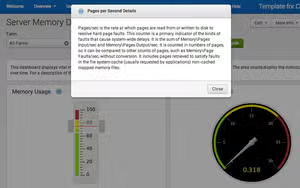
While working on a performance dashboard recently, I wanted an area to further explain the performance metric currently being displayed without taking up too much screen real estate. In the end, I ended up using a Bootstrap modal dialog to display the metric details when a user clicks an information icon. Here is the end result:
Add a Tooltip to Simple XML Tables with Bootstrap and a Custom Cell Renderer
Tips & Tricks
1 Minute Read

Add a Tooltip to Simple XML Tables with Bootstrap and a Custom Cell Renderer

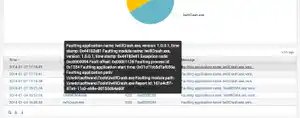
Since a lot of Bootstrap is built right into Splunk 6, adding a little JavaScript allowed me customize the display to show the “Message” field when hovering over some text or icon.
Monitor Processes Per User on Microsoft Remote Desktop Services Session Host
Tips & Tricks
1 Minute Read

Monitor Processes Per User on Microsoft Remote Desktop Services Session Host

Microsoft Windows Remote Desktop Session Host (formerly Terminal Services) hosts multiple users on the same Windows Server Operating System.
Comparing week-over-week results
Tips & Tricks
1 Minute Read

Comparing week-over-week results

Comparing week to week data is no longer a pain in Splunk. A new search command does that all for you and makes tracking this data easier.
Decoding IIS Logs
Tips & Tricks
3 Minute Read

Decoding IIS Logs

Everyone (just about) knows that there is a table of status codes that HTTP/1.1 defines. However, IIS gives you two more status codes in the log files. The HTTP/1.1 status is stored in sc_status (and it is automagically decoded for you in Splunk 6). There is also an extended code called sc_substatus and a Win32 error code. How can you really decode these, especially since the sc_win32_status seems to have really large numbers?
Adventures with SNMP and Cisco Nexus (Part 1)
Tips & Tricks
5 Minute Read

Adventures with SNMP and Cisco Nexus (Part 1)

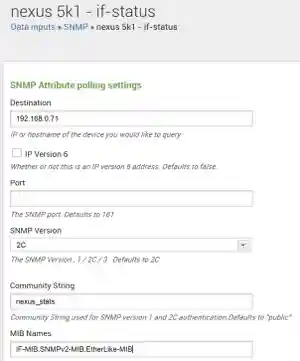
What to do to get data switches to Splunk by using the SNMP modular input.
Splunking Windows PowerShell Commands
Tips & Tricks
2 Minute Read

Splunking Windows PowerShell Commands

This years user conference was another great conference and we got a ton of questions from you during the conference. Some of them I couldn’t answer at the time – I’m making up for that in between blog posts about new features. The first one was “Is there any way I can splunk what PowerShell commands are being executed on a server?”
Pivot a Single Row Table with a DataTemplate View
Tips & Tricks
1 Minute Read

Pivot a Single Row Table with a DataTemplate View

PowerShell has some cool object formatting features. Two of the most common are called Format-Table and Format-List.