Take the Guesswork Out of Collector Configuration with Collector Configuration Builder
Observability Courtney GannonKey takeaways
- The Collector Configuration Builder from Splunk Observability Cloud makes it easier to set up data collection pipelines without writing complex configuration files by hand.
- This tool helps teams avoid common setup mistakes, saving time and reducing errors before deploying their telemetry pipelines.
- Splunk's new builder gives teams more confidence and control over their observability setup, from initial configuration through final deployment.
Configuring the OpenTelemetry Collector is a powerful way to control what telemetry you collect, where it goes, and how it is processed. But for many teams, editing Collector configuration files by hand can be time-consuming, error-prone, and hard to validate before deployment. That’s why we’re introducing a new guided configuration experience for the OpenTelemetry Collector.
Introducing the Collector Configuration Builder.
This new feature provides a visual way to build, review, and export Collector configuration files without starting from a blank YAML file.
With this new experience, users can more easily configure receivers, processors, and exporters, understand how their pipelines are structured, and generate valid configuration files that are ready to copy, download, validate, and deploy.
Why This Matters
As organizations expand their observability practices, they need more control over telemetry collection. Auto-discovery helps simplify initial setup, but teams often need to go further: adding more receivers, adjusting advanced settings, controlling which metrics are collected, or tailoring pipelines for specific environments.
Traditionally, that means manually editing Collector YAML files and cross-checking documentation to make sure every field is correct. Small mistakes can lead to validation errors, broken pipelines, or unexpected telemetry costs.
The new Collector configuration experience helps reduce that friction by making configuration more guided, visual, and predictable.
The new experience helps customers:
- Start from a default or existing YAML file and visualize current Collector pipelines.
- Configure receivers, processors, and exporters through guided forms instead of manual YAML edits.
- Reduce errors with required-field guidance, hidden optional settings, and redacted sensitive values.
- Generate valid YAML that can be copied, downloaded, validated, and deployed.
- Build and review configurations with greater confidence in a structured workflow.
How It Works
To get started, users can choose one of two paths: begin with a default Collector configuration or upload an existing YAML configuration file.
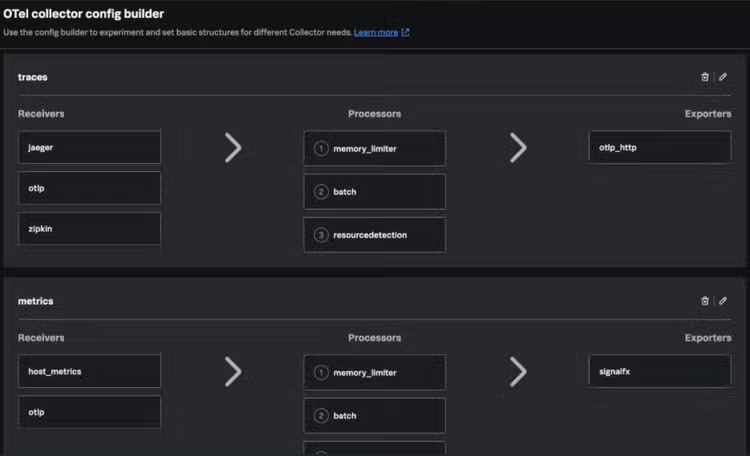
From there, the experience parses the configuration and displays the current setup as a list of pipelines. Users can see which receivers, processors, and exporters are already configured, making it easier to understand how telemetry is flowing through the Collector.
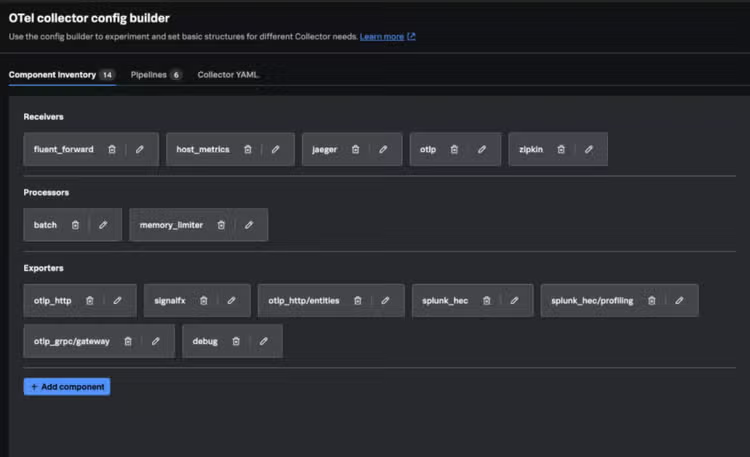
When adding a new receiver or exporter, users can select from a supported list of Collector components. The configuration form highlights required fields first, so users know exactly what must be provided. Advanced or optional settings are kept separate, helping keep the workflow focused and approachable.
When configuring a receiver, users are also guided to connect it to one or more exporters. If no exporter is selected, the experience warns the user before they proceed, helping prevent incomplete pipelines.
Existing receivers, processors, and exporters can also be edited individually. This makes it easier to tune a configuration over time without having to manually search through a large YAML file.
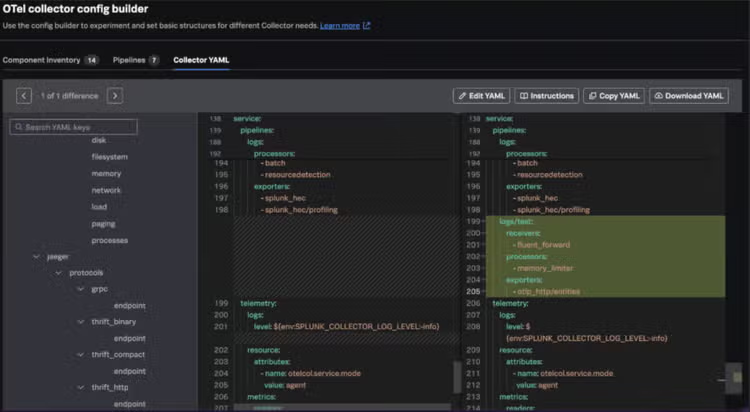
At any point, users can switch to a read-only YAML view to see the full generated configuration. From there, they can copy or download the file, validate it in tools such as OtelBin, and deploy it using the process that fits their environment.
A Better Path from Configuration to Deployment
This experience does not replace deployment workflows today. Users still manage and deploy configuration files in their own environments. But it makes the hardest part of that process easier: creating a configuration that is understandable, complete, and valid before it reaches production.
This also lays the groundwork for future remote configuration capabilities. As OpenTelemetry Collector management evolves, a guided configuration model will help make those future workflows more approachable and consistent.
Getting Started
To use the new Collector configuration experience:
- Open the Collector configuration workflow.
- Choose a default configuration or upload an existing YAML file.
- Select your target Collector version.
- Review your current pipelines.
- Add or edit receivers, processors, and exporters.
- Complete the required fields in the guided forms.
- Review the generated read-only YAML.
- Copy or download the configuration.
- Validate and deploy it using your existing tools.
With this new workflow, teams can spend less time troubleshooting YAML and more time building reliable, cost-effective telemetry pipelines. Try it today! Not an Observability Cloud customer? Sign up for your own Free Edition here.
Related Articles

CISA Top Malware Summary

Splunk at RSAC 2024: Powering the SOC of the Future