Splunk Reimagined: Agentic Use Cases Unbounded by Roadmap
Artificial Intelligence Sancha NorrisKey takeaways
- Splunk Agent Skills give AI agents expert troubleshooting knowledge, like diagnosing why logs stopped flowing, instead of relying on generic guesses.
- The MCP server and splunkctl let agents access Splunk data and run commands safely, whether working interactively across systems or through automated scripts.
- Developers can use the Agentic Splunk SDK and app development tools to build custom AI-powered Splunk apps tailored to their team's specific workflows and risks.
For years, technical work often began in an application’s user interface: open Splunk, write a search, inspect a dashboard, investigate an alert, or configure a workflow.
That is changing. Application users increasingly start with an AI-native workspace such as Microsoft Copilot, Codex, Claude Code or Cursor. They describe the outcome they want, and the agent interprets the request, works across files and systems, calls tools, writes code, and helps execute the task.
The agentic interface is becoming a new front door for enterprise software. That shift raises a question for every platform: will agents treat it as just another data source, or as a platform they can use, extend, and build on?
The answer matters because a traditional product ships the workflows its designers imagine. Every prebuilt screen and automation is useful, but each one also defines a boundary of capabilities. A platform that agents can build on removes that boundary, so your use cases are unbounded by the roadmap. At Splunk, a Cisco company, we are building that platform with a foundation of tools for agents and the developers who work with them.
A New Way To Engage With Splunk
The Splunk Platform capabilities for agents and developers include five tools, each with a different job. Agent skills supply the expertise. The MCP server and splunkctl let agents use Splunk: MCP for interactive work across systems; splunkctl for scriptable work and automation. The agent harness for app development and the Agentic Splunk SDK let developers use agents to build on Splunk. A way to see how these tools work together is to follow one problem through all of them: a critical production service stops sending logs.
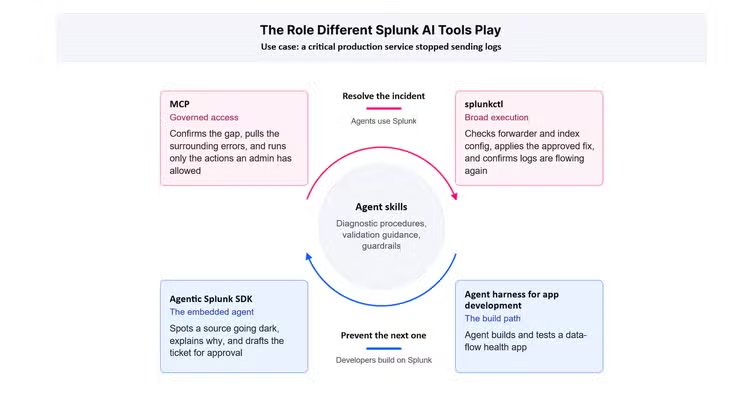
Agent skills sit at the center. The top half resolves the incident. The bottom half prevents the next one.
Agent Skills Provide the Expertise
An agent can generate SPL, but that does not give it the judgment of an experienced Splunk practitioner. Ask a general-purpose agent why the logs stopped, and it may produce a plausible search or suggest checking the pipeline without knowing which signals matter or how to validate the result.
A Splunk agent skill provides the agent with a proven procedure: identify the relevant indexes, inspect ingestion patterns, evaluate likely collection failures, validate the findings, and explain the evidence behind the diagnosis. That expertise may previously have resided with an experienced administrator or been scattered across documentations. Skills package it as reusable instructions, examples, validation guidance, constraints, and guardrails.
Every other capability in this story draws on skills. They guide searches, dashboard modernization, troubleshooting, visualizations, and application development. We have published more than 30 skills, available today in Splunkbase.
MCP Connects Agents To Approved Tools
The Model Context Protocol, or MCP, standardizes how agents connect to tools and data. A Splunk MCP server can expose selected Splunk capabilities, while other MCP servers expose capabilities from other systems. The agent coordinates a workflow across those connected tools within the permissions and approvals you set.
In the stopped-log scenario, MCP lets the agent confirm the gap, pull the surrounding errors, and check host activity and collection status as it reasons. If the response requires another connected system, such as a ticketing or incident tool, the agent carries the approved next step into that system instead of making the practitioner copy evidence from one tool to another. The skill tells the agent which signals to check and how to interpret them. MCP gives it governed access to investigate across systems.
MCP fits work that is interactive, tool-oriented, and spans multiple systems. It preserves Splunk’s authentication, permissions, and control over which tools an agent can use. Splunk becomes something the agent reaches from wherever the work starts, not only a place the practitioner has to go.
splunkctl Provides Broad Programmatic Access
Some workflows need more than a curated set of tools. splunkctl, Splunk’s open source command-line interface, provides a broad, scriptable command surface across Splunk Cloud Platform and Splunk Enterprise, subject to the APIs and permissions available in each deployment. An agent can use it to run searches, review results, inspect indexes and search jobs, compare data flow, and automate administrative tasks. As an open source app, users can also add their own commands. When an approved change is required, the same interface executes and validates it.
In this scenario, the practitioner reviews the evidence the agent gathered and authorizes the fix. The skill defines the checks and validation criteria, and splunkctl runs the workflow: checking forwarder and index configuration, applying the approved configuration change, and confirming that data is flowing again.
The difference from MCP is mode, not governance. MCP suits interactive work that spans systems. splunkctl suits scriptable work that agents, administrators, and developers run directly or build into pipelines, runbooks, and automation. Both operate within Splunk authentication and access controls. Together, they make Splunk something agents can operate, not just query.
The Agent Harness for App Development Turns a Fix Into an Application
Resolving one incident is useful. Preventing the next one is better. The agent harness for app development combines app-development skills, MCP tools, and a Splunk Cloud testing service. You describe an application, and an agent helps build it, test it, find issues, and iterate.
Your team could turn the log-ingestion workflow into a data-flow health app mapped to the services that matter to the business: which critical sources are reporting, which went quiet, who owns each one, and whether the gap puts an SLA at risk. Building that used to require specialized Splunk development knowledge and a long test-and-debug cycle. With the harness, your team describes the outcome and reviews the work while the agent handles the build, test, and debug loop.
The Agentic Splunk SDK Puts an Agent Inside the App
The Agentic Splunk SDK is the way to put an agent inside a Splunk application. In the data-flow health app, an embedded agent could do more than flag a silent source. It could explain the likely cause, identify affected services, recommend next steps, and draft a ticket or response plan for an operator to review and approve.
Traditional apps leave interpretation to the user and push people between workflows. An agentic app interprets, recommends, and moves the work forward in context.
The Use Cases We Will Never Have To Write Down
The point is not the use of any individual tool. It is what becomes possible when an agent combines Splunk expertise, live data, governed tools, broad programmatic access, and application logic around your operating context.
Take the data-flow health app one step further. A security team knows that a firewall or EDR source going quiet can signal defense evasion as well as ingestion failures. They extend the app to check each silent source against approved change windows, page the on-call analyst, and open an investigation with the surrounding evidence. A product can provide the building blocks, but each team’s data sources, change processes, and escalation paths differ. With an extensible platform, teams can shape its use cases around their needs. That’s what we mean by “unbounded”: use cases aren’t limited to prebuilt features and workflows; teams can build beyond them, within the platform’s governance and controls.
Unbounded, Not Ungoverned
Reimagining Splunk does not mean giving agents unrestricted authority, and it does not replace the Splunk interface you use today. Agent skills provide instructions, not permission. Configure MCP servers and agent hosts to restrict access to approved tools and data and require review of consequential actions. splunkctl operates within authentication and access controls. People retain control of validation, review, and consequential actions.
The agentic interface is becoming a new front door to enterprise software. We are making sure that the door opens onto a platform that agents understand and developers can extend. The stopped-log fix in this post is a use case we could predict. The ones that will matter most to you are the ones we can’t: workflows shaped by your data, your processes, and your risks. These capabilities exist so you can build those yourself, under the same controls you rely on today. Start with one problem your team has worked around for years and see what an agent can build on Splunk to solve it.
Get Started
- Explore Splunk agent skills in Splunkbase
- Get splunkctl on GitHub
- Connect your agents with the Splunk MCP server
- Build agentic apps with the Agentic Splunk SDK
- Request controlled availability access to the agent harness for app development
Related Articles
Detecting SeriousSAM CVE-2021-36934 With Splunk

Operation Defend the North: What High-Pressure Cyber Exercises Teach Us About Resilience and How OneCisco Elevates It