Google Cloud Platform Serverless Ingestion into Splunk
If you have or plan to collect data from Google Cloud Platform (GCP), you will have noticed that your option of ingesting data has been by using Splunk’s Google Cloud Platform Add-On.
However, many customers are adopting “serverless” cloud services to deliver their cloud solutions. There are many reasons for this, but mainly it provides solutions that do not require any overheads of server or container management, that scale and is delivered as a part of their cloud platform. Although the Add-on can “pull” data from GCP, a new library of functions provides serverless “push” capability that replicates and extends the Add-on functionality to send data into Splunk, via HEC. This “push” capability allows GCP customers to have a similar capability to AWS customers using Kinesis Firehose or Lambda functions.
Benefits of using this Serverless ‘Push’ to Splunk option:
- Compatibility - The data collection provided is compatible with the Splunk Add-On, therefore it is possible to switch between Add-On or Function depending on adoption preference.
- No Infrastructure - This can be especially useful for development, testing and providing a means of getting data in from GCP without the need of a Heavy Forwarder. This is also ideal for Splunk Cloud customers.
- Efficiency - The new functions for the project also provide a more license and search efficient option for metrics as they can now use the metrics index, aligning to Splunk’s Application for Infrastructure and other infrastructure metrics. Currently, metrics data available from the Add-On is only provided in events.
- Flexibility - The library offers a function to read from any object that is written to a GCS Bucket, including GCS Asset files (which can be created by another function). With today’s Add-on, there is a limitation of what can be read from GCS (Billing). The function library, therefore, contains the capability to ingest most of your GCP monitoring needs, from logs and assets to metrics - all without the need of a Heavy Forwarder!
- Hassle-free – ideal to get started with getting data in from GCP.
As these functions run as a service inside of GCP, they automatically scale to the demands of the workload and are costed by usage only (i.e. not always on). With the core service also being fault-tolerant, it also eliminates the need to size, or configure a failover or high availability setup for your VMs running the Add-On. Another advantage is that no Service Accounts or Keys need to be shared outside of your GCP environment.
SO WHAT'S IN THE BOX?
PubSub Function – Stream your Logs into HEC
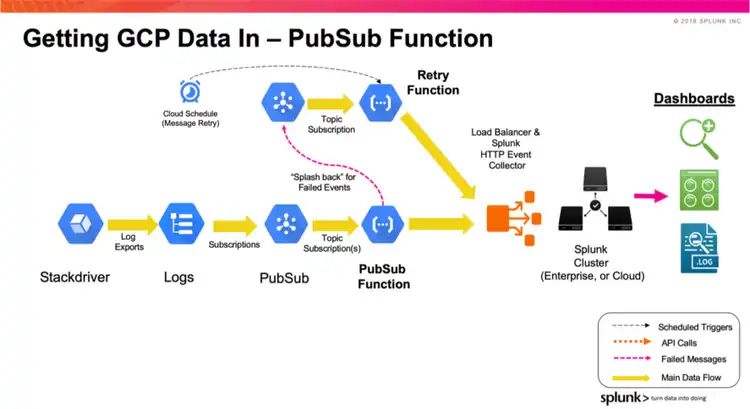
The PubSub Function is configured to collect any message which is placed in a PubSub topic that it subscribes to. In general, these messages are logs that are exported from Stackdriver, providing service monitoring, audit, and activity logs from GCP. The diagram below shows how the function works.
The logs are collected from Stackdriver via Log Export, and then the log subscription is put into a PubSub Topic. More than one Log Export can be aggregated into one PubSub Topic if needed. This configuration is the same as the Add-On. Once the function is installed in your GCP Project, it can subscribe to the PubSub Topic. On receiving a PubSub message, the function will send the contents onwards to Splunk via HEC. Where there is a failure in sending the event to HEC, the message is sent to a Retry PubSub Topic. Based on a schedule, the events in the Retry PubSub Topic are periodically flushed out into Splunk HEC (or subsequently sent if there is another failure).
Metrics Function – Collect Metrics into HEC
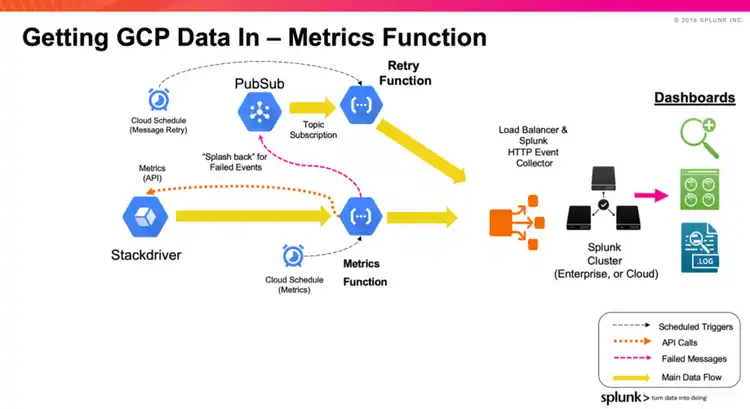
The Metrics Function is configured to request metrics from Stackdriver for your infrastructure components. A list of metrics can be configured per function, along with the frequency/interval of the metrics. As with the PubSub Function, any failed messages are sent to the Retry PubSub Topic to be periodically resent to Splunk at a later time.
The Metrics Function can be configured to send the metrics into Splunk in 2 formats:
- Event Format: This format is consistent with the GCP Add-On metrics sourcetype (googlemonitoring)
- Metrics Index Format: This format uses Splunk’s Metrics Index to store the metrics
GCS and Asset Functions – Getting (any) data in from Google Cloud Storage
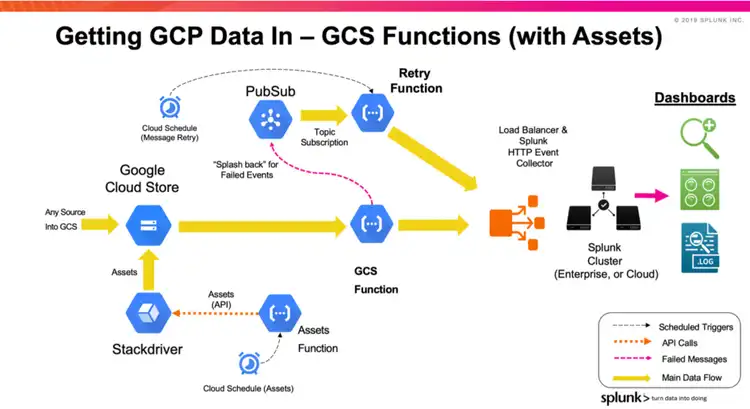
The GCS Function sends data in from a GCS Bucket into Splunk via HEC. The function is triggered by a new object being inserted (Finalised/Created) into a bucket. The function is configured to read events from the object item, splitting the events by the same settings as the sourcetype definition in Splunk (Line Breaker). If the objects are large, the contents of the object are split up into batches of events before being sent to Splunk. This way, there is no limit to the size of the object (apart from GCS limitations) that is sent to Splunk, and the events in the objects are distributed across the indexers (via the Load Balancer).
This functionality is currently not available with the GCP Add-On.
As an additional capability of the GCS Function, another function can be used to request GCP Asset information (inventory). This function can be scheduled to run and call the gcloud Asset API, which sends the asset information into a GCS Bucket. If a GCS Function is set up to be triggered by new objects in that Bucket, it will be able to send the asset data into Splunk.
Retry Function – Cleaning up when things go wrong
The function library is provided with a Retry Function that is used in conjunction with a PubSub Topic and Cloud Schedule. The PubSub Topic collects any events or metrics (or batches of events) that were attempted but failed to be sent to Splunk HEC. This is usually caused by connectivity issues between GCP and the Load Balancer/Indexers. If one of the functions does encounter a failure, they send the event into a Retry PubSub Topic. This topic can be shared as a Retry topic for across multiple functions (many to one vs one to one). A Cloud Schedule will trigger the Retry Function after a nominated time (defined by a cron schedule). The Function simply picks up the events/metrics from the Topic and sends on to the same original HEC URL and Topic. If the send fails during the retry process, it will remain on the Topic to be re-tried at the next scheduled call.
Getting Started
The contents of the Library are available for downloading here: https://github.com/splunk/splunk-gcp-functions
The repository contains documentation and a set of examples on how to set up the functions. The examples contain scripts that will clone the repository and install/set up the functions (with gcloud cli commands) in a basic example configuration. The example scripts can be reused in your Cloud automation/orchestration builds to automate deployment of the functions into your GCP Projects.
Thanks for reading!
Paul
Related Articles

Announcing the General Availability of Splunk POD: Unlock the Power of Your Data with Ease

Introducing the New Workload Dashboard: Enhanced Visibility, Faster Troubleshooting, and Deeper Insights

Leading the Agentic AI Era: The Splunk Platform at Cisco Live APJ

Dashboard Studio: Token Eval and Conditional Panel Visibility

Introducing Resource Metrics: Elevate Your Insights with the New Workload Dashboard

Powering AI Innovation with Splunk: Meet the Cisco Data Fabric

Remote Upgrader for Windows Is Here: Simplifying Fleet-Wide Forwarder Upgrades

Dashboard Studio: Spec-TAB-ular Updates
