Website Performance Monitoring: The Complete Guide
We’ve all been through this: We click on a website that takes forever to load. Most of us don’t wait in such situations — we leave and find another site. If your business is online, this could be happening to you, too, because a slow website frustrates visitors, and they leave without exploring your website.
Although moving online can save you money on rent and overhead, your growth depends on how well your website performs.
In this article, we’ll talk about website performance monitoring and see how it’s helping, not hurting, your business.
What is website performance monitoring?
Website performance affects how visitors perceive your business. In fact, 53% of mobile users leave a site if it takes longer than three seconds to load. For example, if you run an online store that takes longer to load, visitors may get frustrated and leave before checking your products.
To prevent this, you must monitor your website’s performance using tools like Pingdom and GTMetrix. This way, you will know the main issues and be able to fix them before they impact your customers.
Impact of website performance on business and users
Website performance monitoring has a direct influence on both your business and customers. For businesses, a fast and reliable website increases customer engagement.
Users are far more likely to complete tasks and revisit a site when page load times are under four seconds. Pages with load times above four seconds (up to 10 seconds) see 123% higher bounce rates, which can affect user retention.
For customers, a site’s speed and reliability define the user experience. Splunk’s web team achieved 50% faster page load times using Splunk Synthetic Monitoring, dramatically improving performance. This shows how much people value speed and efficiency. The same applies to websites as well — we all gravitate toward platforms that save time and are easy to use.
Measure performance with core web vitals
Core Web Vitals are a set of performance metrics introduced by Google to measure the user experience on a website. These metrics focus on three main aspects of web performance: loading, interactivity, and visual stability. Let’s see how:
- Largest contentful paint (LCP) tracks the time it takes for your page's most prominent visible content to load. Ideally, this should happen within 2.5 seconds because more delays can annoy users and affect the conversion rate negatively.
- Interaction to next paint (INP) measures the time it takes for your website to respond to a user's first interaction, such as clicking a link. It shouldn’t be more than 200 milliseconds.
- Cumulative layout shift (CLS) quantifies unexpected layout shifts on a page, such as buttons moving after the page starts loading.
Other KPIs for website success
Following are some other KPIs to check how your website performs:
- Bounce rate shows the percentage of visitors who leave your site without taking any action.
- Error rate measures the number of failed requests your site experiences, such as 404 errors or server timeouts.
- Conversion rate reveals the percentage of visitors who complete desired actions, such as making a purchase or signing up for a newsletter.
- Speed index tracks how quickly visible parts of a webpage load. A lower score means items load faster.
- Uptime measures the availability of your site. Even a few minutes of downtime can cost your business so much — an average of $9,000 per minute or $540,000 per hour. So, aim for at least 99.9% uptime to ensure reliability.
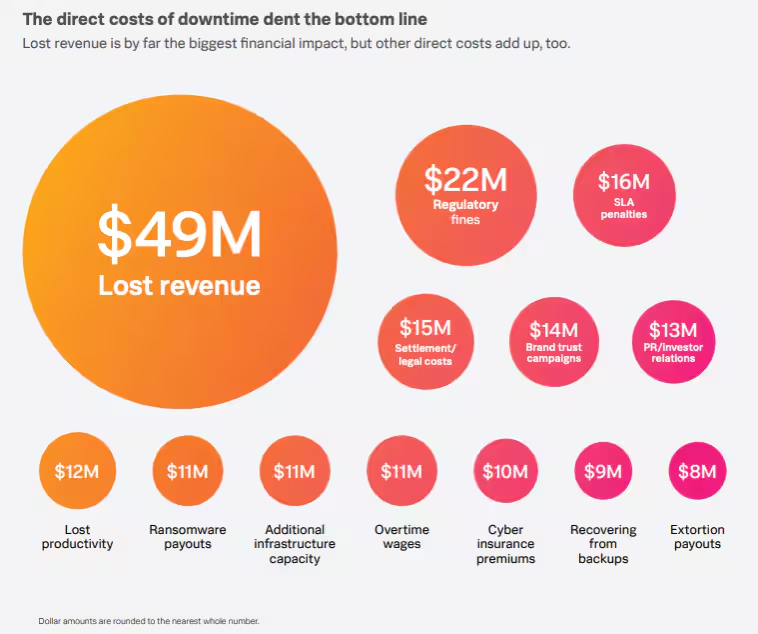
What’s behind the $9,000 lost per minute of downtime? Lost revenue tops the list of direct costs.
(Check out The Hidden Costs of Downtime.)
Types of website performance monitoring
Website performance monitoring involves two primary methods: synthetic monitoring and real-user monitoring. While both aim to optimize your site, they use different approaches to gather insights.
(Related reading: synthetic monitoring vs. real user monitoring.)
Synthetic monitoring
Synthetic monitoring uses software-based agents to simulate user interactions and test your website’s performance. These agents mimic actions like:
- Clicking buttons
- Filling out forms
- Navigating between pages
This way, you can measure performance metrics like load times, response times, and availability. For example, if your website’s API performs poorly in a specific country, synthetic monitoring can identify the issue before it affects users.
Real-user monitoring
Real-user monitoring (RUM) tracks and analyzes actual user interactions with your website in real time. It provides insights into:
- How much time does a page take to load?
- What stopped customers from checking out?
- Why is there a drop in traffic on the site?
Since RUM captures real user behavior, it offers actionable insights to improve the user experience. That’s a primary reason why this market is expected to hit $235.75 billion by 2030.
Key areas to monitor
Your website is a primary gateway to your business, available to customers 24/7. To ensure it consistently delivers, you need to monitor the right metrics. Here’s a breakdown of the key areas to focus on.
Page load speed
Large images or high-quality multimedia content can reduce your page loading speed. To optimize this, you should use tools that compress images automatically, such as TinyPNG or Kraken.io.
(Using Splunk software for identifying slowly loading web pages.)
Content delivery network (CDN)
A content delivery network reduces the distance between your server and users to improve load times. For example, if you’re in Australia but streaming from a server in America, the CDN finds the closest available server to deliver your content quickly. This way, your customers can easily access the content without delays. That's why you must have distributed servers.
Venture Harbour saw a 30.2% drop in page loading times and decreased bounce rates by 41% (from 2.63s to 1.53s) after implementing a CDN. This means that apart from saving time, CDN will also give your users a smoother experience.
(Related reading: content delivery networks vs. load balancers.)
Search engine optimization (SEO)
A half-second delay in page loading can cause 20% of visitors to leave your site, which would directly hit your search engine rankings. To avoid this, run regular SEO tests and follow these best practices:
- Remove extra spaces(“minify”) from CSS, JavaScript, and HTML to make files smaller and load faster.
- Enable browser caching to store site data locally and avoid repeated downloads.
- Use clean and structured code so search engines can easily crawl and index your site.
Mobile responsiveness
In 2023, 73% of people in the US used smartphones to shop online. This shows how important it is for a website to be mobile-friendly if you want to increase sales and revenue. Suppose a potential customer is browsing your site on their phone and the text is unreadable or layouts are broken — that’s a lost opportunity.
You can use tools like Lighthouse to see how your website performs on mobile devices.
HTTP requests
Each time a user visits your website, their browser sends HTTP requests to your server to load resources like images, CSS, and JavaScript files. However, too many requests can slow down your site. For example, a page that loads 4 or 5 unoptimized images or relies on multiple style sheets may take longer to display.
You can combine multiple files into one where possible to reduce HTTP requests. For example, if you've ten CSS files, you can merge them into a single file and then use formats like gzip to reduce the size and the server load.
Traffic source
Traffic sources, whether organic search or paid ads, can tell you a lot about how users interact with your site. If you notice that a lot of your audience speaks French (or any other language), you could translate your website to make it more relatable and useful for them.
You can also use this information to fine-tune your paid campaigns. Let’s say an ad is bringing a lot of visitors to your site, but they’re not buying anything. This could be a sign to adjust your ad’s message or update the landing page to better match what people expect.
SSL certificates
When your site isn’t secure, hackers can exploit weaknesses to slow down or crash it. In 2019, millions of users couldn’t access LinkedIn because its SSL certificate expired. This shows how even big companies can face massive disruptions from small oversights in security monitoring.
To avoid such issues, prioritize continuous security checks. Regularly scan for malware and outdated plugins since they are common cyberattack entry points. And make sure your SSL certificate is always valid (no one wants to hit the headlines for the wrong reasons.)
Tools for website performance monitoring
Once you understand the key areas to monitor, choose the right tools to track them. There are multiple website performance monitoring tools. However, you shouldn't rely on one. Instead, use different tools to get better insights. Here are some popular ones:
- Splunk Observability Cloud, with Synthetic and Real User Monitoring, provides full visibility by automatically correlating metrics, logs, and traces in one unified platform. It enables proactive issue detection with AI-powered analytics, real-time alerts, and synthetic monitoring to optimize system reliability and user experience.
- Google Analytics tracks metrics like bounce rate, session duration, and conversion rates to help you identify areas for improvement. If users drop off at a specific page, Google Analytics can highlight that so you can take corrective action.
- Pingdom combines synthetic and real user monitoring to provide detailed insights. You can use it to assess your website's uptime and analyze page speed. This is a cost-effective option because you get a 30-day free trial.
- PageSpeed Insights analyzes your website’s performance on mobile and desktop to provide suggestions for improvement.
- GTMetrix provides in-depth reports on speed scores and actionable fixes.
Use cloud technology to scale performance monitoring
A fast and functional website is the foundation of online success. That’s why you should make website performance monitoring a regular practice to stay ahead of the competition. The payoff will be worth your efforts — you’ll have happier users, higher conversions, and a growing business. To make this process seamless, use cloud-based technologies. This way, you can scale resources up or down based on traffic demands and monitor website performance globally.
Related Articles

How to Use LLMs for Log File Analysis: Examples, Workflows, and Best Practices

Beyond Deepfakes: Why Digital Provenance is Critical Now

The Best IT/Tech Conferences & Events of 2026

The Best Artificial Intelligence Conferences & Events of 2026

The Best Blockchain & Crypto Conferences in 2026

Log Analytics: How To Turn Log Data into Actionable Insights

The Best Security Conferences & Events 2026

Top Ransomware Attack Types in 2026 and How to Defend