Server Monitoring Today: Why Monitoring Your Servers Matters & How to Approach It
Key Takeaways
- Effective server monitoring enables early detection of issues, minimizes downtime, and optimizes resource utilization through real-time insights and alerts.
- Centralizing and correlating logs, metrics, and traces across all server environments provides end-to-end visibility, helping you quickly identify anomalies and root causes.
- Choosing the right monitoring tools and strategies, such as Splunk Observability Cloud, supports proactive maintenance, unified full-stack monitoring, and scalable organizational growth.
Server monitoring ensures the health and performance of the critical systems that power your IT operations. Whether physical or virtual, servers are the backbone of modern businesses, processing thousands of requests simultaneously.
Monitoring these systems is essential for uptime, reliability, and operational efficiency, a cornerstone of IT infrastructure management.
What is server monitoring?
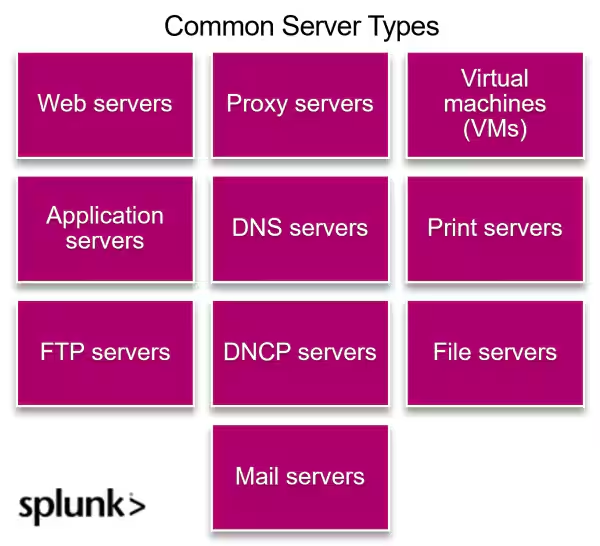
A server is a device or software program that provides services or resources — websites, email, files, databases, and more — to other devices or users over a network. Think of it as the "backstage crew" of your IT operations. Traditionally, a web server was a physical device (server rack), but today, it increasingly refers to a virtual server housed on a physical machine shared by dozens of other clients, each running their own independent web server system.
Server monitoring, then, can be complex because of the wide range of servers your organization may use and all the workloads those servers handle in real time. This activity is closely related to IT infrastructure management.
Why server monitoring is critical
Servers are the backbone of IT operations — any performance issue can have real world consequences: a malfunctioning web server can result in lost customers, for example. Or a failing internal file server can corrupt critical data like accounting or customer records. By monitoring server performance, you can:
- Ensure uptime and reliability.
- Problem-solve proactively, so minor issues don’t escalate to major disruptions.
- To better understand the importance of server monitoring, let’s break it down into four key roles it plays in an enterprise:
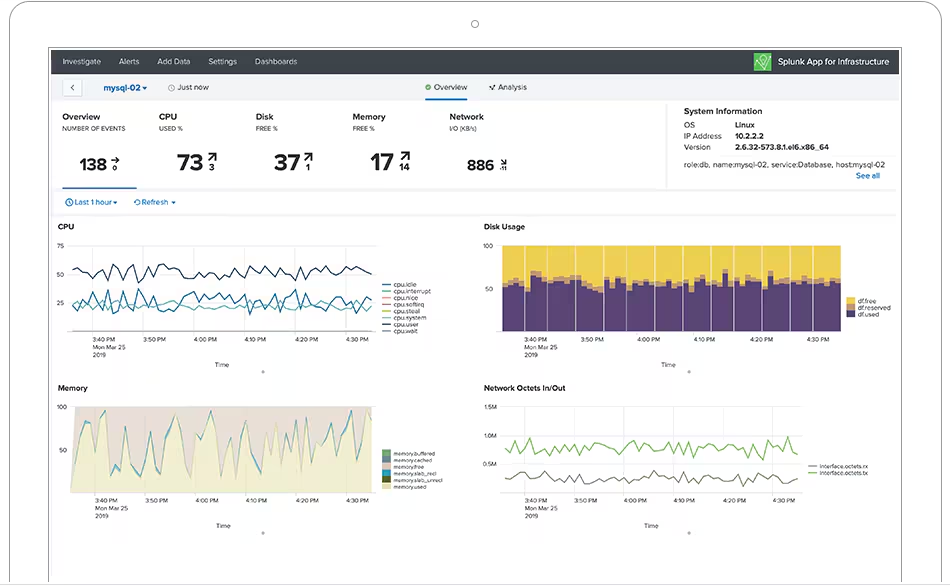
- Monitoring system performance. Server monitoring tools track a variety of metrics that allow IT teams to identify bottlenecks, plan for capacity, and ensure smooth operations.
- Detecting problems proactively. Monitoring tools can detect and alert IT teams to security vulnerabilities, hardware failures, or software bugs before they impact users.
- Historical and predictive insights. Server monitoring is also predictive: Is the disk going to reach capacity soon? Is memory or CPU utilization about to be throttled? By analyzing historical server data, organizations can predict when to upgrade or perform other maintenance.
Server monitoring vs. server performance m onitoring
Historically, server monitoring and server performance monitoring were separate focus areas:
- Server monitoring ensures servers stay online and operational. It’s the “heartbeat” of the server: it’s alive, though maybe not well.
- Server performance monitoring makes sure that servers operate efficiently under various workloads. The “muscle” of the server, this focuses on optimizing how the server performs under various workloads to ensure peak efficiency.
Modern solutions monitor it all
Complex enterprises require both activities — and a modern server monitoring solution integrates server and server performance monitoring. This way, organizations can ensure high availability, consistent performance, and proactive issue resolution.
Emphasizing ROI: Why monitoring pays off
Investing in server monitoring tools has tangible benefits. Here’s how it delivers ROI:
- Prevent downtime: A single hour of server downtime costs $300,000 on average for large enterprises — and nearly half of downtime incidents originate in the application or infrastructure itself. Proactive monitoring minimizes these incidents.
- Optimize resource usage: By identifying underutilized resources, monitoring tools allow IT teams to consolidate servers, reducing costs.
- Ensure compliance: Many industries have strict uptime and security requirements. Effective monitoring ensures compliance, avoiding penalties and reputational damage.
- Boost IT productivity: Automated alerts and root cause analysis reduce manual troubleshooting, freeing IT staff for strategic tasks.
Real information for the real world: Progressive Insurance, a global leader, relies on Splunk monitoring solutions to safeguard its operations. For Progressive, a 30-second processing delay in its claims application could cost millions in lost revenue. Splunk’s real-time monitoring ensures seamless performance, protecting $120 billion in market capitalization.
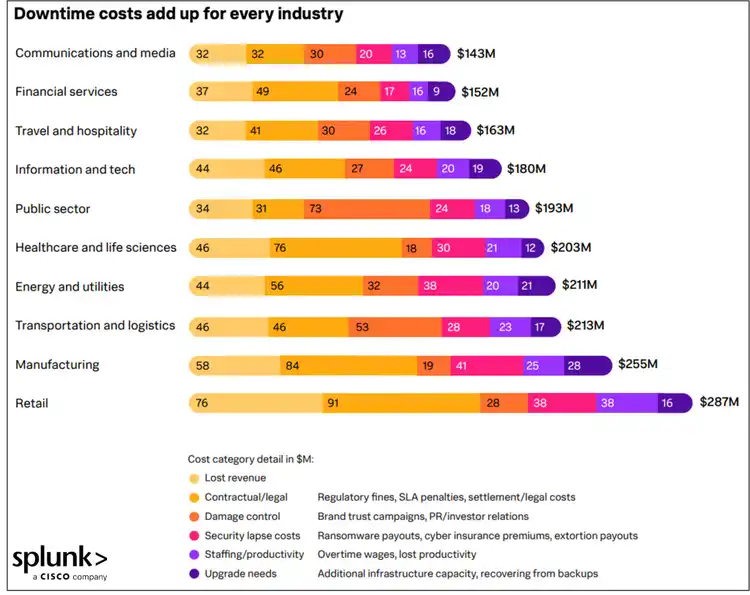
(Source: The Hidden Cost of Downtime)
Types of server monitoring systems
Here are some terms to understand how different solutions may work on your servers:
- On-premises monitoring is installed locally on an organization’s servers, offering full control over monitoring and data. The primary advantage here is the utmost in data security and clear compliance with strict regulations. For certain industries — like finance, healthcare, and governments — on-premises monitoring may be a requirement for at least some of your servers.
- Cloud-based monitoring tracks server health and performance via a cloud-hosted solution, ideal for cloud or hybrid environments. This approach is scalable, accessible from anywhere via SaaS, and requires no on-premises infrastructure.
- Agent-based monitoring installs a software agent on each server to collect detailed, real-time metrics and monitor server-specific applications. Advantage: Provides deep insights and granular control.
- Agentless monitoring uses standard protocols like SNMP, WMI, or SSH to gather data without installing software on servers. Advantage: Simplifies setup and reduces resource usage on servers.
- Application performance monitoring (APM) monitors server-side applications, tracking performance, response times, and user experience. Advantage: Pinpoints application bottlenecks and ensures app efficiency.
- Infrastructure monitoring looks at the entire IT infrastructure, including servers, networks, and other hardware resources. This approach provides a holistic view of the IT environment and helps identify issues that may indirectly affect server performance.
Challenges monitoring physical vs. virtual environments
Server management poses unique challenges in both virtual and physical environments. Let’s see how these difficulties impact IT teams.
Physical environment challenges
- Space constraints: Physical servers require dedicated space. Companies in urban areas or with limited office space often struggle to accommodate them.
- Power consumption: Servers consume significant energy, leading to high operational costs. According to a 2023 report, data centers in the U.S. alone account for 2% of the country’s total electricity usage.
- Hardware maintenance: Physical servers need regular upkeep. Replacing failed components can be time-consuming and costly.
- Physical security risks: Servers are vulnerable to theft or tampering. IT teams must address these risks through physical security measures.
Virtual environment challenges
- Limited visibility: Virtual servers abstract hardware details, making it harder to identify the root cause of performance issues.
- Reliance on virtualization software: Virtual environments depend on hypervisor software that manages virtual machines (VMs), like VMware or Hyper-V. But these are complex environments: failures or misconfigurations in the software can cascade across virtual servers.
Monitoring virtual environments
Hybrid and cloud environments should not be a problem for your monitoring solutions. Leverage virtualization-specific monitoring tools, like Splunk Observability Cloud, that offer insights into both the hypervisor layer and individual virtual machines.
Trends in server monitoring
Server monitoring is evolving rapidly. Here are three key trends shaping the field today:
AI and machine learning
Monitoring tools now leverage AI/ML to detect anomalies, predict failures, and automate root cause analysis. For example, AI can identify unusual patterns in CPU usage that may indicate malware activity.
Edge computing
With the “everywhereness” of IoT devices, edge servers that are located closer to users are becoming critical. Monitoring tools must adapt to track the performance of these decentralized servers.
Serverless architecture
Server monitoring tools are expanding to cover serverless platforms like AWS Lambda, where traditional monitoring metrics (e.g., CPU usage) are replaced with function execution time and concurrency.
Best practices for monitoring servers
Follow these key practices to maximize the effectiveness of your server monitoring solution:
- Consistently check hardware performance. Servers run 24/7 under constant load. Configure thresholds and regularly monitor key metrics like CPU temperature, RAM usage, and storage capacity to ensure optimal performance. Schedule “heartbeat” checks at regular intervals to catch issues early."
- Analyze historical trends. Server issues often have a historical context. Chart metrics over 30–90 days to spot patterns, like a sudden CPU temperature spike that may indicate hardware problems such as a failing fan.
- Manage alerts effectively. Monitor alerts in real time, prioritize critical ones, and assign them to the right analysts for resolution. Streamlining alert management ensures rapid response and better team collaboration.
- Plan for future capacity. With workloads doubling over recent years, tracking long-term trends in server utilization helps you anticipate future needs and avoid capacity bottlenecks.
- Enhance asset management. Leverage server monitoring tools to track hardware nearing end-of-life or detect missing assets, which could indicate failures or security breaches — eliminating the need for manual tracking via spreadsheets.
Proactive advantage: Modernize your server monitoring
Server monitoring is no longer just about reacting to problems. Modern tools provide proactive insights, enabling organizations to stay ahead of issues, optimize resources, and ensure compliance. By choosing the right tools and adopting best practices, enterprises can maximize uptime, reduce costs, and support long-term growth.
Interested in modernizing your server monitoring approach? Explore tools that integrate AI, predictive analytics, and real-time dashboards to stay ahead of the curve.
Related Articles

APM Metrics: The Ultimate Guide

Scalability in IT: The Complete Guide To Scaling

IT & Technology Salaries: Tech Pay Trends

What is Network Security?

Continuous Data: The Complete Guide

11 Common Data Types: A Comprehensive Guide

The Dunning-Kruger Effect Explained

TCP/IP: What It Is & How It Works