What is Digital Experience Monitoring?
Digital experience monitoring (DEM) is the evolution of application performance monitoring (APM) and end user experience monitoring (EUEM) into a comprehensive tool that analyzes the efficacy of an enterprise’s applications and services.
- Application performance management evaluates how an application performs.
- EUEM analyzes user behavior within an application.
Essentially, DEM combines these functions and goes beyond both — all to ensure consistency across the customer experience.
We can easily understand DEM from this definition via Gartner:
Emerging in recent years, the DEM discipline that is an essential element of one of three functional dimensions of APM, which includes:
- Digital experience modeling
- Application discovery, tracing, and diagnostics (ADTD)
- Application analytics (AA)
In today’s digital world, a seamless user experience is the most significant aspect of driving customer behavior. DEM allows an enterprise to optimize the online components of their business, from digital marketing to web security and beyond, by utilizing real user monitoring to identify performance issues and improve processes.
Why is digital experience monitoring important?
Today, the moving parts involved with running a business are more intertwined than ever before. The result of this synergy is a convenient and cohesive customer journey — as long as all of the business processes involved on the backend are operating efficiently and effectively.
However, an unintended consequence of this finely woven network of services is the fragmentation that occurs behind the scenes. More often than not, IT operations are less likely to be maintained by one centralized, collaborative team. Instead, multiple teams manage the work associated with specialized components, such as:
- Digital marketing
- Cybersecurity
- Web marketing & management
- Application development
Each of these teams works independently of each other and with their own system of communication and technical jargon. Ideally, these teams operate without friction to synthesize the processes the businesses need, just like a finely tuned machine.
DEM is a real-time monitoring tool that helps the "machine" of your enterprise run smoothly by:
- Identifying any vulnerabilities that contribute to outages, downtime, or disruptions to the user experience, such as slow page load times.
- Assessing the root cause of issues that affect performance while recommending solutions.
A combination of human and machine-initiated interactions provides the most comprehensive solution to performance monitoring. This is why many online businesses are moving away from solely traditional end user monitoring in order to incorporate DEM, which utilizes information from both.
(Try Digital Experience Monitoring, part of Splunk Observability Cloud, offering monitoring solutions for all enterprise needs.)
Benefits of digital experience monitoring
Implementing experience monitoring solutions is crucial to any enterprise undergoing a digital transformation. Streamlining the digital processes associated with running a business creates a solid foundation for:
- Future updates to existing systems
- Ongoing innovation
Although humans still primarily interact with applications, an increasing number of machines exchange information via artificial intelligence.
A perfect example is The Internet of Things (IoT), which is the embedding of computing devices in everyday objects, allowing those objects to send and receive information. DEM monitors the performance data of these processes to ensure ongoing functionality.
The ability to predict and adapt are essential today. Customers aren't aware of the backend challenges of keeping the various cogs moving smoothly; they only know how they feel interacting with the different facets of your business, from mobile apps to web applications to social pages. Customers expect quality and consistency at every level, no matter how distributed your systems may be.
The metrics offered by an experience monitoring strategy allows businesses to identify and mitigate issues that may negatively impact the customer experience — and consequently, the reputation of the organization itself.
(Related reading: machine data and machine customers.)
Types of digital experience monitoring tools
There is any number of issues that can result in frustrating user experiences — and not all of them are within your control. For instance, glitches could be:
- The result of the limitations of a user's device or browser
- A local issue affecting the cloud
- Another issue altogether
Understanding why a problem is occurring is the first step to solving it or offering resources to the user, and DEM tools can help identify problems and offer solutions.
Testing an application prior to release can be challenging without users to stumble upon causes for concern, but no one wants to release a product full of errors either. In this scenario, you can use two monitoring approaches:
- Synthetic transaction monitoring (STM) uses behavioral scripts to recreate potential user actions so that performance issues can be eliminated before real customers are affected.
- Real user monitoring (RUM) records all customer interactions with your existing application from the user's perspective so that DevOps teams can find and repair problems swiftly and with minimal setbacks to other users.
(Related reading: synthetic monitoring vs. real user monitoring & user engagement metrics.)
Challenges of digital experience monitoring
While it’s impossible for any human to be everywhere all at once, DEM gets us a bit closer to that sort of understanding. The greatest challenges of delivering the best performance include divergent technology and division of responsibilities. DEM can facilitate with the associated issues of both.
Divergent tech
The broad spectrum of user technology is a logistical nightmare for DevOps. There’s of course the differences in operating systems, both desktop and mobile. Then all the updates required for all of them to operate at an optimal state. Many users rely on more than one device, perhaps across a variety of operating systems, a range of hardware limitations and then inconsistencies in user behavior, such as using a web application versus a mobile app — and on top of all of that, connection types ranging from wi-fi to cellular data.
Division of responsibilities
While it's all too easy to blame users for using wide-ranging technologies, potential issues lurk on your own servers as well.
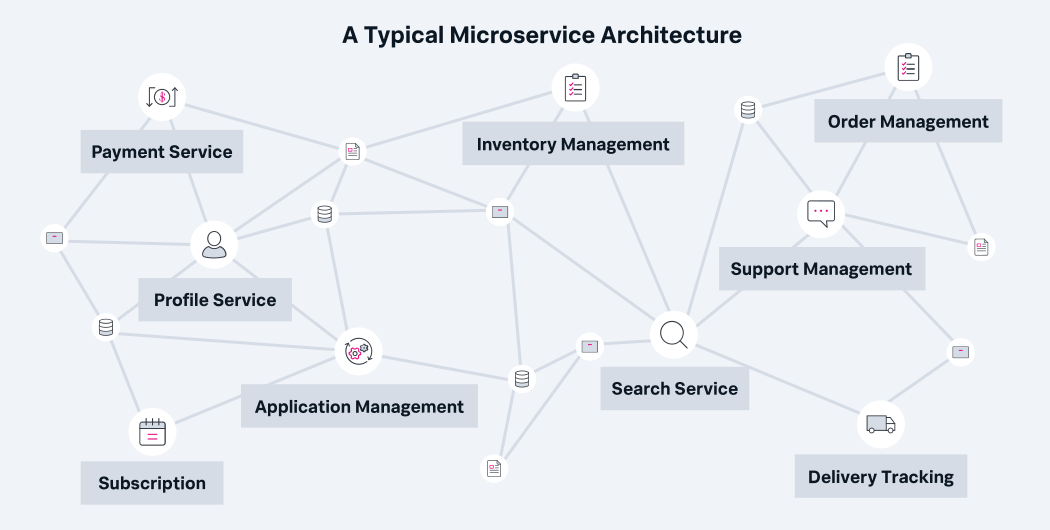
As microservices become more popular in terms of project architecture, it's easier to develop a kink in the communication pipeline among your own teams, and it can be difficult to track down the problem when it's coming from within. It's more difficult to see your digital services as a unified tool when responsibilities are divided. Sometimes that division becomes clear to your users, too.
How to create your DEM strategy
Digitization is changing not only our world, but also the objects within it. We’ve got smart everything: smart phones, smart cars, smart televisions, smart appliances, and more. Whether the technology has AI embedded in it or not (yet), customers still expect a seamless experience. Connectivity, monitoring, and applications are required for many objects and most enterprises — DEM exists to fulfill a growing need.
Upgrade your existing APM suite by incorporating digital experience monitoring to prepare for the advancement of technology and to create more ease as your business interfaces with its users and expands into additional platforms.
Related Articles

The Bulkhead and Sidecar Design Patterns for Microservices & Incident Resolution

Content Delivery Networks (CDNs) vs. Load Balancers: What’s The Difference?

Best DevOps Books: The Definitive List

Kubernetes 101: How To Set Up “Vanilla” Kubernetes
Network vs. Application Performance Monitoring: What's The Difference?

Monitoring Windows Infrastructure: Tools, Apps, Metrics & Best Practices

NoOps Explained: How Does NoOps Compare with DevOps?

How To Prepare for a Site Reliability Engineer (SRE) Interview