Monitoring Family Pickle Consumption with Splunk!

Recently, about a month after our public health crisis started in the US, I opened my mailbox. Inside was a printed public service announcement sent from the mayor of my little community northwest of Denver. It had cute graphics of cartoonish townsfolk wearing facemasks, and the content conveyed reasonable, folksy messaging about social distancing and sheltering in place. I scanned over the card and read the fine print at the bottom: “Families are supposed to only be shopping for essential groceries once a week.

Bollocks. How will I continue to be the gourmet cook my sous-vide thinks I am? Also, the mayor clearly does not know that my household contains two voracious eleven-year-olds that go through eggs, organic milk, Nutella, and pickles like there’s no tomorrow. And, it isn’t like my spouse and I can watch them at all hours of the day and night — we’re teleworking fiends chained to our Zoom webcams, just like the rest of the neighborhood. So how can I monitor the food consumption rate in the house, and be a good upstanding citizen by only shopping once a week?

Splunk to the rescue!
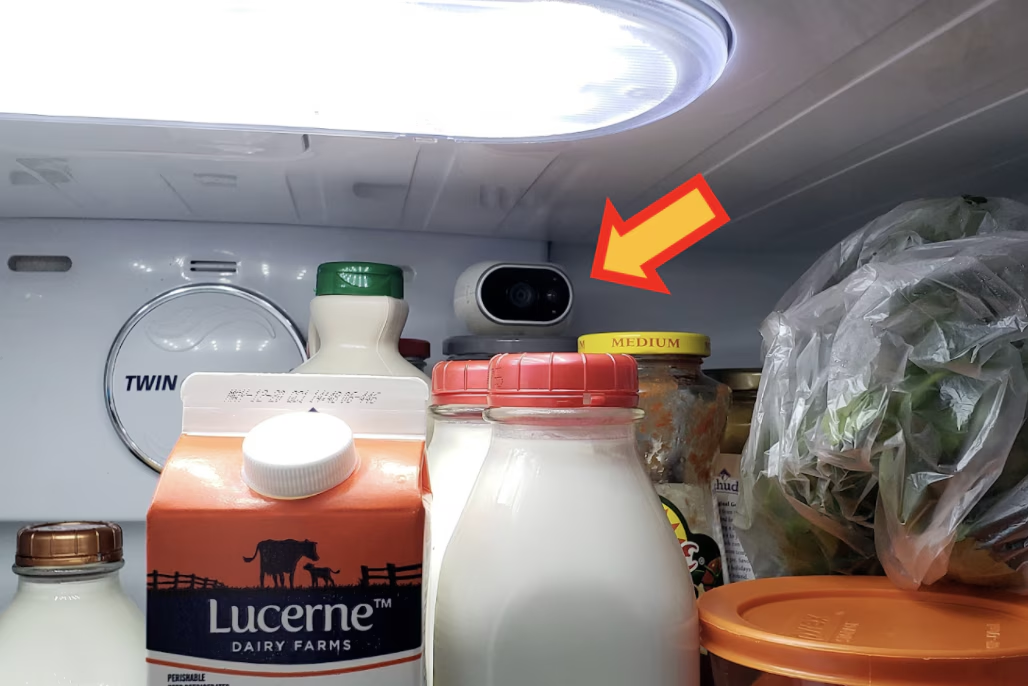
I’ve been running a copy of Splunk in my house1 for the past seven years, collecting all sorts of interesting data from my firewall, VPN connections, DHCP server, home theatre system, speed-tests of my ISP, various Windows and OSX endpoints, wire data from Splunk Stream, my thermostat and so forth. And a few years ago, I bought into the Arlo system of wireless cameras that run off rechargeable battery packs and can be placed literally anywhere in your home, as long as they are within range of the base station... Yep, anywhere — that’s an Arlo camera perched, sideways, atop one of many pickle jars in the back corner of my refrigerator. It also records fascinating snippets of American life. Anyway. What I really would like to put in Splunk is how often the fridge is opening, and specifically if the fridge is being opened in the middle of the night, which is when my son is most likely to consume all of the pickles, or the mini-bagels and cream cheese, which inevitably results in a conflict when my daughter goes to prepare breakfast in the morning. And in these times of quarantine, conflict avoidance takes on unprecedented2 importance!

Now, why on earth is any of this relevant to the security of an enterprise environment? Well, because of the state of the world today, our customers are rightly very interested in the physical security of their employees and their work locations. Most corporate offices are locked down tight, and entire floors should not have people working on them. The employees that are authorized to be in corporate locations during this crisis are few and far between. They should only be in certain areas of the building. In addition, you’ll want to ensure that your employees are following regulations and not trying to access their workspaces.

Basically, you need to make sure your staff that is “working from home” are actually doing so, and not trying to “work from office.” Your offices should look like this image on the left.

So, how can you ensure, in Splunk, that the activity occurring in your building is what you expect it to be? Consider ingesting three very useful data sources: proximity card reader data, local DHCP server logs, and the subject of this blog post, camera activity data. Combine any/all of them and you can start to get a very good picture of who is in your facility, or who is trying to access your facility.

And in this case, my facility is the “Brodsky Kitchen Refrigerator.

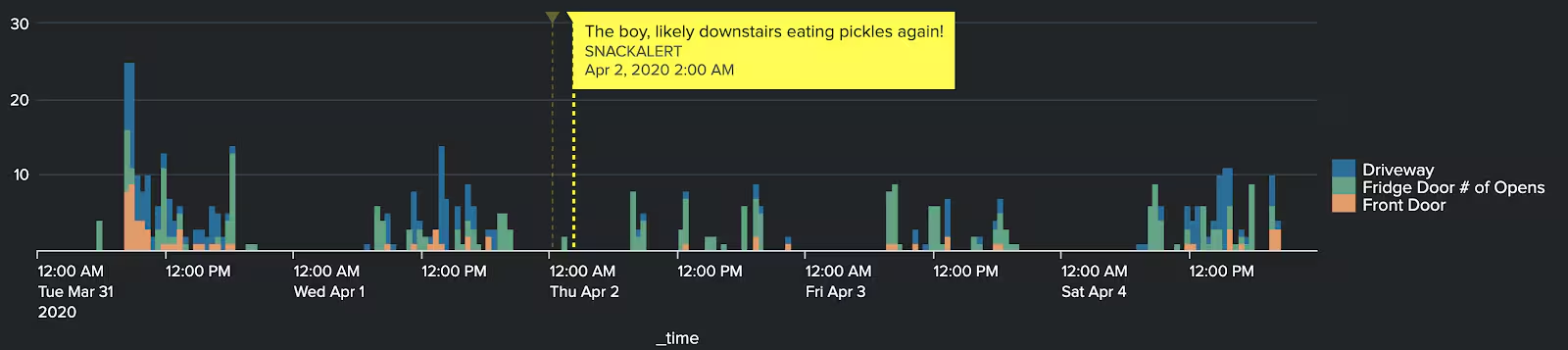
What we’re looking to create is something like this!
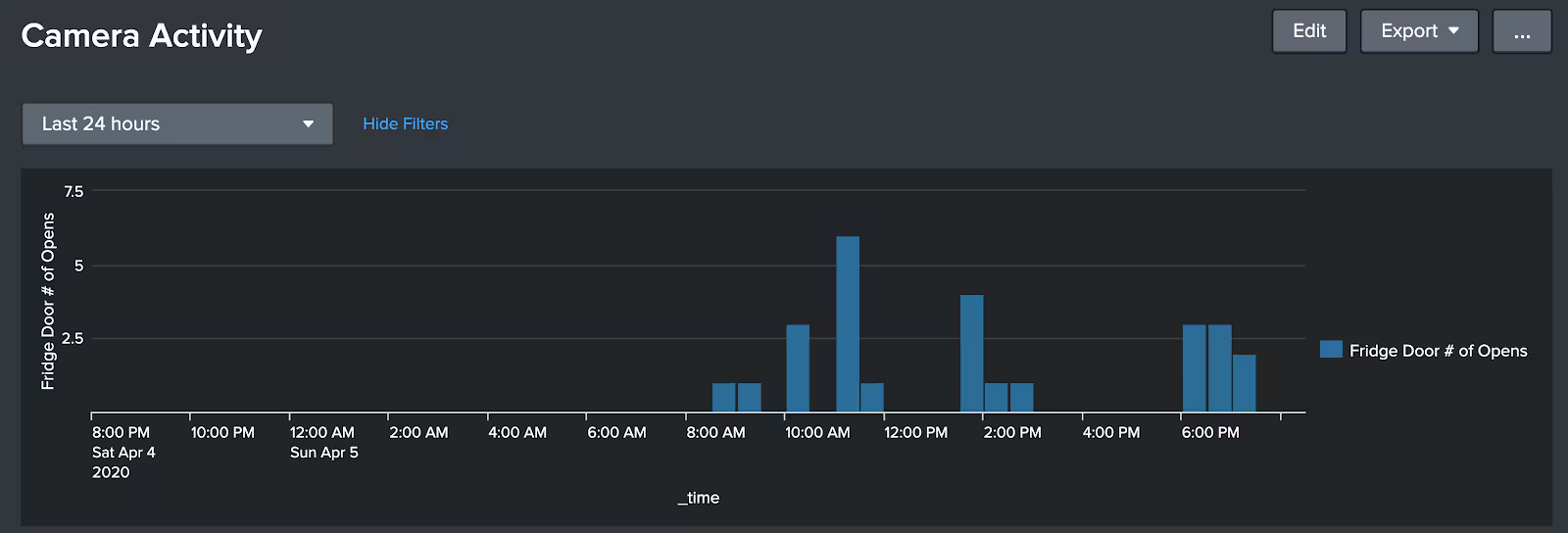
The premise — every time my fridge door opens, the Arlo camera detects motion (and also captures video of the culprit)! We record this activity as a timestamped event in Splunk, and of course tie it back to whichever camera detected the motion. And, since I have multiple Arlo cameras inside and outside my home, I can also do analysis like this:

Now I know, in Splunk, when there’s someone on my front doorstep, or there’s activity in my driveway. Also, if I correlate that with other data I am collecting, such as the MAC address/hostname of the mobile phone that attaches to my WiFi shortly after my front door opens I can paint a pretty good picture of the physical activity surrounding my property. In the example above, you can see that yes indeed, my son snuck downstairs at 1 AM and ate some pickles. Other fascinating happenings this week — Tuesday morning I had a furnace installed (lots of front door and driveway activity) and on Saturday the kids were chalk-drawing on the driveway various messages like “We Support our Healthcare Workers” and “Save Us, Daddy is Creepily Monitoring our Food Intake!

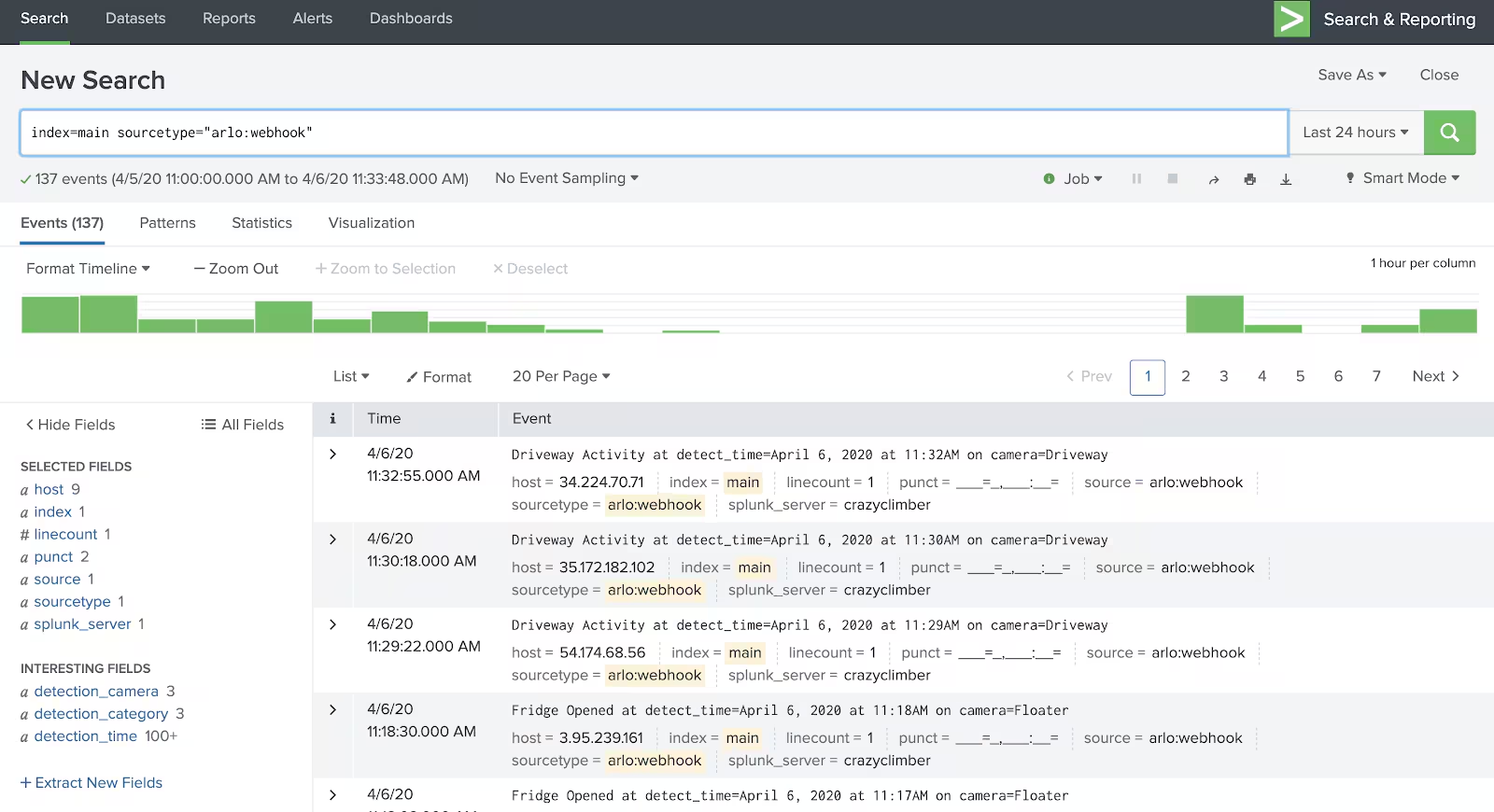
How can you create your own magic? All you need is a camera system that logs its activity when it senses motion — the more detailed the information the better3. Arlo cameras, for example, can identify if an object seen is an animal, or a person, or a vehicle. The activity should be in some time-stamped format that can be consumed in Splunk — a flat-file written to a server, an email notification that Splunk Phantom could parse, data retrievable via API call, or in Arlo’s case (and what I did…) an IFTTT applet that triggers an HTTPS post via webhook to Splunk’s HTTP Event Collector! (Thanks for the tip, Cody!)

My Arlo event data in Splunk looks like this:
How do you do it? This blog has already gone on long enough, but if you’re stuck on exactly how to make this happen, feel free to DM me at james_brodsky.

In the coming weeks we’ll tell you of some physical security monitoring use cases we have been seeing at customers, and give you a view into some of the kinds of data we collect at Splunk behind the scenes! Until then, send pickles and Nutella to one of the Splunk corporate offices — I’m sure they’ll make their way to me eventually.

1: The Splunk “free” license normally provides enough ingest license to capture most data sources on a home network at no cost!
2: Every article you’ve read in the past month uses the word “unprecedented.” Now your streak is unbroken.
3: From IP cameras, you could even pull activity off of the wire via Splunk Stream, Bro/Zeek, or similar

Related Articles

Announcing the General Availability of Splunk POD: Unlock the Power of Your Data with Ease

Platform
2 Minute Read

Announcing the General Availability of Splunk POD: Unlock the Power of Your Data with Ease

Splunk POD is designed to simplify your on-premises data analytics, so you can focus on what really matters: making smarter, faster decisions that drive your business forward.
Introducing the New Workload Dashboard: Enhanced Visibility, Faster Troubleshooting, and Deeper Insights

Platform
3 Minute Read

Introducing the New Workload Dashboard: Enhanced Visibility, Faster Troubleshooting, and Deeper Insights

Announcing the general availability of the new workload dashboard – a modern and intuitive dashboard experience in the Cloud Monitoring Console app.
Leading the Agentic AI Era: The Splunk Platform at Cisco Live APJ
Platform
5 Minute Read

Leading the Agentic AI Era: The Splunk Platform at Cisco Live APJ

The heart of our momentum at Cisco Live APJ is our deeper integration with Cisco, culminating in the Splunk POD and new integrations, delivering unified, next-generation data operations for every organization.
Dashboard Studio: Token Eval and Conditional Panel Visibility

Platform
4 Minute Read

Dashboard Studio: Token Eval and Conditional Panel Visibility

Dashboard Studio in Splunk Cloud Platform can address more complex use cases with conditional panel visibility, token eval, and custom visualizations support.
Introducing Resource Metrics: Elevate Your Insights with the New Workload Dashboard

Platform
4 Minute Read

Introducing Resource Metrics: Elevate Your Insights with the New Workload Dashboard

Introducing Resource Metrics in Workload Dashboard (WLD) – a modern and intuitive monitoring experience in the Cloud Monitoring Console (CMC) app.
Powering AI Innovation with Splunk: Meet the Cisco Data Fabric

Platform
3 Minute Read

Powering AI Innovation with Splunk: Meet the Cisco Data Fabric

The Cisco Data Fabric brings AI-centric advancements to the Splunk Platform, seamlessly connecting knowledge, business, and machine data.
Remote Upgrader for Windows Is Here: Simplifying Fleet-Wide Forwarder Upgrades

Platform
3 Minute Read

Remote Upgrader for Windows Is Here: Simplifying Fleet-Wide Forwarder Upgrades

Simplify fleet-wide upgrades of Windows Universal Forwarders with Splunk Remote Upgrader—centralized, signed, secure updates with rollback, config preservation, and audit logs.
Dashboard Studio: Spec-TAB-ular Updates

Platform
3 Minute Read

Dashboard Studio: Spec-TAB-ular Updates

Splunk Cloud Platform 10.0.2503 includes a number of enhancements related to tabbed dashboards, trellis for more charts, and more!
Introducing Edge Processor for Splunk Enterprise: Data Management on Your Premises
Platform
2 Minute Read

Introducing Edge Processor for Splunk Enterprise: Data Management on Your Premises

Announcing the introduction of Edge Processor for Splunk Enterprise 10.0, designed to help customers achieve greater efficiencies in data transformation and improved visibility into data in motion.