Introducing Automatic UI Updates
Splunk is committed to using inclusive and unbiased language. This blog post might contain terminology that we no longer use. For more information on our updated terminology and our stance on biased language, please visit our blog post. We appreciate your understanding as we work towards making our community more inclusive for everyone.
Automatic UI Updates (AUIU) is a new cloud service that allows admins to get the most up-to-date UI experience between Splunk Cloud upgrades. Cloud admins gain early access to newly enhanced self-service tools through the AUIU opt-in service. Specified AUIU enhanced pages and tooling can now be delivered to customers up to three months faster.
AUIU is a delivery service that allows for new UI pages and UI improvements to be integrated into Splunk Cloud deployments for specific enhanced admin pages. Newly created admin UI pages will be AUIU enhanced, and some existing pages will become AUIU enhanced over time. Once an admin opts into AUIU they will receive the most up-to-date content on all of the enhanced pages going forward.
These enhanced UI pages of self-service tools control more of an admin’s cloud environment so that admins don’t have to create a Splunk Support ticket for certain tasks. For example, managing IP Allow Lists required opening a support ticket, which can now be done in the UI by sc_admins. Additionally, UI adjustments to pages within AUIU are deployed immediately.
New enhanced UI pages in the AUIU service are released with the same development and testing standards. Future UI adjustments to AUIU enhanced pages will use this immediate deployment method. A cloud UI issue reported today can be fixed in your environment tomorrow.
Enable Automatic UI Updates
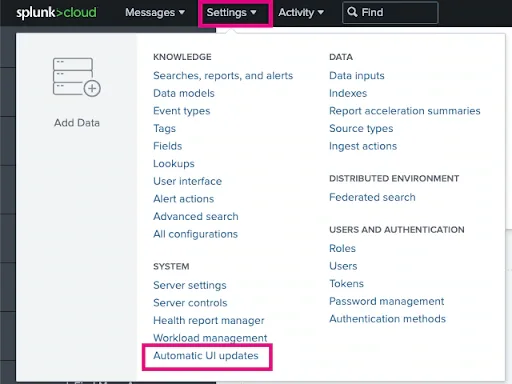
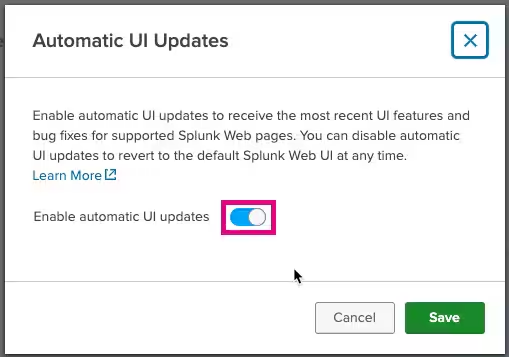
To enable AUIU, cloud admins navigate to the Automatic UI Update option in the main setting menu in Splunk version 8.2.2109 or higher. Change the toggle to “on” and press “save.” Now, new developments on specified AUIU pages will automatically load between Splunk upgrades. See below for screenshots for this step:
Currently, a select subset of admin pages are AUIU enhanced. With Automatic Updates enabled, these pages will always load the most up-to-date UI version. (Further page details are at the end of this post.):
- IP Allow Lists
- Webhook Allow List
- Dashboards Trusted Domains List
- Uploaded Apps Page
- Limits UI Settings (coming soon)
Using Automatic UI Updates
To get AUIU enhanced self-service tools, any users with the sc_admin role can opt into AUIU on their cloud stack. Once an admin has opted into AUIU, there are no additional required steps to benefit from the service.
Although we can deliver page updates quicker with AUIU, we recognize there is still a potential for issues. If you happen to experience any issues on an AUIU enhanced page, you can always toggle the service off. After disabling AUIU and reloading the page in question, Splunk Cloud will load the original version of the page that shipped with your current Splunk version. Please create a support ticket so the engineering team can investigate.
The required fix for an issue could take less than a day with this new deployment process. You must have AUIU enabled for any page adjustments to load in your environment before that fix will be reflected in a future Splunk release.
The AUIU service is only active on the UI layer of Splunk Cloud. Any change an admin makes on an AUIU enhanced page while AUIU is enabled will continue to persist even after AUIU has been disabled.
Growing Automatic UI Updates
Newly created pages or UI adjustments delivered with AUIU are also included in future Splunk releases. This new delivery method is designed to give admins as many self-service tools and updates as possible without waiting for an official Splunk release.
If you have a suggestion to improve AUIU or ideas on which pages would benefit the most with AUIU, please use ideas.splunk.com to submit and up-vote the best ideas. Additional resources can be found in the Splunk Community or within Splunk’s User Slack Group.
Best,
Spencer
Senior Product Manager
Additional Details on AUIU Pages
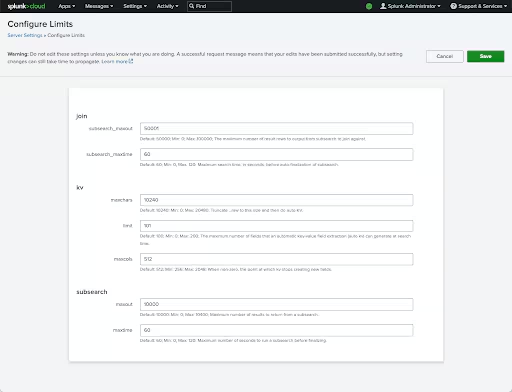
Configure Limits
- Edit global configurations from Limits.conf within the UI
- AUIU opt-in available in 9.0.2209
- Generally available is still TBD
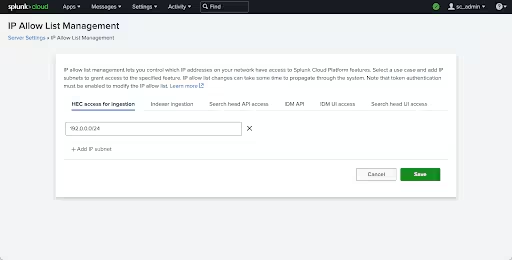
IP Allow Lists
- Create, update, read, and delete IP addresses that can interact with Splunk.
- AUIU opt-in available in 8.2.2201
- Generally available in 8.2.2203
Webhook Allow List
- Provide domains that webhooks are permitted to send data to.
- AUIU opt-in available in 8.2.2203
- Generally available in 9.0.2205
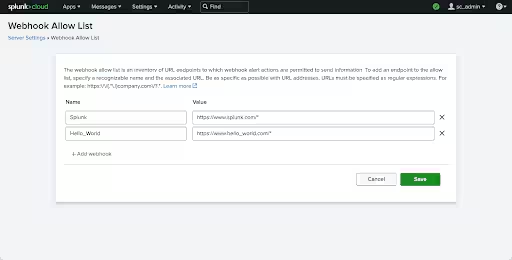
Dashboards Trusted Domains List
- Provide domains that users can import images from into their dashboards.
- AUIU opt-in available in 9.0.2208
- Generally available in 9.0.2212
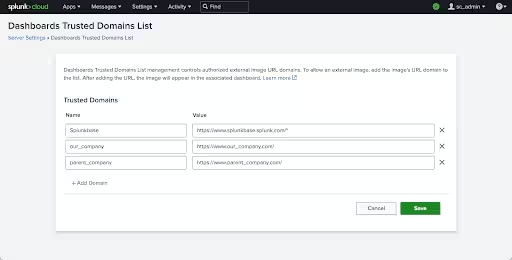
Uploaded Apps Page
- Upload, install and upgrade new private apps
- Generally available in 8.2.2109
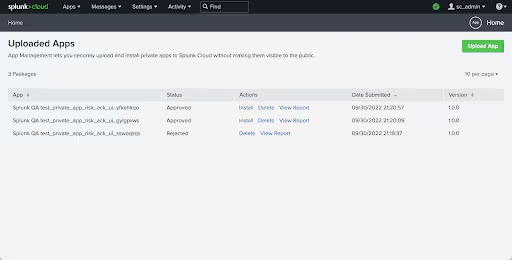
Related Articles

Announcing the General Availability of Splunk POD: Unlock the Power of Your Data with Ease

Introducing the New Workload Dashboard: Enhanced Visibility, Faster Troubleshooting, and Deeper Insights

Leading the Agentic AI Era: The Splunk Platform at Cisco Live APJ

Dashboard Studio: Token Eval and Conditional Panel Visibility

Introducing Resource Metrics: Elevate Your Insights with the New Workload Dashboard

Powering AI Innovation with Splunk: Meet the Cisco Data Fabric

Remote Upgrader for Windows Is Here: Simplifying Fleet-Wide Forwarder Upgrades

Dashboard Studio: Spec-TAB-ular Updates
