Genesys + Splunk = Complete Control Over Your Contact Center
Platform Splunk
Splunk is traditionally known for helping customers with challenges around IT monitoring and security requirements regardless of whether they are running an on-premises datacenter or have a cloud first approach.
Splunk is more recently known as a Data-to-Everything Platform and once customers use it for a particular use case for IT monitoring or Security, they tend to make use of its platform capabilities to bring in other types of data which includes data from Contact Centre environments.
The progression for use of Splunk with Genesys goes something like this…
- Infrastructure monitoring and platform availability
- Application and service availability - One of the most basic data sets leveraged for this is Genesys services logging (e.g. SIP Server, T-Server, URS, MCP, etc.)
In this blog we will talk about a more advanced set of use cases with the Genesys Engage platform and specifically how Pulse integrates with Splunk.
In October 2020, Splunk released the Genesys App for Splunk, which allows customers to get real-time insights into agent status, agent performance, and queue performance of your Genesys Engage contact center environment via API integration with one or more of your Genesys Pulse instances.
The app relies upon the Genesys Pulse Add-on for Splunk that gets data into Splunk from Genesys via a modular input.
So let explore what's inside the Genesys App for Splunk:
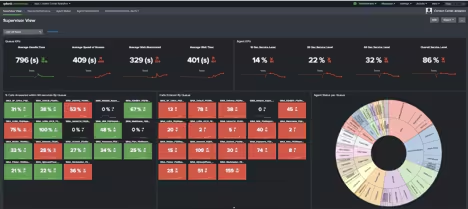
Supervisor Overview
The Supervisor view dashboard view covers the high level aspect of the contact center environment including standard wallboard metrics like Average Handle Time, Average Wait Time, and Service Levels measuring percentage of calls answered within 10, 30, and 60 seconds.
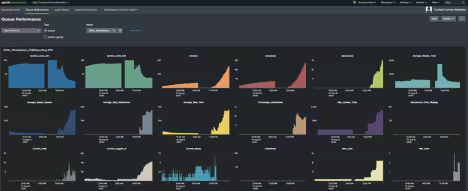
Queue Performance
The Queue Performance Dashboard includes the ability to split by queue or queue group with key metrics displayed over time for the aforementioned metrics as well as others like Average Speed of Answer, Calls Abandoned, Number of Agents Ready, and many more.
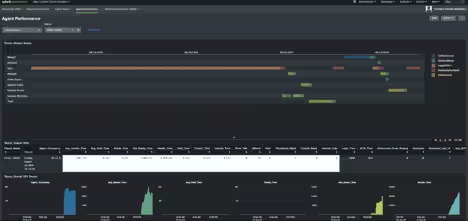
Agent Performance
This dashboard allows you to view key agent metrics including, but not limited to, Agent Occupancy, Dropped Calls, and calls with a Short Talk Time of 30-seconds or less.
Agent Status
This dashboard covers agent statuses over time in a timeline view, with visibility into when agents were handling inbound calls, placing outbound calls, performing after-call work activity, and the duration in which each of those occurred for each queue they are logged into.
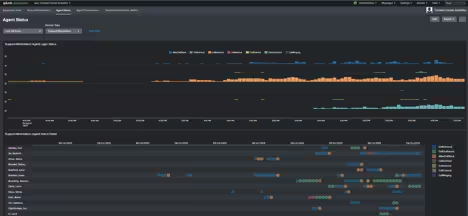
For a more comprehensive list of real-time metrics for queues and agents, you can view the details page of the Genesys App for Splunk.
So beyond these dashboards why would you bring in your contact centre data into Splunk? There are actually many reasons and to name a few:
- Correlation with information that may already be in your Splunk environment like Real User Monitoring, VPN authentication attempts, or VDI data to present a complete story about remote connectivity.
- Creating visibility for those in operational roles outside of the Contact Centre. Quite often, operational issues are brought to the attention of Network or Service Operation Centre personnel by Contact Centre representatives or even further downstream with customers reporting issues.
- Understanding the performance of the contact centre infrastructure whether it be a Session border controller, a Gateway or a server hosting Genesys components.
- Introducing customised alerting capability for when thresholds are reached such as queues reaching their peak and additional agents need to be introduced to handle the increased number of calls.
- Machine learning is a key component of Splunk and imagine being able to leverage the MLTK to predict peaks during the day so the Contact centre operation can be more proactive when scheduling the number of agents which need to be assigned to queues.
Turning Your Contact Center Data Into Action
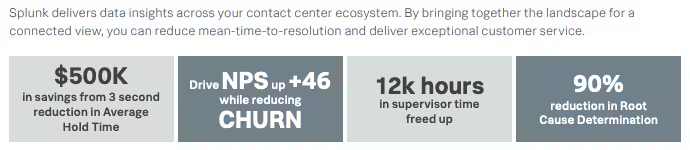
For more on what Splunk can do for your Contact Centre, take a look at our solution guide. If you would like to try the Genesys App and currently do not have a Splunk environment, take a look at our PoV program, Splunk Autobahn, and the newly launched lane for Contact Centre Analytics.
In the next part of our blog we focus on how Splunk can help Genesys customers who are exploring the CCaaS solution or running on their cloud platform of choice.
----------------------------------------------------
Thanks!
Arfan Sharif
Related Articles
Unlock Value from Your Data Anywhere: Connected Experiences .conf21 Highlights
Threat Hunting With ML: Another Reason to SMLE