Deep Learning Toolkit 3.5 - Part 1: Git, MLflow and Image Updates
As the Deep Learning Toolkit for Splunk (DLTK) keeps evolving, I can’t help but be amazed at the amount of positive feedback we receive from customers who are working with it. In addition, they share great ideas on what features can be added and improved. Thanks to the continuous support of the Splunk community we were able to get a few new and useful features available in version 3.5.
In part 1 of this blog series, I talk about the latest improvements for model management, code version control and recent image updates. Part 2 will cover new algorithmic approaches for time series analysis that can provide you with additional useful tools for anomaly detection and prediction tasks.
JupyterLab with Integrated Git
Working with JupyterLab is a common standard for many data scientists and machine learning engineers. For more than 2 years DLTK has provided easy access to Jupyter Notebooks which seamlessly connects to Splunk Enterprise and integrates with SPL. This enables quick experimentation and rapid development for custom machine learning models. In the development phase this is often accompanied by frequent code changes that you and your collaborators might want to track. Luckily a JupyterLab extension is available that allows direct integration of Git into the Lab environment. This extension facilitates the commitment of changes and synchronization with a remote or local code repository right next to your notebook.
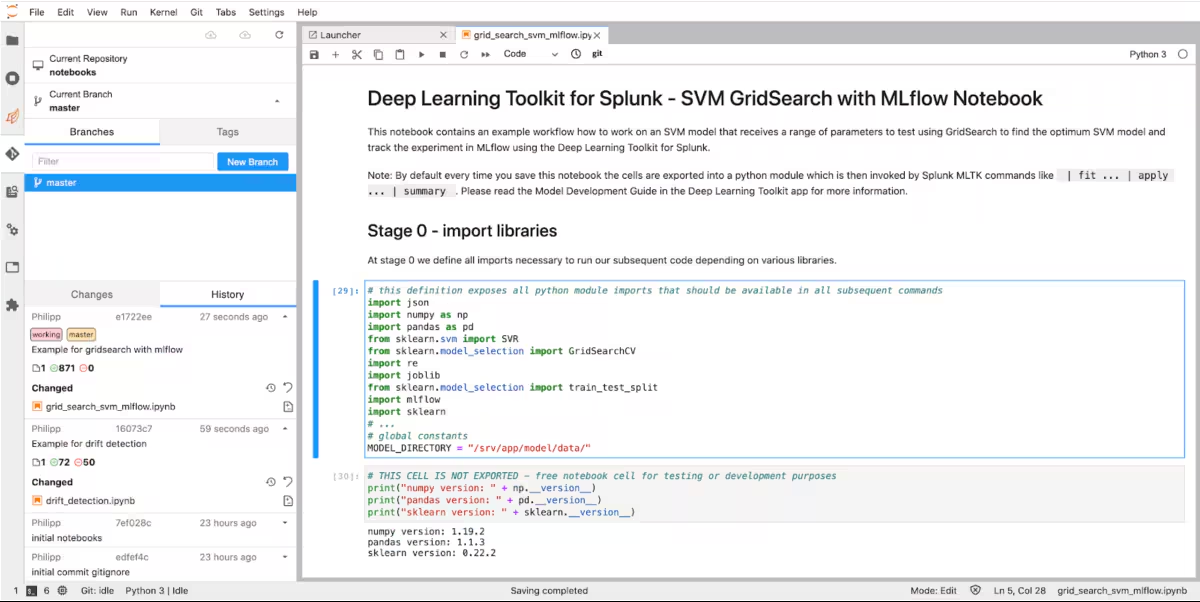
The left panel on the screenshot above shows the activation of a current Git repository for the notebooks folder. The history panel shows recent activities including code changes with the option to revert back to older versions or to create new branches. With this extension most common git tasks can be directly handled straight next to the notebook which gives you more control of your machine learning code versions. While version control is extremely useful, it is only one of many tools within a broader machine learning operations (MLOps) practise. Let’s have a look at what else is possible.
Model Management with MLflow
When machine learning models are built, several iterations are often needed to come up with the best possible solution for a given business problem. In the last blog post on DLTK 3.4 we described how a gridsearch approach can be helpful to automatically determine the best model within a defined hyperparameter space. But what if we want to gain deeper insights into how the various different models performed? This is where a framework like MLflow can provide useful functions that can be easily connected with the existing tools and frameworks in DLTK.
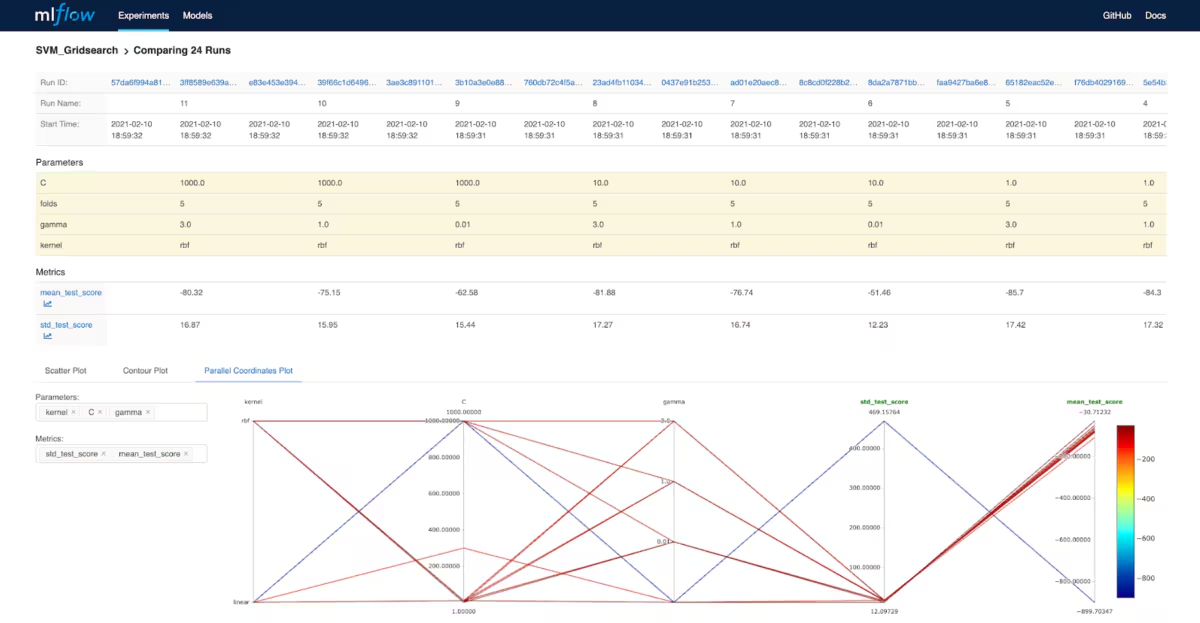
The screenshot above shows how the gridsearch example can be visualized and analyzed in MLflow. Comparing the 24 runs with different parameters and the resulting metrics in a parallel coordinate chart makes it easy to look at the big picture and inspect details as needed for further model improvements. Additionally, you can also keep track of your model artifacts and better manage the machine learning lifecycle. The good news is you can directly connect your DLTK based models to MLFlow and take advantage of both working together.
Image Updates
Many of these new features involved an update of DLTK’s main images. Currently there are four images pre built and tested for compatibility with DLTK 3.5. Next to the Golden Image GPU there is now also a CPU version of this image available which is smaller in size. The Rapids image was updated to Rapids 0.17 and the Spark image was updated to Spark 3.0.1. Apart from more libraries and functionalities HTTPS has been introduced as a standard for data transfer to the container api and access to JuypterLab. Please note that it is recommended that you use your own certificates and further secure your DLTK setup accordingly. The Dockerfiles are publicly available on GitHub so you can easily customize and build the images to fit your requirements.
Now it’s up to you to get started with DLTK and explore all its examples and possibilities. In part 2 of this blog series you’ll learn a few new interesting techniques for more advanced time series analysis. Last but not least, if you want to check out Splunk’s new Machine Learning Environment (SMLE) you can engage here.
Related Articles

Announcing the General Availability of Splunk POD: Unlock the Power of Your Data with Ease

Introducing the New Workload Dashboard: Enhanced Visibility, Faster Troubleshooting, and Deeper Insights

Leading the Agentic AI Era: The Splunk Platform at Cisco Live APJ

Dashboard Studio: Token Eval and Conditional Panel Visibility

Introducing Resource Metrics: Elevate Your Insights with the New Workload Dashboard

Powering AI Innovation with Splunk: Meet the Cisco Data Fabric

Remote Upgrader for Windows Is Here: Simplifying Fleet-Wide Forwarder Upgrades

Dashboard Studio: Spec-TAB-ular Updates
