Announcing the General Availability of Cloud Monitoring Console’s Maintenance Dashboard
Calling all Splunk Cloud Platform admins! At Splunk, we're dedicated to making your lives easier when it comes to managing various aspects of your Splunk Cloud Platform. One critical aspect that requires your attention is maintenance, which directly impacts the operational efficiency of your deployments. As the capabilities of the Splunk Cloud Platform grow, so do the Splunk-initiated updates like upgrades to keep your deployments up-to-date with the latest features and functionality. As an admin you also need to stay on top of keeping your end users informed about planned maintenance activities, which can sometimes be hard to manage when receiving information via email from Splunk. Get ready to say goodbye to solely relying on your email records to keep everyone informed about planned downtime. We're thrilled to introduce you to the Maintenance Dashboard, available within the Cloud Monitoring Console app, where you can stay on top of all Splunk-initiated maintenance information with ease and efficiency.
What’s New?
CMC’s new Maintenance Dashboard is generally available (GA) now starting with CMC 3.12.0. The Maintenance Dashboard provides you with a centralized location to access comprehensive and daily updated information regarding Splunk initiated maintenance windows starting with showing information specifically about Splunk Upgrades. You'll have a single place to view upcoming schedules for the next 30 days and review any past maintenance events that took place within the last 180 days.
Maintenance Dashboard provides the following capabilities to make it easy for you to manage/monitor Splunk initiated maintenance on your deployment.
- View upcoming maintenance: Prepare your end users and address any possible disruptions to business by keeping track of upcoming maintenance in the next 30 days.
- Verify past maintenance: Verify the status of upgrades installed as part of your past maintenance windows
- Audit the progress timeline: Keep track of the most current status of the maintenance window to prepare your users for downtime.
- Give Feedback: Reach out to us directly using the in app feedback button where you can submit comments and feature requests directly.
Navigating the Maintenance Dashboard
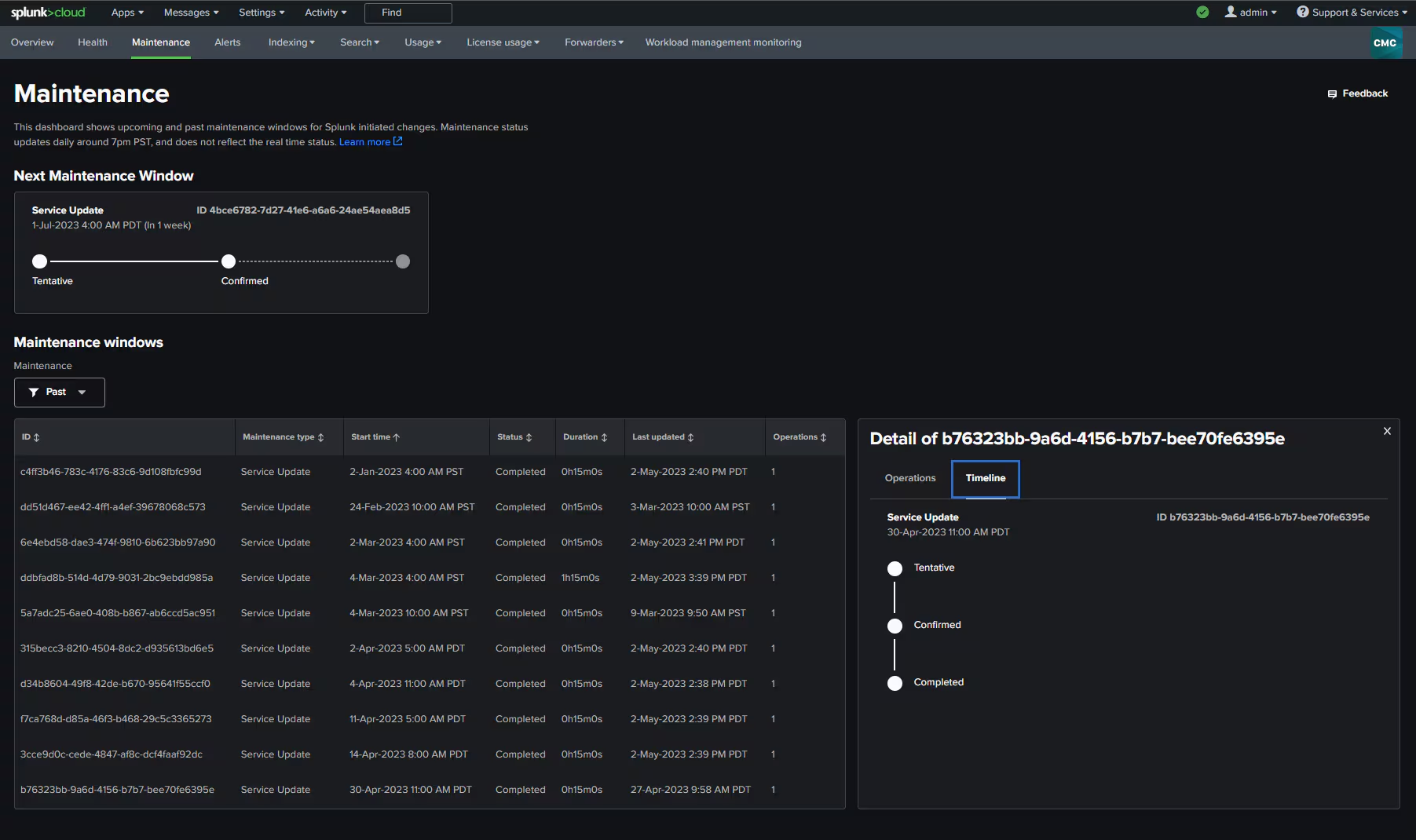
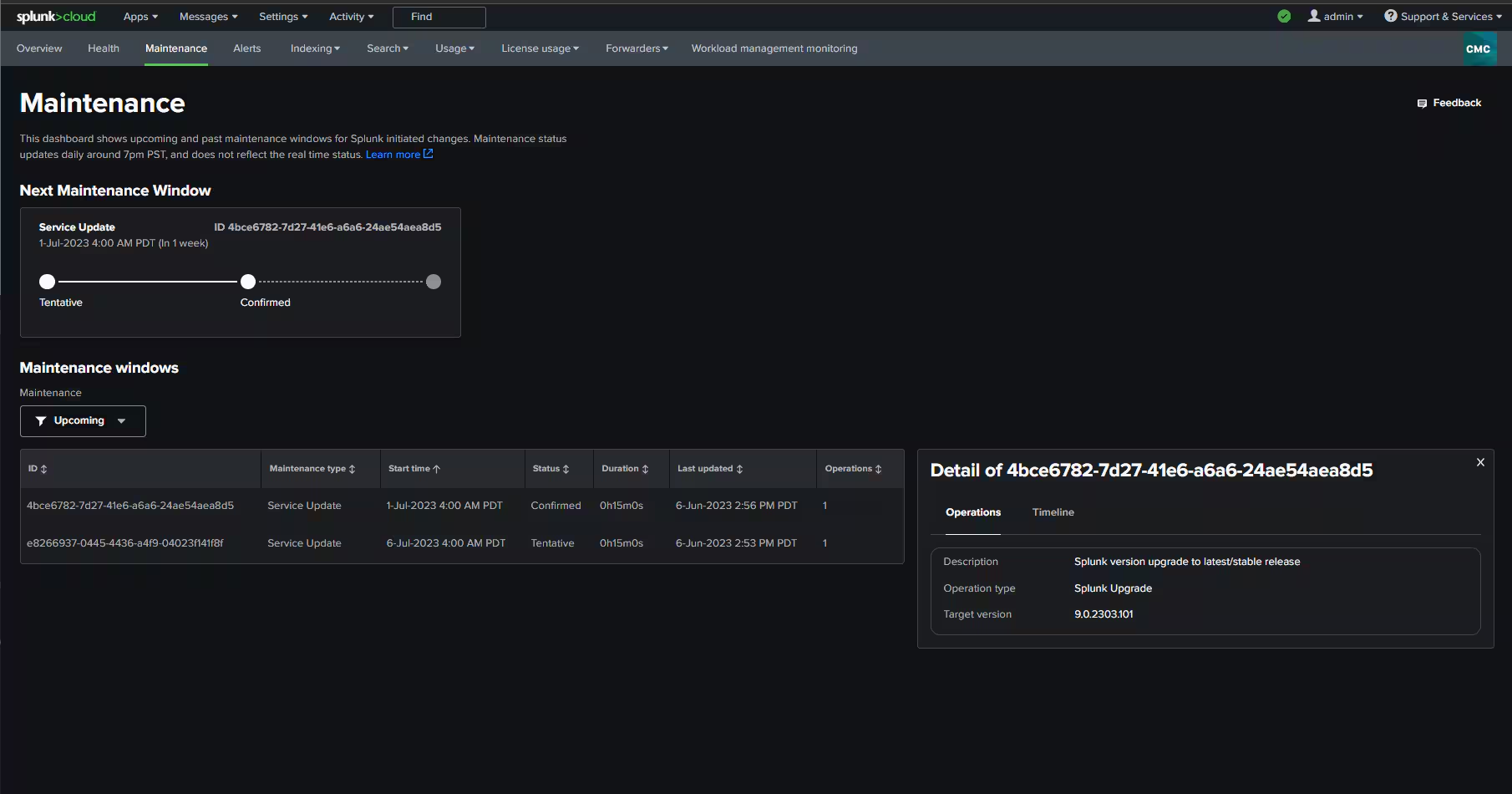
When you access the Maintenance Dashboard within the CMC app, your attention is immediately drawn to the informative card displaying details about the "next maintenance window" scheduled for your deployment within the next 30 days. This card appears only if you have a Splunk-initiated maintenance planned within a month. It provides valuable information such as the Maintenance Type, Maintenance ID, scheduled start time, and a status progress timeline, offering daily updates on the status of your maintenance window. For a more comprehensive view, the bottom section of the Maintenance Dashboard features a table that includes additional details about the operation types (e.g., Splunk upgrades, App upgrades) involved for each maintenance window. By default, the table is filtered to show all upcoming maintenance activities within the next 30 days, including the "next maintenance window."
In this screenshot we see the informational card about the “next maintenance window” as well as the table filtered to show all upcoming maintenance.
Each row of the table provides detailed information about a specific maintenance window including exact/estimated start time, status, duration, timestamp of when the record was last updated as well as number of operations that Splunk plans to perform within that Maintenance window. Each row comes with a convenient side panel displaying the details of the operations planned, with the option to switch tabs and view the status progress timeline. This ensures you have all the necessary information at your fingertips to share with your end users. The table filter allows you to choose whether you want to view upcoming, past, or all maintenance windows. When filtering the table by upcoming maintenance, the windows are sorted in chronological order, ensuring the nearest maintenance window appears at the forefront for easy reference.
In this screenshot you can see the table filtered to show all the past maintenance windows. It also displays a side panel where you can audit the various states of a Maintenance window completed in the past.
What’s Next
We're only scratching the surface of what's to come. Stay tuned for more updates as we work on bringing more self service capabilities to the Maintenance dashboard. But here's the best part: we want YOU to join us on this journey! We value your brilliant ideas and encourage you to share them with us. Simply click on the feedback button within your Maintenance Dashboard and let your creativity flow. We can't wait to incorporate your suggestions to make maintenance management a breeze!
Now, if you're like us and can't resist diving deeper into the world of the Maintenance Dashboard and the Cloud Monitoring Console (CMC), we've got you covered. Check out our comprehensive CMC documentation, where you'll find all the helpful details about the Maintenance dashboard. And hey, don't hesitate to drop by the CMC community page to submit any questions or engage in lively discussions on this topic.
.conf23 Talks Related to Splunk Cloud Platform Admin Monitoring Tools
Related Articles

Announcing the General Availability of Splunk POD: Unlock the Power of Your Data with Ease

Introducing the New Workload Dashboard: Enhanced Visibility, Faster Troubleshooting, and Deeper Insights

Leading the Agentic AI Era: The Splunk Platform at Cisco Live APJ

Dashboard Studio: Token Eval and Conditional Panel Visibility

Introducing Resource Metrics: Elevate Your Insights with the New Workload Dashboard

Powering AI Innovation with Splunk: Meet the Cisco Data Fabric

Remote Upgrader for Windows Is Here: Simplifying Fleet-Wide Forwarder Upgrades

Dashboard Studio: Spec-TAB-ular Updates
