Addition of Syslog in Splunk Edge Processor Supercharges Security Operations with Palo Alto Firewall Log Reduction
Platform Abbas SaboowalaNow generally available, Splunk Edge Processor supports syslog-based ingestion protocols, making it well-equipped to wrangle complex and superfluous data. Users can deploy Edge Processor as an end-to-end solution for handling syslog feeds such as PAN logs, including the functionality to act as a syslog receiver, process and transform logs and route the data to supported destination(s).
Before you start writing a SPL2 pipeline to process and transform incoming logs, configure Edge Processor to natively listen for events coming over syslog by:
- Opening a port to listen for syslog traffic on the Edge Processor node;
- Configuring your device/application to send syslog data to Edge Processor; and
- Configuring Edge Processor to listen for syslog feed on the opened port.
Once you have configured Edge Processor to receive syslog events, you will see it appear in the Edge Processor console as shown below:
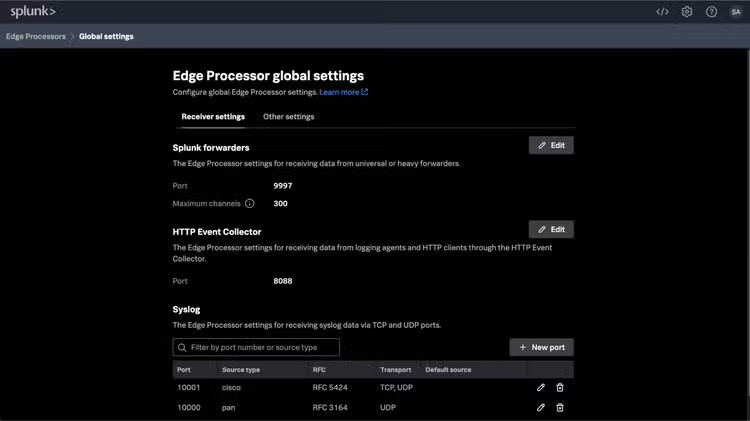
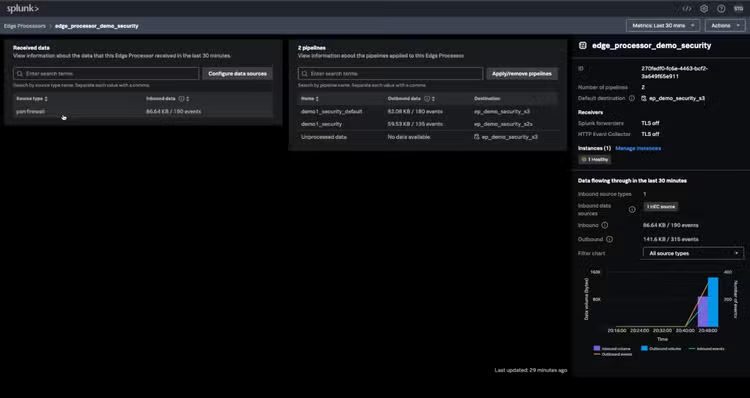
The addition of syslog for Edge Processor expands the ability to filter, mask, transform and route data generated from events from network devices, Linux/Unix-like OS, and more.
Supercharge Security with Palo Alto Networks Firewall Log Reduction
Let’s delve into real-world examples of wrangling data in motion in the context of cybersecurity, specifically, log reduction of Palo Alto Networks (PAN) sources. TL;DR – no worries, check out this video demo to see this use case in action.
Have you ever been swamped by the relentless surge of log data from your Palo Alto Networks (PAN) devices? Ever felt like finding the crucial information within these logs is akin to searching for a needle in a haystack? You're not alone.
The current volume and frequency of PAN firewall log data in syslog results in delayed incident detection, longer search processing times, and slow response and automation. And given that not all log types are created equal, nor are meaningful to an organization's needs, there’s also increased log management costs to contend with. The table below characterizes the most common log types according to size and volume:
*Note: URL and File logs are of type Threat, but are called out separately because they have a different frequency than most threat logs.
You can see from the table that Traffic logs and URL logs are the most frequent and largest, with File logs coming in second. These log types will make up the bulk of what would be ingested and indexed in Splunk.
Generally speaking, Edge Processor could support log reduction in the following ways:
- If you use Splunk in a SOC for security, but are not responsible for the operational health of the firewalls, you could consider filtering out System and Config log types.
- Traffic logs are large and high volume. You can trim their volume by filtering out 'Start' logs. 'Start’ logs often have an incorrect app because they are logged before the app is fully determined. The 'End' logs will have the correct App and other data such as the session duration.
Cutting Through (PAN Log) Noise
More specifically, consider this example — backup software runs every night, generating thousands of connections from endpoints to a backup server. This generates a large volume of low value data that is not critical to detecting threats. Enter Edge Processor! Create a pipeline in Edge Processor for this backup app to retain only threats and drop all other events belonging to log traffic sessions, URLs, or files.
Let’s take a closer look at the challenge of gaining control of PAN logs via syslog, where our ultimate goal is to improve search performance. How? By reducing event size; removing unnecessary, “noisy” fields; and routing a full-fidelity copy of the data that is to be maintained for compliance purposes in AWS S3 — all of which, in turn, reduces ingestion and storage costs.
In particular, we aim to:
- Trim the unnecessary syslog header content and drop extraneous fields like future_use and time;
- Filter out events that might not be directly useful for immediate security incident investigation, such as the HIPMATCH and CORRELATION event types, and entries related to ROUTE and RAS event subtypes; and
- Route these reduced log events to the Splunk index for active security-related use cases, including searches and alerts, while keeping unmodified copies in AWS S3 for long-term storage.
PANning for Gold – Creating Edge Processor Pipelines
Now, let’s get started with creating pipelines in Edge Processor to transform those PAN logs and ultimately, supercharge your security operations!
The two pipelines below show how a user controls what data the pipeline applies to, how that data is to be processed, and then where the processed data is routed. The first pipeline shows how to filter and minimize data volume on the way to a Splunk index, and the second keeps a raw copy in an AWS S3 bucket for compliance reasons! However, it's essential to note this is one example of how the Edge Processor can be employed. Just like SPL, the actual query definition depends on the nuances of the data (and your creativity!), and we encourage you to tailor the Edge Processor pipelines to best fit your unique needs.
Below, you will see references to commands you may not recognize, like remove_readable_timestamp. These aren’t out-of-box SPL2 commands, but are custom functions that you can define to improve usability. Continue reading to the “Making Security Function-al” section to learn more about user-defined functions.
$pipeline =
| from $source
// First, drop the human readable timestamp which is added by syslog, as this is redundant and not used.
| remove_readable_timestamp
// Then, extract the useful fields like other timestamps and event type
| extract_useful_fields
// Drop events of specific type and subtype which are not useful for security analysis
| drop_security_noise
// As field extraction generates extra fields which are not needed at index-time, use the fields command to keep only _raw
| fields _raw
// Lastly, route the filtered events to a specific index used for security incident analysis
| eval index="security_paf_index"
| into $destination;
Splunk Index = security_paf_index
Splunk destination =
splunk_stack_security_s2s
$pipeline =
| from $source
| into $destination;
Making Security Function-al
As you review the first pipeline definition, you might be thinking, “wow, those SPL2 commands are super readable and straightforward!” — and you’d be right! Or at second thought, you may wonder, “hang on, there’s no way extract_useful_fields is an out-of-box SPL2 command, so how does Splunk know what’s a useful field?” — and you’d also be right!
The extract_useful_fieldscommand is made possible through custom SPL2 functions. Custom SPL2 functions are named, reusable blocks of SPL2 code that can wrap a bunch of complex SPL2, in a simple custom command or eval function; think of it like an SPL marco, but way more powerful! Let's explore this capability further.
- Remove_readable_timestamp: Each event, as received, begins with a human-readable timestamp appended by syslog. While this might be easy on the eyes, it's unnecessary for our processing purposes. A concise SPL2 function can rid us of this redundancy:
function remove_readable_timestamp($source) {
return | from $source
| eval readable_time_regex = "\\w{3}\\s\\d{2}\\s\\d+:\\d+:\\d+"
| eval _raw=replace(_raw, readable_time_regex, "")
| fields -readable_time_regex
}
- extract_useful_fields: Before we can filter events based on their relevance, we need to extract some of the useful fields required to determine relevance of events to security - in this case, event_type and event_subtype, but this could be anything! Here’s how we can extract them efficiently:
function extract_useful_fields($source) {
return | from $source
| rex field=_raw
/(\d{4}\/\d{2}\/\d{2}\s\d{2}:\d{2}:\d{2}),([\w\d]+),(?P<event_type>[A-Z]+),(?P<event_subtype>[\w\d]*),\d*,(\d{4}\/\d{2}\/\d{2}\s\d{2}:\d{2}:\d{2})/
}
- drop_security_noise: By simply applying the suitable filters using event_type and event_subtype, we can sift out the noise and focus on what truly matters:
function drop_security_noise($source) {
return | from $source
| where not(event_type IN ("CORRELATION", "HIPMATCH"))
| where not(event_type in ("SYSTEM")) or (event_type IN ("SYSTEM") and not(event_subtype in ("routing", "ras")))
}
As you can see, the bodies of each of these custom SPL2 functions are composed of standard SPL2 — just like a macro. All a user needs to do is use the functions in the pipeline, but if you prefer to inline all SPL2 in your pipeline without using custom functions, you absolutely can:
$pipeline = | from $source
//Remove readable & redundant timestamp
| eval readable_time_regex = "\\w{3}\\s\\d{2}\\s\\d+:\\d+:\\d+"
| eval _raw=replace(_raw, readable_time_regex, "")
| fields -readable_time_regex
//Extract useful fields
| rex field=_raw /(\d{4}\/\d{2}\/\d{2}\s\d{2}:\d{2}:\d{2}),([\w\d]+),(?P<event_type>[A-Z]+),(?P<event_subtype>[\w\d]*),\d*,(\d{4}\/\d{2}\/\d{2}\s\d{2}:\d{2}:\d{2})/
//Drop security noise
| where not(event_type in ("CORRELATION", "HIPMATCH"))
| where not(event_type in ("SYSTEM")) or (event_type in ("SYSTEM") and not(event_subtype in ("routing", "ras")))
| fields _raw
| eval index="security_paf_index"
| into $destination;
Put Edge Processor to Task
Given the capabilities described above, the Edge Processor stands out with its resilient approach to modern log reduction. Its robust security foundation filters essential information and efficiently manages log data, reducing incident analysis time and accelerating threat identification. Edge Processor goes beyond these core functions, unifying security operations through effortless integration with Splunk Cloud Platform and paving the way for easier alert enrichment in future updates. The result is a tool that empowers security teams to detect and respond to threats with unmatched speed and precision, ensuring minimal disruptions to the current infrastructure.
Splunk Cloud Platform customers can access the Edge Processor for free! To activate an Edge Processor tenant in your environment, contact your Splunk sales representative or shoot an email to EdgeProcessor@splunk.com with your details.
Together, let’s make your security operations smarter, faster, and more robust!
This blog was co-authored by Xi He and Sri Tejaswi Gattupalli, Product Manager Interns, Summer 2023 and Aditya Tammana, Senior Product Manager.


Related Articles
Get in Command of Splunk Resources with Workload Management - Part 1
Threat Hunting With ML: Another Reason to SMLE