Kubernetes Metrics for Troubleshooting: The Practitioner’s Guide To Diagnosing & Resolving K8s Issues
Learn Greg LefflerKey Takeaways
- Metrics are foundational to effective Kubernetes troubleshooting, helping teams move from reactive guesswork to proactive diagnosis across control plane, pods, resources, and networking layers.
- Organizing metrics by categories enables faster root cause identification and prevents downtime. This article looks at cluster health, pod/container health, resource utilization, network performance, and more.
Troubleshooting Kubernetes without the right metrics is like flying blind. Metrics, as quantifiable measurements or Key Performance Indicators (KPIs), are one of the four core telemetry types (metrics, logs, traces, and events) that form the backbone of Kubernetes observability.
Metrics provide essential visibility, enabling engineers to detect, diagnose, and prevent issues by offering measurable signals, instead of leaving you guessing and reacting only to symptoms.
This guide will break down the key Kubernetes metrics that matter for troubleshooting and demonstrate how to interpret them effectively to troubleshoot faster, avoid unnecessary downtime, and optimize your Kubernetes workloads.
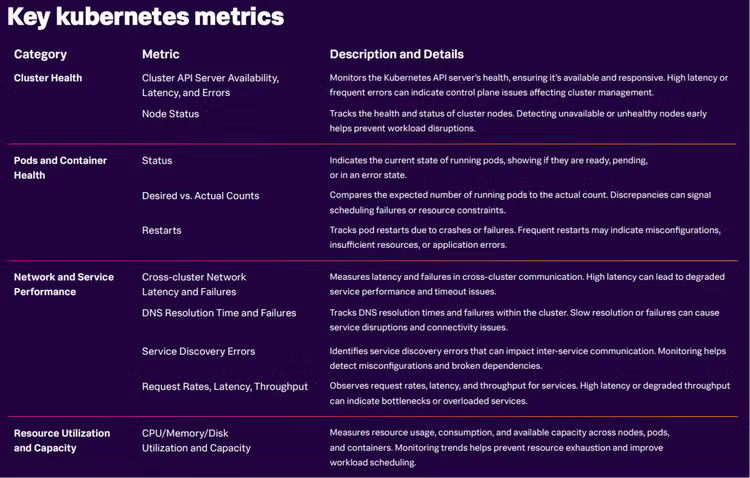
At-a-glance Kubernetes metrics cheat sheet
How to group Kubernetes metrics for better troubleshooting
Kubernetes environments are highly dynamic: pods are ephemeral, workloads shift between nodes, and autoscaling can change the shape of your cluster in seconds. All of this results in an overwhelming amount of data, much of it noise. Without metrics, you’re relying on instinct instead of evidence to find the metrics that matter.
Grouping metrics into logical categories helps you cut through the noise. The right metrics help you:
- Identify anomalies before they cause outages.
- Establish baselines for normal behavior.
- Correlate symptoms to root causes across the stack.
- Prioritize fixes based on real business impact.
Example of using grouped metrics
When users report slow application response times, a quick glance at Network and Service Performance metrics might show increased latency, while Resource Utilization metrics reveal a sudden spike in CPU on a particular node.
This correlation, facilitated by grouping, quickly points to a potential "noisy neighbor" (another workload on the same node that’s using excessive resources) or a runaway process, allowing you to prioritize the fix and avoid sifting through unrelated data.
The four pillars of Kubernetes metrics
With the value of grouping metrics in mind, this guide organizes key metrics into four foundational pillars:
- Cluster health
- Pod and container health
- Resource utilization
- Network and service performance
Understanding these categories provides a structured approach to troubleshooting, effectively diagnosing issues, and maintaining a healthy cluster.
Cluster health metrics
What they measure: These metrics provide a high-level view of the Kubernetes control plane's health and the readiness of your cluster's nodes. This includes API server availability, latency, and error rates, as well as node readiness and overall health.
Why they matter for troubleshooting: The control plane is the brain of your Kubernetes cluster; if it's unhealthy, every other part of the system is affected. Monitoring these metrics helps you quickly identify foundational issues that could impact all workloads.
How to use them for troubleshooting:
- Initial check: When a cluster-wide issue is suspected (e.g., many pods pending, deployments failing), start by examining API server latency and error rates. Spikes here often indicate an overloaded or unhealthy control plane. If the control plane is unhealthy, workloads cannot be managed automatically.
- Node-level diagnosis: Concurrently, check node status. An unhealthy or unavailable node can cause scheduling delays and impact workloads running on it.
- Correlation: For instance, if you observe API server latency spikes alongside an increase in pending pods, it could point to scheduler delays, potentially caused by a failing node or resource exhaustion impacting control plane components. This combination guides you towards investigating the control plane's capacity - or potentially issues with a specific node in the control plane.
Pod and container health metrics
What they measure: These metrics provide insights into the operational state and lifecycle of individual pods and their workloads (containers). This includes readiness and liveness check statuses, the difference between desired and actual replica counts, container exit codes, and restart counts.
Why they matter for troubleshooting: These are often the earliest and most direct signals of a problem at the application or workload level, indicating issues like misconfigurations, resource exhaustion, or application bugs.
How to use them for troubleshooting:
- Workload stability: High pod restart counts are a critical red flag, often pointing to underlying issues like bad code deployments, out-of-memory errors (OOMKills), unhandled exceptions, or misconfigurations.
- Service availability: Monitor readiness and liveness states to ensure your application instances are healthy and capable of serving traffic. A failing readiness probe means a pod isn't ready to receive requests, while a failing liveness probe indicates a pod needs to be restarted.
- Deployment health: Track desired vs. actual pod counts to quickly identify if your deployments are failing to reach their target scale, which could be due to scheduling failures or resource constraints.
- Root cause analysis: For example, if a deployment triggers a surge in restarts, correlating this with container exit codes and logs can quickly reveal the root cause, such as an unadjusted memory limit leading to OOMKills.
Resource utilization metrics
What they measure: These metrics track the consumption and allocation of computing resources (CPU, memory, network utilization, and disk) at both the node and pod levels.
Why they matter for troubleshooting: Resource management is crucial in Kubernetes. Overutilization can lead to performance degradation, throttling, and pod evictions, while underutilization wastes valuable resources and increases costs.
How to use them for troubleshooting:
- Preventing performance issues: Continuously monitor CPU, memory, and disk usage to identify trends that could lead to resource contention. Spikes in utilization can indicate an application bottleneck or a "noisy neighbor" scenario.
- Optimizing scheduling: Compare allocated resources (requests and limits) against actual usage. This helps identify misconfigured resource requests that might be causing pods to be throttled or preventing efficient packing of pods onto nodes.
- Diagnosing evictions: If you see unexpected pod evictions, immediately check node-level resource pressure. For example, a service consuming excessive memory on one node can cause unrelated pods to be evicted, even if the cluster overall has capacity.
Network and service performance metrics
What they measure: These metrics focus on the communication flow within and across your Kubernetes services. They include service request rates, latency, error rates, DNS resolution times, and cross-cluster connectivity.
Why they matter for troubleshooting: Network bottlenecks and communication failures often masquerade as application issues, making them challenging to diagnose without specific network-level visibility.
How to use them for troubleshooting:
- Identifying communication issues: High service latency or error rates, especially between services, can point to network congestion, misconfigured network policies, or issues with service mesh routing.
- Service discovery problems: Slow or failing DNS resolution times can severely impact service discovery, preventing applications from communicating with their dependencies.
- Dependency mapping: Service discovery errors directly identify broken dependencies between workloads, helping you quickly identify which services are failing to connect to others.
- Cross-cluster visibility: In multi-cluster or hybrid environments, tracking cross-cluster network latency is crucial to detect inefficient routing or network issues impacting geographically distributed services. For example, a latency spike during peak load could be traced back to packet loss between namespaces due to a misconfigured network policy.
What are RED metrics in Kubernetes? Rate, errors, duration
The RED methodology is a gold standard for monitoring Kubernetes workloads:
- Rate: number of requests per second the service handles
- Errors: percentage of failed requests
- Duration: latency per request
Tracking RED metrics in Kubernetes workloads can surface performance regressions before they trigger user-visible issues. For example, a sudden spike in latency combined with a rise in error rates may indicate downstream issues, like database slowness or resource contention on the node.
How to diagnose Kubernetes scaling issues with metrics
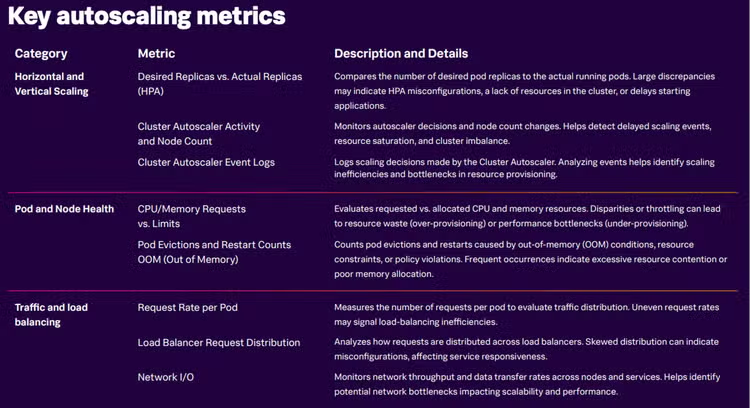
Automatic scaling is a fundamental feature of Kubernetes, allowing your applications to adapt to changing loads. However, without proper monitoring, tuning autoscaling can become guesswork, leading to performance problems or resource waste. By tracking specific metrics, you can ensure your scaling mechanisms are working efficiently and diagnose issues quickly.
Here are the key metrics to monitor for effective Kubernetes autoscaling:
Horizontal pod autoscaler (HPA) metrics
The HPA automatically scales the number of pods in a deployment or ReplicaSet based on observed CPU utilization or other select metrics.
- Desired vs. actual replicas: This metric shows the difference between the number of pods the HPA wants to run and the number currently running. A significant or persistent gap here can indicate scaling lag, insufficient cluster resources to provision new pods, or issues with pod startup.
- HPA target utilization: This metric reveals how close your pods are to the defined scaling thresholds (e.g., 80% CPU utilization). Monitoring this helps you understand if your scaling thresholds are realistic and if the HPA is reacting appropriately to workload demands.
Vertical pod autoscaler (VPA) metrics
The VPA automatically adjusts the CPU and memory requests and limits for containers in a pod.
CPU and memory requests vs. limits: Mismatches between requested and limited resources can lead to problems.
- Under-requesting: If requests are too low, pods might be throttled (CPU) or evicted (memory) due to resource contention, even if the node has available capacity.
- Over-requesting: If requests are too high, resources are wasted, and the scheduler might struggle to find suitable nodes, leading to pending pods. VPA metrics help identify optimal resource allocations.
Cluster autoscaler metrics
The Cluster autoscaler automatically adjusts the number of nodes in your cluster.
- Node count and scaling Events: Track the total number of nodes and the frequency of scaling up or down events. This helps detect delayed scaling actions (nodes not added quickly enough when needed) or an imbalance in resource distribution across your cluster.
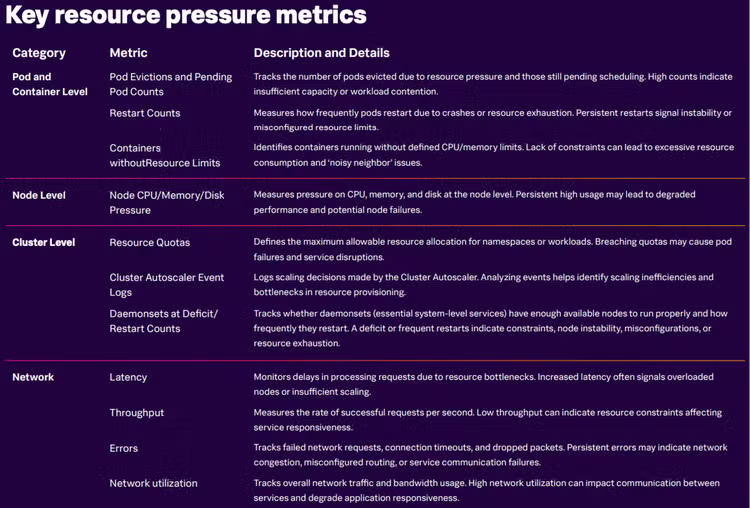
Metrics for detecting resource pressure
Resource contention can cause cascading failures across Kubernetes workloads. Key metrics to watch here include:
- Pod evictions and pending pod counts: High numbers suggest insufficient capacity or misconfigurations, as Kubernetes evicts pods or fails to schedule them when resources are scarce.
- Node-level CPU/memory/disk pressure: Persistent saturation of these resources at the node level indicates that the node is struggling to accommodate its workloads, necessitating rebalancing or adding capacity.
- OOMKill events/counts: Specifically tracking Out-Of-Memory (OOM) kill events or the resulting restart counts directly points to applications consuming more memory than allocated, often due to poor memory management or runaway workloads. This is a critical indicator of memory resource pressure.
Pair these resource metrics with throughput and latency metrics to understand the full impact of resource contention on user-facing services.
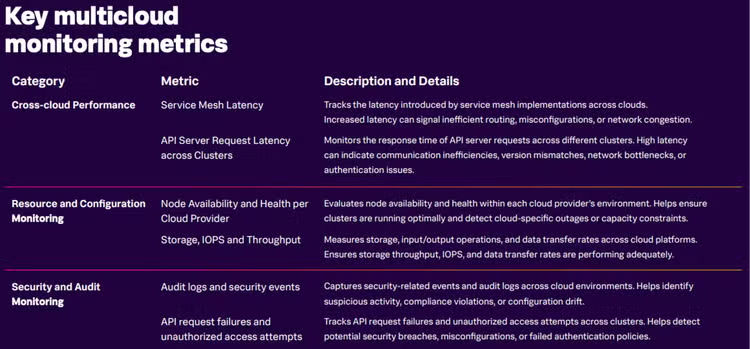
Metrics for multicloud and hybrid Kubernetes environments
If you run workloads across multiple clouds, provider differences can complicate troubleshooting. Essential metrics include:
- Service mesh latency: Detects inefficient routing or network congestion across clouds.
- API server latency across clusters: Identifies authentication issues or version mismatches.
- Storage IOPS and throughput: Monitors storage performance to catch slow reads/writes.
Consistency is key: Standardize metric names and tagging to make cross-environment comparisons meaningful. Use the OpenTelemetry metrics semantics conventions as your guide.
Putting it all together: How to integrate metrics into your troubleshooting workflow
Metrics aren’t just numbers, they’re the starting point for root cause analysis that supports the entire environment. Here’s how to integrate them into your overall troubleshooting workflows:
- Detect anomalies early with adaptive thresholds. AI-driven platforms like Splunk Observability Cloud can compare real-time metrics to historical baselines.
- Correlate metrics with logs and traces to see the full impact path.
- Link metrics to business impact. For example, API latency increases cause high cart abandonment rates, affecting revenue.
- Automate responses for recurring metric patterns, like scaling out when CPU usage stays above 80% for 5 minutes. Beware that scaling has costs: Include a safety valve to stop scaling and alert the SRE team if this has been done more than X times in Y minutes, for example.
Best practices for metric-driven Kubernetes troubleshooting
- Instrument consistently across clusters with open standards like OpenTelemetry.
- Use labels and annotations, respecting semantic conventions, to make filtering fast during incidents.
- Retain enough history for trend analysis. Some problems only reveal themselves over days or weeks.
- Avoid metric overload. Track only what matters for your SLIs and SLOs.
- Integrate security metrics alongside performance data to detect malicious workloads early.
Common pitfalls to avoid when tracking metrics
- Tracking too many metrics: Leads to alert fatigue and slows decision-making.
- Not correlating metrics with other telemetry: Without logs and traces, you only know that there is a problem. You don’t know where the problem is or what the cause of it is.
- Using static thresholds: Leads to false positives and missed anomalies. Because Kubernetes workloads are highly dynamic, static thresholds are going to miss the mark at some point.
- Ignoring historical baselines: Trends over time are often more important than single data points.
- Forgetting to label and tag metrics: Makes filtering slow during high-pressure incidents, and makes it harder to see if specific groups or types of users are affected.
The value of observability for K8s troubleshooting
Ultimately, a robust, metric-first observability strategy transforms Kubernetes troubleshooting from reactive firefighting into proactive stability management. By consistently tracking the right signals, from control plane health and resource utilization to RED metrics, engineers can detect problems sooner, diagnose them faster, and prevent recurrence.
This approach is crucial no matter if you’re managing a single on-prem cluster or a fleet of multicloud deployments. Using a smart metric strategy ensures your workloads remain healthy and your users stay happy.
Ready to harness the power of observability in your K8s environments?
FAQs: Metrics for troubleshooting Kubernetes
Related Articles

Data Encryption Standard: What Is DES and How Does It Work?

Observability-Driven Development Explained: 8 Steps for ODD Success