Detecting DNS Exfiltration with Splunk: Hunting Your DNS Dragons
Splunk is committed to using inclusive and unbiased language. This blog post might contain terminology that we no longer use. For more information on our updated terminology and our stance on biased language, please visit our blog post. We appreciate your understanding as we work towards making our community more inclusive for everyone.
Oh no! You’ve been hacked, and you have experts onsite to identify the terrible things done to your organization. It doesn’t take long before the beardy dude or cyber lady says, “Yeah...they used DNS to control compromised hosts and then exfiltrated your data.”
As you reflect on this event, you think, “Did I even have a chance against that kind of attack?”
Yes, you did because Splunk can be used to detect and respond to DNS exfiltration. In fact, people have been using DNS data and Splunk to find bad stuff in networks for nearly two decades!
Since you've been an avid reader of Threat Hunting with Splunk: The Basics, you all know that good hunting starts with a hypothesis or two. So, let’s create a hypothesis! In this article, we’ll deal with the perennial topic of DNS exfiltration and we’ll show some awesome visualizations,hunting and slaying techniques.
(This article is part of our Threat Hunting with Splunk series and was originally written by Derek King. We’ve updated it recently to maximize your value.)
Understanding DNS exfiltration
When we talk about DNS exfiltration, we are talking about an attacker using the DNS protocol to tunnel (exfiltrate) data from the target to their own host. You could hypothesize that the adversary might use DNS to either:
- Move sensitive files out of your organisation.
- Use it as a side channel for communications with malicious infrastructure.
With the right visualizations and search techniques, you may be able to spot clients behaving abnormally when compared either to themselves or their peers!
Where do we find DNS data?
If you're already sucking DNS data into Splunk, that's awesome! However, if you’re not and you haven't seen Ryan Kovar and Steve Brant's .conf presentation, Hunting the Known Unknowns (with DNS) then check it out — it's a treasure trove of information. If the work of my esteemed colleagues just isn’t your bag, then I’m sure they won’t take it personally...much.
Either way, let me tell you that these can all be excellent sources of data:
- Windows Legacy DNS debug logging
- DNS analytical logging
- Zeek DNS
- Splunk Stream
If you want to follow along at home and are in need of some sample data, then consider looking at the “BOTS V3 dataset on GitHub”. ” Note* All of the searches below were tested on the BOTSv1 data found here.
Signs you’re experiencing DNS exfiltration
Are you a victim of DNS exfiltration? There are many questions you can use to support your hypotheses. For example, if your hosts are compromised they may show changes in DNS behaviour like:
- Increase in volume of requests by the client, indicating command & control or data movement.
- Change in the type of resource records we see, e.g., TXT records from hosts that don’t typically send them.
- Variance in the length of the request, indicating DGA or encoded/obfuscated data stream.
- Variability in the frequency of requests, such as beaconing activity to C&C.
- Randomness in domain names, like DGA.
- Substitution of domains to very slightly altered domains, as in typosquatting.
These are adversary techniques we can craft searches for in Splunk using commands like stats, timechart, table, stdev, avg, streamstats. (Visit each commands’ Docs page for more specific information.)
Hunting for threats in DNS
In the section below, I will show you some ways to detect weirdness with DNS based on the techniques highlighted above.
NOTE: As always, we write our searches to be common information model (CIM) compliant. You may need to adjust the sourcetypes/tags/eventtypes to suit your environment!
Top 10 Clients by Volume of Requests
Capturing spikes or changes in client volumes may show early signs of data exfiltration.
tag=dns message_type="Query"
| timechart span=1h limit=10 usenull=f useother=f count AS Requests by src
We begin with a simple search that helps us detect changes over time. The first line returns the result set we are interested in, followed by the timechart command to visualise requests over time in one-hour time slices.
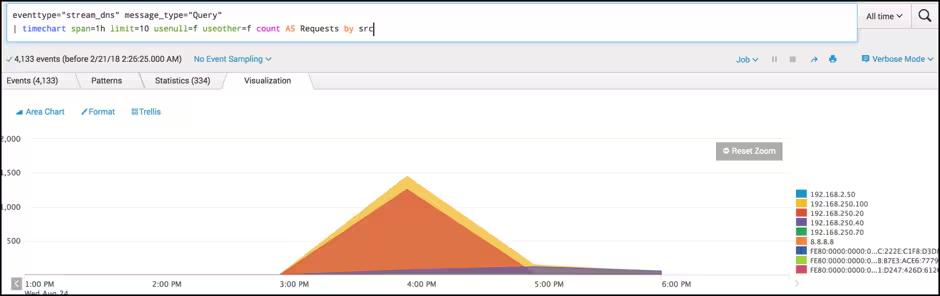
Clients with an unnecessary number of events compared with the rest of the organisation may help to identify data transfers using DNS.
Requests by Resource Record Over Time
Changes in resource type behaviour for a client may point toward potential C&C or exfiltration activity. Carefully observe both A records and TXT records, as these are common techniques. However, don’t be blind-sided into just these two resource types!
tag=dns message_type="QUERY"
| timechart span=1h count BY record_type
Continuing to keep things steady for a start, we again begin with the same dataset and use the timechart command to visualise the record type field over time in one-hour slices. This search could be used in conjunction with the previous search by including a client IP of interest to help follow our hypothesis.
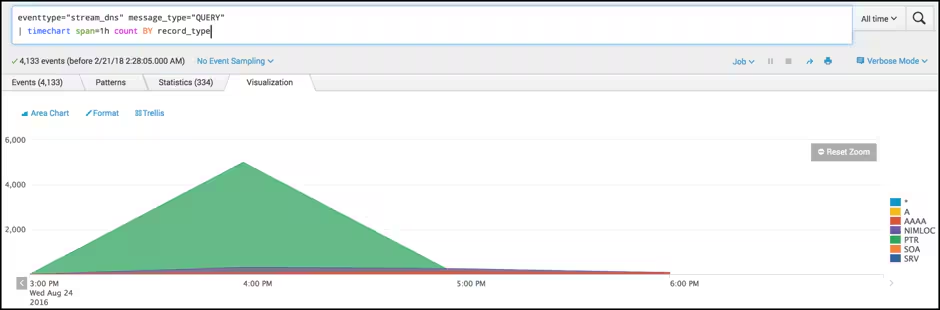
Spotting changes in behaviour early is a great way to reduce the impact of a compromised host. Using Splunk to search historical data helps to identify when a host was initially compromised and where it has been communicating with since.
Packet Size & Volume Distribution
Events that have significant packet size and high volumes may identify signs of exfiltration activity.
tag=dns message_type="QUERY"
| mvexpand query
| eval queryLength=len(query)
| stats count by queryLength, src
| sort -queryLength, count
| table src queryLength count
| head 1000
Whoa, we’re throwing in a couple more commands here. Let’s take a closer look — it’s fantastic, I promise.
We start with the same basic search as before, which you can follow along with the BOTSv1 dataset, but this time we will:
- Use mvexpand on our multi-valued field.
- Use the eval command with the len function to calculate the length of the query field.
- The stats command provides a count based on grouping our results by the length of the request (which we calculated with the eval statement above) and src field.
- Next, apply Sort to see the largest requests first and then output to a table, which is then filtered to show only the first 1,000 records.
- We can then use the scatter chart to visualise.
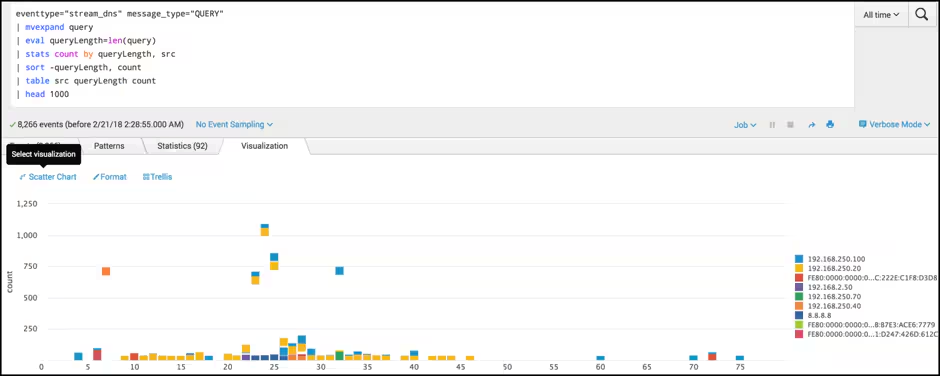
In the above example, looking for distributions that do not match the norm are identified using the scatter chart. A high number of requests, and/or large packets will be of interest.
For example, I usually visit ‘www.bbc.co.uk’ and ‘www.facebook.com’ (thirteen, and sixteen characters respectively). If, however, the malicious software opens a sensitive document that’s 5 Mb in size, chops it into 255-byte packets, and sends via DNS requests, then I’m likely to see many 255-byte packets.
Beaconing Activity
Let’s take it up a notch now and look for clients that show signs of beaconing out to C&C infrastructure. Beaconing activity may occur when a compromised host ‘checks in’ with the command infrastructure, possibly waiting for new instructions or updates to the malicious software itself.
tag=dns message_type="QUERY"
| fields _time, query
| streamstats current=f last(_time) as last_time by query
| eval gap=last_time - _time
| stats count avg(gap) AS AverageBeaconTime var(gap) AS VarianceBeaconTime BY query
| eval AverageBeaconTime=round(AverageBeaconTime,3), VarianceBeaconTime=round(VarianceBeaconTime,3)
| sort -count
| where VarianceBeaconTime < 60 AND count > 2 AND AverageBeaconTime>1.000
| table  query VarianceBeaconTime  count AverageBeaconTime
In this example, we use the same principles but introduce a few new commands.
- fields is a great way to speed Splunk up. Keeping only the fields you need for following commands is like pressing the turbo button for Splunk. Give it a go and you’ll be feeling like an SPL ninja in the next five minutes — honest, guv!
- streamstats and eval allows us to calculate the difference in seconds between the last two events Splunk gets. This use of streamstats is an elegant trick! (For more, review the blog post I Need to Do Some Hunting. Stat! to learn the dirty details.)
- Next, we are sailing to beaconing heaven using our much-loved stats command to calculate some averages and variance of queries, with a bit of rounding and sorting.
- The last new command we used is the where command that helps us filter out some noise.
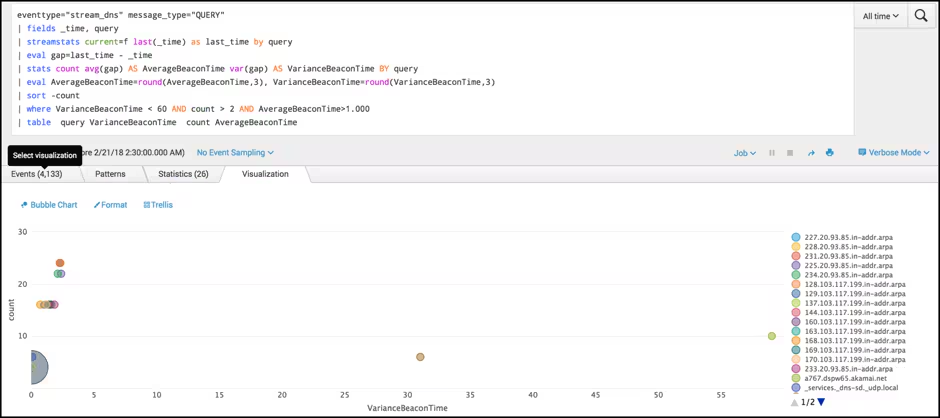
In this example, spotting clients that show a low variance in time may indicate hosts are contacting command and control infrastructure on a predetermined time slot. Say every thirty seconds or every five minutes.
Number of Hosts Talking to Beaconing Domains
Identifying the number of hosts talking to a specific domain may help to identify potential BOT activity or help to identify the scope of hosts currently compromised.
tag=dns message_type="QUERY"
| fields _time, src, query
| streamstats current=f last(_time) as last_time by query
| eval gap=last_time - _time
| stats count dc(src) AS NumHosts avg(gap) AS AverageBeaconTime var(gap) AS VarianceBeaconTime BY query
| eval AverageBeaconTime=round(AverageBeaconTime,3), VarianceBeaconTime=round(VarianceBeaconTime,3)
| sort –count
| where VarianceBeaconTime < 60 AND AverageBeaconTime > 0
Nothing much new in this search. We look to see beaconing activity and the number of distinct hosts communicating with it, which may help us to scope multiple hosts being bad! The search only introduces one new function of our stats command:
- Distinct count (dc) shows us how many hosts show the same activity.
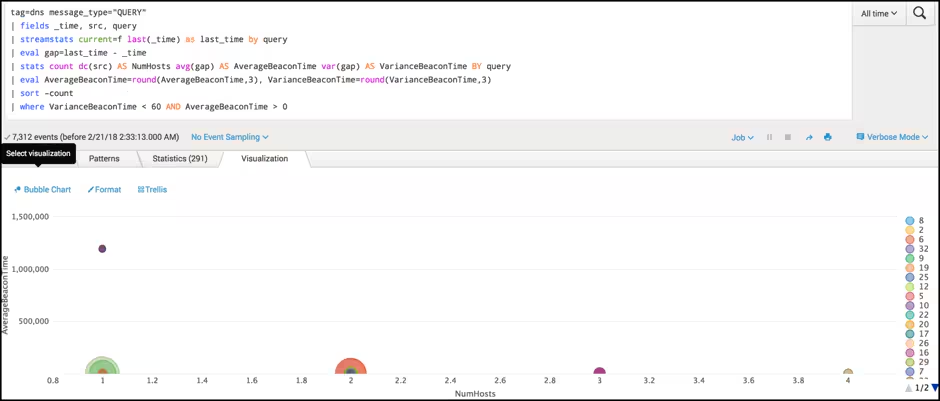
This example is very like the previous beaconing activity (i.e., looking for timing requests that are consistent), but this time we are aggregating clients that are showing the same behaviour.
Domains with Lots of Subdomains
Encoded information could be transmitted via the sub-domain. Looking at the number of different subdomains per domain may help identify command and control activity or exfiltration of data.
tag=dns message_type="QUERY"
| eval list="mozilla"
| `ut_parse_extended(query, list)`
| stats dc(ut_subdomain) AS HostsPerDomain BY ut_domain
| sort -HostsPerDomain
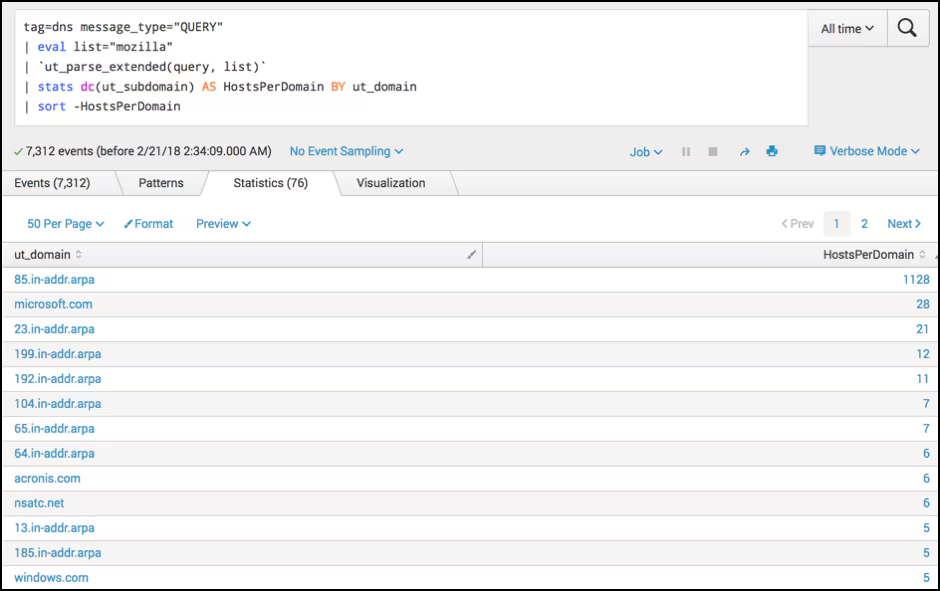
Here, we are looking to see how many subdomains are requested per domain. This behaviour may help us identify signs of exfiltration or DGA domains. The URL Toolbox allows us to parse domain names easily. Check out our "UT_parsing Domains Like House Slytherin" blog post if you want to know more.
As always, we begin with our DNS dataset of interest and create a field with a value of ‘Mozilla’. If you have read the link above, you’ll understand perfectly. If not, it’s needed for the URL Toolbox. ;-)
After ‘ut_parse_extended’ we continue to use commands we have used previously. Our stats command is used to count the distinct number of sub-domains by domain, and then the results are sorted to give us the highest value first.
Dashboards
In this example, we are looking for high numbers of subdomains per domain. It's likely we will need to do some filtering for common, assumed good sites.
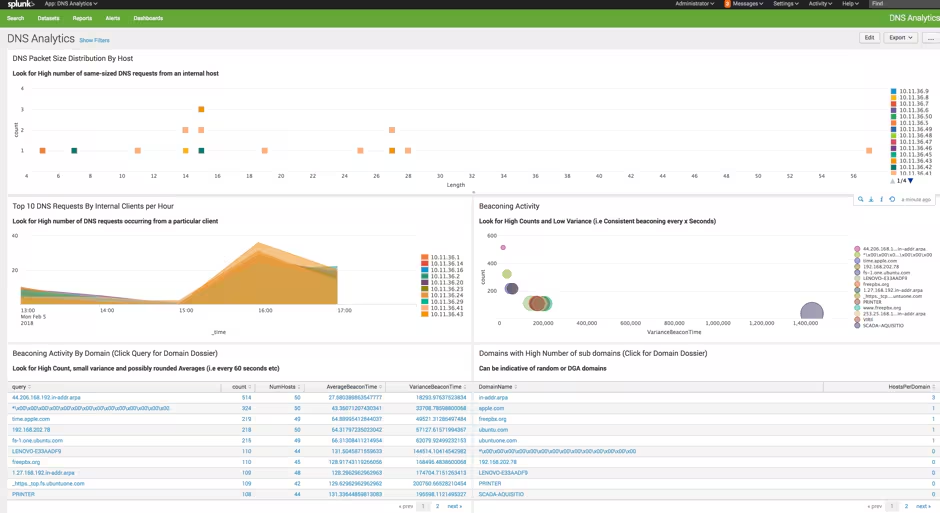
Here at Splunk, we have a saying: “Get shi stuff done!” The good news is everything above is available to download right away this GitHub repo to help you get started hunting.
Tips for enhancing quality results
Here are some additional ideas to enhance the quality of your results:
- Use lookups, lookups, and more lookups, to remove noise! Using the sub-domain example above, knowing that many chickenkiller.com sub-domains are being queried is much more critical than the number of microsoft.com subdomains. Eliminate that noise by following this excellent advice from Ryan’s Lookup Before You Go-Go...Hunting.
- Run Splunk-built detections that find data exfiltration. The Splunk Threat Research Team has developed several detections to help find data exfiltration. Data Exfiltration Detections is a great place to start.
- Excluding non-working days.
- Filter excess noise with the where command.
- Consider post-process searching. It will save you a TON of time!
- Make dynamic dashboards a filter for specific clients.
Happy hunting!
P.S. A Note About Randomness
We intentionally avoided talking about randomness in this article. If you are interested in detecting typ0 5quatting or more randomness with math, then take a look at these articles:
Related Articles

ML Detection of Risky Command Exploit
Splunk Security Essentials 3.6.0: A Holistic View of Your Security

3 Important German BSI Documents Every SIEM & SOC Manager Needs To Know About

Introducing Splunk Attack Range v2.0

Staff Picks for Splunk Security Reading June 2022

Security Advisories for Splunk 9.0

SANS 2022 SOC Survey: A Look Inside

Threat Update: Industroyer2