Splunking F1: Part Two

Do you remember when your maths teacher told you it’s not the final answer that’s important, it’s your working out that really counts? Well, during this year’s SplunkLive! London event, we had a tie for first place on our F1 racing simulator; two identical lap times to within one thousandth of a second - amazing! Both James and Joe wanted to win the first prize – tickets to the British Grand Prix, so we decided to investigate their driving styles by examining the car telemetry data streamed to Splunk during their respective sessions. Much like an outage or security investigation, with the data in Splunk, we were able to unwind the events to find out how we arrived at the end result. In this case, the result was the fastest lap time. In other scenarios, it could be how security defences were breached, or why a server went down, the process is the same.

One element missing from the F1 data listed in part one of this post, was information concerning the actual driver. To supplement this, we built a simple form in Splunk to capture driver name and demographic data, storing the information in the Splunk KV Store. The final piece; the leaderboard dashboard, correlates the driver information with the telemetry data collected during the race to determine fastest completed lap, of the first 3 laps per contestant.

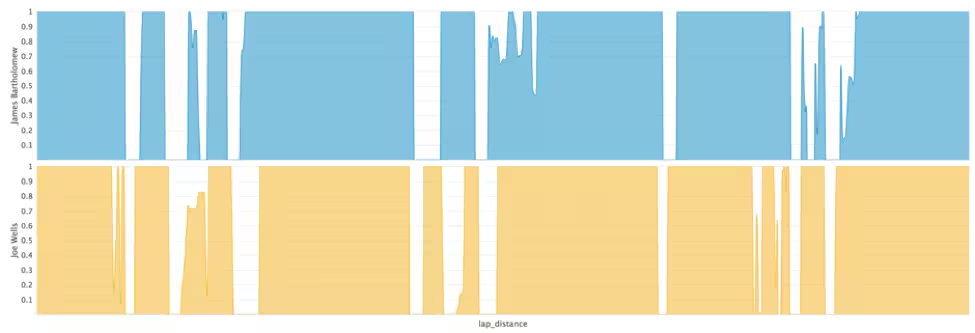
The table below shows the average throttle, brake and steering application from the driver, ranging from 0 (no application) to 1 (full application).

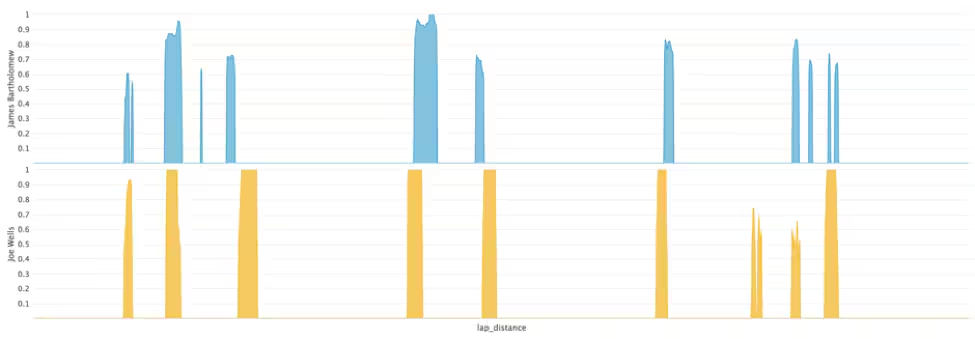
Session Summary Stats From the above summary table, we can see that James was on the throttle longer and on the brakes less of the time, indicating that he accelerated and braked harder than Joe – key for a fast lap time. James also used less steering angle, indicating a smoother driver, again key for being fast. So how was Joe able to match James’s lap time?

Throttle Application

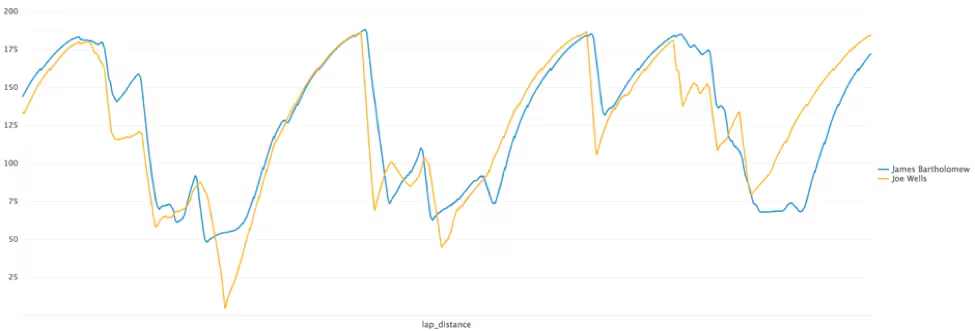
Brake Application The answer isn’t obvious when looking at the driver inputs alone. However, the speed of the car does give a clear indication. The speed chart from the two drivers reveals that James had a terrible last corner as the pressure of the big prize got to him! Joe kept a clear head and applied the power beautifully through ‘Club Corner’, a very fast right hander which requires the driver to balance the car on the edge of adhesion. This allows him to recover the time that he had lost to James in the earlier part of the lap.
Speed (mph)

For those who missed out on the excitement, the competition is sure to make another appearance at a Splunk event near you! We are also exploring additional features to add to the app, such as the use of the Machine Learning Toolkit to predict behaviours based on player demographic, driving style, and to correlate the data with real-world IOT data sources.

Not and F1 fan? Let us know what other sports you think we could Splunk. Who knows, it could be our next event competition!
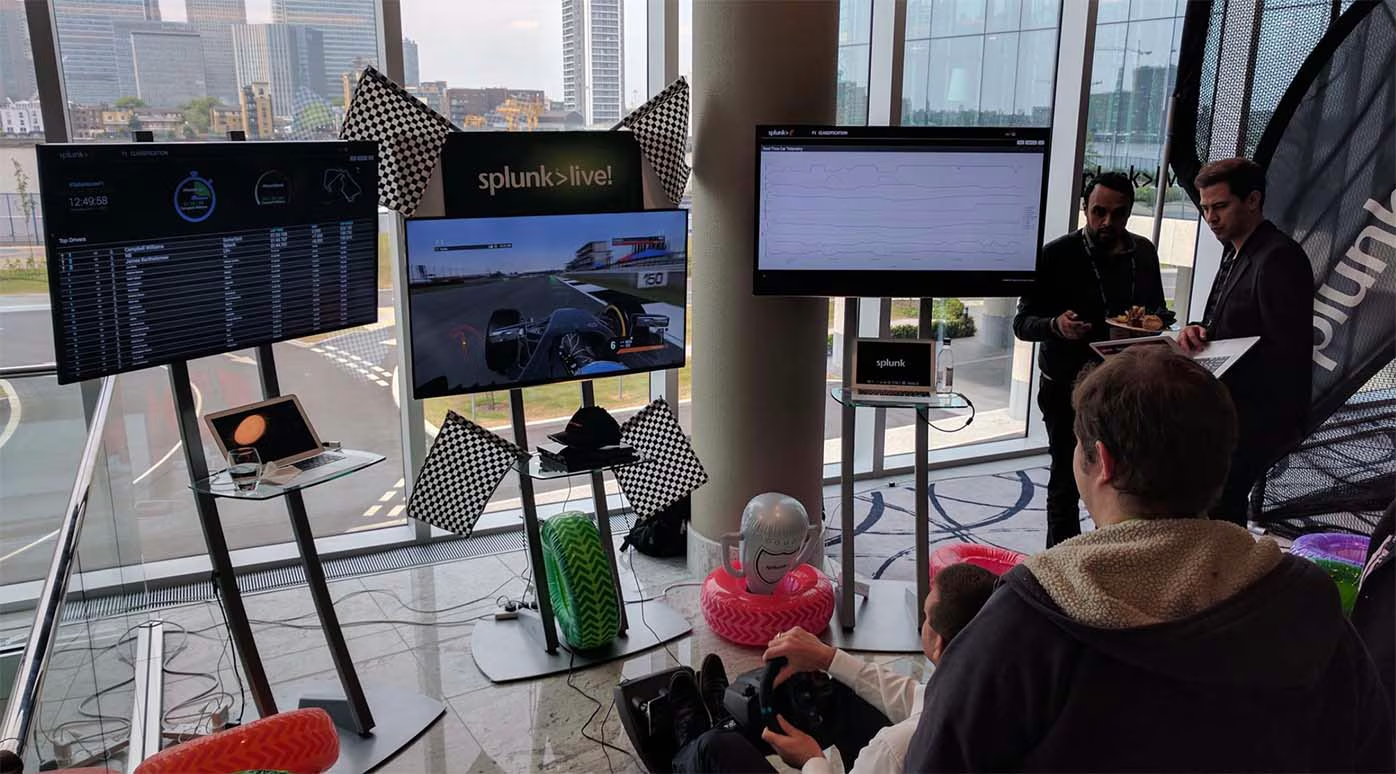
SplunkLive London F1 simulator

----------------------------------------------------
Thanks!
Haider Al-Seaidy

Related Articles

Announcing the General Availability of Splunk POD: Unlock the Power of Your Data with Ease

Platform
2 Minute Read

Announcing the General Availability of Splunk POD: Unlock the Power of Your Data with Ease

Splunk POD is designed to simplify your on-premises data analytics, so you can focus on what really matters: making smarter, faster decisions that drive your business forward.
Introducing the New Workload Dashboard: Enhanced Visibility, Faster Troubleshooting, and Deeper Insights

Platform
3 Minute Read

Introducing the New Workload Dashboard: Enhanced Visibility, Faster Troubleshooting, and Deeper Insights

Announcing the general availability of the new workload dashboard – a modern and intuitive dashboard experience in the Cloud Monitoring Console app.
Leading the Agentic AI Era: The Splunk Platform at Cisco Live APJ
Platform
5 Minute Read

Leading the Agentic AI Era: The Splunk Platform at Cisco Live APJ

The heart of our momentum at Cisco Live APJ is our deeper integration with Cisco, culminating in the Splunk POD and new integrations, delivering unified, next-generation data operations for every organization.
Dashboard Studio: Token Eval and Conditional Panel Visibility

Platform
4 Minute Read

Dashboard Studio: Token Eval and Conditional Panel Visibility

Dashboard Studio in Splunk Cloud Platform can address more complex use cases with conditional panel visibility, token eval, and custom visualizations support.
Introducing Resource Metrics: Elevate Your Insights with the New Workload Dashboard

Platform
4 Minute Read

Introducing Resource Metrics: Elevate Your Insights with the New Workload Dashboard

Introducing Resource Metrics in Workload Dashboard (WLD) – a modern and intuitive monitoring experience in the Cloud Monitoring Console (CMC) app.
Powering AI Innovation with Splunk: Meet the Cisco Data Fabric

Platform
3 Minute Read

Powering AI Innovation with Splunk: Meet the Cisco Data Fabric

The Cisco Data Fabric brings AI-centric advancements to the Splunk Platform, seamlessly connecting knowledge, business, and machine data.
Remote Upgrader for Windows Is Here: Simplifying Fleet-Wide Forwarder Upgrades

Platform
3 Minute Read

Remote Upgrader for Windows Is Here: Simplifying Fleet-Wide Forwarder Upgrades

Simplify fleet-wide upgrades of Windows Universal Forwarders with Splunk Remote Upgrader—centralized, signed, secure updates with rollback, config preservation, and audit logs.
Dashboard Studio: Spec-TAB-ular Updates

Platform
3 Minute Read

Dashboard Studio: Spec-TAB-ular Updates

Splunk Cloud Platform 10.0.2503 includes a number of enhancements related to tabbed dashboards, trellis for more charts, and more!
Introducing Edge Processor for Splunk Enterprise: Data Management on Your Premises
Platform
2 Minute Read

Introducing Edge Processor for Splunk Enterprise: Data Management on Your Premises

Announcing the introduction of Edge Processor for Splunk Enterprise 10.0, designed to help customers achieve greater efficiencies in data transformation and improved visibility into data in motion.